🖨️ Print Like a Pro, Live Like a Boss
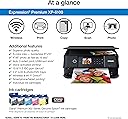
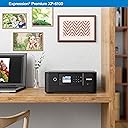
The Epson Expression Premium XP-6100 is a sleek, wireless all-in-one printer designed for millennials who demand professional photo quality and fast, convenient printing. Featuring 5-color Claria Premium inks, it delivers sharp photos up to 8" x 10" and documents with crisp text. With ultra-fast 15-second 4" x 6" photo prints, automatic duplexing, voice-activated commands, and seamless mobile device compatibility via Wi-Fi Direct, it’s the perfect blend of style, speed, and smart tech for your home office or creative space.


| ASIN | B07PDNS5CZ |
| Additional Printer functions | Copy, Scan |
| Best Sellers Rank | #10,462 in Office Products ( See Top 100 in Office Products ) #3 in Desktop Photo Printers |
| Color Depth | 24 bpp |
| Compatible Devices | Camera, PC, Smartphones, Tablets |
| Control Method | Voice |
| Controller Type | Amazon Alexa, Vera |
| Customer Reviews | 4.0 4.0 out of 5 stars (5,335) |
| Date First Available | May 29, 2019 |
| Dual-sided printing | Yes |
| Duplex | Automatic |
| Global Trade Identification Number | 00010343944169 |
| Hardware Interface | USB |
| Included Components | Expression Premium XP-6100 color inkjet printer, setup and instruction manuals, CD-ROM containing software and drivers (Windows and Mac (7)), power cord, 5 Claria Premium Ink cartridges: 1 302 Black ink cartridge; 3 302 color ink cartridges: Cyan, Magenta and Yellow; 1 302 Photo Black ink cartridge |
| Ink Color | Black |
| Item Weight | 14.6 pounds |
| Item model number | XP-6100 |
| Manufacturer | EPSON PRINT |
| Max Copy Speed (Black & White) | 15.8 ppm |
| Max Input Sheet Capacity | 100 |
| Max copy resolution black-white | 5760 dpi |
| Max copy resolution color | 5760 x 1440 dpi |
| Maximum Black and White Print Resolution | 5760 x 1440 dpi |
| Maximum Color Print Resolution | 5760 x 1440 dpi |
| Maximum Media Size | 8.5 x 11 inch |
| Memory Storage Capacity | 64 MB |
| Model Series | Expression Premium |
| Number of Trays | 2 |
| Output sheet capacity | 100 |
| Power Consumption | 13 Watts |
| Print media | Paper (plain) |
| Printer Ink Type | Claria Premium Ink |
| Product Dimensions | 5.39"D x 7.8"W x 2.2"H |
| Scanner Type | Photo |
| Series Number | 6100 |
| Sheet Size | 3.5" x 5", 4" x 6", 5" x 7", 8" x 10", 8.5" x 11", A4, B5, A5, A6, half letter, executive |
| Specific Uses For Product | High-quality photo printing, Professional-looking CDs/DVDs |
| Supported Media Sizes | 4 x 6 inches, 5 x 7 inches, A4 |
| Total USB Ports | 1 |
| UPC | 010343944169 010343924536 |
| Warranty Type | Limited |
| Wattage | 13 watts |
N**M
Great product
Found this very easy to set up. I set up as wireless in about 15 minutes. Printer is working well and I like that it doesn't take up a lot of space. I had purchased this to replace an Epson that was about 15 years old and purchased it on sale so am well pleased with the price. I have yet to print photos but expect it to print well.
C**R
Everything worked well but some setup info hard to find
First of all, I had to go to a bricks-and-mortar store to find out where the paper tray was. I wanted to put the printer into a utility closet with an outlet and print without moving it, and until I could see the paper tray, I couldn't purchase it. Just showing the front of the printer without the open paper tray was not enough. I set up this printer with my MacBook Pro running OS 10.14.6. The power button is all black -- it lights up nicely when it. is on but is a bit difficult to find when it's off, although the setup sheet does show the location. I had trouble getting AirPrint to work. The setup sheet gives you enough information to get what I think is called Direct Print to work over your wireless network, but that's not enough for AirPrint -- you have to set up Wifi Infrastructure Mode, and the Epson online help is no help. Using Google, I eventually found an Epson YouTube video that showed how to do this from the printer's front control panel. Before I downloaded and used the 7100 User Guide, I also set up Epson Connect and the iPrint app, and after they did not help with AirPrint, I wondered if I would ever use them at all (but I did use iPrint, see below!). These different wireless print options and a one-sentence description of what each is good for should be on the Setup Sheet. Color print from MS Word, Excel, and Notes on iPhone and iPad worked perfectly the first time (once I had AirPrint). Then I started checking functions from the User's Guide, including several I've never done with any other printer. Duplex color copy and scan worked perfectly the first time, even though my input was an old and slightly wrinkled drawing. I did both from the Automatic Feeder Tray with the printer control panel. Photo print from Preview came out really well, even though I had only Another Brand photo paper instead of the Epson Ultra Premium Glossy paper I prefer. Photo print from a camera memory card, using the front printer control panel, also came out very well (my photo wasn't so great, so I won't say it was excellent yet) and I was able to preview what was on the memory card and select a layout right from that panel, without my computer. I didn't try transferring those photos from the printer to the computer because I put the memory card away before I saw that was possible, but I did confirm the Mac could see the printer over the network. I checked the printer supply levels from the printers and scanners icon in System Preferences. Finally I printed a layout of four 4x6 photos from my iPhone using iPrint. Worked fine. I am amazed at what this printer can do.
S**H
Terrible Quality and Customer Service
Terrible printer. It is so inconsistent! 1 print will be great, then the next print is faded or washed out. When I try to get help from Epson they just ask if you're using Epson inks and then they won't respond to the problem for another 45 days. I used all Epson products, all bought from Amazon. I run a print club of my paintings and I print more unusable copies than useable. Very inefficient and wasted money on ink and paper. You can see from the picture that the 1st and 4th prints are really good but the rest are washed out. The Epson reps did not know how to fix this.
M**S
Good printer
I bought this printer as a replacement for my older epson printer. In this one works well and is a little more compact.
M**R
So far, so good; prints well, scans well
I replaced an Epson XP-830 with this machine because this was the newest model and would use the same ink cartridges. It prints well and scans well. Unlike my previous machine, it does not have fax capability. It does, like its predecessor, print on CD/DVDs and has a back feed slot for heavier media, like card stock or envelopes, though only one at a time. I have not printed photos yet. I am able to reuse the partly used cartridges from my previous machine. However, in setting up the machine for the first time, you are advised by Epson to use the cartridges in the box first because they're designed for a first priming of the ink system. It recognized the used cartridges and the amount left when the initial ones ran out. I highly recommend buying the 410XL cartridges instead of the standard 410's; they cost a bit more, but you get more than twice the ink for a bit less than twice the price. The mixed box set contains an XL black cartridge but only standard color cartridges. The XL colors have to be bought individually, but they're worth it. There are third-party inks out there that cost much less than brand name, and you use them at your own risk. Many people say they're just as good and that the Epson inks are a ripoff; I'll only say that I have tried third-party inks and have definitely had problems more than once. My two criticisms of the machine: one, the main paper tray is low-capacity, extremely flimsy, and sometimes difficult to remove; if you want high-capacity printing, this printer is probably not for you. Second, the display icons are irritating, and the system will not stay in home display mode after printing, you have to hit a cancel button. Still, I will not hesitate to buy this printer again so long as it lasts out its warranty period and a little more. I've been far happier with Epson photo printers than HP, Canon, or Brother. I would also check the paper specs carefully. I wanted to do some printing on 3X5 sheets, but paper will not feed properly on any size less than 3.5" width. Not their fault that I didn't notice.
S**O
This is a great printer !
Let me start off by saying I am 71 years old. I’m not computer illiterate, but I like things easy to install. This printer has. Touch screen that makes installation a breeze. It found my WiFi very quickly and I was able to have it recognized by my windows computer, my Mac laptop and my iPhone without any issues. It was great value for the money and seems to print well from all devices.
M**S
La meilleure imprimante. Très facile et ne tombe jamais en panne. Je l utilise plusieurs fois par jour et elle marche sans soucis. Bravo Epson!
J**I
No me gustó que los cartuchos no son fáciles de encontrar, además de que no tuvieron mucha duración los que traía
J**H
I bought an Epson XP6100 printer on-line from NES Online through Amazon. The item arrived promptly on the first day of the expected delivery window. It was brand new in its manufacturers packaging and has worked like a dream. It seems quieter than previous Epson printers I have owned, and the scanning function operates quicker and at better resolution than previous scanners, probably due to improved software.
B**N
cette imprimante fonctionne tres bien et pour le prix cet exelent
B**O
I tested the new printer with photos having different shade of colors and brightness....very good results. I am a little worried about the quality of the plastic cover and multi use tray, they look very flimsy. This makes for a little printer, but not sure how long it will be before it breaks. Also, the size of the ink cartridges is getting ridiculous, they look like they would fit only a few milliliters (very small). Anyway, I will update my review after a few months.
Trustpilot
2 weeks ago
1 month ago