Some deliveries may take a little longer than usual due to regional shipping conditions.

DOWNLOAD THE APP


Customer Services
Copyright © 2025 Desertcart Holdings Limited
DOWNLOAD THE APP


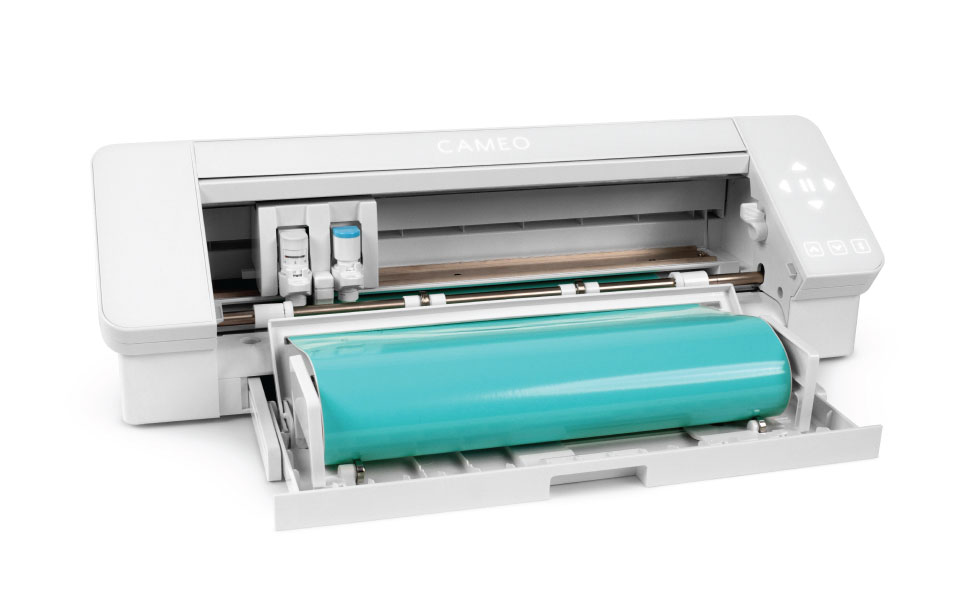
🎨 Elevate your craft game with the Silhouette Cameo 4 — where precision meets power and creativity flows wireless!
The Silhouette Cameo 4 is a professional-grade 12-inch desktop cutting machine featuring a revolutionary dual motor system for unmatched speed and cutting force. It supports matless cutting up to 10 feet, Bluetooth wireless connectivity, and smart tool detection for automatic blade adjustments. With a built-in roll feeder and crosscutter, it streamlines vinyl and heat transfer projects. Compatible with free Silhouette Studio software on Mac and Windows, it empowers makers and small business owners to create intricate designs with ease and efficiency.



| ASIN | B07XGZMTPS |
| Active Surface Area | 144 square inches |
| Best Sellers Rank | #231,453 in Arts, Crafts & Sewing ( See Top 100 in Arts, Crafts & Sewing ) #185 in Scrapbooking Die-Cut Machines |
| Brand | Silhouette America |
| Color | Black Edition |
| Customer Reviews | 4.6 4.6 out of 5 stars (2,064) |
| Date First Available | September 4, 2019 |
| Global Trade Identification Number | 00819177022193 |
| Item Weight | 11 pounds |
| Item model number | SILH-CAMEO-4-BLK-4T |
| Manufacturer | Silhouette |
| Material | Vinyl |
| Operation Mode | Automatic |
| Print media | Card stock |
| Product Dimensions | 10"D x 24"W x 8"H |
| UPC | 819177022193 |
S**M
A (kind of complicated) love story
I love my Cameo 4 more than words can say! This is my first die cutting machine; I bought it so that I could expand my small business into stickers and vinyl. There is a learning curve, but if you're determined and patient, anyone can figure it out. It's absolutely worth the time it takes to set up and learn. I had a few moments of frustration early on, especially with registration marks, but once I hung a little LED light over the machine and really dedicated myself to testing and writing down cut settings, I haven't had a single misstep. It more than paid for itself from die cut sticker sales in less than a month. I will comment on the most recent version of Silhouette Studio, however. ***PLEASE read this if you are a Mac user!*** Version 4.4 of Silhouette Studio (the newest version) can cause a printing glitch when you use it for print and cut. Let's say, for example, you want to print and cut a sheet of stickers. You've designed them and arranged them in the software and are ready to print them, so you send the print job to your printer from Silhouette Studio. The print may come out with a strange glitch (or two or three) in the graphics or lines or text of your sticker designs. This can be VERY frustrating when it happens on your nice, expensive sticker paper...especially when you want to sell your stickers. I had this happen dozens of times and had no idea what was going on. I almost pulled the trigger on a new $400 printer because I couldn't figure out why else this would be happening...until I found a Reddit post about it. There is some weird incompatibility between Mac and Silhouette Studio 4.4 that causes this printing glitch. The fix is to go to the Silhouette site and make sure you download the 4.3 version instead, under the "Legacy" section. The glitch does not happen in this version, so you end up with great prints and thus exactly what you're hoping to cut in your Cameo. Silhouette + Mac users' greatest hope is that the current Beta version corrects the glitch so we can use the most up-to-date version of the software in the future. I hope this helps someone! Don't be intimidated. Give it a week of your patience and you'll be a pro!
B**O
Amazing machine
I did a bunch of research on the cricuit machine vs this one. I landed on the Silhouette since it did not require a monthly subscription in order to use the software. I was skeptical, but I would emphatically agree with all of the other viewers, there is a learning curve with the software, but it's not insurmountable. There are some nuances I still don't understand and are pretty unexplainable in my opinion, but it doesn't stop or hinder me from using the machine. Maybe just generates a bit more waste than initially anticipated. The only other drawback is that inserting the knife properly is a little tricky too. If it's not done properly, the knife may not even hit the paper, or may extend too far. Always make test cuts after changing a blade to make sure it's installed correctly. Outside of those two points (software nuances and blade installation), the machine is wonderful. It does everything I expect it to, and I'm sure I haven't really pushed it to the limit yet. It only comes with the Autoblade. Which is fine, it works well. One piece of advice I got though was to have a blade for paper, and a separate one for vinyl or other materials. I do cut both vinyl (perm and HTV) and paper, so I have 2 autoblades that i switch out depending on what material I'm using. I have noticed that the paper cuts are much better with a dedicated blade. Another thing that nobody warned me about is using cheap paper/card or coverstock. Some cheap paper is 'pulpier' than a more expensive brand. The cheaper paper may need some extra cuts by hand (xacto knife) to finish weeding, and will likely leave a lot of annoying residue on your cutting mat. You get what you pay for with your materials... The roll holder for vinyl is awesome. It's another reason why I chose this machine over the cricut. The cutter on the back of the machine is good too, but it could create a lot of waste, or mess up your design if not attended to ever time tou use it. There is about 4-5" between the blade and the cutter on the back. If you leave your material there, that 4-5" will be waste if you don't re-feed the material into the machine. That being said, if you DO re-feed the material into the machine, make sure to unlatch the cutter as the material may get caught on it as it comes out, jam up the whole machine, and ruin the design so you'd need to start over. Overall I couldn't be happier with this machine. Yes, there is some trial-and-error to learn how to operate it, but I was able to get all of my holiday gifts made in the 4-5 weeks I've had it. There are a lot of resources online, but not one central place to go for beginners. It seems to be a pretty tough machine, so if something goes wrong it's dourable enough to handle it if your material or cutting mat gets stuck. Just hit the pause button as quickly as you can, cancel the job in the software, remove the material/clear the jam, restart the machine, and try again. I cant emphasize enough how great this machine is. I'm thinking about doing a series for first time users of the things I had a hard time with and wasn't expecting when starting out with this machine. I'll update with a link if i follow through on that.
A**R
Great choice
Simple to use. Happy with the purchase.
A**O
Your Creative Partner!
Do you have a thousand ideas in your head and want to do incredible things? Then you need the Silhouette Cameo, the cut plotter that turns your DIY dreams into reality. With a super beautiful pink design, this team will be your best ally for all kinds of creative projects. What makes her so cool? • 12" x 12" cutting mat: Ideal for small or large projects, from labels to epic decorations. • Total multifunctionality: Cut vinyl, paper, fabric and even cardboard, all with the precision you need! • Easy to use: Includes adjustable blade and tool adapters so you can customize your work as you like. • Pro technology: The cuts are so precise that it will look like you have a design team working with you. Perfect for: • Design unique stickers for your business or home decorations. • Customize gifts, cards or details for your events. • Try all kinds of crazy DIY and craft ideas. The Silhouette Cameo is that tool you always wanted and didn't know you needed. Get creative, express yourself and have fun while you do things that everyone will love. What are you waiting for to start creating? It's your time!
C**O
El producto llegó en perfecto estado, fueron puntuales con la entrega, la máquina funciona muy bien hasta el momento
L**O
Todo llegó en tiempo y forma, no hay que decir mucho de este plotter de corte sin duda una buena adquisición con la garantía de que la marca es una de las que ofrecen las mejores prestaciones, aunque en pudiera un pensar que en algunas partes de plástico estuviera su debilidad están bien pensadas y cumplen su función a la perfección. Sin duda estoy 100% contento con la compra.
C**I
Plotter da taglio molto comodo e pratico! Tramite il software gratuito si installa e si può iniziare subito a intagliare ciò che si desidera. Unica nota lo scomparto per inserire il rotolo di carta un po’ scomodo, infatti io non lo uso. Del resto tutto perfetto e di alta qualità il taglio! Super consigliata!!
S**️
Der Cameo 4 Plotter ist ein wirklich tolles Gerät, besonders für Anfänger wie dich. Es bietet eine Vielzahl von Funktionen und Möglichkeiten, um deine kreativen Ideen zum Leben zu erwecken. Egal, ob du gerne Karten gestaltest, Scrapbooking machst oder Vinylaufkleber erstellst, dieses Gerät ist vielseitig einsetzbar und einfach zu bedienen. Die Qualität des Geräts selbst ist wirklich beeindruckend. Es ist robust und solide gebaut, was bedeutet, dass es lange halten wird. Die Schneideergebnisse sind präzise und sauber, was besonders wichtig ist, wenn du filigrane Designs erstellen möchtest. Der Silhouette Cameo 4 Plotter bietet auch eine automatische Einstellung der Klingentiefe, was die Bedienung noch einfacher macht. Leider muss ich jedoch erwähnen, dass die Verpackung bei meiner Bestellung beschädigt ankam. Das war natürlich enttäuschend, da man sich bei einem neuen Gerät eine einwandfreie Verpackung wünscht. Glücklicherweise hat die Beschädigung jedoch keinen Einfluss auf die Funktionalität des Geräts gehabt. Außerdem habe ich bemerkt, dass bei meinem Gerät ein oder zwei Teile etwas locker waren. Das war zwar nicht schlimm und hat die Leistung des Geräts nicht beeinträchtigt, aber es wäre dennoch besser gewesen, wenn alles fest und sicher gewesen wäre. Insgesamt würde ich dem Silhouette Cameo 4 3 Sterne geben. Das Gerät selbst ist super und bietet viele Möglichkeiten für Anfänger wie dich, um kreative Projekte umzusetzen. Die beschädigte Verpackung und die lockereren Teile sind jedoch kleine Mängel, die den Gesamteindruck etwas trüben. Trotzdem kann ich dir das Gerät empfehlen, da es seine Aufgabe gut erfüllt und dir viele Stunden kreativen Spaßes bereiten wird.
L**F
Better for two reasons. 1. £100 Cheaper than the equivalent Cricut 2. You can cut without a mat Out of the box the Silhouette cameo worked, set-up was easy. As I use the Silhouette in my workshop it's the quietest tool, however, I can see this as being a bit noisy if you were using it at night in your craft room with sleeping children next door. The Bluetooth didn't work out of the box, but I use the machine wired anyway. However following instructions on YouTube I bought a replacement Bluetooth dongle and fitted it into the machine, still didn't work so I now use the dongle on my PC instead where it works perfectly. Minor issues, well reported on YouTube but not an issue for me. Very pleased with my purchase.
Trustpilot
3 weeks ago
2 months ago