




M2 USB-C Audio Interface
Product ID: 168780843
Details
- BrandMOTU
- Compatible DevicesPersonal
- Connectivity TechnologyUSB
- Number of Channels2
- Supported SoftwareMOTU Drivers
⚡USB-C Plug & Play
🔊24-bit/192kHz Hi-Res Audio
🎛️2 Ultra-Clean Preamps
Buy anything from 5,000+ international stores. One checkout price. No surprise fees. Join 2M+ shoppers on Desertcart.
Desertcart purchases this item on your behalf and handles shipping, customs, and support to Mexico.
🎧 Unlock Pro-Level Audio Magic with MOTU M2 – Your Studio’s New Best Friend
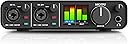
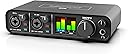
The MOTU M2 USB-C Audio Interface delivers professional-grade 24-bit/192kHz audio with two ultra-clean preamps and 2-in/2-out channels. Designed for seamless plug-and-play use across macOS, Windows, and iOS, it features precision hardware monitoring with smooth tactile controls and an intuitive LCD VU meter. Included is a generous 6+GB content library, making it an unbeatable value for creators seeking studio-quality sound on the go.


| ASIN | B0812B26TN |
| Audio Input | USB |
| Best Sellers Rank | #1,547 in Musical Instruments ( See Top 100 in Musical Instruments ) #15 in Computer Recording Audio Interfaces |
| Brand | MOTU |
| Brand Name | MOTU |
| Compatible Devices | Personal Computer |
| Connectivity Technology | USB |
| Customer Reviews | 4.6 out of 5 stars 1,521 Reviews |
| Item Dimensions D x W x H | 7.5"D x 4.25"W x 1.75"H |
| Item Weight | 612 Grams |
| Manufacturer | MOTU |
| Manufacturer Part Number | 3120 |
| Maximum Sample Rate | 192 KHz |
| Model Number | M2 |
| Number of Channels | 2 |
| Operating System | Windows |
| Product Dimensions | 7.5"D x 4.25"W x 1.75"H |
| Supported Software | MOTU Drivers |
| UPC | 839128006119 |
| Unit Count | 1.0 Count |
| Warranty Description | 2-year warranty. |
P**D
Killer interface for $200
This is an impressive audio interface at probably any price, but for $200 it feels like an absolute steal. Even if you do not care about recording, the DAC and headphone amp alone are worth more than the price of admission compared to what I've seen elsewhere in the PC DAC/headphone amp space. It seems to be very solid and well built. The knobs move very smoothly with a little resistance (they feel expensive) and the buttons are pleasant. The LCD VU meters, physical power switch, and DIN MIDI jacks are all unexpected and nice to have. The noise floor seems very low both in and out. I mainly have low impedance headphones (~ 50 ohms) and they are easily driven and sound excellent. I haven't had any issues with the MOTU drivers on Windows 11, nor had any issues getting Windows to map inputs or outputs correctly. The only thing I changed after plugging it in was the sample rate in the MOTU driver/app, the rest worked out of the box. I've had a couple different Focusrite Scarlett models and a Presonus Audiobox in the past and, although I never had a problem with any of them, this seems like a notable improvement in quality, features, and, to my ear anyway, audio quality. The only thing that seems of poor quality is the included USB-C to USB-A cable which is both shorter and thinner than I'd like. I've read some technical reviews that conclude the MOTU M4 is even better in some ways but, for me anyway, the M2 does everything I need or could hope for at a reasonable price.
D**L
Excellent for Archival Tape Transfers
Excellent, easy to use interface that worked immediately with my MacBook Pro and Logic Pro without need for any driver installation whatsoever. Just assign the interface as soon as Logic recognizes it and go. The knobs are very smooth, and extremely sensitive. It's a very low noise unit, but then I'm using it for analog tape to digital transfers so basically anything modern far exceeds the noise floor levels of analog tape by leaps and bounds. The only thing I wish is that the headphone amplifier had more power to drive DT-770 Pros with more staging ability, but then for the price it's totally adequate. Five-star product for ease of use, great front metering - makes incoming sources so easy to gain stage, clean low noise floor, construction, price and overall quality. Oh, and thank you Motu for including the required USB cable with the unit (I'm looking at you Cambridge Audio... tisk tisk). Anyway, well done Motu, well done. *Disclosure: I'm using this primarily as an archival tape transfer interface, NOT in a professional studio setting, although I'm positive it would work there as a simple interface for various purposes as well.
G**R
I FIXED the sound only coming out of the left or right side
I almost returned this thing when I ran into an issue where apparently each channel only records lift or right, but not both. This wasn't the end of the world and easily fixed in post but I didn't want to deal with that unnecessary step every time. I googled and saw others asking but no one else came up with a good solution. Well here's the fix I did that worked. (This is for Windows only!!!) -Right Click Sound Icon (bottom right) -Select Sounds -Recording Tab -Set Default to "Loopback Mix" And that's it, you should be all set. If it doesn't fix immediately you might have to also disable the other options, but do 1 at a time to make sure you can still record. ----REVIEW---- I got this to record my mic for voiceovers. I use a Shure SM7B with a cloud lifter. This doesn't need a cloud lifter but I already had one from my previous setup so I decided to use it so it gives me more room for more gain because without the cloud lifter the gain was set all the way to full and it would barely peak. It didn't sound bad but with the cloud lifter I can set the gain more to the 60% full which gives me a lot of room to work with. I tested the mic with and without the cloud lifter, the cloud lifter doesn't hurt the quality at all, it sounds the same with or without but of course with the lifter the extra gain makes it a bit louder. Which sounds good with the SM7B. Maybe another mic would not benefit from this setup the same way. It's important to note that with the sound lifter you need the 48V powered on, without the sound lifter you do not with the SM7B. Once I figured out the fix to make it so the sound records both Left & Right side I have been very happy with the setup. I like the feel of it, it's made of aluminum and the the knobs are tight and feel quality (I saw another review complaining they were loose feeling), theirs must have been broken or something because mine feel very sturdy. I also really like the monitoring screen in the front. It just looks sorta retro but also modern at the same time. It really adds to the look on my desk. The only thing I don't like is that the XLR input is in the front. I hate the look of cables going out the front, you have this beautiful simplistic front fascia and then you stick your inputs there, I can't figure out why they'd do that. It was enough of an annoyance that I almost went with the Scarlett 2i2 4th gen. Because I liked how they had the inputs at the back. I like the meters of the Motu M2 more than those knob lights but not enough to sway me on its own. I really like how the 2i2 has the auto peak protection and air mode which was almost the reason why I ended up buying it instead of the M2. But ultimately the main reason why I chose the Motu M2 > the Scarlett 2i2 is the sound quality. At the end of the day, sound quality is all that matters. I watched a youtube video comparing the 2 and the sound clip of the M2 was much better than the 2i2. The M2 has more bass and a "follow through" when you speak. it sounds nice and is noticeably better. At the end of the day the Motu M2 has a simplistic design retro design that I love, I used 90 degree XLR input adapters to make the cable look better now that it connects torwards the back. I think it looks a little better than a cable just looping around. It's a fantastic sounding audio interface that's absolutely the best at it's price point.
A**R
MOTU M2 - Awesome Performance for a TERRIFIC Price! (Quick delivery too, sometimes!!!)
Miracles abound: the MOTU M2 was delivered the next day (!) and not a moment too soon! The MOTU M2 is a bedrock sound module that enables amazing resolution audio for you PC recording station: My original gave up the ghost unexpectedly so we needed a replacement immediately, if not sooner! Software (and firmware update) are all available from the manufacturer's website (to maintain that you get the latest, greatest drivers and updates!) and it's easy as pie to set up and get running. It's USB-powered, and since it IS USB it is compatible to Mac and PC alike. The minimal size of the MOTU M2 means it doesn't eat up a lot of desk space (keep it off of the top of your PC if it has vents up there: the MOTU M2 is solid and will serve to block the air vents on top!) and it even comes with its own USB cable!!! I already loved the product even before I ordered it! Being able to get my replacement so soon was absolutely fantastic!!
M**G
First Impressions - Just works
Just got this device, and my immediate impressions are pretty fantastic. Upgrading from an Audient Evo 4 which had some limitations and annoying driver issues for me as a Windows user. My use case is using it for an xlr mic for Discord and recording, recording electric guitar, and light general music production. I've come to realize that even small annoyances can add up to affect your productivity and workflow, and I wanted something that just works with no fuss. The metal construction of the M2 feels much more professional, and while it lacks "smart gain" of the Evo the clearly labeled knobs on front plus the visual metering display makes setting everything up straightforward compared to a single knob device. After installing drivers first like the instructions say and plugging it in, everything just works. Set itself up nicely, no issues with desynced sample rates like I had with the Evo (I could play audio through my DAW and browser simultaneously). Software is extremely simple with just options to set up sample rate and buffer, as well as the ability to toggle on and off the sample rate sync and enable lowest possible latency if your machine can handle it without hiccups. Loopback is handled through extra audio devices in windows, no software mixer like the Evo, but it seems to just mirror your pc output exactly and leaves little room for confusion. It also has a separate headphone amp, so you can simultaneously play audio through your speakers and headphones or switch at ease (the Evo mutes your speakers if your headphones are plugged in, requiring you to unplug them to switch back) Overall, I'm just impressed about how seamlessly this device just works. I pretty much just installed the drivers, rebooted, plugged the MOTU in, and tested all of my use cases. Got all of my usual levels set and now I'm happy. I feel like I don't have to worry about messing with my interface at all, it just works. If I don't come back and update this review, assume it's doing just fine and I'm not thinking about it too much.
J**Y
An almost perfect solution
I really liked the MOTU M2. The sound quality was genuinely excellent, super clean and clear. The build felt solid and well-made, and those color LCD meters were way more useful than I expected. I could glance at the levels and know exactly where things were, which made recording smooth and stress-free. I used it for recording music, and the ultra-low latency made the whole process feel incredibly responsive and natural. But I ended up returning it, and the reason was pretty specific. On Windows, it only shows up as one stereo input, so Mic 1 and Mic 2 can’t be used independently in the system audio settings. Inside a DAW with ASIO, it’s totally fine—you can split the channels no problem. But for things like Zoom or recording with separate software, I wanted to use one mic for music and another for video calls without changing settings every time. I use an isolation booth, and it blocks my face, so I need a second mic for things like meetings. This interface just didn’t let me do that easily. To be fair, this feels more like a Windows limitation than a problem with the MOTU itself. I just wish there was a driver or something that gave that flexibility. Otherwise, this is a fantastic interface, especially for music. It just didn’t fit the way I needed to work.
W**E
Hands down, the best mid-level interface for a very realistic cost, unexpectedly audiophile quality.
I’ve been an audiophile for over five years and stepped up the costly ladder of “the audio experience” spending thousands on equipment. Don’t think I’m trying to say the Motu M2 is comparable to a high-end setup all-in-one, but dang it had me impressed. My pre-disposed view on ESS Sabre DAC’s utilizing their stock internal filters is a negative one. I expect delta-sigma typical ring from the mediocre oversampling filters and a blatantly colored response. Fortunately, I wasn’t disappointed when I used the integrated ESS DAC from the Motu on my main system (driving Hifiman He1000v1’s with a restored Harman Kardon HK770). The DAC is actually pretty good! Not unjustly sibilant or colored, very impressive for a DAC, especially one that’s integrated into an audio interface! Now the pre-amp. For the actual monitor outs, the pre is very clean and low noise floor. It’s easy to say this because outputting into a speaker amplifier to drive headphones doesn’t create static galore. Other than low noise floor, the pre is fairly linear. Not perfect, but great for a passive potentiometer that’s integrated into an interface. The pre-amplifier for the microphone is... Interesting. I love it, but I must clarify that it clearly has a warm, tube-like tonality to it. This isn’t muddy. For better perspective, it takes my condenser and sustains the resolving quality that condensers are known for, but gives a tubey or dynamic (diaphragm) like tonality which is very rich and sweet. There doesn’t seem to be clear delineation, yet there is still this slight tonality change. I am very open arms to it, and it is apparently a commonly known thing to people that have used Motu equipment in general. In summary of that, if you want a tubey sounding solid state mic pre, this is actually a perfect fit. That wasn’t my intent when I’ve purchased it, but it made me much happier with how my voice is picked up (no EQ) anyways, so it’s a win. Now the headphone output. I haven’t actually played with it! I do know it has 3x the power of a Focusrite headphone out, and seemingly even more dynamics potential than those possible “under-ratings”. Basically, if you’re going to drive low impedance closed dynamic driver cans for voice sampling or anything else where you need real-time mic feedback and sample audio, the integrated amp is actually decent! A friend of mine says it can drive his Hifiman Aryas surprisingly well. I still haven’t messed with it but I trust his word. If you have a strong focus on studio use or streaming use even, and are told you need an amp and DAC for your headphones that is separate from your interface, normally, those people are right! However, the Motu M2 is super practical as an alternative unless you have very hard to drive planars. If you want a temporary solution and need to upgrade the headphone amp alone, you can utilize the DAC without passing through the potentiometer if you get the Motu M4 and use the fixed line out to utilize the DAC and mic pre directly. I have previously owned (and still have) a Focusrite Scarlett Solo 2nd Gen. In no way does that interface have any strong suits for an audiophile like myself, and every part of it, including the software, is fairly bad and not worth its value. If you’re skeptical of spending a little more for a SOLID all-around interface like the Motu M2/M4, heed this. It is ABSOLUTELY worth it. I say that in utmost confidence, based on all aspects of its’ functionality. There’s more I could say, but it’s really just better to not look the gift horse in the mouth. The fact that this interface performs this well for its’ cost is fantastic and I couldn’t recommend it more. No, this isn’t a sales pitch, I don’t work for Motu nor am I affiliated with them. I’m just a happy audiophile that was really impressed by entry-mid level gear that shouldn’t be as good as it is. Trust me. If it matters to you at all, once you know how great these are, you’ll shill them too.
Z**Q
Excellent Audio Interface
The MOTO M2 is a great audio interface at any price. Clean sound, easy to install and operate, works very well with Windows 11 and Ableton Live.
P**L
Great value, great sound.
Fantastic piece of equipment, works flawlessly with Ableton Live 12 Standard and Aaki MPC Key37.
T**O
Not possible to register the device, no support.
The interface is not damaged or scratched which is good. The original packaging was not complete, nor the manual or original cables. The serial number is already registered so it is impossible to get support from Motu as registering a product is mandatory before tickets or contact is possible. So basicly just the interface, nothing else.
J**N
Awesome underrated product at a very good price
Very good and authentic product that i cannot find in Singapore for a good prrice
A**N
جميل جدا سعره مرتفع شوي
Good mic جميل وتراقب مستوى الصوت والمايك بالشاشه
L**S
Excellent
J'ai renvoyé ce produit car il ne correspondait pas à mes attentes cependant il remplie très bien les rôles pour lesquelles il a été conçu avec des fonctionnalités bien pratiques. Pas de logiciels additionnel hormis les drivers - vous aurez accès à tout via la façade du produit (c'est une qualité comme un défaut ça dépend de ce que l'on en attend). Il excelle dans le "live mixing" parole et/ou instruments avec/sans playback. Très simple d'utilisation il monitore en stéréo si vous le souhaitez. Le point qui m'a posé problème est le fait que les 2 entrées sont "couplées" (je suis néophyte un peu désolé), elles ne sont pas reconnues séparément par Windows et les autres logiciels et Motu ne semble pas fournir d'application qui puisse les piloter séparément (In 1-2) - alors que ce que je voulais c'est pouvoir récupérer l'entrée 2 (ma voix) pour l'injecter dans les canaux de conversations (Team, Discord, Messenger...) sans devoir récupérer avec, l'entrée 1 (qui me servait de Line-In pour la switch) OU/ET le Loopback MIX qui prend toutes les entrées + le son du bureau... :). La fonction direct monitor fonctionne à merveille et il est facile et rapide d'avoir une fonction 0 latence. Je pense m'orienter vers la M4 (car je ne souhaite pas spécialement de GoXLR qui serait parfaite pour moi). Je pouvais contourner mon problème en utilisant l'entrée ligne de ma carte mère mais c'est pas super pratique et avoir une carte externe à 200e seulement pour un micro de casque c'était pas super worth. Bref excellent produit : qualité de fabrication, propreté, puissance du son, séparation des alim phantom...
Trustpilot
2 weeks ago
4 days ago