Some deliveries may take a little longer than usual due to regional shipping conditions.

DOWNLOAD THE APP


Customer Services
Copyright © 2025 Desertcart Holdings Limited
DOWNLOAD THE APP
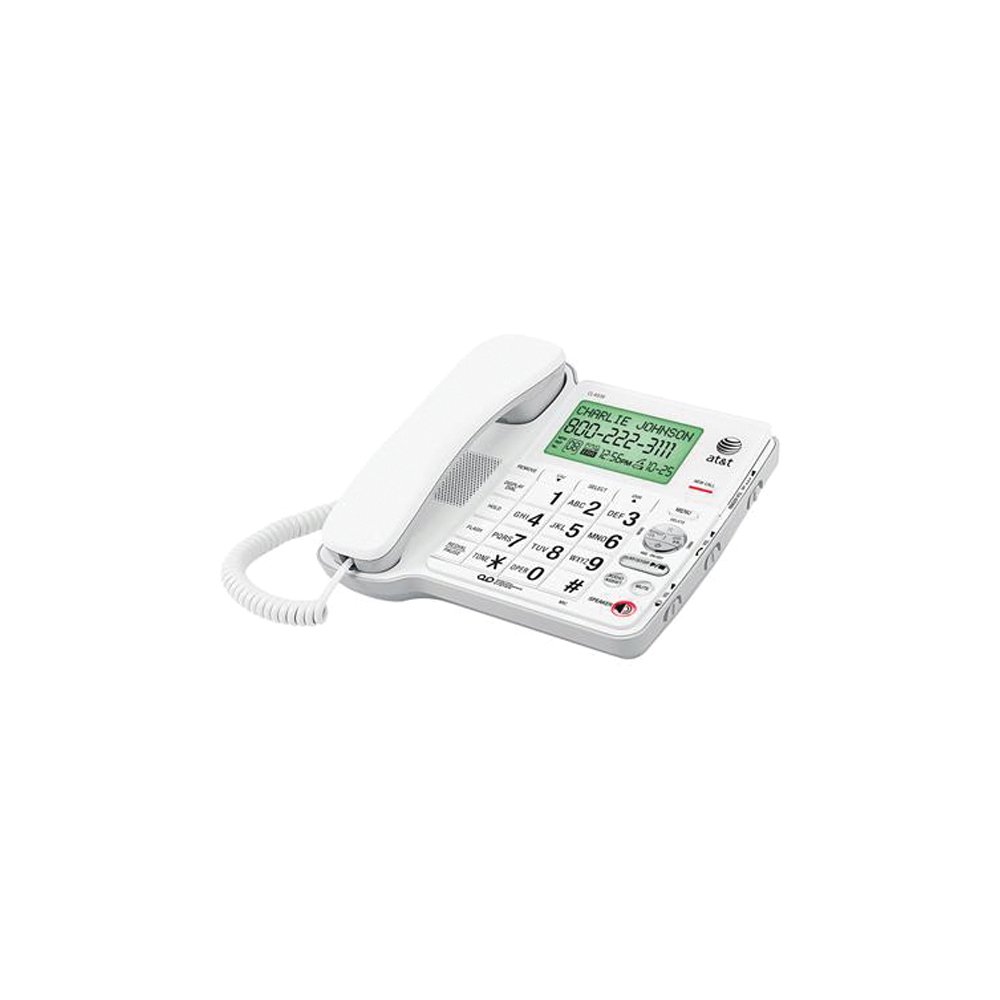
📞 Stay in Touch, Stay in Style!
The AT&T Corded Phone with Digital Answering System combines classic reliability with modern features, including an extra-large tilt display, 19 minutes of recording capacity, and a robust caller ID system, making it an essential tool for both home and office environments.
| Color | White |
| Item Weight | 2 Pounds |
| Item Dimensions | 8.75 x 3.25 x 8.2 inches |
| Recording Capacity | 19 minutes |
| Is there Caller ID | No |
| Multiline Operation | Multi-Line Operation |
| Dialer Type | Single Keypad |
| Answering System Type | Digital |
| Number of Batteries | 2 AA batteries required. |
| Power Source | Corded Electric |
G**O
"Come quick Watson, I need you."
Phone is great, so I ordered a second one (hoarder) so I will always have a second ready when this one wears out, if it does, or I will hook it up and have two phones in the house instead of just one?There is a male digital voice who has done everything for you, answers your messages, tells you when there are no messages, and has a message to in coming callers that alleviates me having to do it. Nice tone to his voice.There is a volume control for playback speaker; a volume control for the receiver audio and a volume control for the ringer volume. That is so cool, and they all works, and they slide by finger, not by punching a dial to raise or lower the volume.It is all the new technology made to ape the good old technology, if you know what I mean.
J**S
sound is awful and other problems
My original review below was written on 7.7.2011. Now, on 12.27, I'm amending it. I HATE THIS PHONE. And I dropped it from 3 stars to 1If you're getting this phone because you have a lot of things going on at once, and think that you will be able to dial quickly and easily using your peripheral vision because it has big buttons and you're going to be multi-tasking.....THINK AGAIN!!!! Your objective will be more easily met simply by paying moderate attention to a normal phone rather than having to pay acute attention to this maddening instrument.ONE: You have to hit the numbers hard and very precisely. If you don't, you have to start over because you missed a number. So every time you dial the phone, make sure you are looking at it, are dialing slowly, and you poke each number HARD.TWO: Along with hitting the number hard...and dialing SLOWLY, make sure you poke the number PRECISELY. Because otherwise, if you're dialing a 1, 2, or 3, you might the button that's above whichever number you want. This is infuriatingly easy to do, because they are adjacent and raised, and therefore, 9 out of 10 times will be hit INSTEAD of the 1, 2, or 3 button. Then the previous call comes up on the caller ID screen. OOPS!!! Now you have to start over because you can't dial the rest of the number! I do banking transactions via my bank's phone bank. If I mess up and don't hit the number hard and square on, I have to start again.This thing is going to an electronics recycling place. Unless I throw it out the window first!----------------------From my research this appeared to be the perfect phone, and with two exceptions, it is.First of all, at the top of the numbers are the CID and DIR buttons that pertain to the directory and previous incoming calls. Almost every time I hit the one or the three to dial, I hit one of those buttons with the tip of my finger and then I have to hang up and start over.Since I spend a great deal of time on the phone in a home office, I rarely look at the keyboard because I'm absorbing info from my computer screen. So this problem has become extremely annoying.Also, whether it's my phone or the product in general, sporadically the sound is awful. Perhaps I'm doing something somewhere to cause it, but while I always sound clear to the other person, at times the person with whom I'm speaking is extremely muffled and it's difficult to discern their words. When I'm speaking with someone whose first language isn't English, it's virtually impossible to have a conversation.I've had the phone about 3 or 4 months, and I had an AT&T phone before this that lasted me years and was great. Why I didn't get that same model I don't know - maybe it wasn't available. Who knows.Other than that the phone is great. But that sound problem.....I don't care how awesome a phone is. If you can't tell what the other person is saying then the phone is pretty much useless.Amended october 2011: This phone is so annoying. I got it for the tilt and the big buttons. But you have to hit the buttons really hard or it doesn't register. Then you have to start the entry over. The directory buttons are right on top of the 1.2.3 - so if you're in the middle of dialing or entering a number and hit a directory button instead, it sidetracks the whole system and you have to hang up and start over.
T**R
Excellent for almost 10 years, then a POWER SURGE
Brief Update, August 2021. Lightning, close (Flash & Bang, nearly together) apparently caused surge cutting off 3 services from my phone company. Technician could not get the phone to work, but demonstrated the circuit was working with another phone. Elsewhere in the house, a phone of a different make and model suffered no casualties. Sorry to see this one go.Did not change the rating because of the features, but be warned.--------ORIG BANNER: The best match for my requirements: Excellent Sound, Readable dialing buttons.- - - - - - -AT&T Speakerphone with Large Tilt Display: thus saith the packaging for my CL4939 phone, in use about three weeks.For my use and the features I wanted, I'd give it over 4 but less than 5 stars. It works as advertised, in some areas excels, and in some areas the methods are kludgy. If it had battery backup, I'd have given it a full five stars. The lower rating is my signal to AT&T that there's at least one person that would like the many excellent features to not be so dependent on house-current that you can lose most of them while the power is off. You can still get and receive calls without external power, but only as a 1950s type non-feature phone with push buttons. **UPDATE 2019 (I used this review to refresh my memory on a feature, and discovered two things to note. #1 The description I saw today on Amazon may indicate a few of the "cons" have been fixed, eg # of storaeble numbers, #2 I've had loss of power several times since having the phone. I've NOT had to restore times, dates, or entries after power has returned. I'm removing the language that says otherwise. **I'm using this as a wall phone. Some have commented the display hard to read - the phone is mounted near eye level for my wife and a little below my chin. The biggest observed handicap is the highly reflective view screen and the lack of back-lighting. Volume and clarity of sound is excellent. Memory capacity for frequently desired numbers is excellent when both speed dial and directory capabilities are combined. Up to 32 numerals can be stored at any spot, with a caveat (see below).Summary Pros:Large buttons; large number display for Caller ID and phone numbers; 99 dialable numbers from THE Caller ID directory; 25 dialable numbers from internal phone directory; 10 more speed dial numbers; independent volume control for speaker, phone receiver, and phone ring; hands-free options; answering machine (not used or reviewed); easy temporary switch to tones if you have pulse service but reach an automated answering service.Summary Cons:Loss of all special features during power outage (even during a blink) - inconsistent implementation of the three dialable sources; highly reflective non back-lit screen; user manual obscures missing capabilities except for one instance (short setup manual doesn't explain what some of the optional settings do and the longer user manual doesn't tell you until after you set them - if you are looking carefully - see full report), also it might be wrong in another (see CID); and has no HOLD button. The bottom display row uses narrower and shorter font - might be difficult to see for some (most of date & time is set here), lacks a short cord to make wall mounting easier (it has a "just right" compartment but I opted for my own 4" cord), the screen shows only the last 12 digits dialed - it does not scrollThe manual is very clear on this, page 23>.Details:Parts Checklist - named and individually pictured 5 parts - manualsWall Phone set up, there's a small nib where the receiver earpiece is to catch, but first you must turn the nib 180º from "normal" desk/horizontal use to the wall/vertical position.PHONE IN USE displays on the screen when another extension is using the line; however the "IN USE" red bar does not light up unless this particular phone is offhook.The bottom right number in brackets [n] is supposed to be the number of calls on your answering machine, not of what might be at the phone company's if you have that feature. I'm in the latter category, so haven't tested it.Setup is managed via the [MENU] (mid right). When powered on, the display immediately goes into Set Date / Time mode, briefly. Key in 12-hour time, [#] toggles between AM/PM, two digit month and day. The Year displays in large letters above the rest of the time, and Now you may set it (factory setting is 2010) - be sure it's accurate to handle leap years, and possibly auto switch between DST/ST ** It does not do either (added 2019)Other Setup notes - all factory settings can be changed. ** To scroll thru with MENU button, hit MENU first, then use the UP & Down arrow buttons located on CID/DIR to get to particular options. **Contrast - factory setting of 2 works fine for me.Repeated Calls - factory setting combines multiple calls from the same # to 1 entry.Language - English (instead of Spanish or French)Home Area Code/Local Area Code - these settings only affect how the display of phone numbers is handled. It does not affect dialing out, but the manual offers no useful explanation of what its for. Because I'm in an all 10-digit area code, I left the settings at 000 or blank. If your area code uses only 7-digits, and the local area stays within four phone company area codes, these entries will adequately filter out the area code for a more user-friendly display. Four (4) is the maximum area codes it can filter, however.Dial Type - Tone can be switched to Pulse.# of Rings - a wide range of options for when to have the built-in answering machine pickup, including several toll saver options. I set it to 10 because I prefer my phone company's version which picks up sooner.These remaining options for the built-in answering machine were not tested : Audible Message Alert (periodic) for new messages, Remote code, Priority code make a special ring, call screening on/off.Handset or Hands-free - for most features and options you can push the speaker button or lift the handset interchangeably. You can enter the number before or after you choose either option, but here's a bonus feature: if you choose to enter the numbers first, you can correct them (right to left by replacement). Pre-dial entry also allows you to insert pauses followed by other numbers such as extension #, or password (not advisable unless you are a hermit). Use the speaker or handset when ready.If you ever need to start a sequence over, [FLASH] is used to reset the phone to a fresh, ready-to-use status.Chain dialing (where account numbers, extensions, etc are stored ahead of time) - per the instructions, you must manually dial the first number, then use any of the three dialable sources to enter the remaining information on cue. Personally, I don't like the way they've implemented this, but if you "must" try it then put the extra numbers in one of the Speed Dial locations for simplest access.Last number redial - Doable either before or after using speakerphone or after lifting the handset. Use [REDIAL/Pause] to bring up the last 12 digits of the most recent number.Volume/Clarity - in addition to two separate slide switches on the right (handset, speaker), (AUDIO ASSIST - orange) lower right may sometimes improve clarity further (I think this depends upon the carrier being used - I've noticed little difference so far. Switches "off" when you hang up.(MUTE - orange) - to cut out your background noises while listening.[FLASH] - for Call Waiting and Third Party options - per your phone company.[TONE *] - if you have rotary dial service but need tone signals when you reach an automated service, this button (left of zero) is for you. After the service answers, push this button: all subsequent button pushes will send tone signals until you hang up. (not tested)Dialing with Stored Numbers - there are 3 ways - none work exactly like the the other.Speed Dial - shows only the number, I fastened a small table on the handset to identify the 10 locations represented by the numbers 0-9: If possible, I'll attach a photo. Use before or after getting a dial tone. To use: ++ (before dial tone) [MEM]-the appropriate 1-digit number-any of these three: [DisplayDial][Speaker]or lift handset. ++ Or (after) you can lift the handset or push speaker, then [MEM]-and 1 digit. There's a long pause before dialing begins.User definable directory - Use before getting dial tone. ++ [DIR]-scroll* through directory-[DISPLAY DIAL]-optionally lift the handset if you don't want to use the speakerphone (speaker comes on when you touch DD, off when you lift handset. Optional shortcut: touch the letter corresponding to the directory entry (up to 4 taps of [PQRS7] for "Smith") to get to the first letter, then scroll*.Caller ID directory - before the dial tone. ++ [CID]-scroll* through directory-if the number displays the way you want to dial it, [DISPLAY DIAL], otherwise press [#] to cycle through 1+10 digits, 10 digits only, 1+7 digits, 7 digits only, then [DISPLAY DIAL]. The online version of the manual on page 36 says to cycle with the SELECT key, its wrong. The correct info is on page 38 of the accompanying hardcopy manual. *-------- * scroll - the manual will not tell you there are two ways to scroll. The manual identifies the [CID-v] (down) and [DIR-^] (up) keys. The key names (CID/DIR) should be ignored after you select the directory you need to use - just remember the direction indicated. ------- The manual doesn't mention you can use the >>; (down) and >> (up) keys of the answering machine controls to do the same thing. (YMMV-I turned the machine off, do not use it, but "guess" in this context those buttons would still scroll through the directory entries.) ---------EditingCreating MEM entries - the only things worth noting is (1) you cannot name the entries on the phone: the text portions are LOCATION 0, LOCATION 1,... and cannot be altered. (2) You can edit MEM entries from the right-edged numeral or replace them entirely. Up to 32 numbers but only the last 12 will display after entry.Creating DIR entries - in contrast (1) you can enter both a name and a number, (2) once entered you can only delete and re-enter - NO "true" Editing. Only the last 12 numbers will display when using or deleting, but the name you used will also display.[REMOVE] will clear any entry. If held more than a few seconds it will clear the CID directory if selected. I would assume it might do the same for the DIR (not tested!)Reviewing the CID- The phone has 6 different "names" it may show depending upon whether a caller or the the caller's telephone company has blocked or is not providing the caller's name and/or number. See page 36 of the user manual, but if the number can be determined and it exactly matches your DIR entry, the name in your DIR entry will display. I believe the (1-North American Long Distance signal) will cause some long-distance calls not to exactly match.CID to DIR: Find the number as though you were going to dial it, then push [MENU] twice. One of several ways. Or between [MENU] pushes, cycle through [#]to get the right format for how you want to dial - see Editing, but you cannot edit the Name rendered by the caller ID feature.Other reviews have noted the back of the phone in "wall" position is not flush to the wall - there's room to store the excess cord for instance, and the modular connection on the phone company side (not supplied) sticks out about half 'n' inch. To be clear, the phone is built to attach to a modular fastener, following the instructions to alter its body to expose the connector and hide the cord.There are 11 pages in the larger manual detailing how to use the answering machine (not tested, not used).In summary the phone is feature rich, and worth a B+ for what it gives, and a B- for how easy it is to use and set up. But over time, like anything else it will become easier by repetition. Consider the primary users though - if your user wants strong amplification, the phone delivers, or big buttons, this phone is excellent. If the user doesn't like working more than the pause/play of a DVD player, or changing channels on cable, then they aren't likely to take advantage of all those nifty features you're paying for, or maybe you can show them a little bit at a time if they have the urge to know, but feel technologically challenged by it all.As you can see, there are many choices as to how to use a few of the phone's options. I've used one approach to sort them out (and have omitted some), the manual uses another. The key hope is that one way or the other you'll find what you need to know.
C**M
Well designed/User friendly phone
Large easy to read keys and call display which appear to be a rarity amongst available phones.It is also user friendly and is easy to program.Sound quality is excellent and volume adjustment on Speaker, Handset and Ringer is defintely handy.Highly recommend this product!Cam
M**U
One Star
Non satisfed product
W**N
It works well for us
I liked our cordless phones better in many ways but in an effort to reduce the brain-damaging RF we are exposed to, I got this corded phone. Other than the obvious lack of mobility, this phone performs well. A couple of other reviewers complained about things that can be solved easily by reading the manual---what a novel concept! For example, it is easy to program the phone to display and redial numbers in your own area code. There is a solution to the receiver coming out of its cradle too easily. Once we learned the operational procedures---by reading the manual---we could do everything we want with this phone. We're getting used to it and now like it quite well.
S**.
Perfect choice of phone!
Great phone for those who need large numbers. I recommend this phone!
F**O
Basic and Functional
A good phone meeting my basic needs, i.e. white, corded with VM. However the functional buttons are quite counter-intuitive (I normally can figure things out using common sense and trial but I need to refer to the manual frequentlyas labels make little sense). The most frustrating part lies with voicemail message playback. There's a Repeat (rewind) and Skip (forward) composite button to help navigate existing message but the Repeat (rewind) function doesn't work and the only way to go back to the previous message is to keep pressing Skip(forward) key to skip forward and through all the existing messages again.
Trustpilot
1 month ago
2 days ago