We remain fully operational. Our teams are working around the clock to ensure your deliveries continue safely.

DOWNLOAD THE APP


Customer Services
Copyright © 2025 Desertcart Holdings Limited
DOWNLOAD THE APP
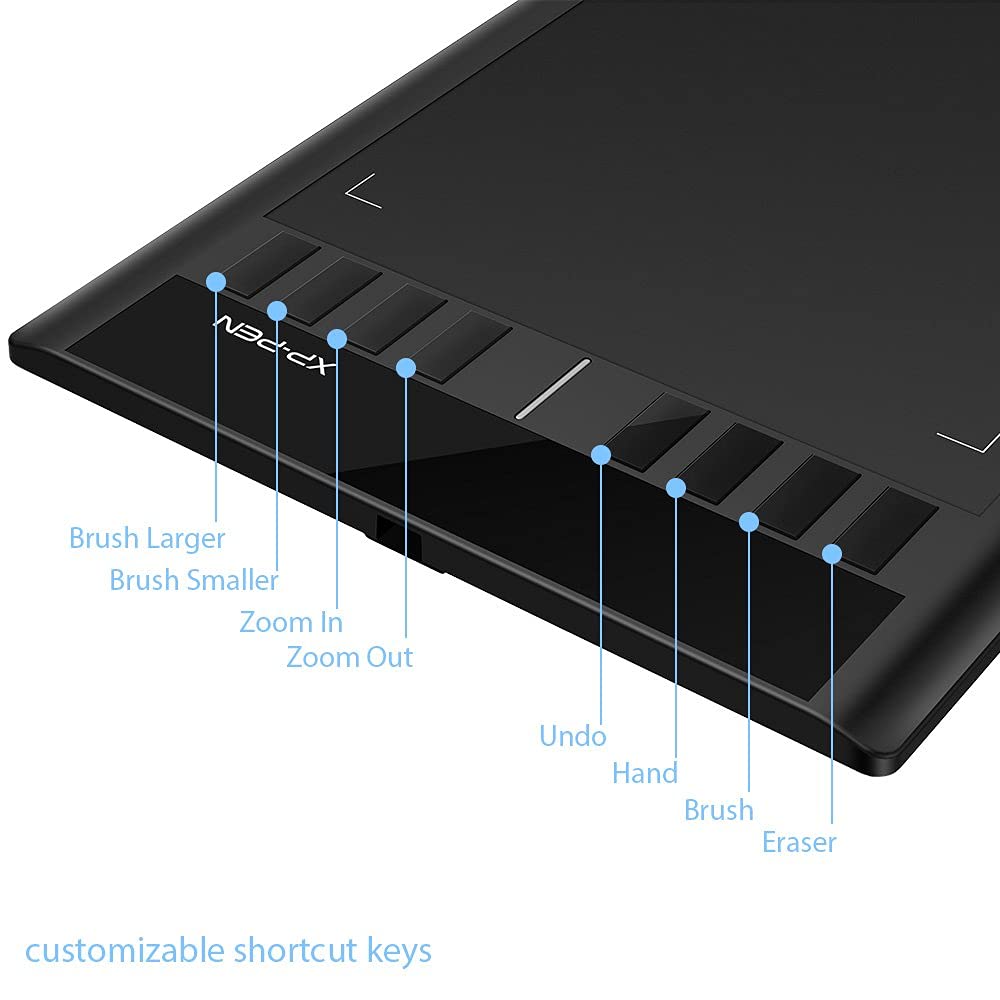


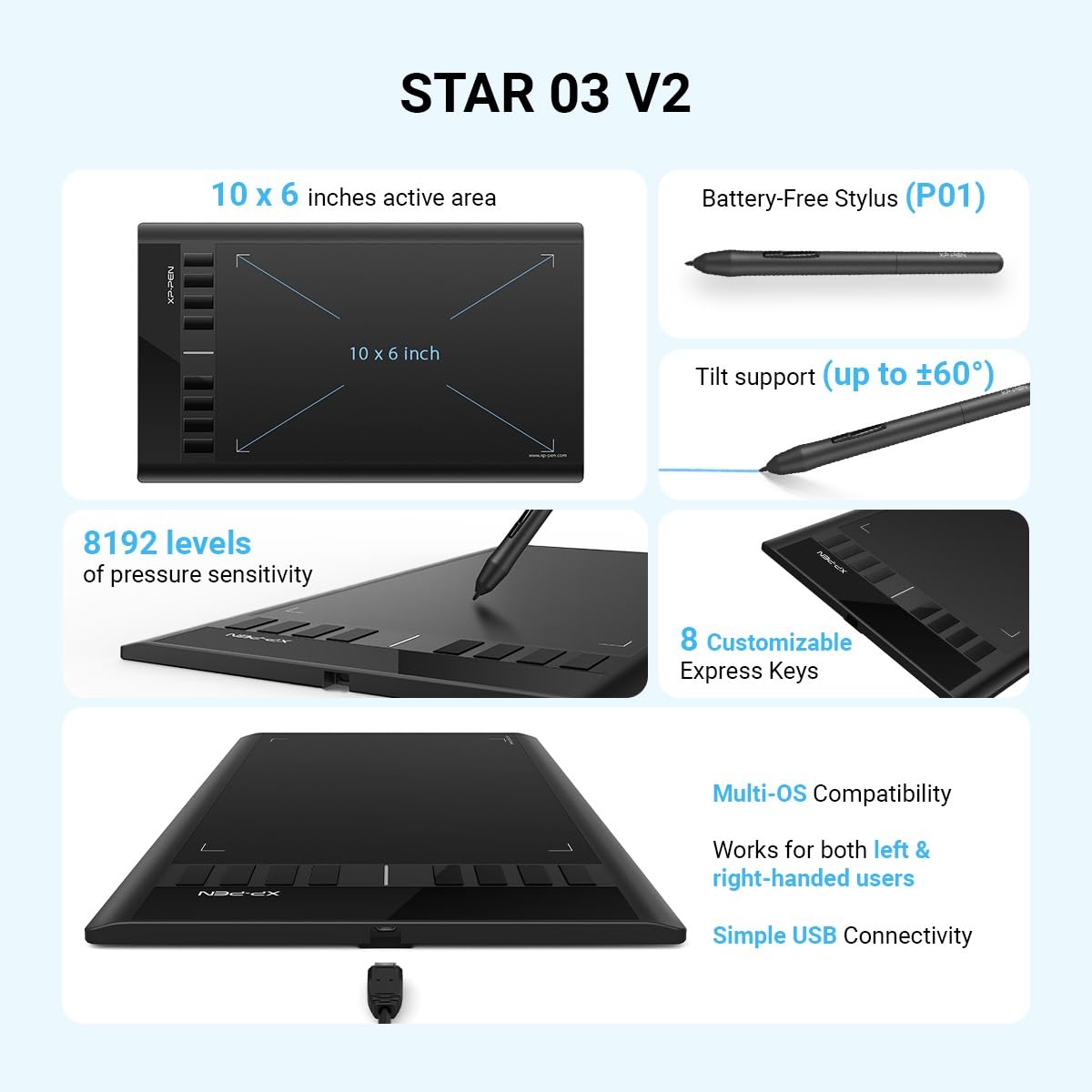


🎨 Unlock your creative edge with precision and freedom — don’t just draw, dominate your digital canvas!
The XPPen Star03 V2 is a professional-grade drawing tablet featuring a large 10x6 inch active area and an ergonomic, battery-free stylus with 8192 levels of pressure sensitivity. Equipped with 8 customizable shortcut keys and broad OS compatibility, it offers an affordable yet powerful solution for artists and designers seeking precision, comfort, and workflow efficiency.









| ASIN | B017ATNRTY |
| Average Battery Life (in hours) | 2 years |
| Best Sellers Rank | #359 in Computer Graphics Tablets |
| Brand | XP-Pen |
| Color | Black |
| Computer Memory Type | SDRAM |
| Customer Reviews | 4.5 4.5 out of 5 stars (4,296) |
| Date First Available | October 29, 2015 |
| Is Discontinued By Manufacturer | No |
| Item Dimensions LxWxH | 14.25 x 8.27 x 0.31 inches |
| Item Weight | 10.6 ounces |
| Item model number | Star03 |
| Manufacturer | XP-PEN |
| Number of Processors | 1 |
| Operating System | MAC OS 10.10 or above, Mac OS, Windows 10, Windows 7, Windows 8 |
| Product Dimensions | 14.25 x 8.27 x 0.31 inches |
| Screen Resolution | 1920x1080 |
| Series | star,star 03 |
| Standing screen display size | 12 Inches |
| Voltage | 5 Volts |
A**B
When she opened her present and she saw the beautiful xp-pen box she screamed and cried and laughed
My whole family was impressed with this pen tablet! We bought it as a bday gift for my 9yr old daughter(she has high functioning autism). She draws all the time, and it has been a dream for years to own her own pen tablet. And the one at school no one is allowed to touch. When she opened her present and she saw the beautiful xp-pen box she screamed and cried and laughed, She asked me mom how did you get the money to get this! She thought I spent a fortune! And her reaction was priceless! It works great in every program we have tried Adobe illustrator, photoshop,MediBang Pro. Medibang is a free drawing app and works beautifully with this pen tablet. We let the Artists of the family try this out at our house , They never used a pen tablet and they loved it! And everyone who has tried it had so much fun. It arrived on time right before her birthday, i got free 2day shipping Thank you amazon prime! My aunt bought amazon prime for herself, and she listed my email on her prime account, because amazon is awesome like that. The pressure sensitivity really works, and if you guide the pen above the surface of the tablet you can use the pen like a mouse. That does take a little getting used to, but it gets easier. I would totally recommend you try out this free drawing game its on windows app store , its called interference, its hilarious and great if you do not know what to draw! the people who play are not vulgar and they are very respectful, you can also play online too if you go to the website playinterference.com We love this pen tablet so much! it was a steal for the quality of the product, we have been using it for about a month, and we already want to buy another one and buy this for every artist in our family. I hear wacom is good, and honestly i've never tried it, but i can tell you i am not disappointed i feel pretty good I found this product and everyone is so impressed by it! the pen feels great in your hand, there is no charging, it comes with pen tip replacements, which we had to replace once , because we accidently dropped the pen and lost the tip, but got a new tip installed in under a minute and we were drawing again! GET this pen tablet, you really dont need to keep looking, this is the one, it has everything. The size is large and its cheaper than a smaller wacom model. im so thankful for this xp-pen! This product does not look or feel cheap, it does not lack in performance. This is the one you need to get, if your looking for the best product and the best price. This is the pen tablet. I have no complaints, and its still working great! Thank you to xp-pen for making such an amazing product and making it so affordable! I am so glad I got this ! if you need help getting it to work , their customer service is great, i would be willing to help if anyone if you have questions or issues, I love it that much!! contact me on my website, abqcreations.com
A**.
Excellent Value, and great customer support
I was actually forced to get a new tablet, because in their corporate greed Wacom decided not to support their wacom intros 2 on Yosemite and up. Now some will say that after 8 or 9 years we shouldn't expect them to support their products but I disagree. This tablet works perfectly and meets all my needs, if wacom wants me to buy something new from them, then let them add features that I can use. There is no good reason for me to switch tablets. OK that said I found my way to this XP-Pen Star 03. At first I ran into some software issues and could not get it to work with my photoshop. I have to say their customer / tech support was excellent. I couldn't talk to them by phone, but was able to communicate via Skype. I think there is a big time difference and so this was the way we had to do it. I was convinced I was just getting what I paid for and it was just not going to cut it. BUT they had me trouble shoot one issue at a time and we narrowed it down to a problem in CS6 and there was a workaround that they sent me the link to, and when installed, the tablet worked perfectly. It is not as well built or quite as elegant a "feel" as the wacom, but that was a $350 dollar tablet, for the price this is an excellent value. It has an adequate feel to it, and as I am getting use to the 8 express keys, it is turning into a good work flow routine for me. Based on the price AND the excellent support I got I would recommend this to anyone else looking. Whether this is your first tablet, or like me you became obsolete with a wacom, and don't feel like spending another 3 or 4 hundred bucks, then this is one to consider.
L**O
Great Value for the Price. Not Quite a Wacom
First of all, the active area on this device is 6" x 10". I don't know why they insist on using equivalent monitor screen size. Even so, it's 11-5/8", not 12". I have had three Wacom tablets over the years, and my last ($400) one bit the dust when I spilled half a glass of water on it. I wasn't about to spend another $400 for something that sensitive, so I decided to try the XP-Pen Star 03. I must say, for the money, this is quite a good tablet. Engineered in California and manufactured in China, it's not quite up to Wacom standards, but good none-the-less. Generally, this tablet comes close to Wacom standards--though I haven't had it long enough to determine durability--so I'll just list the negatives: 1. The active distance of the pen from the tablet is smaller than the equivalent Wacom, so there's a bit of a learning curve. 2. The inactive area outside the active area is narrower than the Wacom, so you need a bit of empty desk space around the tablet if you want use the entire active area. 3. The express keys don't illuminate their names, so if you can't remember what they do, a good label maker is required (I use a Brother with the 6 point tape). 4. There's no eraser on the reverse end of the pen, so you either have to use an express key or a side button to switch between pen and eraser, or you need to use the eraser in the program you are using, which I normally do anyway. I don't think I've ever used the Wacom eraser. 5. The pen is hard plastic with no rubberized covering like the Wacom, so it's a bit harder to rotate, making the side buttons harder to find. One positive I should mention is the icon in the system tray, which allows you to change settings without opening up the Control Panel. The express keys also have a bit more of a positive feel than the Wacom. And one tip: If you can't get rid of all of the Wacom DLL files, start your computer in safe mode and delete them there. The popup notice that the Wacom driver wasn't working was getting annoying. They should have a utility at their website to remove everything.
G**L
Excelente!!! Me ha servido muchísimo
P**N
Very good product. Nicely writing pen. All fine. Good for beginners
L**S
Top
R**H
Haven't had a drawing tablet before this (besides playing around with a display Wacom at a store once), so can't really compare it to anything, but I'm very happy with the XP-PEN Star03 V2. When I first received it, I couldn't get the thing to work. My (Windows 10) computer wouldn't recognise the tablet: I'd get a "USB device not recognised" error most of the time, and other times it would disconnect without warning. I emailed XP-PEN and they helped me work out it was a problem with the cable. I've been using a generic USB-2 micro-B connector since then, but the replacement cable they sent arrived today and works well. Pen is just plastic but comfortable to hold, and tablet is a good size and has plenty of buttons (though customising the express key functions wasn't super intuitive - I didn't realise "Function Key" is the option that lets you customise the keyboard press the express key maps to). Pen pressure works great in Krita, though I've followed a piece of online advice and halved the pressure/output curve to save the tablet surface and keep my lines less wobbly as I get used to drawing on the tablet. It's been a month and the tablet surface isn't visibly scratched. It is pretty easy to slip up and press the pen buttons by accident. The tablet works both with single and dual monitors (though it works best when you set it to one monitor at a time for screen ratio reasons). Driver was easy to find and download (Windows 10 computer). Left-hand mode/180 rotation works fine, but it does not reverse the order of the express keys, so you have to remember the buttons are in the opposite order to one shown in the settings menu. All-in-all, a good tablet (for my purposes and in my limited experience), feels pretty sturdy, great price (AU$60 when I bought it), and XP-PEN's customer service guys are champs. Hopefully it lasts too!
I**I
It's pretty good
Trustpilot
1 month ago
3 weeks ago