
DOWNLOAD THE APP


Customer Services
Copyright © 2025 Desertcart Holdings Limited
DOWNLOAD THE APP
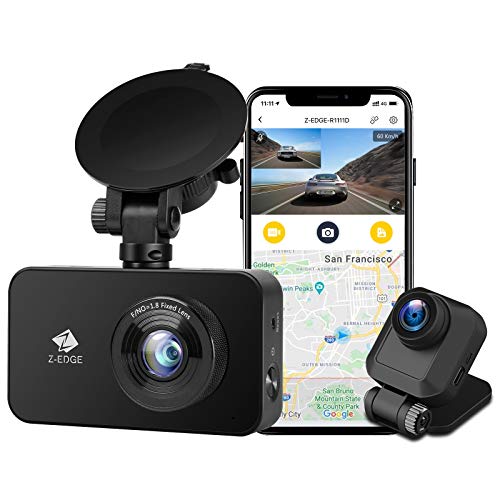


🚗 Stay Ahead on the Road with Z-Edge: Your 24/7 Digital Co-Pilot
The Z-Edge WiFi Dash Cam delivers professional-grade dual-channel Full HD recording (1296P front, 1080P rear) with advanced night vision and Wide Dynamic Range technology. Its built-in WiFi and dedicated app enable instant wireless access to footage, while smart features like loop recording, G-sensor video protection, and parking mode ensure comprehensive security. Designed for easy installation and rugged use, this dash cam is the ultimate upgrade for safety-conscious drivers who demand clarity, convenience, and peace of mind on every journey.


| ASIN | B08M9JD55C |
| Batteries | 1 Lithium Polymer batteries required. (included) |
| Best Sellers Rank | #176,115 in Electronics ( See Top 100 in Electronics ) #2,166 in Car On-Dash Mounted Cameras |
| Color | black |
| Connectivity technologies | Wi-Fi |
| Customer Reviews | 4.0 4.0 out of 5 stars (2,830) |
| Date First Available | November 30, 2020 |
| Item Weight | 15.8 ounces |
| Item model number | R1 |
| Manufacturer | Z Z-Edge |
| Other display features | Wireless |
| Product Dimensions | 7.48 x 3.94 x 5.12 inches |
| Special features | App Control |
| Whats in the box | Car Mount,cable |
E**N
This is a very good wifi dash-cam.
I am pleased with my Z-Dash Dash Cam. I have tested it out for three months now, and it is perfect for my needs. This dash-cam is an excellent addition to just about any car, helping keep you safe out on the road. This camera is ideal for protecting me from unfair tickets, as well as a back up of my version of events in the case of an accident. It has a front-facing camera that suctions well on my vehicle's windshield and a rear camera that works well on the back window of my car. It has all the fantastic features that come on more expensive versions of DashCams. The best quality is that it has wifi capability, capturing footage in your cell phone as you drive. The wifi capture is handy in an accident, robbery, or any unfortunate scenario where you need a backup to show the police or anyone else. Please see the pictures below, which are images that my phone captured from the Z-Dash camera. You will need to purchase your own SD card. I bought an inexpensive compatible SD card from Costco and it works perfectly. The cameras are connected via a mini-USB cord. You will need to lay the cable into the panel lining of the car. I do not recommend using the provided cable hooks to hold the wires because they will not work in summer-heat conditions. I suggest you lay the cable in the car's paneling so that you can avoid disappointment from failed glue in place of having a fantastic camera for a reasonable price. (You can look up videos on youtube on how to install the cord in the car's panels. They also provide a few tools in the box to do this. It is easy to do with some effort and should take a half-hour to do.) This dash-cam does not have GPS unit. Coordinates are captured in the images so the app on the phone can display the location on a map. This dash-cam will not fit your needs if you drive for a ride-sharing service. Suppose you want to record any activity for passengers who get into your car so that you have peace of mind as you go. In that case, you need to look elsewhere for a camera that has a rearview camera on the windshield camera. This is my genuine critique of a dash camera that I purchased on my own. It is an excellent dash-cam.
T**R
Great Camera with the advantage of an App! I can even take Snapshots!
Great camera, light and functional. Price is competitive and Amazon always deliver! The installation was easy (not my first rodeo, my 3rd actually) and very straight forward. I replaced a previous version on my truck for this one to take advantage of the WiFi/Application Option. 26 ft of cable is ample for any installation on rear applications. I have a Tundra Crewmax and I have a lot of slack cable stored inside the trims. I would say the greatest advantage of the camera is the wifi/app interface. I programed the entire thing via the app. I really preferred the app vs playing with the buttons on the side. Specially after I installed it, the position was not good to play around with the buttons. I added a couple of snapshots of the app configuration menu. BTW, the app allows you to play the videos stored in your SD Card but also I can take a snapshot from the camera's live view. That is a neat feature. The PRO's of the camera are the wifi and application interface and the 155 degree lens. One thing I would probably improve for this model is to consider a GPS version of it. I did have GPS on my previous model but opted for this one since the app I think is a nice feature. I had another model by the same seller and I thought I could re-use the previously installed rear camera cable but I WAS WRONG... cable is not compatible. No biggie, installation wasn't that bad at all if you've done it before.
J**5
Good quality with a very good image.
I bought this Z-Edge R1 to replace a Z-Edge Z3 dash cam that I bought in 8/2017 which is having a problem. My experience with the Z-Edge dash cams is that they have a very good build quality and the R1 feels sturdy and appears to also have a VG build quality. Unlike some other dash cams, the Z-Edges have a battery rather than a super capacitor. On my old Z3 the internal battery lasted about 3 years but with some basic DYI skills you can replace the battery as I did and got another 2.5 years of use. The window suction cup on the Z3 also failed when it was about 3.5 years old and I replaced it. I would expect the R1 to have a similar life. I live in S. Florida and I needed a camera that could handle the summer heat in the car. The Z-Edge specs state that it can handle up to 158F and my old Z3 survived the heat. There was another camera that I seriously considered but I saw a user's pic from Houston which showed the camera's plastic case had melted. The setup on the R1 was relatively easy and the app provides a lot of useful functions. You can view/save recorded videos several ways including 1) on the LCD screen in the camera, 2) on a smartphone with the Z-Edge app installed or 3) connecting the camera to a PC with the included USB cable or popping the memory card into a card reader on PCs with memory card readers. The image quality of the videos is excellent and smooth. I am not using the small rear camera which I have read improves the quality of the video recorded on the front camera. The captions on the app could be significantly improved and take a little time with the manual to determine what the icons or descriptive text actually mean. For instance, the default password for the camera is 12345678 and I wanted to change the password which is good digital security practice. There weren't any instructions in the manual on how to do this but I eventually determined that you can only change the password in the app using the Wi-Fi menu item. A Wi-Fi menu item in the app just says 'password', not 'change password'. However, to change your password you enter the new password here and it doesn't require you to enter the new password twice so make sure you enter what you think you are entering else you will need to reset the camera to the factory setup and re-setup everything again. I add very few apps to my primary phone which is an iPhone 13 so I installed the Z-Edge app on an iPhone SE 2016. It installed fine but many of the menu items I expected to see in the app weren't there. I installed the Z-Edge app on my iPhone 13 and all of the menu items were there. In both cases the app installed fine but apparently the Z-Edge app checks the iPhone model and turns off/on menu options depending on the model. When installing the app make sure you authorize access to your local area network else you will not be able to connect the app on your phone to the camera. I had the camera plugged into my PC to charge the battery and when I tried to connect phone app to the camera it didn't work. Make sure when using the app that the camera is not connected to your PC. If you want to see a video on your camera the easiest way to do so is to view it on your smartphone with the app. In order to do this your car needs to be on so that the camera is on else you will need to turn the camera on manually using the on/off switch on the camera. The camera Wi-Fi doesn't play well with wireless Apple CarPlay and probably would have a problem with wireless Android Auto. Wireless Car Play uses Wi-Fi to connect to the iPhone and has priority and prevents the Z-Edge app from connecting to the camera as it also uses Wi-Fi. If you have wireless CarPlay you need to turn it off before accessing the video recordings on the camera (or turn on the camera manually and access the video files before turning the car on). It would have been better if they had used Bluetooth to connect the phone app with the camera rather than Wi-Fi as it permits multiple concurrent connections.
A**R
My audio is not working
M**E
Super Dashcam top Qualität und Service Hatte ein kleines Problem mit einen karbel hatten den Support geschrieben und mir wurde super geholfen habe anstandslos Ersat bekommen
G**5
Meine bisherige Dashcam ging zu Bruch und ich wollte nun eine mit Heckkamera. Die Wahl fiel auf die Z-Edge EiFi Dual Dashcam. Die Montage war einfach und ohne Werkzeug zu erledigen. Das Kabel nach hinten ist wirklich ausreichend lang im KIA NIRO, ich habe den Rest in unter einen Abdeckung der Heckklappe verstaut. Die Saugnäpfe haben bisher bestens gehalten, auch bei heftiger Sonneneinstrahlung. Als ich die ersten Filme am PC angesehen hatte, war ich echt überrascht. Die Filme sowohl der Front-, als auch der Heckkamera sind gestochen scharf. Autokennzeichen oder Straßenschilder sind gut zu lesen. Auch Nachts sind die Filme sehr scharf. Problem sind hier allerdings öfters die extremen hell-dunkel Kontraste, die von der Kamera kaum ausgeglichen werden können. Reflektierende Straßenschilder oder Kennzeichen sind erst dann gut lesbar, wenn die Scheinwefer nicht frontal draufleuchten. Die Bedienung per Bluetooth hatte ich nur zur Erstinstallation der Kamera benutzt. Einmal richtig eingestellt, braucht man das eigentlich nur noch zum Spaß, um mal was anzusehen. Insgesamt finde ich die Z-Edge Dual Dashcam nach den ersten Wochen im Einsatz wirklich gut und für den Preis einmalig.
Trustpilot
1 month ago
3 days ago