🔄 Switch smarter, work faster—never miss a beat!
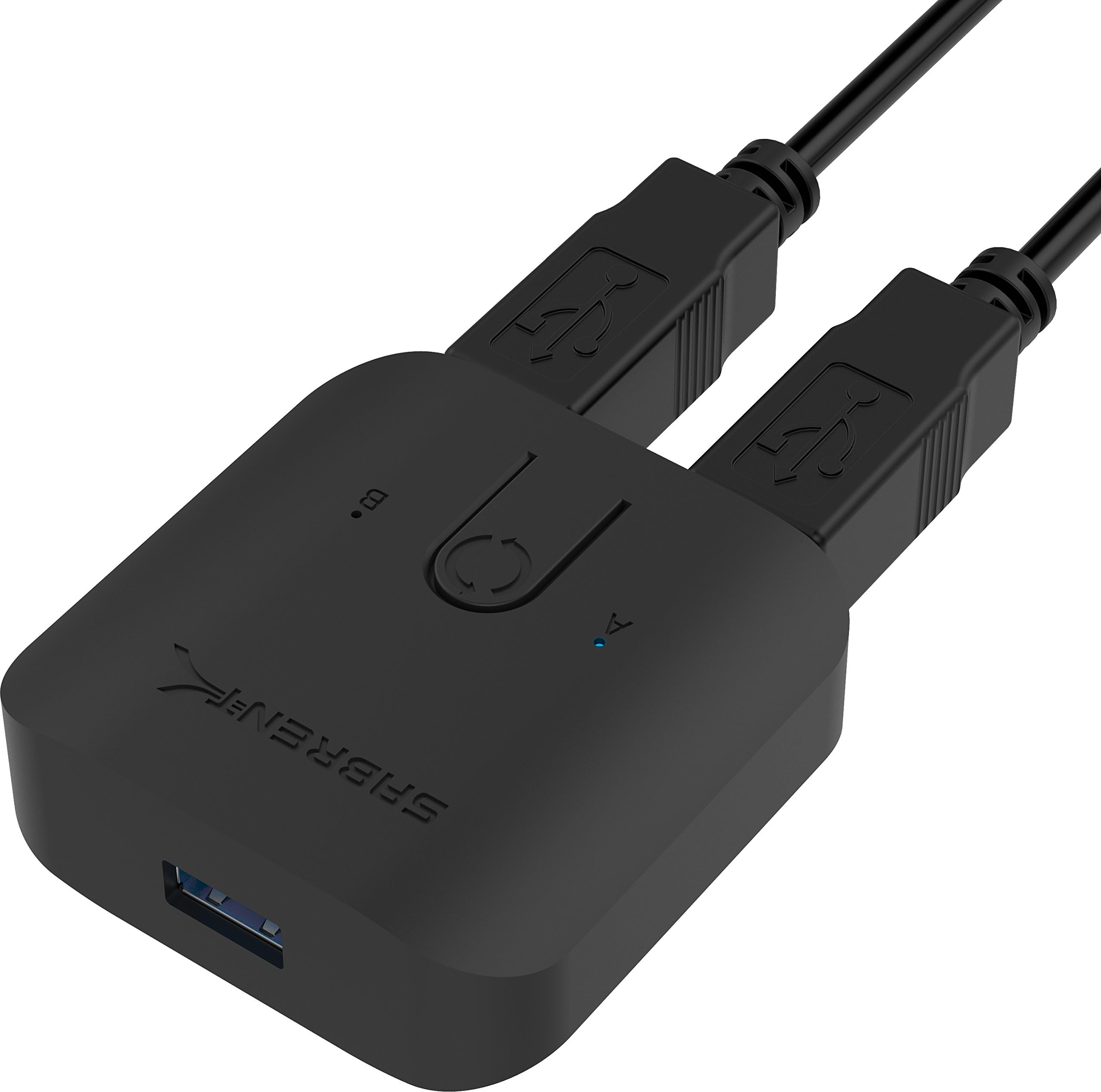
The Sabrent USB 3.0 Sharing Switch (USB-SW30) is a compact, plug-and-play device that lets professionals effortlessly toggle USB peripherals between two computers. With blazing 5Gbps data transfer speeds and intuitive LED indicators, it streamlines multi-device workflows without extra drivers or power adapters.


| ASIN | B074TYDJK2 |
| Are Batteries Included | No |
| Best Sellers Rank | #29,470 in Computers ( See Top 100 in Computers ) #67 in KVM Switches |
| Brand | SABRENT |
| Color | Black |
| Customer Reviews | 4.3 4.3 out of 5 stars (7,453) |
| Date First Available | 26 September 2017 |
| Item Weight | 40 g |
| Item model number | USB-SW30 |
| Manufacturer | Sabrent |
| Power Source | Corded Electric |
| Product Dimensions | 6.1 x 5.9 x 2.1 cm; 40 g |
| Voltage | 5 Volts (AC) |
E**E
Good quality and working as expected but the charging output not working
its working perfect to switch between two computer and using only one display output, no need for extra power the output power not working with me it good quality but expensive comparing with benefits you will get it
J**K
Does its job pretty reliably
Very satisfied. Installation is a breeze and operation is very good.
A**D
high quality product + reasonable price
i usually use KVM to switch from pc to another, with this device, i can switch using my screen the video input and from this device i can switch keyboard and mouse.
U**8
Simple and useful add-on.
There are two strong pros: - Dedicated switch button. It helps to keep desk clear. - Pure focus on usb (no unnecessary extras as HDMI and so on) - Flexible USB cables. - Smart switch between _plugged only_ devices. Cons: USB cables inbuilt (not pluggable)
H**D
I liked the product
It's really a helpful product
T**K
Old USB 2.0 for Peripherals and SSD drives
USB 2.0 only and there is no USB 3.1 or USB 4 for sharing peripherals like external SSD drivers for fast data transfers. For the price factor it could have been at least USB 3.1 instead of old USB 2.0
S**D
Stopped working about a month
Worked great and loved it for about a month then all of a sudden just stopped working. Swapped cables and usb ports nothing worked. Assuming the switch box just stopped working.
A**I
Plug n play - 2 cables included
Great product , 2 cables are included Plug and play setup
L**E
I am glad I found this little gem. I use 2x PC's and a Laptop that gets connected to my main external monitors. I use to have a keyboard/mouse combo for each of the 3. Now, with this device, I have only one set I use for all 3. I was always having trouble with the networked printer, now the printer swaps directly (via USB) to whichever device I am active on. It also makes swapping files from one to another simpler. I recommend this for anyone just looking for a keyboard solution for multiple devices. But it is capable of much more.
M**K
Update 13/4/21 - still going strong! It's perfect. I spent hours, literally trying to find the right KVM to suit my needs. I even read the bad reviews about this KVM and thought I was making a mistake. I'm running a 2020 MBP and a HP laptop for work both connecting to a single 32" LG Ergo Monitor. I really wanted a KVM that outputted to usb c but they don't exist on the market. I hope this comes soon, my monitor has 2 x USB 3.0 ports on the back so they can be piggy backed to the host. But with this KVM that won't work as the output is HDMI. So initially, I was having issues switching between my MBP '20 model & HP Win 10 laptop. The HP worked fine but when switching back to the MBP it wouldn't switch. Then I realised my MBP was going to sleep and wouldn't wake with my bluetooth keyboard or mouse. So once I connected power to the MBP it switches fine. But I'm still trying to see if switching without power will work. I've not tried the power input on the KVM as I've read some nightmare stories about KVM's frying motherboards, and I have some expensive kit that I don't want to destroy. If anybody has tried then please post this in the question section! (Shame we are not allowed follow up comments on Amazon). And very little info exists on forums about this KVM. Some notes for existing users to read if having issues:_ 1) HDMI 2.0 cable sends 60hz 3840x2160 to my LG 32" Ergo from both my MBP & HP. This is the first time I've managed to get a hub to work at 60hz - so big tick for Sabrent. BUT.... it does not allow HDR via this route (HDR works fine when connecting USB C directly to monitor). 2) Audio via HDMI. Interesting, I got it to work no issues from my MBP to my LG 32" ergo. But it wouldn't work on my HP Win 10 laptop at first. Then I somehow managed to disable the audio on my Win 10 laptop, rebooted it and voila I could see the audio option being routed to my LG monitor, so that now works fine. Another tick to Sabrent. 3) I'm still experimenting with the switching to my MBP, it works fine with my HP Win 10 laptop (switches in 5 seconds), but the MBP goes to sleep every time, and it needs a wakeup with my USB mouse. Very strange. 4) The USB ports work fine with my mouse, jabra headset and my webcam (shame only 2 ports), they really need to have 4 USB ports on them. So far it seems to work brilliantly, I was having issues before switching inputs on my monitor and struggling to get 60hz so this KVM fixes that problem. For me, I just wish the output could be USB C and then allow passive charging as that will eliminate any additional power inputs, and also expand the USB capacity if the connecting monitor, like mine has USB connections on it. Also, no overheating to note on the KVM which is good. My only gripe is for £100 maybe it should have a bit more weight to it, It's feels a bit cheap. I'd also like to see the option to allow keyboard shortcuts -> KVM to switch the input instead of having a cable on my desk. I'll post an update after a few days to see how this goes.
C**N
BONJOUR j'ai acheter ce model car il a deux port HDMI et USB c mais malheureusement ça ne marche pas, je l'es branché avec mes deux ordinateur portable Hp et deux ecrans Hp rien ne marche
R**D
It's intuitive to hook up and use, and it works for switching a USB hub with a connected mouse, keyboard, and Yubikey. I haven't tested the USB throughput, so I can't speak to that. Only downside is that the LED indicators are a little dim and hard to see in a brightly lit room unless you know what you are looking for. This could be a good thing if you are using it in a darker room (e.g., watching a movie). It's not a big deal and you'll quickly get used to it. I'm happy with my purchase.
L**.
Lastimosamente no era compatible con mi think Center de Lenovo Pero con mi laptop Dell y mi MacBook pro Funciona al 100
Trustpilot
2 weeks ago
1 day ago