


Amazon Fire TV Stick, sharp picture quality, fast streaming, free & live TV, Alexa Voice Remote with TV controls
Product ID: 294661245
⚡50% more powerful quad-core CPU
📶Dual-band MIMO WiFi for seamless streaming
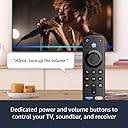
🎙️Alexa Voice Remote with TV control
Desertcart purchases this item on your behalf and handles shipping, customs, and support to Mexico.
🔥 Stream Smarter, Not Harder 🎬
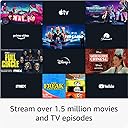
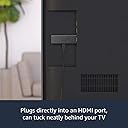
The Fire TV Stick (3rd Gen) delivers fast, Full HD streaming powered by a quad-core 1.7 GHz processor and dual-band MIMO WiFi. With Alexa Voice Remote, control your TV and soundbar effortlessly using voice commands. Access over 1.5 million movies and shows from popular streaming services plus thousands of free titles. Enjoy immersive Dolby Atmos audio on select content, all packed into a compact device that plugs directly into your TV’s HDMI port for instant entertainment.
| Size | 3.4” x 1.2” x 0.5” (86 x 30 x 13 mm) |
| Weight | 1.1 oz (32.0 g) |
| Processor | Quad-core 1.7 GHz |
| GPU | IMG GE8300 |
| Storage | 8 GB internal |
| Wifi | Dual-band, dual-antenna wifi (MIMO) for faster streaming and fewer dropped connections than standard wifi. Supports 802.11a/b/g/n/ac wifi networks. |
| Bluetooth | Bluetooth 5.0 and Bluetooth Low Energy. Pair with compatible Bluetooth speakers, headphones, video game controllers, and more. |
| Voice support | Yes, with Alexa Voice Remote (included) or the free Fire TV app (available for download on Fire OS, Android, and iOS). |
| IR device control with included Alexa Voice Remote | The included Alexa Voice Remote can control Fire TV Stick and certain functions (such as power and volume) on a wide range of compatible IR-enabled devices, including TVs, soundbars, and A/V receivers. Note: Certain functions may not be available on some IR-enabled devices. |
| Cloud storage | Free cloud storage for digital content purchased from Amazon. |
| Ports | HDMI output, micro-USB for power only. |
| Audio support | Dolby Atmos, Dolby Digital, Dolby Digital+ surround sound and HDMI Audio passthrough for Dolby Digital, Dolby Digital+, Dolby Atmos. |
| Video content formats supported | HDR 10, HDR10+, HLG, H.265, H.264, Vp9 |
| Output resolution supported | 1080p and 720p up to 60 fps |
| System requirements | High-definition television with available HDMI input, internet connection via wifi, a power outlet. |
| TV compatibility | High-definition TVs with HDMI capable of 1080p or 720p at 60/50 Hz. |
| Warranty and service | 90-day Limited Warranty and service included. Optional 2-Year and 3-Year Extended Warranty available for U.S. customers sold separately. Use of Fire TV is subject to the terms found here. |
| Content availability | Certain apps and services are subject to change or withdrawal at any time, may not be available in all areas and languages, and may require separate subscriptions. |
| Accessibility features | VoiceView screen reader enables access to the vast majority of Fire TV features for users who are blind or visually impaired. Screen magnifier enables viewers to zoom in and out, and pan around the screen. Text Banner consolidates onscreen text into a compact, customizable banner that appears on the screen. Watch videos and TV shows with closed captioning displayed. Use Audio Description for verbal descriptions of what is happening on the screen, including physical actions, facial expressions and scene changes. Captions and audio descriptions are not available for all content. You can also listen to Fire TV with compatible Bluetooth headphones. Learn more about accessibility for Fire TV. |
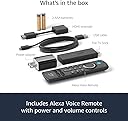
| Included in the box | Fire TV Stick (3rd Gen), Alexa Voice Remote (3rd Gen), power cable and power adapter, HDMI extender, 2 AAA batteries, Quick Start Guide |
| Software Security Updates | Learn more about these software security updates. If you already own a Fire TV, visit Manage Your Content and Devices for information specific to your device. |
| Size | 38 x 142 x 16 mm |
| Weight | 43.4 g (without batteries) |
| Batteries | 2 AAA (included) |
| Technology | Bluetooth |
| Compatibility | Fire TV Stick (3rd Gen), Fire TV Stick 4K, Fire TV Stick 4K Max |
K**J
Still my most reliable Fire TV Stick after 4 years on the job!
I've been using Amazon Fire TV Sticks for several years, and this 3rd-generation Fire TV Stick continues to impress me. Setup is quick, navigation is smooth, and it handles all of my everyday streaming without any issues. I regularly use Prime Video, Friendly TV, Paramount+, Peacock, Disney+, ESPN, and Xfinity Stream, and it has been consistently reliable. One thing that stands out is just how dependable this model has been. It has become my "go-to" Fire Stick because it simply works. The interface is responsive, the remote is comfortable to use, and I haven't experienced the kinds of reliability problems that can occasionally happen with electronic devices. For comparison, I also own a Fire TV Stick 4K Max. My original 4K Max developed freezing and black-screen problems and Amazon replaced it under warranty. That experience actually made me appreciate this 3rd-generation Fire TV Stick even more because it has continued to perform reliably throughout my ownership. If you don't absolutely need 4K streaming, this remains an excellent choice. With over half a million customer ratings and a 4.7-star average, it's easy to see why this model has earned such a strong reputation. In my experience, it has been dependable, easy to use, and an excellent value. The picture quality is always clear,
N**N
Great for streaming
I have had Firesticks for several years now and they are a very good option for streaming. The first few sticks I had didn't last as long as the newer versions but that is likely due to advances in technology. It comes with all the things you need to get it up and running immediately, even batteries for the remote. The OS is user friendly and works very well. It makes sense how its laid out is easy to navigate. Something else I like about it is that it is an android based OS so there are developer options which allow you more opportunity for customizing your experience. In the past the most common issues Ive had with it are the OS slowing down. There is 5gb of internal storage on it and it can get bogged down if you have a lot going on. Over time I notice there is a delay in the responsiveness to remote commands. Resetting the device does improve the lagging for a short period of time but it isn't a permanent fix and it never goes back to how it ran when it was brand new...just a little less lag. In my experience these devices will last several years before needing to be replaced. In my opinion, that is a great bang for your buck. Something else great about them is that you can find them on sale all throughout the year on amazon. There are also numerous areas for support on the amazon site as well as live customer service to help if you need it. I have used other streaming devices before but keep coming back to these. One side note....we have phillps hue ecosystem for our lights and use the hue sync box to control the lights to match the colors on the screen. We bought the 4k stick and it wasn't compatible with the hue sync box. Our sync box is several years old so perhaps the newer ones have a patch that fixes the issue but we weren't able to use the 4k stick with our hue sync box. The HD stick works just fine with our setup. I will say that there was a noticeable picture and audio quality difference with the 4k stick, but not being able to work with our lights was a deal breaker for me. Overall I would recommend this device for anyone. It's affordable and works great for all of our needs.
Z**Z
This is very interesting technology to me!
This is a pretty cool Firestick. I mainly use it for streaming on YouTube, Vudu, and Netflix. It's the third one I've purchased... with every purchase, the designs get newer and more interesting. I love the power button that controls my tv, and the volume button that magically controls the tv as well... it's not a smart tv, but it does have HDMI ports x 2. Set-up was easy... just followed the instructions, linked my prior account, and it took it some time to get my apps on there, but it was eventually successful... did it all by itself! In case you don't know, or you've never owned a Firestick, the remote can be taken all the way across your house, and it'll still be able to work. You can hide it behind a pillow, and the signal is still strong. This is very interesting technology to me! On the other hand, I can take the manufactures (regular) remote and face it away from the tv, and it won't work! LOL!!! Oh! You get two AAA batteries to boot. I use rechargeable Duracell batteries with all of mine, and there's an on-screen prompt that notifies you when your batteries are running low. Pretty neat. (= I don't use voice recognition a lot, but most of the time, it works just fine. I refuse to invite Alexa into my humble home... for the time being. If she's hot enough, then I may reconsider. Technology is good depending on the intended application of it. At this point? My only concern is the longevity of this product. Had my first one, my very first one, not stopped working as expected (screens freezing, having to reset it multiple times to link with my Wi-Fi, mashing the button to the right required more muscle), then I'd have not been in the market for another. Nevertheless, all things eventually break down. In the meantime, this one is working just fine. 5 Stars. I hope this helps you with your purchase. Thanks for stopping by, and take care. Have a wonderful day! Z.
D**R
Worthwhile
I don't have a smart TV. Was streaming using apps on the Xbox One or on mobile devices, so I wondered if something like this was even worth it. It totally is. Wish I had bought one a long time ago. Makes my TV a lot more functional & worthwhile. Everything is all in one place. There are apps/channels I can get on the fire stick that aren't available on Xbox. When streaming using a console or mobile device channel surfing isn't much of a thing and it's more intentional. Using the Fire TV stick I can easily surf through live channels and apps, plus there is more available. If you use Amazon Photos you can look through your photos, play a slideshow, or set them as a screensaver. Music apps such as Amazon Music & Pandora are also available. The home shopping channels - QVC & HSN are in one app. You can have links to the products being shown sent to your phone, which is cool. Whichever subscription services you use can be placed on the top to access easily. The Fire TV stick would be good even if you don't subscribe to anything because of the free TV apps. There is a live TV guide that will show you what's playing on all the live channels in your apps, such as Pluto TV & Tubi, so you don't have to open them up individually and look. The remote is really nice and intuitive. It is the only thing I need to control it while watching TV. Alexa integration is nice and can be helpful. Weather forecasts, announcements, & Alexa's answers show upon the screen. I can use the voice control to ask for local news and get a local channel playing the latest broadcast. I can also ask for specific genre's or actors. Plugging it in and setting it up didn't take that long and it was easy. Overall, the Fire TV stick is a great thing to have for streaming and watching TV. Totally worth it - especially during a sale.
A**G
We have switched from Roku to FireTV for all of our devices
While the device works great for streaming, it still has room for improvement. We first started with Roku devices. Over time though, Roku devices basically stop working. They stop being supported, and even though they may have worked fine for years, you can no longer update them or install software, even old versions, so you have to throw them away. So, we tried firetv sticks. The first generation was rough, but they have come along way. For media streaming and app coverage, they really can't be beat..... but.... We love that they are tied into Amazon, but also hate that they are tied into Amazon. It never lets you forget that its primary job is to let Amazon sell stuff to you and its secondary job is to be your streaming device. What do I mean by this? Well, it really likes to put you back on Amazon's homescreen as much as possible, and when you are in Amazon's homescreen, you are presented with the content you have paid for, but also a lot of content Amazon would like to sell to you. I really only want to see the content I have already paid for. For example, if you are watching something on MAX, or Netflix, and you pause the program, if you unpause it quick enough, it will just pick up where you left off. However, if you wait to long, you will find yourself back at Amazon's homescreen asking you to tell it which user profile to use. Well, unless I tell it otherwise, shouldn't I be the same person I was when I hit pause? Shouldn't I want to continue watch what I was watching when I hit pause? Once you select a profile, you are back to Amazon's homescreen where the show you ads for services they want to sell you, when all you really wanted to do was resume what you were watching when you hit pause. So then, you have to remember... what was I watching again? And what service was it I was watching it on? And then you have to navigate back to wherever it was you were and then and only then can you resume. So other than that, the device is great. I wish there was a way I could just pay a fee like you can on the kindle, to alter this behavior so its primary function is to be my streaming device, instead of to show me ads. This also becomes a problem if you have guests or visitors that don't understand this is how an Amazon device works. We didn't have a password set on the device and we had an older house guest that unknowingly subscribed to all sorts of streaming services and pay per view not realizing what they saw on the TV was not in our services, even though we already subscribe to more services than you could ever possibly watch. Lastly, the stick periodically has little flukes. Like we have the remote set to turn on the tv. One time, it wouldn't turn on the tv anymore. It turned out, it seemed to be turning it on, but then turning it right back off. Like when you hit the button once, it was sending the on off signal more than once. Unplugging the stick and plugging it back in seemed to fix it and then we could turn the tv on again. It happened in the opposite direction too. One time, we couldn't turn the tv off. We would press the button and it would turn off and then it would turn right back on again. Same as before, a reboot seemed to fix it. This doesn't happen often, but it is annoying when it does. As for Alexa integration, it usually works well, but sometimes, it just stops working. All of a sudden telling Alex to pause just doesn't work anymore. It just doesn't do anything. Doesn't tell you there is a problem or anything, so you have to go find the remote, even though you have paused it that way 100 times before. The wanting to take you through the advertising screens is a problem with the Alexa integration as well. You can't say "Alexa watch some movie on some service" and get taken to that movie. No, no, it is first going to want to know who you are, so you get to the profile selection screen. I should be the same person I was last time, unless I have logged out for some reason. Selecting a profile still doesn't get you to where you asked to go, it gets you to the Amazon advertising center. So then, you have to repeat yourself "Alexa watch some movie on some service", and then, and only then, will it do what you asked it to do in the first place. So the device, is great. But it is my device, and should focus on my needs more than Amazon's, but it doesn't. That is its only flaw.
M**.
Awesome purchase, very satisfied!
I have a bunch of streaming services and dont pay for cable. This allows me to utilize all of my apps on one device and even gives me the capability of watching movies and shows on free streaming apps, the ads on those services are similar to commercials I would see on cable television. I dont know what more you could ask for. Just pay for internet, get an Amazon FireStick and call it a day. Do t waste your time with cable subscriptions. I dont use this feature but you can also select some of your favorite cable television networks and stream those using this product. I dont use the voice option often but it does save a lot of the leg work of having to type out exactly what I’m searching for. I only have the one television, but I will definitely pick up another FireStick, it’s just that awesome! To circle back a bit, setting it up was very straight forward and simple. Just need an available wall outlet and an open HDMI port and you’re set. Once it is all hooked up, it’s as simple as changing your video output on the tv like you would with a gaming console or something. Syncing the remote was easy with step-by-step processes. Keep in mind that you may need to update the FireStick once it is all synchronized. The update for me took about 20minutes, but once that was finished I was instantly enjoying my favorite movies and shows. I could have had my FireStick sent to me already signed into my Prime account but I dont trust that enough so I chose to do it myself manually. I signed into all of my apps and downloaded a few new ones onto the tv. That process was pretty normal really and I’m glad that I have the freedom to choose which apps I want and how I want to use them. Also the customization of the homescreen is awesome. My ONLY gripe is that I havent figured out how to disable the idle screensaver. I like to take a break and pause my shows to go play with my dogs outside or run an errand or two. I dont mind leaving my devices on. But with this device, if I pause anything within 5 minutes the screen goes to a windows like screensaver then goes black until i press a button on the remote. I’d rather it stay open and on but then again I havent looked into it and I dont know if that’s even an option, again my only gripe. Still not a deal breaker and I give this product 5/5 stars.
C**E
Comparable to an APPLE TV!
Overall an amazing product! Amazon thought of everything and then fit it all into this little gadget. I'm an owner of an Apple TV and when the streaming box of one of my TVs broke, I decided to give the Fire Stick a chance since I didn't feel like dropping $100+ for another Apple TV. IT WAS THE BEST DECISION I'VE MADE. My initial impression of the Fire Stick was how tiny it was compared to the Apple TV. It wasn't a huge, heavy box that I had to lug around whenever I traveled, even to the point where it became too big of a hassle to bring. Instead, the Fire Stick is small, 100% portable, and doesn't weigh any more than a pen. So you can imagine how surprised I was when I found out that this little stick had more features and abilities than my Apple TV. The built-in Alexa is so much smarter than Siri and I love how it can switch between applications and do everything that an Alexa can do, the only big difference being that you have to click the Alexa button instead of being voice-activated (Maybe Amazon can add that feature). Installing it was super simple, all I had to do was plug it in and connect it to the power. The fire stick plugs into any HDMI port and if the stick is too long to fit in the HDMI section then you could use the provided HDMI extender which has a flexible cord. Again, Amazon thought of everything for this product. P.S. I must say that Amazon was super generous including the needed 2 AA batteries, a shock for big companies these days. The Fire Stick can turn any TV into a smart TV and add many features if you already have a smart TV. If you have an Amazon Prime subscription, you'll get access to Prime Video and a LOT of news sources (I'm not sure about what it'll be like without a Prime Subscription, sorry) But everyone can log into apps like Disney+, Hulu, Netflix, Youtube, and my new personal favorite, Spotify. My only concern with this product is how easy it is to lose the remote, especially if you're a very forgetful person like I am. Amazon does have replacement remotes that they sell, one even has additional features like the ability to make the remote play a sound to locate it, but even the basic one can go for up to $20 which is more than half the price of what I paid for it. Also, a little tip, I noticed that this product specifically goes on huge sales from time to time so I recommend waiting if it currently isn't on sale. The Fire Stick is truly an amazing product and in my opinion, it belongs in the top tier of streaming devices.
M**A
Easy setup and smooth streaming
I’ve been using the Fire TV Stick for a while now and it’s been a really good upgrade for my TV. Setup was quick and straightforward, and everything runs smoothly. The picture quality is clear and sharp, and streaming is fast with no buffering so far. I like how easy it is to switch between apps and find something to watch. The remote is simple to use, and having voice control makes it even more convenient when I don’t feel like typing. Overall, it’s a great little device that makes streaming a lot easier. Definitely worth it.
Trustpilot
2 months ago
4 days ago