

๐ Elevate Your Storage Game!
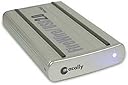
The Macally PHR-250CC is a sleek and portable hard drive enclosure designed for 2.5-inch IDE drives, featuring fast USB 2.0 and Firewire 400 connectivity. Its solid aluminum body not only protects your data but also enhances heat dissipation, making it the perfect companion for professionals on the move.
| ASIN | B0000B3ALD |
| Brand | Macally |
| Color | Silver |
| Compatible Devices | Laptop |
| Connectivity Technology | usb |
| Customer Reviews | 3.6 out of 5 stars 81 Reviews |
| Data Transfer Rate | 5 Gigabits Per Second |
| Enclosure Material | Aluminum |
| Global Trade Identification Number | 00701107485355 |
| Hard Disk Form Factor | 2.5 Inches |
| Hardware Interface | USB |
| Hardware Platform | Mac, PC |
| Item Weight | 1 Pounds |
| Manufacturer | Macally |
| Material | Aluminum |
| Mfr Part Number | PHR-250CC |
| Model Number | PHR-250CC |
| Supported Devices Quantity | 1 |
| UPC | 701107485355 |
S**M
This is the enclosure to buy older Mac laptop drives
QUALIFICATIONS This enclosure will fit standard 2.5" laptop drives of the older IDE or PATA (parallel ATA) variety. For Macs, that means most of the iBook and Powerbook G3 & G4 drives will work. Do not buy this enclosure if you have a drive that came out of any of the newer MacBooks; they use the newer SATA (serial ATA) technology, for which Macally has another product. WHY BUY AN ENCLOSURE? Why would anyone want to buy a hard drive enclosure that doesn't include a hard drive? Mainly because you already have an extra internal drive and you need the enclosure to make the internal drive function as an external drive. Most people end up with homeless internal drives for two reasons: (1) they got a good deal online and couldn't pass it up, or (2) they upgraded their laptop's main hard drive, leaving the old internal drive as a castoff. Instead of letting your old internal drive collect dust, give it new life by sticking it into an enclosure. You can then continue using it as a backup drive, perhaps. REVIEW I love this enclosure because it looks cool, it's very small, it includes both USB and Firewire 400, and it doesn't require a power supply. And, it was super easy to set up with my old internal drive. Looks -- the aluminum case looks great, especially because it matches my PowerBook G4. I also like its small size and cool blue light that blinks as the hard drive is used. The drive includes a nicely snug fabric case (feels like soft vinyl). The drive+case+cable should have no problem fitting in even the smallest computer case or backpack. Installation -- If you buy a new 2.5" PATA/IDE drive without a case, then it will be a breeze installing it in this enclosure. All you do is undo a few screws and you're in. You slide the drive onto a chassis with loads of pin connectors that line up nicely, slide it all back together and redo the screws. That's it. -- if, like me, you bought a replacement internal drive for your laptop, then you'll first have to swap out the old drive. On some laptops, like mine, this is a difficult and long task, requiring patience and advance prep. Advice for iBooks and Powerbooks can be found at [...] -- once you've done the swap, installation of your old drive into the enclosure is a breeze in comparison. It literally takes just a few minutes. Functionality -- my old 80gb internal drive runs great in the enclosure. It spins up fast and always mounts on my desktop in just a few seconds. The old drive sounds a bit louder than it used to, probably because it's no longer buried deep inside my laptop. I really like the on-off switch that most other enclosures do not include. Another huge benefit of this drive is that it doesn't require an external power adapter. -- if you're using firewire, the enclosure gets all its power through the firewire cable (included) -- if you're using USB (older iBooks, perhaps), you'll need 2 free USB ports because USB carries less power than firewire. Luckily, the enclosure also includes the 2 USB cables that you'll need: 1 cable goes from computer USB to enclosure mini USB; the other cable goes from computer USB to enclosure power port. Sounds kind of clunky, but hey, it works... and you still don't need to carry around a heavy power brick. I researched a lot of competing products and decided it was worth paying a few extra dollars to get a quality drive that includes all the features that I value.
T**'
firewire frustrations
Product is well-built and the drive fits in snugly. Has a cable that connects a second USB port to the power input of the enclosure. USB works well: the drive powers up with a simple USB connection and quickly appears in My Computer, ready for use. However, I bought the enclosure to be able to connect using firewire. On my laptops - Dell Latitude D630 (WinXP) and Dell XPS M1330 (Vista business) - the drive is not recognized when connected using firewire. Without a power supply, the drive will not power up at all when connected with firewire. With a power supply (USB power cord provided or AC adaptor) the blue light goes on but the computer does not detect the drive at all. Thought it was a Vista problem (all documentation stops at XP) but it didn't work with the D630 (using a cardbus firewire adaptor). Annoyingly enough, no information is given on the exact AC adaptor needed. Other HD enclosures using firewire have worked on both computers. Rated low as you would be better off getting an enclosure with just the USB connection.
M**H
Perfect functionality, near-perfect design.
The enclosure operates as expected. Currently using it on a Mac which didn't require any 3rd party driver installations. The drive is snug and secure within the enclosure. The aluminum body is solid and pleasing to the eye. Comes with a firewire cable, a USB 2.0 cable, as well as a USB->DC cable. (Nice touch). The only complaints I have about this enclosure is the unnecessarily bright LED. This thing can light up a dark room. The front and back of the enclosure are cheap plastic instead of aluminum. Finally, there is little shock absorption between the case and the drive, but it is held so snugly inside this shouldn't matter much. Overall an awesome enclosure.
J**N
Little Tech Support
Bought it to use as a firewire boot drive on an Ibook. Doesn't work for that, though it does operate fine as a firewire drive after the system is up. FAQ on Macally site is out of date and incomplete, firmware upgrade doesn't work and is badly documented, no answer from tech support after two emails and a week or so. The boot issue might be a software or cloning problem, but without tech support it might as well be design. The pros are it seems a tough case, easy to assemble. Wish I'd gone with Lacie, though.
J**A
good, but cheap
I just got this from Amazon. There are many types of 2.5 enclosure on the market and this seems decent in my view. Pro: 1) sturdy. the case does not bend a bit when you push down 2) fit. the drive fits case quite well. it does not loose 3) work well. this is the most important part. I tried both firewire ports and USB port on read and write. Overall, it could achieve 10MByte/s on fetching and 8MByte/s on writiing. Good speed. One one tough set of files, it got 3MByte/s. 4) with or without USB power cord, drive behaves same. Con: 1) cheap case. I could tell the case does not have even polish. 2) The major problem is that it keeps drive running all the time even though you do not access this drive. I think it will burn out disk sooner or later. 3) the indication light is too bright, I need to tape a paper over it. Overall, it delivers the performance. If it could stop disk while not using, I would give it 5 star. If you do not mind larger size, Seagate 160GB and 200GB external are the best. Today, Seagate 200GB is priced at $150 after rebate at my local store. But do not try Seagate 300Gb or 400Gb models. They have bad reputation.
J**O
Great 2.5" laptop IDE enclosure.
I love this enclosure. First of all, it's the quality build. It doesn't bend. As advertised, it is a nice aluminum body build. Granted, it's not the slimmest enclosure, but it will still fit in your hand. I wanted a nice sturdy yet small enough enclosure. The screws and board that anchor the 2.5" HDD are quality parts. Very snug fit in the enclosure. Nice bright activity lights. Love the ability to use a single Firewire connection or use the dual USB connections (one for data and one for power). Thank god I don't have to worry about carrying a power brick around.
T**1
Macally PHR-250CC
Tis type of enclosure is difficult to find in Europe, so I was a bit surprised to find it at all. It arrive in very good time, much earlier than expected in fact (Thank you Amazon) and the product surpassed my expectations, being well made and finished and having all possible interface cables included. Really good stuff. Its for road warrior use in the marine industry where theres lots of legacy software and hardware on the go, so robust build and backwards compatability are a must. Excellent product. Macally PHRS-250CC FireWire 400/USB2.0 External Storage Enclosure for 2.5" SATA HDD .
R**E
The bus was no match for my SATA drive!
I should have taken a pic before I returned because the bus was no match for my SATA drive! Rather than take a chance on a replacement, I got a very nice "Accomodata" enclosure with Firewire capability.
Trustpilot
2 months ago
1 month ago