
🖱️ Elevate your workflow with the mouse that bends to your lifestyle.
The Microsoft RVF-00052 Arc Wireless USB Touch Mouse combines innovative design with practical portability. Featuring a unique fold-flat form factor, 2-way touch scrolling with haptic feedback, and BlueTrack technology for surface versatility, it’s engineered for professionals on the move. Ambidextrous and powered by included AAA batteries, it connects seamlessly via a plug-and-play nano USB receiver magnetically stored on the device, making it an essential accessory for laptops, desktops, and even smart TVs.


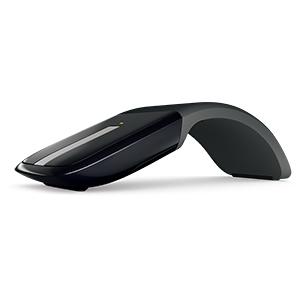


| ASIN | B009CP4PIW |
| Additional Features | Lightweight, Portable, Touch Scroll, Wireless |
| Antenna Location | Office |
| Are Batteries Included | Yes |
| Are Batteries Required | Yes |
| Best Sellers Rank | #2,481 in Computer Mice |
| Brand | Microsoft |
| Built-In Media | Batteries |
| Button Quantity | 2 |
| Color | Black |
| Compatible Devices | Laptop, Personal Computer |
| Connectivity Technology | Bluetooth |
| Customer Reviews | 4.4 out of 5 stars 4,912 Reviews |
| Enclosure Material | Plastic |
| Global Trade Identification Number | 00885370428216 |
| Hand Orientation | Ambidextrous |
| Hardware Platform | Laptop |
| Item Dimensions L x W | 5.12"L x 2.23"W |
| Item Height | 0.59 inches |
| Item Weight | 0.19 Pounds |
| Manufacturer | Microsoft Input |
| Model Name | 2012 |
| Model Number | RVF-00052 |
| Movement Detection | Optical |
| Movement Detection Technology | Optical |
| Number of Batteries | 2 AAA batteries required. (included) |
| Number of Buttons | 2 |
| Operating System | Windows 7, Windows Vista, Windows XP |
| Power Source | Battery Powered |
| Range | feet |
| Special Feature | Lightweight, Portable, Touch Scroll, Wireless |
| Style Name | Modern |
| UPC | 734911456198 885370428216 623839044610 803982784087 |
| Unit Count | 1.0 Count |
| Warranty Description | 3-year limited hardware warranty |
S**R
Recommended accessory for your facination with stuff that clicks.
I ordered this item on a whim when I was away from home. I had forgotten to pack a mouse to use with my tablet and decided to look browse online for one of those tiny travel mice. I happened across this item, the Microsoft Arc Touch Mouse. The powered off mode when the mouse is bent out flat is perfect for slipping into the small zipper pocket on my tablet sleeve. Mind you, this is the USB version and I have the Surface Pro which has a USB port so it may not work for your tablet but works great with desktops, laptops, my smart TV, and even a game console which supports mice input. Set-up is a breeze. The tiny USB receiver plugs into... a USB port which then immediately is detected. On Windows 7 there was a quick installation but on 8 it was practically instantaneous. After opening the battery hatch and popping in the provided AAA batteries, you're ready to go. The wireless signal was a little weak due to my super thick desk and using a rear port, but using a front port, keyboard port, or even a USB extension cord gave a much stronger connection. As a computer mouse, this is an odd one at first glance. To power it on, you bend the "tail" of the mouse downwards until you hear and feel a nice solid and satisfying click. To show you the mouse has been powered on, the blue optical sensor on the bottom lights up along with a green light on the top. The arc (ah-ha, hence the name) gives the mouse the feeling of a typical pointing tool so your muscle memory kicks right in and you'll be pointing and clicking in no time. I was a bit concerned about how the wheel-slide-pad thing would work but finally giving it a try did away with my fears. The wheel (I'll be calling it that from now on) works just a mechanical wheel, slide up and down to scroll. There is a small amount of haptic feedback when scrolling; just like with a mechanical wheel clicking and a cellphone vibrating, you immediately know when the mouse registers a scroll command. You can also give the pad a small flick in either direction to cover more distance quickly but it allows you to then put your finger on the wheel to immediately stop to prevent any runaway scrolling. I also figured out that if you double tap the wheel near the center, it acts like a middle mouse button press which is a very useful function I worried was missing. Using the wheel takes a small amount of time to get used to but after a few hours, I believe I've gotten the hang of it. One could assume the mouse is rather lightweight due to the compact design and the mouse gives quite a bit of resistance from force at the top so as not to fold flat and turn off. I was able to balance a small tub of lotion, a roll of packing tape, a 500mL bottle of water, a remote control and a smallish digital camera on the mouse without it collapsing. Even so, a quick but gentle swat or using leverage at the ends is enough to close it shut without having to use much muscle providing ease of use for when you with to turn your mouse off. Storage is easy due to the flat profile but I am somewhat worried of keeping the USB receiver and mouse together. I was expecting a small hole for the receiver behind the battery hatch like with most other wireless mice I've seen. This mouse has a small picture of the receiver on the bottom showing where a surprisingly strong magnet is hidden where you can store the tiny plug. It's a little strange to have it this way but the magnet seems strong enough to keep it from falling away and getting lost. If you're worried too, keep it in the USB port of your laptop or tablet; the protrusion is practically invisible, almost flush with the side of my laptop, and won't get in the way when storing your computer. Long-story-short/conclusion: Great mouse; travels well, works well, comfortable for gaming and productivity, good for scaring people when you bend it in half to turn it on. I can't comment on the battery life due to it only arriving today but I'm willing to guess the batteries will last as long as in a typical wireless mouse. Also, it works as a blue flash light for when you need to find something in the darkness under your desk.
S**S
Useable, Beautiful, Moveable
This is a great mouse. Touch Scroll: The touch scrolling is unbelievably satisfying. The scroll bar has a vibrator inside, so that when you scroll it gives the feedback of a normal scroll wheel. This can be configured to be on/off and even quiet/loud using Microsoft Keyboard and Mouse Center. Flicking the scroll is super cool as the scroll vibrator continues to vibrate in a slowing down fashion after you release the mouse. It feels and sounds great while scrolling through large files and websites is a breeze. Arc: I hate having to awkwardly flip normal mice over and switch it off to save battery. This arc design is super cool to simply push down into the table to turn off. When it snaps into its straight position, it turns off. Configuration: Having Microsoft Keyboard and Mouse Center is crucial to fully. The buttons, scroll sensitivity and speed, vibration, and center click can all be configured to your preferences. The flick can also be turned off, but it is so cool no one in their right mind would do that. Design: The mouse looks great, and I impress all my friends with its sweet design. The rubbery back end gives it a nice grip while feeling cool in your hand. Because the mouse is so light, this grip is necessary. The mouse only makes contact with the surface in two places: front and back. This is a huge plus. This enables the mouse to glide seamlessly over any surface. I have tried a number, and they all work well. Some work better than others, but most work way better than they do using a traditional mouse. Transport: This mouse is super light and super flat. Some complain about the storage of the receiver, but for me, this is absolutely awesome. I don't loose it because I pay attention when I carry this thing around. If you have a habit of loosing things, this might be bad for you; but then you will loose anything else you are going to buy to so... I hate how every mouse on the market (except the Microsoft Touch Mouse, which is also on my desk) stores the receiver inside the mouse. You have to open it every time you want to transport it or you loose the receiver. Now you simply throw it at the pick (it will stick) and you are good to go. The magnet it SUPER strong. You have to work at getting it off the back. I would definitely buy this again, and will consider it as a great gift item in the future. Hope that helps!
T**L
AH-mazing mouse!
I'm a college student and do most of my work on my laptop. I use it at home, during class, at the library or even a coffee shop. The touchpad on my Samsung laptop is sluggish and hard to control, so I needed a mouse. With this mouse I can transport it so easily; whether in my jeans pocket or in the smallest of pockets in my backpack. Not only is it super portable but it works and feels like a dream. It works on any surface (even concrete), it's smooth and lightweight and very responsive and precise. It's a simple mouse with a touch scroll wheel (the scroller even makes the typical scrolling sound) and only three buttons; left and right-click with a double-tap button in the middle of the touch scroll wheel. Only thing I think that would make it better would have a automatic shut-off after at least a minute because it is easy to sometimes forget to close it flat. I also wouldn't suggest it for gamers. Overall a great mouse! Everything I could want from a modern, everyday mouse.
T**M
Great Mouse, But It Might Not Be For Everyone
Okay, first of all: The design for this thing is just awesome. It looks really cool and people will think you're James Bond when you show them your little folding mouse. But there are two sides to this story: The pros: It looks freaking cool The battery lasts a LONG time (I got about four months out of it without turning it off once) The touch scroll works and feels great The Blue Track technology will let this thing work anything from my desk to my couch to my glass coffee table It's absolutely perfect for travel. Incredibly thin when unfolded and it's pretty lightweight. Also: It seems very durable It connects easily and almost instantly, even with the first use The cons: No bluetooth. This, in the end, was the reason I switched to a different mouse. I bought a Macbook and they only have 2 usb ports. The clicking is a little hard- as in, if your finger isn't all the way towards the end of the mouse, you have to use some pressure It doesn't move well compared to other mice-but we'll get to that more in a minute: The in-between: The moving thing... it bugged me at first, as did the clicking pressure thing. After a while though, I started kind of wrapping my thumb underneath of the mouse to sort of pinch and slightly lift it as I moved. I got pretty comfortable with this and in the end it actually seemed more accurate than a conventional mouse. I was able to move the mouse very slightly and precisely rather than drag it like a conventional mouse. I do graphic design and that aspect came in handy for my work. I also got used to the click very quickly. All in all, I really loved this mouse. If they come out with a version that has bluetooth I'll be making the switch back to it.
M**L
Microsoft Arc Touchmouse
I originally purchased this mouse at major retailer about 2 years ag, primarily because it collapses flat - making it portable and much easier to pack, it works on virtually any surface, and because it is wireless (I hate those pesky wires). the mouse is highly responsive, easy to set up and feels nice under my hand. I never had any problems with it. the transceiver conveniently magnetizes to the underside of the mouse if you need to remove it from your pc. so one fine day, I lost the transceiver. I usually keep it attached to the pc, but I needed the usb port. most of my usb connected equipment will not work on a usb hub and I have not got the time to figure it all out properly, so I just removed the transceiver and stuck it to the mouse. the next thing you know, the transceiver is gone and a search around the house was futile. the next thing to do was a search on the web - which revealed that it is a DEDICATED transceiver and it is not possible to buy just that part. I was mad. a replacement mouse is about 60 dollars at full price. i am not a full price kind of gal. things changed and made me hopeful when I found a replacement here at amazon, i liked that. I like to be frugal. I did not want to break the bank purchasing something that Microsoft should have easily available at a discount.. I chose a particular seller because they had a high rating and their item was the least expensive--being listed as used. used is good as long as it works and is not sticky from snacks gone by. (I want to express how important it is to review your seller and award a high rating if they deserve it! it makes it easier for shoppers to see who they are dealing with.) upon testing the new mouse (it was a newer manufacture than my original) I found it to be in perfect working order. I was pleased. the price was less than half the original smrp and the only reason was that the box was opened. all packaging was original, the included batteries had not even been opened. it was indeed genuine Microsoft. I know, I can tell these things. so, good for me, and good for the seller because he/she got another excellent McRating for politeness and promptness! McYay! just for the heck of it I tried the OLD mouse with the NEW transceiver. alas, it did not work. the old mouse will be useful for some parts if I accidentally step on the new mouse and crush it like I did my new glasses (well, I couldn't SEE them, I wasn't wearing my glasses). I also own a Logitech usb unified remote touchpad and keyboard. I switch off between mice now and then for various reasons, and Logitech has the right idea. even though the touchpad and the keyboard came with their own little transceivers, I only need one transceiver to successfully use BOTH the keyboard and the mouse. Logitech seems to realize that although you can hook up 256 million usb items to your pc, most laptops and pcs have a limited number of usb ports. hubs may work or may not work. I need simplicity with "it will work" without having to go to Taiwan to replace the integral part that has no other use. now if Microsoft could please do something about that 'dedicated transceiver' thing (um, do they know about Bluetooth?) then that would make this mouse better than perfect. all that being said, and since i was able to get what i needed from amazon, my final thought is this: my son has a very specialized gaming mouse he paid a lot for. it is very precise. I like a fast precise mouse. this microsoft arc mouse is that and a whole lot more. I do love it.
B**Y
Buy this mouse
I went on the original website as most of you reading this have and it is 60$ + Shipping and handling but amazon has free shipping and it was only 40. I love it. It works great very, small so i can put it in my pocket if i wanted to, yet big enough that it feels comfortable in my hand. I just leave the USB connecter in my computer because it is small enough it does not get damaged being plugged in. I would advise buying a case for it so it will be protected. Response is great I have had no problems at all. I use this mouse to play games all the time and it is easily one of the best mouses i have used for my games. I also use a mouse-pad though. It reads well on most surfaces but with a mouse-pad it is unstoppable. The scrolling is very comfortable and easy to do. It is actually kinda fun to scroll up and down.Clicking noise is quieter than most so when I'm in class it does not bother my classmates. It is a very good product very well made and very well priced. If your looking for a mouse that is good for the price BUY THIS MOUSE!
R**F
Great mouse, but has some significant issues and could use more robust build quality to stand up to travel.
I really like this mouse. I should say I really WANT to like this mouse. But it has some issues. First off, it fits my hand perfectly. Many reviewers say it doesn't fit them, but for me it's very comfortable. I am sure it's an individual and a feel thing. I love how it goes flat - I slip it in my laptop sleeve with my laptop, with no issue. Buttons work well. Scrolling works well. People love the mouse and comment on it all the time - whenever I use it publicly people want to know more about it. Battery life is great - I've changed the battery once in about 4 months, with fairly heavy use. Now for the issues. First off, I do get occasional lag using the mouse. As in, I'm moving but the mouse is frozen. It usually corrects within a second or so, but it's very annoying. Scrolling SOMETIMES causes issues - as in sometimes it seems to work and sometimes it doesn't. I notice this less and less lately. The biggest issue I've had so far is that the mouse just isn't durable. I'm on my second one since this summer - the first was damaged by my own fault. I flattened the mouse too much apparently - screws began protruding out of the mouse after this point. It could no longer be turned "on" by bending it. I replaced it. This new one, after about 3 months, is beginning to indicate to me that it's about to break as well. The bending/flattening is getting more difficult. The smooth covering around the bottom at at the interface of the bottom and the buttons is beginning to pull down. I think it's heading the way of my last one, though this time not through my own fault. I'm disappointed in the (apparent lack of) build quality of the device, because I really love otherwise (even given the faults noted above). I'm debating trying to return it to MS for a new one vs. just looking for a new mouse. Tough choice.
M**K
Solid mouse, perfect for travel
I got this mouse a while back for work about a year ago and have been using it ever since. Recently bought this as a gift for my dad as well because of how much I like it. Previously I was using a Logitech Anywhere Mouse (which I've replaced twice), both times the mouse was damaged because of either a drop or some sort of impact whie carrying (despite being in the protective case). I really love that mouse, but turns out I actually like this one even more. Summary: + Slick design with cool snap on/off feature and force feedback scroll + Compact; slim body, lightweight, but good overall size for your hand; receiver is very small + Very accurate, works on most surfaces, great for travel. - No forward / back buttons Review: I travel a lot for work and rarely sit at an actual desk. This mouse is perfect for that but really is great for anyone who wants a mouse to take with them to a coffee shop, on a plane, or just when they move to their living room. It's really compact, slips easily into a pocket or pouch in your bag. Flip it open and it's instantly on and the receiver is super small (I just leave it in all the time). One nice feature is that if you take the receiver out, there's a magnetic hold on the mouse that's super strong, never lost it. Accuracy is excellent, can use on pretty much any surface and it will work well which lends itself to mobile use. The scroll wheel works extremely well, and the force feedback is awesome -- provides great feedback on how fast or far you're scrolling, and is a cool feature in general. I'm honestly surprised that Microsoft hasn't licensed it or put it in more products because it really is cool and useful. Battery life in this guy is above average, i use this daily but only replace batteries maybe 2-3 times per year. My only negative is that this guy doesn't have forward/back buttons which initially i really missed. But after a while I got used to, and apparently not many people use them as much as i thought. Also, i advise against ever looking at the laser, pretty powerful and not super nice on the eyes. Switching from the Logitech Anywhere Mouse was a transition at first. I had to play with the settings and performance quite a bit to get it where I wanted to. Now that I've had time to use this and fully compare to the Logitech, I have to say this is a better mouse IMO. It's more compact and is super sturdy, withstands falls and impacts. The Logitech AM worked a little better on glass / really tricky surfaces. But (surprisingly), the software for this mouse is really lightweight because it uses the standard interface for windows, compared to Logitech's hefty UI which uses more memory. I've been extremely happy with this mouse. If you're in the market for a mobile mouse that you can toss in your bag and take anywhere I highly recommend it. Although I don't have a Win8 tablet, if you do this would no doubt be the perfect accompaniment.
Trustpilot
1 month ago
3 weeks ago



