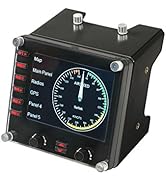
✈️ Take control like a pro — don’t just play, dominate your simulation!
The Logitech G Saitek PRO Flight Throttle Quadrant is a professional-grade simulation controller featuring 3 precision axis levers, 3 two-way rocker switches, and an LCD display. Designed for ultimate customization, it supports interchangeable lever heads and flexible mounting options to fit any cockpit setup. Compatible with Windows 7 through 11 via USB, it integrates with Saitek Smart Technology software for personalized control profiles, making it a top choice for flight sim enthusiasts and gamers seeking enhanced realism and control.


| ASIN | B01M00UHE3 |
| Best Sellers Rank | #3,341 in Video Games ( See Top 100 in Video Games ) #14 in PC Game Flight Controls |
| Brand | Logitech G |
| Color | black,blue,red |
| Customer Reviews | 4.4 4.4 out of 5 stars (1,659) |
| Date First Available | October 9, 2016 |
| Hardware Platform | PC |
| Is Discontinued By Manufacturer | No |
| Item Dimensions LxWxH | 4.33 x 6.5 x 3.54 inches |
| Item Weight | 1.1 pounds |
| Item model number | 945-000032 |
| Language | English |
| Manufacturer | Logitech, Inc |
| Operating System | 8 . 1,Windows 7 |
| Power Source | Information Not Available |
| Product Dimensions | 4.33 x 6.5 x 3.54 inches |
| Series | Logitech G Saitek PRO Flight Throttle Quadrant |
A**D
Good beginner throttle quadrant for playing games.
Bought this throttle quadrant to play Diesel Railcar Simulator. It does the job. Hasn't broken yet - don't tighten it to the table too much. Some of the knobs are a bit sharp if you grab them by the palm of your hand. Good value for money.
C**M
Excellent, Affordable Addition
This is an excellent, relatively compact, exceptionally versatile controller to add for pretty much ANY gamer. It works extremely amazing for single engine aircraft in flight simulators, consisiting of the standard controls for most small craft. Space sims like Star Citizen? Who CANT find a use for three more slider axis?! Tank simulators/games like War Thunder? You can use these for individual track control on tanks, etc.. Its pretty fun when you play a game with multiple crew in a tank and you can drive using just the throttles.. Its affordable. Its pretty solid. The desk mount is versatile. After a few weeks, the sliders still are very accurate, smooth, and have no "wobble" to them. You will not find a better throttle/slider quadrant for the price.
J**.
MSFS budget awesomeness
So this throttle quadrant comes 'PLUG AND PLAY' for MSFS. I didn't need to install any software. Microsoft was ready for it as soon as I plugged it in. The throttle itself is made from very low cost, form molded plastic. You get what you pay for here, so you need to be extra careful with it, because parts can break easily. The piece that mounts to your desk is also made from the same plastic. There is no metal, and the plastic screw going through the plastic lip to secure it to the desk could EASILY snap if hit very hard. Use caution. The levers are also made from plastic, but it's a slightly more pliable plastic that can take a little bending. Still not strong, and there's a decent risk for breakage if you have an accident. Nothing about this quadrant looks forgiving. Accidents happen, it's probably going to need replacing, but it's cheap. Functionality is terrific. Each lever is its own Axis (X,Y,Z) for complete customization in MSFS control options menu. It comes with additional lever caps and one that seems to be made if you have 2 of these quadrants side by side, because it connects to 4 levers to simulate a 4 engine airliner like the Boeing 747. Personally, I cut that piece in half to just fit across 2 levers. If I get another quadrant, I'll attach the other half so there's 2 for left and 2 for right engines. The quadrant also has 6 additional programmable buttons, 2 below each lever. These are not flip switches, so they can be programmed for 2 different functions. Very difficult to see if gaming in the dark, so you might want to apply some white fingernail polish or paint pen markings to make them more noticeable. All in all, This quadrant is 100% well worth $60, and I would say the most cost efficient throttle for flight sims under the Honeycomb Bravo. A fantastic little REALISM throttle for permanent use, or to just get you by while you wait for Honeycomb to take their sweet time figuring out the proper supply/demand ratio for their throttle. Support? Typical Logitech. Hope you never have to contact them.
L**Y
Good quality
I have had this for a while now and enjoy it. Quality is good with nice crisp stops at various settings. Levers have a firm feel of quality. Having flown real life therenis not much difference in the feel. Installation on my windows computer was a snap and it secures firmly to my desk. Nice long cord to place it wherever you wish. Button are easily programable each one having 2 positions. I have mine programmed for gear up/down, flaps up/down and Alt up/down which saves me time and effort. Good quality for the money.
F**O
Good auxiliary flight controller
This Logitech G Pro Flight Throttle Quadrant works well. I have had it for almost a year and I have had no issues, It has 3 Axis control levers and 3 double setting switches which give you 6 actions you can control. The axis controls are incremental. I use one lever for the flaps and the other two for the brakes on my DCS World P-47D, I don't have foot pedal rudders and brakes and you can't steer a P-47 on the ground without brakes and with this I substitute two levers for the brakes. The more you move the lever, the more pressure is applied to the brake. . It is recognized by DCS World as a controller. All the levers and switches can be mapped to what ever action you want in DCS World. I can't speak to its compatibility with other flight sims. It has a bracket that allows you to clamp it to a tray or a table edge, or you can take it off and screw it to a surface, or put Velcro tape on it and Velcro it to a surface. It is a good control for adding the extra axis and buttons that you are falling short of on your HOTAS.
M**R
It's a great starter but far from flawless
I've been using this for about a year now with MSFS 2020. No matter what I do, the controls are never super accurate. Moving the throttle control just a hair can either not increase throttle at all, or increase it by 30% all at once. Same issue with programming flap controls, it doesn't recognize every position and isn't all that accurate. Overall for the price it's a good throttle quadrant to start out with. If you're not a beginner though, spend a little extra and get something with better response.
B**.
Works with Mac (Tahoe / MacOS 26) and X-Plane 12.
Logitech might not support this officially on Mac OS. However, I am using it with an M3 Studio and X-Plane 12. X-Plane recognizes the device and lets you calibrate it and assign the 3 levers. Each of the 3 levers has a 'negative' area at the bottom past the 0 detent. X-Plane treats that area for each slider as a button which is assignable. And the device has 3 rocker switches which can be pushed up and down. X-plane treats these as 6 more assignable buttons. No drivers needed, just plug in via USB and assign the functions in X-Plane as expected. It is a USB A type plug, so as usual with modern Mac's, if you have limited USB ports open, you might need to use a hub.
T**Y
Used for flight simulator.
U**6
Very good quality, highly recommended. Beat seller on amazon . Friendly seller.. showed how to assemble product and was friendly..Good customer service skill
Y**S
Good product
G**S
Lo bueno: Palancas suaves, el soporte se puede montar de diferentes modos, es muy cómodo, se siente bien hecho, plástico de calidad y funciona perfectamente, poder cambiar los pomos de las palancas lo hace configurable para cualquier tipo de avión. Lo malo: Esta hecho 100% de plástico, si las palancas fueran metal seria mejor.
B**R
It’s a Logitech product so it does the job decently. Not as good as other G series Logitech stuff but definitely holds me over till I can get the Honeycomb throttle. The controls are sturdy and don’t feel super cheap like others I’ve used. The mounting bracket does a great job holding it securely and allows many different mounting options. Comes with many different throttle tips. Also extremely easy to setup and use considering Flight sim 2020 recognizes it and defaults to the controls I already wanted it to use. For the price it’s a hard one to beat.
Trustpilot
4 days ago
3 weeks ago