We remain fully operational. Our teams are working around the clock to ensure your deliveries continue safely.

DOWNLOAD THE APP


Copyright © 2025 Desertcart Holdings Limited
DOWNLOAD THE APP



Buy anything from 5,000+ international stores. One checkout price. No surprise fees. Join 2M+ shoppers on Desertcart.
Desertcart purchases this item on your behalf and handles shipping, customs, and support to Mexico.
🚀 Upgrade your network game with SpeedBooster power!
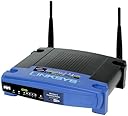
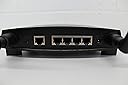
The Cisco-Linksys WRT54GS Wireless-G Broadband Router with SpeedBooster combines a high-speed 54 Mbps 802.11g wireless access point, a 4-port 10/100 Mbps full-duplex Ethernet switch, and advanced routing capabilities. Featuring SpeedBooster technology, it enhances wireless performance by up to 35% while maintaining full 802.11 compliance. With robust security protocols including WPA and SPI firewall, plus compatibility with open-source firmware like OpenWRT, this router is a versatile, reliable centerpiece for home or office networks seeking speed, security, and customization.
| ASIN | B0001D3K8A |
| Antenna Location | Gaming |
| Antenna Type | Fixed |
| Best Sellers Rank | #362,798 in Electronics ( See Top 100 in Electronics ) #2,198 in Computer Routers |
| Brand | Linksys |
| Color | blue/black |
| Compatible Devices | Gaming Console, Personal Computer, Printer |
| Connectivity Protocol | Ethernet, Wi-Fi |
| Connectivity Technology | Wireless |
| Control Method | Voice |
| Controller Type | Switch |
| Coverage | Large Household |
| Customer Reviews | 4.2 out of 5 stars 713 Reviews |
| Data Transfer Rate | 54 Megabits Per Second |
| Frequency | 2.4 GHz |
| Frequency Band Class | Dual-Band |
| Global Trade Identification Number | 00745883559183 |
| Has Internet Connectivity | Yes |
| Has Security Updates | Yes |
| Is Modem Compatible | No |
| Item Weight | 1.1 Pounds |
| LAN Port Bandwidth | 10/100 megabits_per_second |
| Manufacturer | Linksys |
| Maximum Upstream Data Transfer Rate | 2000 Megabits Per Second |
| Mfr Part Number | WRT54GS |
| Model Name | WRT54GS |
| Model Number | WRT54GS |
| Number of Antennas | 6 |
| Number of Ports | 4 |
| Operating System | Cisco IOS |
| Other Special Features of the Product | WPS |
| Router Network Type | Wireless |
| Security Protocol | WPA-PSK |
| Special Feature | WPS |
| UPC | 745883559183 |
| Unit Count | 1.0 Count |
| Voltage | 120 Volts |
| Warranty Description | 1-year limited warranty |
| Wi-Fi Generation | Wi-Fi 5 and Wi-Fi 6 |
| Wireless Communication Standard | 802.11g/n |
| Wireless Compability | 802.11g/n |
V**N
With Linux inside it is *amazing* what this router can do! - Get OpenWRT and you'll be amazed!
This review is targeted to those geeks among us who like to color outside the lines. I have 2 WRT54G routers and now have this WRT54GS router. To be honest, the first thing I did when I received my GS router is boot it up and load the OpenWRT firmware on it. It's quite amazing what you can do using OpenWRT as a base. [...] My favorite is the wireless remote control truck. I actually am using my oldest unit as a wireless web server. Here are two different sites running on it, one even running PHP: I am actually using disk space shared from another server (NFS mounted, there are also other ways to mount disk for you non-Linux people). People have turned them into wireless radios, vehicle tracking devices and more. You can wire up serial, USB, hard drives, sound, and more on these things. You can also hook up other antenna for other applications (outdoor directional, etc). If you like to color outside the lines you might also use Linux as your primary desktop operating system (all my computers at home and at work run Linux exclusively). For those of you I would suggest this and for your laptop pick up a Linksys WPC55AG PCMCIA card. This card uses the Atheros chipset and works well with the Madwifi drivers (probably should do a review under the card). This is a great combo and for the most part nearly 100% driven by open source software on both the router and the card drivers. NOTE: Nearly everything I have just discussed will void your warranty so continue at your own risk. I have been using these routers for a couple of years now and still haven't been able to render one unusable. At < $50 for the WRT54G and < $80 for the WRT54GS it might be something you want to risk. Also, it is important to note that there are several versions of each of these routers and they all are a little different (internal switches are a different model, Broadcom MIPS processors are a little different, speed etc). There is even one version that comes with less RAM and a proprietary version of the firmware. I believe this is the Linksys WRT54GS v5. I wish the version number was listed as part of the model number so you know which one you are buying. The one I just received a couple of months ago was the WRT54GS v3 and it works GREAT with OpenWRT. I guess it's a roll of the dice which version you will get. If you get a v5 I would send it back. I believe they are also coming out with another model that will continue using the Linux firmware. It appears that this new version will be called the WRT54GL. If you have a choice of versions get the v3, or wait for the WRT54GL to come out so you know what you are getting. I don't believe it even says anywhere on the box what version is inside. The only place you will find this version number is on the label on the bottom of the unit. At any rate, you Linux experts/users and tinkerers go check out OpenWRT: You'll find a nice Wiki and great Forums. Void Main
D**.
Great performance and a good price
I have been running the WRT54GS for a few months and it has been fantastic. My main objective was to run the WRT54GS as a centrally located stand alone unit - not hooked up to a computer. For installation it was necessary to hook up the WRT54GS to a computer via the provided Ethernet cable, but once up and running it is independent. After initial setup, setting changes can be done through the wireless network using a browser, and in case of a crash a laptop can be hooked up to redo the setup if necessary. We have had several severe thunderstorms and power spikes that are typical for our area. These have sometimes caused problems with other equipment (despite being on APC surge protectors or UPSs). The WRT54GS has only once needed to have the power unplugged and plugged in again to establish normal operations, and then with no loss of settings. Our building has provided a great deal of interference for an ad-hoc network between computers. The WRT54GS equipped with a pair of Linksys high gain antennas solved the problem, and provided a single internet connection. I got a range expander for dead spots, but so far I have not needed to use it. Using the Intel PRO/Wireless 3945 Mini Card on Dell laptops we achieve 54 Mbps everywhere in the building, even where the signal is weakest. Reception is even good in the courtyard outside. We get similar performance using the Linksys WMP54GS in our desktop PCs. Our 10 Mbps cable modem link (to Brighthouse/Warner Cable) is the slowest part of the network. Other companies offer better speed and range performance with proprietary technology, but the WRT54GS gave us the same great performance no matter what wireless hardware we were using. It was also the best solution for the price. Our initial installation of the WRT54GS was problematic, requiring a firmware update. However, a couple of calls to Linksys technical support was all it took. I received a tech person within a few minutes and after going through the settings step by step they answered all my questions. They log all tech calls so even a new tech on a different call is instantly aware of the history of any problem. The setup software works well, but fails if there is no internet connection. Otherwise, it works great and makes installation easy. The default settings allow for a quick start even without the setup software, and the advanced features allow for sophisticated security and access solutions. The manual (on CD) is also excellent.
D**N
Impressive Linksys Router
I have a plain vanilla home network with a desktop (with a wired connection) and a laptop that connects wirelessly and a shared printer. I had to purchase a new wireless router because I switched from DSL to Cable. My previous router (made by Westel) was quite sensitive, dropping the wireless connection from time to time and it seemed that I had to reboot both PCs once or twice a day because it could not connect to the internet or the PCs could not connect or both. I just got this Linksys a few days ago and it is quite impressive. You can even put your PC in hibernate and when you go back in, it usually is still connected just fine. I could never do that with my last router. When it did lose the connection to the Linksys router(I put the Laptop in hybernate overnight), I just had to disable the connection and then enable it, much easier than rebooting everything (10 seconds versus 5 minutes). I could not do that with my Westel router. I deducted a star because it could not make a connection to the internet using the setup wizard which Linksys supplied on their CD and because the manual is in a PDF file. It asks for a password in the middle of the wizard and I was not sure which password it wanted. What it wanted was the password of the modem. It ships with a username and password of admin; admin so when you get to that question don't enter a password - there will be one already filled in like this --> **** Just click the button to continue. Also I had to type 192.168.1.1 on Internet Explorer's address bar get to the manual configuration routine after the wizard failed to get me connected. Once I was in the Linksys configuration I looked around and found a button to get it to refresh or renew the address and once the address appeared, it connected and it was fine. I got version 5 of this model. You can tell which model it is if you flip the unit over and it says next to Model WRT54GS v5. I noticed on the Linksys website that this is pretty recent model, January of 2006 I believe, so by now maybe they have got their act together. The setup wizard asks you what type of a connection you have but does not indicate that if you have Cable it is probably a PPOL connection. I believe that the DCHP choice is for DSL however you can call tech support from your Internet provider if you are not sure. There are a few other choices for the connection type but they are for the corporate world where you have an IT (Information Technology) staff. Other than the setup, I am quite happy with the purchase because of the stability, speed and the range. I had no problems connecting to it from my deck outside. One thing good about the setup is that it walks you through the cabling steps with pictures etc. Pretty soon I am going to get VOIP (Voice Over Internet Protocol) and hook a few phones up to this router and will get back and report how it worked out. I noticed that an earlier reviewer said this router is great for VOIP as you can priortize the physical ports and give the port that connects the phones the highest priority. Sound like this is just what I need. Does anyone want to buy a used, slightly unstable, Westel Router?
K**R
Great product
I bought this router and got it just a few days before Christmas. My husband got me a DSL line for Christmas and I bought him a Toshiba Laptop with the new Vista software for Christmas. Before I wrapped this laptop for him I hooked up the wireless router to my cable modem. I installed my desktop in an instant. I couldn't believe how fast I hooked it up. Their installation disk was all self-explanatory and everything worked to perfection! The laptop and its VISTA were the challenge. I was glad that I attempted to install this router then and not found the problem on Christmas morning. It would not recognize the router. I called Linksys tech support and boy what a surprise! I waited no more than 2 minutes to speak with a tech and he came through like a charm. I needed to download a patch for the vista and he was very patient with me as I had just turned on this computer and the vista is a pain in the butt to use compared to the XP I have on my desktop. He stayed on the line with me until the computer was functioning wirelessly with the router. My husband has been on his laptop non-stop since Christmas and I have not had any problems whatsoever with this router. It also has you name your router for security and I believe I had to put a password in as well. The installation went so fast I forgot. I feel very confident with its encryption features. Being new to DSL from dial-up, I would recommend this product to anyone from beginners to experts.
D**D
Poor functionality; abysmal service
I couldn't agree more with Fred, below, regarding service. How in the world is a company like this going to expect mass consumer acceptance of this technology given the difficulty and confusion surrounding its installation and use? And then to follow that up with such useless tech "support" - as oxymoronic a phrase as I've ever heard. Buying into the g speed claims, I bought this router and two adapters (WUSB54GS and WPC54GS notebook card) to install a new wireless network after moving into a home that did not have a cable outlet in the room where we needed to put our main family desktop. In my former house I had a Netgear MR814 b router that worked flawlessly. After almost four hours on the phone with levels 1 and 2 "support" and a still unreliable and unconfigurable system, I am returning these products to Amazon. I am a loyal Amazon customer who has purchased 1000s of dollars worth of merchandise and am glad the company has a solid return policy. I will buy a Netgear system and try that. Among the technical issues: a) the setup/configuration tools are seemingly straightforward, but apparently the device doesn't have the capability of detecting the presence of WinXP SP2, thus there are incompatible drivers to deal with right from the start. Encryption simply doesn't work. b) after downloading drivers that allegedly were going to fix the problem, connctivity remained spotty - for the two weeks I've had this device I've had to spend about half of the time resetting the router/rebooting the computer and various other contortions to catch a few minutes of the internet. c) Today I was on the phone for almost two hours with level 2 "support", trying to understand a man whose English was barely conversant. A core issue became quickly apparent - his script was clearly directing him to compel me to find and use the wireless connection utility in Windows XP, but all of the linksys literature/CD said to use the linksys configuration manager which is what I used to set the thing up. I followed the installation instructions exactly. Speaking about two words per minute, he failed to ever tell me - I had to find this on my own through some forums - that a Microsoft KB article speaks to the exact issue he was failing to recognize. Finding no other answers in his script, he insisted that I needed to reinstall the entire operating system, including SP2. Unbelievable. Just how did my operating system suddenly "lose" important files right after I installed the router? Needless to say, I will never again buy another Linksys product. Good luck if you do.
M**E
Did I get a dud?
I'm sure that this item is fine generally but I seem to have gotten a bad unit. Mine is version 5 and setup is easy. Surfing the net after installing my unit has not been a problem. I also bought a Playstation 3 and have been UNABLE TO CONNECT. I've used my PS3 at a friend's house and it connects effortlessly. Tech support was very professional and suggested a number of modifications. But none have worked. My PDA is not able to connect either. Both detect the network but are unable to connect to it, despite the fact that security is disabled. While the product is likely to be a good one, based on the other reviews, it has not worked for me at all. Linksys is replacing my unit. New Info (Sept. 28, 2008): I just got my new v7 from linksys. Its sets up in about 20mins and works with the PS3 like a charm. As a matter of fact, I'm using the PS3 to write this update now. I'm grateful because I had a reasonable costumer service experience. It annoyed me however to pay to send the unit back since I live in Jamaica. Cost me just about the original price of the unit. To get it back, I was charged a costums fee. So, I guess there is nothing like getting it right the first time.
S**O
Solid Product. Great Signal Strength. Easy to Setup.
I chose this router based on a few considerations: 1) Stability 2) Ease of Management/Flexibility 3) Price So with the above in mind, I set out to replace an overly flaky previous router from DLink. My experience with the WRT54G routers of other makes (namely the non-L and non-gs) versions led me to go with Linksys due to a real-world stability. I've used a number of other wireless routers and have seen linksys models outperform other brands in terms of number of necessary reboots in a give period of time. After stability, I wanted something that was easy to manage. And to be sure, Linksys has had some extremely clunky interfaces in models/revisions past, but this model was very easy to configure out of the box w/ no CD. The initial setup took less than 20 minutes - and I'm not a network expert, however I am versed in the ins/outs from previous experience. I was able to rename the SSID, setup new login credentials, Configure WPA2, configure PPOE and setup a new address range (changed from the standard 192.168.1.x range). These configuration changes took no real time to get up and going and when plugged in to replace the dlink, it took one simple power-on for the WRT54GS to step in line and do the job w/ no issues. I'm currently sticking with the stock firmware (dated 11/07) but like the idea of being able to use the other open source firmwares if needed on this model (just like the L-series). And finally - price. This model was actually less than the L-model at the time of purchase and features the same configurability/flexibility in terms of firmware. So far, the router has been a major improvement over the DLink that was in service. Speed is noticeably faster as well. Both routers were set to G-only, so I can only infer that that the Linksys handles WPA more efficiently. Overall, this is a solid wireless router. You can spend less money for a wireless router - but for the level of service this provides, the few extra dollars is certainly worth the increased performance. Many consider wireless routers to be a commodity - everyone has one and they must all be the same, right? Wrong. There are some subtle nuances that make or break a good router. This model from Linksys gets the details down right and in doing so shines in its role as the main wireless and wired router on my network. Kudos to Linksys (Cisco) for producing a quality product.
G**U
best wireless broadband router i have ever owned
well 1st let me say setting up this was the most fast & eazy router ive ever had to set up. i ran the disk that came with this router it doesnt install drivers or programs all the disk does is help you set it up with your pc's/laptop's & modem. on a side note you might want to go to linksys website & look up the firmware to check out if it has the latest ver. of firmware. (mines was out dated by a year.) & updating the firmware is just as eazy as setting up the router. (make sure you look up this info only after you have recived your router) all you do is save the firmware file to you desktop (or a folder of your choise) & once your in your router settings page 192.168.1.? just browse to it & wala ;-) yes it does have a firewall built in it also very eazy to config.(to turn off if your using windows firewall) you can also set up what ports to have open/closed witch i dont have to config sence im on a DHCP connection by default there all open & my windows firewall manages thos ports on what i want open or closed for what ever program i want to have access to the net for ( aka online pc games and such) also the wireless settings is very eazy to set up & is blazing fast. the range is also very good depending on what wireless reciver your using. another side note is that if your on a static ip address make sure you know what your ip address is. if your not sure just simply call your isp. most cable/dsl isp's use DHCP connections (aka your ip address changes from day to day or week to week) a simple way to check on what your connection type is to check the local area connection status window witch is normaly near where your pc clock is at or by going in your networkplaces section. then clicking on details botton. if your still unable to find it just google "local area connection status" and im sure you can find a guide on how to find it. also another grate thing about this router is that you can get bigger antana's slaped on it for even greater range. over all like the title say this is the best router i have ever owned.
Trustpilot
5 days ago
2 weeks ago