Buy anything from 5,000+ international stores. One checkout price. No surprise fees. Join 2M+ shoppers on Desertcart.
Desertcart purchases this item on your behalf and handles shipping, customs, and support to Mexico.
๐ Secure your system, secure your future.
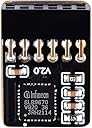
The NewHail TPM2.0 Module with Infineon SLB 9670 chip is a 12-pin SPI TPM security module designed for broad compatibility with Gigabyte motherboards, including popular Z490, Z590, and B460 series. It enables hardware-based encryption and trusted platform functionality essential for Windows 11 and enterprise-grade security, making it a must-have upgrade for professionals seeking robust data protection and system integrity.


| ASIN | B09L43GQJ9 |
| Best Sellers Rank | #161,182 in Industrial & Scientific ( See Top 100 in Industrial & Scientific ) #270 in Prototyping Boards & Accessories |
| Brand | NewHail |
| CPU Model | Core i5 Family |
| CPU Socket | LGA 1200 |
| Chipset Type | Intel B460 |
| Compatible Devices | Personal Computer |
| Compatible Processors | Intel B460 compatible processors |
| Customer Reviews | 3.5 out of 5 stars 153 Reviews |
| Graphics Card Interface | PCI Express |
| Main Power Connector Type | 24-Pin |
| Manufacturer | NewHail |
| Memory Clock Speed | 4.7 GHz |
| Memory Slots Available | 12 |
| Memory Storage Capacity | 64 GB |
| Model Name | AORUS PRO |
| Model Number | Z590 AORUS MASTER |
| Number of Ethernet Ports | 2 |
| Number of Ports | 4 |
| Platform | Windows |
| Processor Socket | LGA 1200 |
| RAM Memory Technology | DDR4 |
| Ram Memory Maximum Size | 768 GB |
| System Bus Standard Supported | SATA 1 |
| Total PCIe Ports | 3 |
| Total SATA Ports | 1 |
| Total Usb Ports | 4 |
| UPC | 192530272467 |
| USB 2.0 | 4 |
W**R
Works.
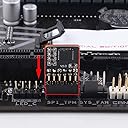
Works. There are 2 versions of this TPM module, and they use the same connector, distinguished by which pin is missing. Before you order, take a close look at the picture, and check if the closed hole on this connector is in the same position as the missing pin on the socket on your motherboard.
D**.
Believe the reviews: It Won't Fit
I was about to trust the reviews about the fit and not purchase this TPM, but saw the photo in the website captioned "If the motherboard is a 2*6 socket, and SPI_TPM is written on the socket, it means that this product is supported. After inserting the module, you can upgrade your computer." The photo shows a sample socket in which the pins are in the correct pattern and appear to be surrounded by an enclosure, which mine has as well, so I thought the sizing issue may have been resolved-- this is a brand new motherboard of current generation, so why not? However, just as noted in the other reviews, the TPM is blocked by the pin enclosure (Z690 Master). Maybe the photo is showing an etched border or something, but mine is solid and the TPM won't fit (another reviewer's description of modding the TPM with a hacksaw suddenly made sense). However, I'm the new boards may support TPM 2.0 AND SPI 2.0 (these TPMs show TPM 2.0 S), and a newer version is TBD but not released. In any event, the whole rat's nest of poorly-worded and incomplete TPM descriptions is frustrating and unnecessary. Until there is some clarity, I'm not ordering a TPM from anyone, and I'm going to trust that enabling the TPM in the BIOS will pass Win 11's secret police. Good luck...
C**B
This Module Has Been Redesigned - No More Installation Problems
I just received this TPM module today. The manufacturer has updated the design so the circuit board no longer goes all the way down to the bottom of the plug. Therefore the module fits my Gigabyte B650 Gaming without modifying the module or the TPM socket on the motherboard! I haven't started my build yet so I cannot verify that the module is TPM 2.0. I will update this review when my build is complete.
W**E
Works great, needs small adjustment by user
This TPM fits and works well in an Aorus Z790 Elite AX with Windows 11. But, like some other reviews mention, it requires a simple mechanical adjustment. The 12-pin header is blocked by the TPM's PC board from being inserted into the motherboard connector. To fix this merely GENTLY bend the connector away from the TPM's PC board. You'll only need a gap of about 1/16 inch, just enough for the side of the motherboard connector to squeeze in between the TPM's PCB and connector. Then carefully insert the connector into the Aorus mother board. If you hope to use this TPM in other motherboards, you must carefully examine the pinout of this TPM versus the pinout of *your* motherboard. I did a lot of searching to discover a TPM with the proper set of pins, and the proper "blocked pin" location. Don't fall for a TPM with the "mirror image" for the blocked pin location like I did. A good product. Works great with Windows 11. Recognized by both the motherboard and Win11 out of the box. Supports everything an Infineon SLB 9670 should support. Minus one star only because you have to bend it for it to work.
M**.
Careful of the pin-out
I went through a couple of different TPMs before I found this one that worked with my "GIGABYTE Z790 Eagle AX LGA 1700 Intel Z790 ATX Motherboard with DDR5, M.2, PCIe 5.0, USB 3.2 Gen2X2 Type-C, Intel Wi-Fi 6E, 2.5GbE LAN, Q-Flash Plus, EZ-Latch". I was able to install Windows 11 after successfully installing it. The BIOS immediately recognized the TPM and configured it automatically.
J**E
Does not fit into plastic cover on the mobo.
The top of the chip prevents it from fitting into the header. This is a design fault that can only be remedied by NewHail. Performance unknown.
K**R
Works but does not fit supported motherboard
As others have pointed out, the module does not fit in a socket that has a surround around the pins and is obviously designed for a set of exposed pins. It's because the black plastic connector on the TPM has the circuit board extend to be flush with the mounting face and that circuit board thickness interferes with the thin surround around the TPM pins. If Newhail shortens the circuit board material back about 1/8"-1/4", then the black connector will be able to fit into the socket. So, even though my motherboard is listed as supported (the TPM DOES work), it does not fit without some effort. I used snips to remove the upper side of the plastic surrounding my pins on my motherboard and the TPM will insert fully. BUYER BEWARE!
B**N
Note on installation to Gigabyte B560M AORUS PRO AX
Topic: installation to Gigabyte B560M AORUS PRO AX Remove power from the computer and use an ESD wrist strap during installation. The PCB is built so that one side of the 12 pin female header connector lay fully against the PCB on one side. This prevents installation. Simply "bend" the PCB's header slightly away from the PCB (less than 1/16 inch) so it installs easily into the motherboards 12 pin male header. It can be done by hand. Check BIOS to make sure the board is detected and follow any recommended settings in the motherboard manual.
E**T
Ben contant ca marche
Jai fait lerreur tpm cest securitaire
R**R
Pin positions are inverse, will not fit a gigabyte X570 Aorus Elite motherboard.
Defective design, will not fit a Gigabyte motherboard.
B**E
Works with Gigabyte Z490 AORUS Pro AX Motherboard
Needed TPM 2.0 module to install Windows 11. Worked fine with Gigabyte Z490 AORUS Pro AX motherboard.
A**N
Had to modify it
Purchased it knowing I would have to modify module. I cut a part of the bottom.board off as there are no wire traces there and it was then able to plug into my mothboard. Alternatiiivel you can remove the plastic bezel from the tpm pins.
R**S
Does the trick, for windows 11
Just what was needed to allow requirements for windows 11 with my motherboard.
Trustpilot
1 month ago
2 weeks ago