We remain fully operational. Our teams are working around the clock to ensure your deliveries continue safely.

DOWNLOAD THE APP


Copyright © 2025 Desertcart Holdings Limited
DOWNLOAD THE APP
Buy anything from 5,000+ international stores. One checkout price. No surprise fees. Join 2M+ shoppers on Desertcart.
Desertcart purchases this item on your behalf and handles shipping, customs, and support to Mexico.
⏳ Never Miss a Beat with Precision Timing!
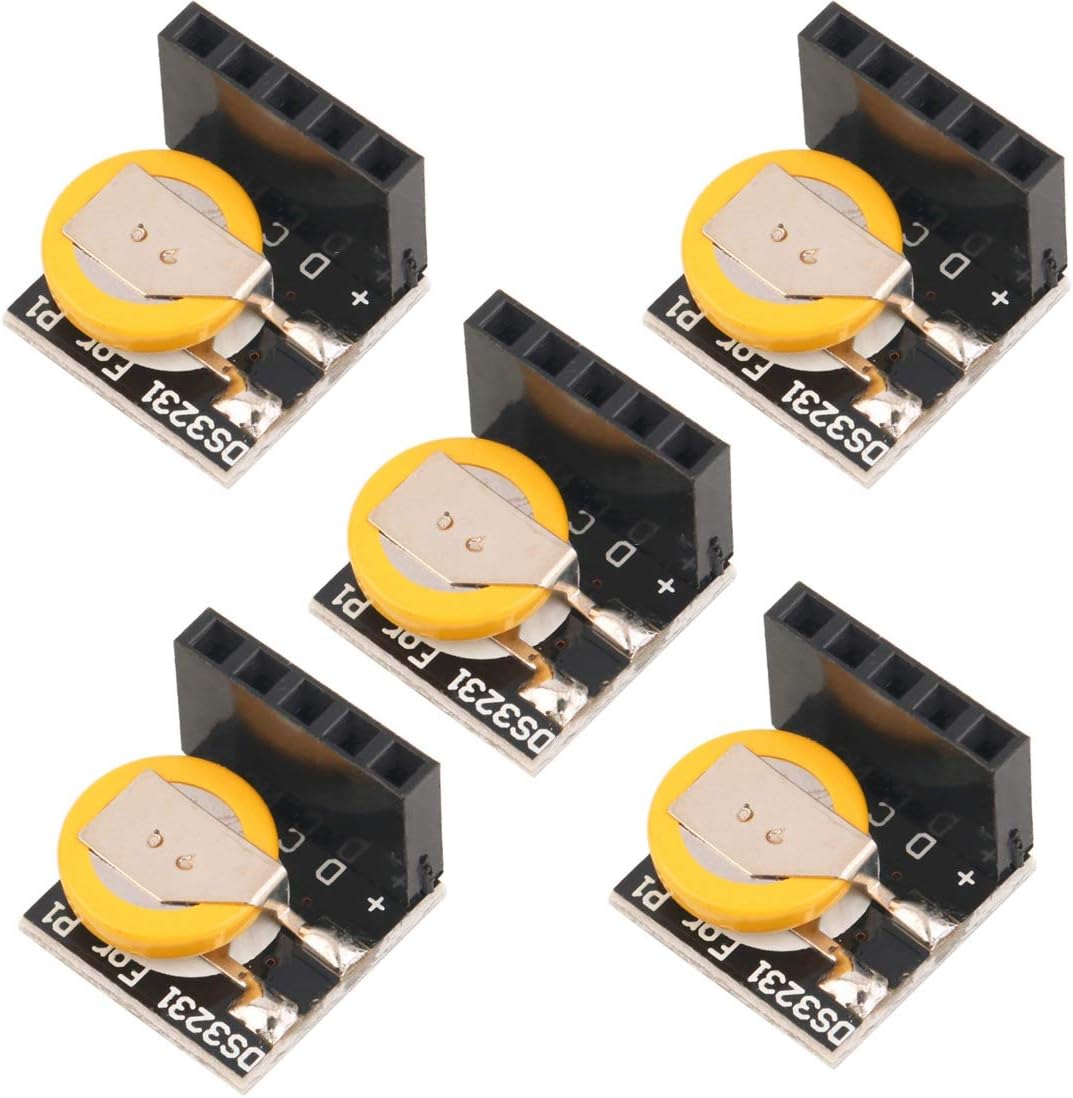
The HiLetgo 5pcs DS3231 High Precision RTC Real Time Clock Module is designed for Arduino and Raspberry Pi enthusiasts, offering exceptional accuracy and reliability in timekeeping. With dual calendar clock functionality, it operates at both 3.3V and 5V, features a high-speed 400 KHz I2C serial bus, and includes a digital temperature sensor with a precision of ±3°C.
| ASIN | B01N1LZSK3 |
| Batteries | 1 CR2 batteries required. (included) |
| Best Sellers Rank | #90,060 in Industrial & Scientific ( See Top 100 in Industrial & Scientific ) #10 in Semiconductor Timing Management Products |
| Date First Available | November 28, 2016 |
| Is Discontinued By Manufacturer | No |
| Item Weight | 0.317 ounces |
| Item model number | 3-01-1198 |
| Manufacturer | HiLetgo |
| Package Dimensions | 3.62 x 3.15 x 0.91 inches |
M**L
The ones that work work great. 2/5 arrived DOA
**Update 2/17/19** Seller reached out to me to address the problem with the items and offered to make things right. Super helpful, and gave several options to exchange/replace the faulty items. So long as they have what I need, I’ll be buying from HiLetgo— amazing customer service! **Original Review** 3 of the 5 units were DOA. After some diagnosing, 3231 IC was defective with 2 of them and the standby battery was bad on one. I was able to swap a good battery from a defective one to the bad battery one, so I have 3 working. After all that, the 3 that DO work are fine.
M**M
Functional
They work, but don't expect the battery to last forever.
E**G
I was surprised that they worked right out of the packaging
Edit 20220301 - All units STOPPED working at the end of 2021. Battery still good. The current advertisement still says, "until 2100". Maybe it is planned obsolesence? Any how, at this point I will have to locate another vendor's RTC to get my RPi's back to automated time without an internet connection. Or at each power-on the temporary solution is to enter: sudo date -s "month day year hh:mm:ss" where month would be like Feb. The day would be 1 to {28|29|30|31} and the year like 2022. ( e.g. sudo date -s "Feb 28 2022 23:59:59" ) Now to find a vendor who sells a reliable Real Time Clock. Edit 20200608 -- Just noticed: Complete clock calendar function includes second, minute, time, week, date, month, and year, and provide leap year?compensation until 2100;? This AMBIGIOUS 2100 is curious. What does it mean? Lowered my rating one star. There were no setup instructions. I did find some with a search. Once I had the setup instructions the clock installed and worked flawlessly. The only caution is to make sure it is put on the J8 end of the pin-outs. Installed on a B, B+, 0, and RPi 4 B. The welded power cell will be a point of contention if it dies. Oh well, the price and the simplicity of installation makes it a good purchase. Locating setup instructions could be an issue as could be the software step needed to get it working. If I get more RPi and the vendor is still providing these devices, I would probably buy it again!
G**N
Quit losing time on your Pi
I've started using Raspberry Pis for my ham radio hobby. Sometimes in the hobby, you are at a park or elsewhere outdoors without a network connection. For those that aren't already aware, the Pi has no built in battery to keep time settings. Each time you boot, the pi retrieves the current time from the network so it looks like it maintained time since last boot but it didn't and when there is no network, the Pi will not have a time set. Attach one of these boards, set it up, and you will no longer have a problem of losing the time settings between power offs.
B**S
Real DS3231 but no SQW pin.
It is what it says it is but if you need the SQW your not getting it from NC...stands for Not connected. Using this guide here (Just google instructables + "Clock-Calender-Using-DS3231GLCDAtmega32" ) If you just want this to keep pretty accurate time for your PI its perfect, I just wish they hadnt skimped on the 4.7k resistor to make the SWQ pin available for dorks like myself but if your willing to mod it a little bit you can still get it out of this one!
T**N
If you need a tiny DS3231, this is it.
I'm trying to fit an arduino Nano, an nrf24L01, and an RTC into a super-tight space by super-gluing them all together into one big "strip". The other DS3231's are way too big for this project but this one is the perfect size if I remove that big black connector and relocate the battery to a more convenient place.
J**I
Very good RTC module.
Plug-n-play. Installed and setup with ease. Thank you
T**L
Was excited but only one worked and that one is sketchy (UPDATED)
I was excited to get these yesterday as I have 3 Arduinos I want to use them in. Sadly, they are faulty out of the box. I've heard of bad batches, but this was a time vampire. Very surprised as HiLetgo has had about a 95% good sensor rate for me so far, not today. So, I used Nick Gammons I2C scanner to check each one and only one showed up, all the others gave me an I2C unknown error on the default address as in, it sees the RTC, but could not talk to any but one. It updates fine passing a long DateTime array[6] to rtc.adjust() using RTCLib.h library and it held the time and kept time fine. Until I repowered to install some other things, then it would come up AUG 0 as the date, I do .adjust() again and it works fine. Guess I could add an ETH() to poll a remote server to keep it updated but that seems to defeat the point of the RTC. So, it ate a few hours of my life and probably returning them tomorrow. I mean, we all know we get bad parts all the time, but one in five or ten is kind of a thing... but this was 4-5 out of 5. I really liked the battery attached and thought it would be plug-n-play but I ordered some others with a CR battery cradle so will be using those. UPDATE: Mar 29 '24 @9AM EST -> Last one died today. After a power down to add another sensor, then repower, lost the date/time and would not accept the rtc.adjust() command anymore. Date shows AUG 0 and the clock does not advance at all, stuck at 09:00.
Trustpilot
1 month ago
1 month ago