


🎯 Elevate your game with seamless cross-console control—never miss a beat!
The BIGBIG WON R100 Pro Wireless Bluetooth Controller Adapter empowers gamers to use Xbox Series X|S, Xbox One, PS5, PS4, and Switch Pro controllers across Switch, PS4, and Windows 10/11 PCs with lag-free wireless connectivity up to 5 meters. Featuring plug-and-play ease, customizable vibration, turbo, and joystick calibration, this compact adapter supports dual controller connections and ensures stable, versatile gameplay for the modern multi-platform gamer.
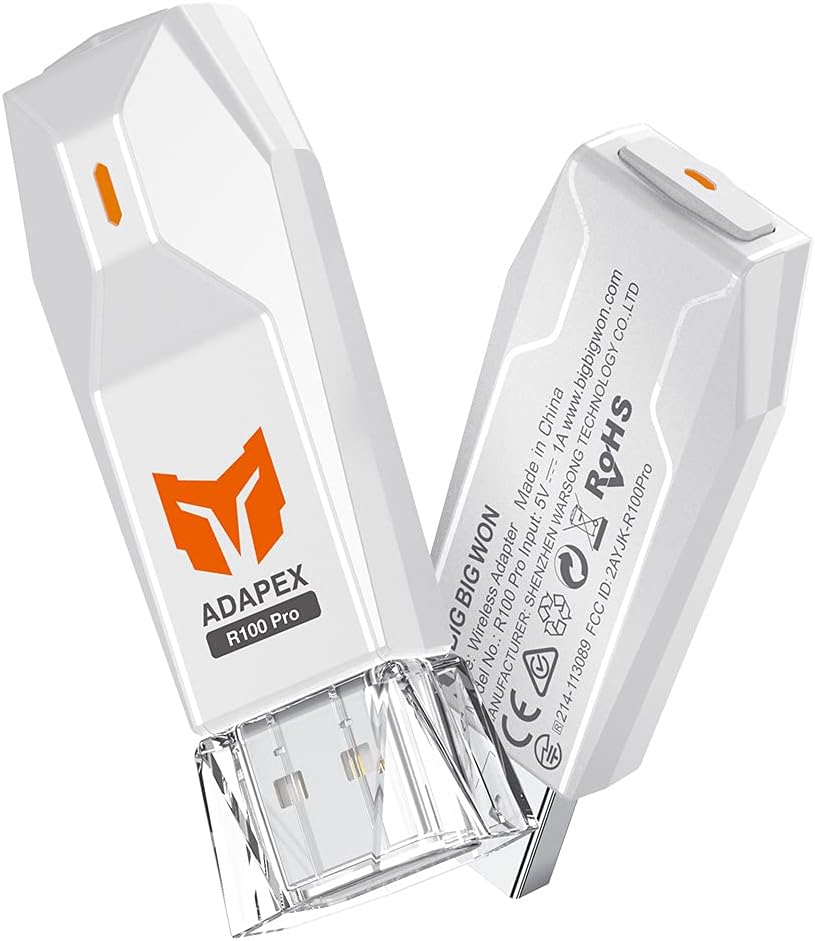


| ASIN | B09G6FS7FR |
| Best Sellers Rank | #4,237 in Videogames ( See Top 100 in Videogames ) #9 in Xbox One Cables & Adapters |
| Item model number | ZG-R100Pro |
| Manufacturer | BIGBIG WON |
| Product Dimensions | 2.29 x 1.4 x 6.2 cm; 10 g |
C**L
Amazing product
This thing is a game changer. I was able to use my PS5 Dualsense controller on my PS4 Pro, the touch pad functions worked properly. As well as my Xbox Elite series 2 controller to my Nintendo Switch. I'm trying to figure out the xbox's "view" with the switch's "-" & "Screen shot" buttons as they have managed to merge into one with some double & hold functions.
A**M
كواليتي ممتاز
I**I
Beautiful and amazing
I love this product very fast and easy
M**O
Ho utilizzato questo adattatore per connettere il controller della PS5 alla mia PS4 per più di quattro mesi, e devo dire che è stato un acquisto fantastico. La connessione è sempre stata stabile e non ho mai riscontrato episodi di disconnessione! L'unico problema che ho riscontrato è che, quando spengo la console, il controller rimane acceso. Anche se è un piccolo inconveniente, è facile da gestire: basta tenere premuto pulsante di connessione per 10 secondi sul controller. Nel complesso, consiglio vivamente questo adattatore a chi desidera utilizzare il controller della PS5 sulla PS4. Ottima funzionalità e performance!
D**.
Excelente, solo fue conectar y vincular, he conectado un mando de Ps5 en un Ps4, funciona correctamente.
R**N
私の環境を書き残します。 下記の環境では全て正常動作しています。 参考にしてください。 使用ゲームパッド:Xboxコントローラー(4N6-00003) 接続先:Window11(PC)、NintendoSwitch、GoogleTV(SONY) こちらは2.4GHz帯を使用して手持ちのコントローラーと接続、ドングルを介すことによってUSB接続を実行できるものになります。 まず基本知識としてBluetooth接続も2.4GHz帯域を用いて接続をしています。 2.4GHz帯、ドングルを使用し独自規格を用いて通信を行うこの製品は2.4GHz方式での接続と位置づけて良いでしょう。 この商品が使えるか心配な場合、手持ちのコントローラーが有線接続に対応しているならば一度、有線で接続してみてください。 コントローラー〜ドングル間は無線接続ですがUSBを挿すため認識としては有線コントローラー扱いになるため、です。 Bluetoothと2.4GHz(ドングル)では接続方法が異なりBluetoothは接続安定性が欠けるため頻繁に接続切断、キー入力されっ放し等が起きていましたが、これらは全て改善できました。 余談ですがAndroidTVやGoogleTVといった所謂スマートテレビにも直接接続可能。 Bluetooth対応してるものであれば大体繋げられると思います。 ゲームストリーミングのアプリを使用しリビングのテレビでゲームしたり自室へ移動してPCでのゲームをしたりする場合もBluetoothだとペアリングし直す必要がありますが、R100PROも一緒に持って差し替えれば再接続の煩わしさも無くなりました。 私のテレビのUSBがカバー内へ隠蔽されるタイプだったのでUSB延長ケーブルを1m追加購入、延長し裏側へ両面テープで貼り付け、抜き差しを容易にしてみました。
C**O
Funcionaba bien, aunque nunca pude conectar mi control de PS5 a la PC. Fue entonces que decidí buscar actualizaciones del firmware. Al realizar la actualización el adaptador dejó de funcionar por completo. Lo reconoce windows en USB y me deja agregar archivos, pero ya no conecta ningún control.
A**M
Bought this to connect my Xbox/Luna controllers to PC/Switch/PS4. Works great. Plug n play. I can hop between devices by just unplugging it from one and plugging into the next. Every once in a while if I left my controller to sit until it shuts off and the pc go to sleep I’ll have to unplug it and plug it back in to the usb port to get it to recognize on some games and apps but it always works 100% right away after doing so and only happens every few days or so and is more software related probably. This is the 3rd adapter I bought after trying the other 2 popular ones on Prime. although it was a few bucks more than the other ones, was worth every Penny. Love being able to switch between ps4/switch/pc by just plugging it in to the next device hassle free. Was the only adapter that works with all 3 devices. The other one sold on Amazon connects to a lot of different devices but only ps3 not ps4 and u have to annoyingly switch through them by holding down a little button and it had some issues with the Luna controller for some reason. I love being able to just unplug it from my pc, plug it into my switch and it’s ready to go instantly. I have yet to dive into the deep settings to change controller sensitivity etc. I always just use it in default settings and works perfect at default so far. Only downside is I think it can only connect to one controller at a time, as all the dongles do, which is fine but if I want to play with a friend on pc would be nice to connect two controllers through it at same time. Have to look it into it to see if u can connect two at a time or not maybe you can? Also would be nice if it had the usb through that the other adapter had because some emulators on pc won’t work with Bluetooth devices and you have to have a controller hardwired to usb to work and it would be nice to just plug it into the device itself instead of unplugging it and plugging in a separate usb cable. But these are all minor critiques compared to the ease and efficiency of the device. There’s no “perfect adapter” but this one comes close. 9/10.
Trustpilot
1 month ago
2 weeks ago