

Desertcart purchases this item on your behalf and handles shipping, customs, and support to Mexico.
⌨️ Work smarter, feel better — the keyboard your wrists will thank you for!
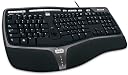
The Microsoft Natural Ergonomic Keyboard 4000 features a split, curved layout with 104 tactile mechanical keys designed to reduce strain and improve typing comfort. It includes 5 customizable shortcut keys and an intuitive zoom slider for enhanced productivity. Compatible with Windows devices via USB or RF, this keyboard is engineered for professionals seeking ergonomic efficiency and seamless workflow integration.
| Additional Features | Ergonomic |
| Antenna Location | Gaming, Office |
| Asin | B000A6PPOK |
| Best Sellers Rank | #84,833 in Computers (See Top 100 in Computers) #2,314 in Computer Keyboards |
| Brand | Microsoft |
| Built In Media | Microsoft Natural Ergonomic Keyboard 4000, Start Up Guide |
| Button Quantity | 104 |
| Color | ice |
| Compatible Devices | Smartphone |
| Compatible Operating System Family | Windows |
| Connectivity Technology | RF, USB |
| Customer Reviews | 4.4 4.4 out of 5 stars (5,439) 4.4 out of 5 stars |
| Enclosure Material | Plastic |
| Global Trade Identification Number | 00882224015462, 03606508481944 |
| Hand Orientation | Ambidextrous |
| Is Electric | Yes |
| Item Dimensions L X W X H | 50.3L x 26.2W x 8.3H centimeters |
| Keyboard Backlighting Color Support | Single Color |
| Keyboard Description | Ergonomic |
| Keyboard Layout | QWERTY |
| Manufacturer | Microsoft |
| Mfr Part Number | B2M-00012 |
| Model Name | Natural Ergonomic Keyboard 4000 |
| Model Number | B2M-00012 |
| Number Of Keys | 104 |
| Number Of Sections | 3 |
| Power Source | Corded Electric |
| Style Name | Modern |
| Switch Type | Tactile/Mechanical |
| Theme | ergonomic |
| Unit Count | 1 Count |
| Upc | 672118843833 731631157640 803982747198 060090915042 611101297109 820294274952 642008412548 749850994083 809385157527 741329056438 172302695601 211131834956 041114204069 042132692470 808111646427 172302697292 085783540974 012302907369 763615808545 012302517698 809185308068 778888156224 163120777686 999994107904 132017583259 971472864011 069060136272 999900891248 737989665646 085783541650 141291049184 882224015462 840356820231 778329858687 887590191871 031112759036 085783541766 031112684468 717689063874 102930733185 008822240154 163120777648 168141471414 791109156148 085783541605 777786303143 168141471698 085783541599 085783541414 791109156155 112840371100 720825503134 031112187709 |
User
Mac OSX Yosemite以降でも使えてます。
Macだとホットキー、マルチメディアキーのドライバーが、Yosemiteに対応しておりませんが、(かなり前から使えない)ControllerMateという有料アプリケーションで、自由に割り当てが可能です。ズームスライダーは大きなディスプレイをお使いであれば、とてもズームが楽で、ブラウザーから様々なアプリケーションまで拡大・拡小が可能です。パームレストもポイントで、慣れると快適ですね。有線ですが、Macのキーボードは選択肢も少ないので、好みもありますがオススメです。現在、OSX El Capitanで使用しています。
User
Muitos recursos no teclado
Bom
User
Best "typing" or "work" keyboard ever made in my opinion.
I have used the same keyboard for 10 years at work. My first one is 10 years old and still works like a dream. It is just super old and stuff started rubbing off and getting overall worn down. It still works completely fine, but I bought a new one for work and am bringing my 10 year old one home for retirement. She deserves it honestly. Maybe the best keyboard ever made for someone who sits at a desk for a living. I have a mechanical gaming keyboard at home (Razer Blackwider) mainly for gaming, but I'll end up giving this a try for gaming someday and see how it goes.
User
Excelente producto.
Elegí este teclado porque soy Software Tester y parte de mi trabajo es estar mínimo 8 horas al día en un PC. Estaba acostumbrado a laptops sin embargo ahora estoy trabajando con un desktop y apenas luego de un mes de estar trabajando con un teclado estándar comencé a presentar molestias en las muñecas.Con este teclado inmediatamente desaparecieron las molestias. Cuesta un poco acostumbrarse al principio por la distribución física si nunca has trabajando con un teclado de estos, pero luego de unos días se hace muy natural y cómodo. La posición de las manos queda perfecta, las teclas son muy suaves y muy silenciosas. Tiene teclas de acceso directo muy útiles sobre todo si eres Developer, SQA o informático en general.Consejo 1:- Día 1 a Día 5: Utiliza el teclado sin la base de plástico que trae y con las "patas traseras" levantadas, en esta posición se asemeja mucho a los teclados estándares. Con esta posición te acostumbras a la distribución física.- Día 6 a Día 10: Utiliza el teclado sin la base de plástico y con la "patas traseras" guardadas para que ya vayas relajando la posición de las manos.- Día 11 en adelante: Coloca el soporte plástico bajo el teclado, de esta forma las manos adoptan la forma natural y las molestias desaparecen y podrás escribir mas rápido y sin siquiera ver el teclado.Consejo 2:No temas comprar un teclado en inglés, es fácil configurarlo para usar todas las teclas de forma correcta para escribir en español, es decir: acentos, la Ñ, etc, etc. Para configurar basta con ir a los ajustes del idioma de entrada del Sistema Operativo que usen, en mi caso Windows; seleccionan como idioma de entrada: "Inglés Internacional", con esto cada tecla funciona como debe ser. Para los acentos presionan ' y luego la vocal y para la ñ/Ñ presionan "~" y luego "n/N".
User
Still the best keyboard I've ever owned.
This is my second Ergo 4000 and I really couldn't be happier (well if it was wireless that would be sooooo awesomer). I bought my first one after 4 months of being a software engineer. I wrote code for about 8 hours a day (9-5, m-f) so my wrist started to hurt after a whole day of typing. I bought one of those keyboard cushions and hated it. I found this keyboard for sale on, I think, Newegg and have been loving it ever since. That keyboard is still working just fine but needs to be taken apart and cleaned (all keyboards need to be cleaned, ew). I decided to buy a new one and take the old one home for use in my 'home office'. I have spent hours and hours trying to find a replacement that I would like. Saddly split ergos are not in fashion any more. I've tried the Wave and played with a bunch of logitech keyboards but the only one I've even thought about switching to is the Smartfish Technologies K2418B Reflex ErgoMotion Keyboard but after finding a YouTube videos and seeing how loud it is when it moves turned me off completely. That and people complained about the cramped numberpad which I use a lot. I even tried looking for a split that at least had some kind od padding like the 4000 but all I found was either gel or plastic. I ended up coming right back to this one. It may not be stylish as a logitech, or as solid as a 80's mechanical keyboard but this thing still beats them all at comfort and reliablity.Actual Review:The keys are pretty silent but I type kind of fast and hard so there is some muted clacking but it's pretty light. The keys themselves have a matted feel to them and spring back up when you press down. You don't need a lot of force to press but you know you pressed a key. Rarely can you accidently press a key and not know you did (never happened to me but I guess these things can happen).There are reviews about the how you have to press near the center of the spacebar to register a "space" but I've never had that. The spacebar is oversized and my thumbs rest directly on it without any effort on my part. Some split keys boards have the two spacebars or the oddly shaped one but this board has an oversized one that spands the entire split.I've never set up the "My Favorites" keys so I can't comment on those but I saw somewhere online that you could substitute macros rather than *.exe or homepages. (If I find it again I'll edit this post.)The Zoom button I use rarely but only when I need to up the font size in Notepad++.I use the hell out of the volume and calculator buttons. The play button works in iTunes but is really meant for Windows Media Player. The volume controls are meant for the system sound not as a media player control.My programming enviroments do not recognize the "="/"("/")" keys found above the numberpad but this is due mainly to such old software (VS6) but Word (even 2010) sees them.Cons:The only real complaint I have is that there is no real wireless version. The 7000 I think is wireless but you need to use the mouse and I have no need for it (I use a Logitech VX at home and a MX at work).And just a note, depending on what OS and hardware you are on the volume controls can take up to a 3-4 seconds to adjust the volume. I'm pretty sure on a fast system that you won't even notice a lag if there is one.Remarks:After 5 years of solid use the key that were oringally matte are now shiny and a few letters have rubbed off but the keyboard still works just as it did the day I first set it up. It's been to 3 different companies and survived 2 moves. The pleather/leather is still the same color as it was, no rips, no fading, no tearing apart, no little pieces flaking off, etc. A rubber foot did come off but that happened like a few months ago which agains speaks volumes about the overall construction. And the little led lights on the bottom still work!I'll post a picture of them side by side later so you can see what I'm talking about.
Trustpilot
1 month ago
2 months ago