Buy anything from 5,000+ international stores. One checkout price. No surprise fees. Join 2M+ shoppers on Desertcart.
Desertcart purchases this item on your behalf and handles shipping, customs, and support to Mexico.
🎹 Cut the cords, not the creativity — wireless MIDI that keeps you in the zone!
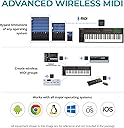
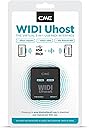
The CME WIDI Uhost is a cutting-edge Bluetooth MIDI interface and USB host designed for class-compliant MIDI instruments and controllers. Compatible across Windows, Mac, iOS, Android, Linux, and ChromeOS, it delivers ultra-low 3ms latency and a reliable 65ft wireless range. With plug-and-play simplicity, adaptive frequency hopping, and a dedicated app for optimization and firmware updates, it transforms your MIDI setup into a clutter-free, high-performance powerhouse—ideal for professionals and creatives who demand seamless wireless connectivity on stage and in the studio.


| ASIN | B09GS326QW |
| Audio Input | USB |
| Best Sellers Rank | #1,552 in Musical Instruments ( See Top 100 in Musical Instruments ) #4 in Computer Recording MIDI Interfaces |
| Brand | CME |
| Brand Name | CME |
| Compatible Devices | Android via Bluetooth MIDI integrated apps, Pair automatically with other WIDI devices and standard BLE MIDI Controllers, Pair manually with iOS and macOS., USB-C MIDI Class Compliant Host Port + USB-C Client Port for iOS, macOS, Android, Windows, Linux, ChromeOS, Works with Windows 10/11 via Korg BLE MIDI Driver Compatible Devices Android via Bluetooth MIDI integrated apps, Pair automatically with other WIDI devices and standard BLE MIDI Controllers, Pair manually with iOS and macOS., USB-C MIDI Class Compliant Host Port + USB-C Client Port for iOS, macOS, Android, Windows, Linux, ChromeOS, Works with Windows 10/11 via Korg BLE MIDI Driver See more |
| Connectivity Technology | Premium Bluetooth MIDI, USB-C Client: macOS, iOS, Windows, Android, Linux, ChromeOS, USB-C Host: Compatible with "class compliant" USB MIDI devices via USB OTG cable |
| Customer Reviews | 4.5 out of 5 stars 1,518 Reviews |
| Global Trade Identification Number | 08885011101180 |
| Item Type Name | Wireless MIDI over Bluetooth for USB MIDI |
| Item Weight | 0.7 Ounces |
| Manufacturer | CME |
| Manufacturer Part Number | S-WU00B11 |
| Model Number | WIDI Uhost |
| Number of Channels | 16 |
| Operating System | Compatible OS via Bluetooth - With iOS, macOS and Android via integrated BLE MIDI. With Windows 10/11 via Korg BLE MIDI drivers., Compatible OS via USB - macOS, iOS, Windows, Android, Linux, ChromeOS |
| Supported Software | Works with all Bluetooth MIDI software – For non-Bluetooth MIDI programs, simply add bridge apps such as midimttr (iOS), MIDI BLE Connect (Android), or the Korg BLE MIDI driver (Windows) to enable full compatibility. Supported Software Works with all Bluetooth MIDI software – For non-Bluetooth MIDI programs, simply add bridge apps such as midimttr (iOS), MIDI BLE Connect (Android), or the Korg BLE MIDI driver (Windows) to enable full compatibility. See more |
| Unit Count | 1 Count |
| Warranty Description | 1 year manufacturer. |
H**R
Amazing Little MIDI Miracles
I preordered my first pair of WIDI Masters when they were still under development. They promised the ability to connect MIDI devices wirelessly without a third device, like a computer or tablet. It seemed too good to be true, but I was willing to try. I was not disappointed. I now own seven WIDI Masters and use them both live and in the studio. As a heavy MIDI user, they are amazingly useful tools. I keep finding more uses for them. This is one really important difference between WIDI Master and many of the other WIDI dongles you'll find here and elsewhere. Most of those others, such as the Yamaha MD-BT01, can NOT connect to other Bluetooth WIDI devices. They can only connect wirelessly to a computer, tablet or phone equipped with Bluetooth MIDI. In other words, you can't connect two such devices together. WIDI Master CAN wirelessly connect to almost any Bluetooth MIDI device, including other WIDI Masters. To put it simply, with two WIDI Masters you can connect any two MIDI devices (with 5-pin DIN connectors) wirelessly, without having to go through a third device. Essentially you use them just like MIDI cables--but without the cables! This is a really big deal. Nothing like this existed before WIDI Master. It's a game-changer. I've been using these little MIDI miracles in many ways. In my photo, you see three WIDI Masters plugged into my studio MIDI interface. I use these to connect (from left to right) a Korg nanoStudio controller, a Roland Aerophone Pro, and Roland SH-201 synthesizer. In my live rig, I use WIDI Master to connect two of my three keyboards directly to my iPad for changing patches via app (OnSong). I've even used WIDI Master to connect a set of Roland V-Drums to my studio from another part of the house. I could go on, but suffice to say these things have made a huge impact in my MIDI life. The things I'm using them for didn't even seem possible a few years ago. Now I don't know how I lived without them. Operating them can be remarkably simple, depending on your situation. In the most basic situation--for example, connecting two MIDI keyboards together--you simply plug them in. The devices will automatically connect to one another, and you're good to go. That simple. But things can get a bit complicated with more devices. With multiple Bluetooth MIDI devices in the area, managing which devices connect to one another can be confusing. Fortunately, CME has developed an app to control your WIDI Master setup. I highly recommend using the app to update the firmware on your WIDI Master before using it. You need to plug your WIDI Master in to power it (it gets power from the MIDI OUTPUT of any MIDI device). In the app, you'll see the device and be able to connect to it. Once you've updated the firmware, you'll have the ability to manage your settings. You can set a WIDI Master to "peripheral" mode. This prevents it from accepting connections while still allowing it to connect to other WIDI Masters. You can also create groups of devices that always connect in the way you need them to connect. These are incredibly useful features if you have many WIDI devices like me. To sum it all up, WIDI Master is an amazing little MIDI miracle that lets you connect almost any MIDI device to any other MIDI device wirelessly. It simply works, and works better than I'd thought possible. It's not an exaggeration to say these devices changed my life.
T**W
As an Audio Pro, I'm very impressed
I've been waiting for this for a long time. After emailing CME and getting the full details, I got 2 of these to test out. It works amazingly well, although it does take a little fiddling to get it going. BTW I'm on Win 10, and here's what I've learned so far: There are 2 ways to go, directly to your PC's BT (or another BT device like a DAW controller) or to another WIDI Master. I went from an FCB 1010 midi footpedal into my Win 10 PC. But to get it working, you need to have the May Win 10 update (I think it's V. 1909). At first I wouldn't see the WIDI, but after the update it worked great. Since the footpedal is not sending note data (which inlcudes a lot of other data like aftertouch etc), and is only sending relatively small control data, I notcied no latency at all, even on very fast wah pedal moves. But there is some latency when playing notes directly into the PC BT, apparently that's due to how Win 10 handles BT (Mac users don't have that issue, apparently). To get around that latency, I put the 1st WIDI on a keyboard controller, in my case an Akai 4000S wind controller, and the 2nd right on my interface's midi ports. No detectable latency at all, it works really well. BTW their customer support is excellent, they got right back to me with a solution when I initially had problems. CME had told me that the WIDI Bud Pro will solve any Windows BT latency issues, it's a USB dongle that essentially bypasses Windows BT management entirely and therefore makes latency around jsut 3ms. So I could have my footpedal and my Akai each with a WIDI Master, both connecting to the Bud Pro. But unfortunately the Bud Pro's rollout is delayed due to the current global chip shortage. Therefore I just ordered a 3rd Widi Master, which I'll put on my interface's midi ports. The Akai will connect to that for note data at virtually no latency, and the footpedal will go direct to the PC BT, as it is now. BTW I plan to use this gigging and in the studio. I've tested it pretty thoroughly and the range is excellent, plenty for the stage, and I've no dropouts or issues. Although I'm an old-school guy and like the security of cables for many things, so far this has been rock solid. I'll still carry some backup midi cables, but this gives me a slightly faster setup and teardown, and freedom of movement. If they can transfer this low latency BT tech to wireless BT IEM's, they'll have a gold mine. But audio has a lot more data than midi, so that may a while. Kudos to CME... great product.
A**D
Works well, no issues.
This thing works very well for me. I use it with my Helix pedal and I'm able to send MIDI commands to my phone/iPad for page turning or queueing backing tracks etc. It's powered by the MIDI ports so it's literally plug and play. Compatible with my devices without a lot of extra effort, but there is an app to help with connections as needed. Great value being able to convert MIDI devices into wireless devices.
R**5
Not compatible with certain Android tablets
This works as expected with the correct tablet, BUT I could not get it to work with an Android tablet. I have to use an iPad. I reached out to customer service and none of the things they told me to try worked with the Android. It connects to the device but MIDI program changes do not transmit.
L**T
GREAT Product that made my life much better!
I use these to control program changes with my Kemper Rack using an Android phone and Band Helper app. I have MIDI commands associated with each song. When a song is selected in the set list, the correct patch and settings are setup automatically (and wirelessly) on my Kemper. I have them plugged into the back of an SKB roto molded 3 space case with my Kemper and the distance is great. I have been up to 50 feet away without any problem (that's as big a stage as I am likely to ever play on anyway :) ). These were easy to setup and get working. Worked great on my Android tablet. I do have to pair it every time through Band Helper (once a power up), but it has been rock solid (not drops, no misses). Well worth the money.
Z**.
A real life saver
I am using this with: Windows PC Android Tablet Meta Quest 3 and Quest 2 VR headset (PianoVision app) -I have a Kawai digital piano and did not want to run a USB cable around to my devices. However, I had trouble connecting my piano's Bluetooth to anything other than official Kawai apps. Windows requires 3rd party hacks for Bluetooth MIDI and they do NOT work well. -This device saves me the headache on everything. I had some troubles updating the firmware but eventually got it squared away. Once I had set the device up, it's SUPER easy. Just plug it into any device, the piano immediately connects with no noticeable latency, and it stays connected. It bypasses your devices bluetooth stack all together which is great, because many android apps don't support bluetooth midi. Please note - when I move my receiver 8 ft from my piano it starts to cut out notes. This is most likely a limitation on my piano's bluetooth transmission power, but something to keep in mind. I highly recommend this product. I would have given up on using my keyboard's bluetooth midi if i hadn't found this device.
C**R
Great hardware, when it works; The software developer needs to be cast into the pits of hell
If you are planning on using these 1 to 1, they're fantastic. You spark up two of them, they find each other, and it's like you hardwired them with a midi cable, with low latency and stability. But once you want to use 3+ devices, you're reliant upon the software implementation and it is god-awful. It is virtually impossible to create a group - remember what I said about 2 devices connecting automatically? Well, when you try to create a group, you need at least two devices. But as soon as you have them both running, they find each other and disconnect from the software. Start 3? Two will pair off and leave you stranded. Supposedly, you can have them auto-learn a group without using the software, but good luck with that. Because you have to have the settings juuuuuuuuuuuuust riiiiiiiight in order to complete a group pairing, and in order to change a setting, y uneed to use the app. And to do that, you have to: 1. turn off all Widi/bluetooth devices. 2. Make sure your phone has forgotten its pairing with any of them. 4. Start the app. 4-a. Turn on 1 (AND ONLY ONE! GODDAMMIT) Widi device at a time. 4-b. Pair it. 4-c. Change one setting. 4-d. disconnect it. 4-e. close the app 4-f. unpair the device under your bluetooth settings 4-g. Toggle your bluetooth; and 5. Repeat step 4a-g for any additional settings that you need to change, and then one last time to confirm that all changes have been accepted. So if you need to (A) Update your firmware, (B) change the name so that you can tell devices apart, (C) set the device role to "Force Peripheral" and (D) change it to "Group Auto Learn" for a 4 device group, that means you need to start and stop the app and your bluetooth settings, and repair each device TWENTY TIMES! It's maddening. If you get something wrong, you're in a loop, and you have to start from the beginning. Clearly, the hardware is fantastic, and that's why it gets 3 stars, because the software implementation is atrocious. It has to be the most torturous workflow experience I've ever experienced in software, and I grew up with DOS. What's even more mindboggling, is that he's rolling out software updates CONSTANTLY. Do these ever FIX anything? No, of course not. All they do is ensure that one of your devices is out of step at all times, so you have to update all of them so that they will interoperate. It's amazing that so much time is spent updating the firmware, without ever once making it even functional at its most basic level. It's almost as if the only purpose of the firmware updates are to remind you just how painful the firmware updates are. Like Zeus taunting Sisyphus with a bluetooth boulder.
W**S
Can’t go wrong with CME
Works great on my master DMX
S**N
Excellent product - but make sure you install them correctly
These Widi links are a marvel, allowing me to connect a stone-age but wonderful Yamaha keyboard to the latest and greatest computer equipment. I did however have an issue installing them - my iPad would not recognise them. There was excellent and immediate support from the manufacturer and from the Facebook user group so I was able to identify the problem quickly - good support is rare these days so I think the manufacturer should be praised for doing good support. The issue turned out to be a) firmware needed to be updated and b) all other bluetooth profiles must be deleted before installation ( in my case it was an Apple Pencil causing the problem). So you must delete all existing bluetooth connections, then install and run a firmware update on the WIDI, and then re-install the other bluetooth profiles on top. Everything now works and is of high quality. Recommended.
F**.
Plug and play et performances au rendez-vous
J’ai acheté le uhost pour palier aux performances minables du midi Bluetooth sur Mac. En effet Apple est au top mais en ce qui concerne le Bluetooth, ils ont décidé que les communications n’étaient pas prioritaires, donc pour des changements de programme, ça passe, mais si vous voulez utiliser un contrôleur continu (une pédale d’expression dans mon cas, branchée sur un pédalier midi Bluetooth) vous avez une latence qui rend le truc inutilisable. Maintenant sur mon MacBook, le Bluetooth est éteint et ce petit truc est branché en usb-c, pédalier midi et pédale d’expression reconnus de suite, nouveau périphérique midi dispo sur la Mac et 0 latence ressentie !
N**K
widi midi
good
R**I
Muy bueno!
Muy bueno!
S**S
Très bonne communication midi ewi 4000/ ipad
Ewi 4000s/ iPad parfaite transmission du signal midi latence imperceptible
Trustpilot
2 months ago
1 month ago