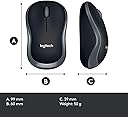
Desertcart purchases this item on your behalf and handles shipping, customs, and support to Mexico.
โจ๏ธ๐ Elevate your desk game with wireless power that lasts and performance that never quits!
The Logitech MK270 Wireless Keyboard and Mouse Combo delivers a robust 2.4 GHz wireless connection with virtually no dropouts up to 10 meters. Featuring an ultra-long battery lifeโup to 36 months for the keyboard and 12 months for the mouseโthis combo includes 8 hotkeys for quick media and internet access. Its full-size, low-profile keyboard and contoured mouse offer ergonomic comfort, while the tiny nano receiver ensures a clutter-free setup compatible with Windows and Chrome OS. Ideal for professionals seeking reliable, hassle-free wireless productivity.
| ASIN | B00BP5KOPA |
| Antenna Location | Office |
| Best Sellers Rank | #718 in Computer Keyboard & Mouse Combos |
| Brand | Logitech |
| Built-In Media | โฆ |
| Color | black |
| Compatible Devices | Personal Computer |
| Compatible Operating System Family | Windows |
| Connectivity Technology | Wireless |
| Customer Reviews | 4.3 out of 5 stars 19,257 Reviews |
| Global Trade Identification Number | 00097855089816 |
| Hand Orientation | Ambidextrous |
| Item Type Name | Logitech 920-004536 Wireless Keyboard and Mouse Combo, 2.4GHz Dropout-Free Connection, Long Battery Life |
| Item Weight | 8.8 ounces |
| Keyboard Description | Wireless, QWERTY |
| Keyboard Layout | QWERTY |
| Manufacturer | Logitech |
| Mfr Part Number | 920-004536 |
| Minimum Required Operating System Version | Windows Vista |
| Model Number | 920-004536 |
| Movement Detection | Optical |
| Number of Batteries | 2 AA batteries required. (included) |
| Number of Keys | 104 |
| Number of Packs | 1 |
| Operating System | Windows 10, Windows 7, Windows 8, Windows Vista, Windows XP |
| Other Special Features of the Product | Wireless |
| Power Source | Battery Powered |
| Special Feature | Wireless |
| UPC | 097855089816 |
| Unit Count | 1 Count |
| Warranty Description | 3 years limited warranty |
M**N
Can't be beat !! Press the 'Buy It Now' button.
5 years ago, the wireless mouse alone would have cost 3x what this wireless mouse/kbd package cost today. Although I currently only use the wireless keyboard portion, (I use a logitech trackman due to limited desk space) I couldn't beat the value even for wireless keyboard only devices. I type with the kbd in my lap - - very comfortable and ergonomic. I do still prefer my Northgate Omnikey 102 (eat your hearts out) for which I am the original owner and Logitech MX Laser mouse on my main production computer But this Logitech MK270 (although somewhat mushy compared to the Omnikey) is just as good as any other Kbd available today (IMHO) at a very competitive price. Some whine about the numeric keypad - - but I happen to LIKE it - as I use it constantly I also appreciate the on-off switch - - and Always turn the kbd off when done for the day - - bet the batteries last for years ! - Addendum - 5/16/19: This is a GREAT Kbd & Mouse Combo - this is the fifth one I've purchased. One for my office computer, one for my mothers laptop, one for my Skype computer in the Media Room, #4 I can't remember, and this one #5 for use at our Church recording station. What I'm NOT happy with is Amazon for sending what appears to be a previously sold item. I've purchased four of these that were new - so I know what to expect. This one had tape over the sides and primary front closure (previous ones had no tape) Box corner was crushed (sure - could have happened in transit) Batteries were in bubble-wrap (the new ones come installed in the Kbd and Mouse with a pull tab to activate) The BT receiver came inserted in the Mouse compartment. The new ones are packed independently in the box. I initially freaked out - thinking the BT receiver had been omitted - but then remembered there was a spot inside the mouse where the BT receiver can be stored when traveling. Had I NOT known that - I would have requested return. Yes - - all works perfect - and as I need to use the Kbd/Mouse in 3 days - I'll NOT request return. Just BAD on Amazon for their shenanigans.
P**A
exactly what I wanted: SIMPLE!!!
I've been using the Logitech Wireless MK270 Keyboard [sans Mouse as I have another one I love] for roughly a month now, and it is exactly what I was looking for. It has a standard key layout, including a numeric key pad. It makes tiny clicking noises when you type on it and I can't imagine the slight noise would bother anyone unless someone was sleeping a few feet from away you while you were using it. The mini USB plug fits in a port in my tower and just about disappears. Plug it in and forget about it. There's no chance of brushing past it with your arm while reaching for something on the shelf above the tower and knocking into it, thus risking breaking it. And I can type my usual 80 to 90 wpm on it with no problem. No lag time at all. I use this keyboard with Windows 7 on a desktop. Whenever you click on "Caps Lock, Windows 7 puts a notification on the screen saying whether Caps Lock is on or off. Which brings me to the only thing I can find wrong with the MK270. Next to the on/off switch on the top right hand of the keyboard is a Caps Lock light under a small "A." When I put Caps Lock on, it should light up green. But it doesn't. It lights up green, signalling that Caps Lock is on, when I turn Caps Lock OFF! Being a total non-techie, I have no idea why this is, but it doesn't bother me since I'm used to looking for the on-screen notification. Whether or not it would misbehave in this fashion on any other computer, I don't know. But I would imagine that if it did you get used to the green light being lit meaning Caps Lock is off. And that on/off switch on the TOP of the keyboard, in such a convenient place, makes it a cinch to take the extra second to turn the keyboard off when you're not going to be using it for several hours or more. I would definitely recommend this keyboard to anyone looking for a simple design, and a standard keyboard layout with no extra bells and whistles other than 8 keys at the top including Home Page, calculator, volume controls, email--and two more I haven't tried yet so I don't know what they do. [I told you I was a total non-techie.]
S**E
For the price, a great keyboard and a mediocre mouse. Over all, I am happy with my purchase. Comes with Batteries!
I bought this keyboard to use with my Strand Lighting Preset Palette light console. The console does not support bluetooth, but I didn't want to use a wired USB keyboard and mouse like some kind of savage, this seems like a happy medium. I am a lighting designer and theatrical electrician by trade, and have long relied on logitech mice like the Performance MX, MX Master, and Anywhere MX versions 1&2 for use with my computer, especially when I do drafting in Vectorworks. Logitech has always worked well for me over the years. This keyboard work well with my light console (I also tested them with my mac and they work fine as expected for those too). The Keyboard feels much more well built than I expected. It is solid. It is not as nice to type on as my DAS Model S professional keyboard that I use at my computer, but it also doesn't cost nearly as much. The keys have maybe a little more key travel than I would like for this kind of key switch (A rubber dome), but the keyboard is overall nice for the price, it pleasantly surprised me. Besides, for use with a light console the keyboard won't be used too much. The mouse isn't as heavy or large as I would like. It is incredibly light weight. I tend to like heavier mice, but it feels like I'm not even holding anything in my hands when I use this mouse. I do have large hands, too, but even people with smaller hands will probably find this mouse small. The Mouse and Keyboard work together well from one receiver, and "imitate" being a wired mouse and keyboard perfectly. My light board is supposed to only support wired mice and keyboards, but this works perfectly. This keyboard and mouse would work great with legacy systems. I also just have to take a moment to say that not only do both the keyboard and mouse come with batteries, but they are high quality Duracell batteries. Now that's nice touch!
M**N
Excellent Product!!
I purchased this, โKeyboard and Mouse Comboโ off Amazon about 2 years ago. My current keyboard at the time had just been broken because the cord and plug on the keyboard had been damaged. I was also redecorating my room at the time and wanted a bit more of a โmodernโ keyboard for my desktop, as I am always using my desktop for something, whether it be homework, Netflix, etc. After receiving the combo-pack, I was surprised at how easy it was to operate and the convenience of not having cords all over my desk. You simply have to insert the dongle from the keyboard and mouse into your computer, power on the keyboard and mouse, and that is it! The durability is also extremely good. I have typed paper after paper for my college classes these past two years and both still function just as well as the day I got them. In fact, they are what I am using to write this review currently! This combo also provides accessible comfort, as they automatically connect to your computer as soon as you power them on, you can use the keyboard and mouse in your lap, on your bed, in your favorite comfortable chair, etc. One downside about having a wireless keyboard and mouse is that they operate off of batteries. So, I do have to go out and purchase batteries occasionally, although, as I said I am always using my desktop, typing papers for school, etc. and I usually only have to grab some new batteries every couple of months. Overall, this product is convenient, accessible, extremely durable, long-lasting, and definitely worth the price tag of $35 for the number of years it will last you, and the accessibility it will give to you. I would recommend this keyboard and mouse combo to anyone who uses their computer a lot and would appreciate not having to deal with the traditional worry of cords being damaged, pulled, or yanked, or the foot worth of cord from your keyboard and mouse that chains you to the confines of your desk.
D**Z
Must have
This keyboard makes me feel like I'm typing for a courtroom
B**G
Great combo, Purchased two
I've now purchased two of the MK270 combos and love them. The first was a ways back for my work laptop, Windows 7 based computer. Plugged in the tiny USB hub and both the keyboard and mouse were working in seconds. I like the larger keyboard for the number pad and the various shortcut keys at the top that all function nicely (volume up and down, mute, email, browser launch, even calculator). Let's me be comfortable while I type. Mouse is small but I like that, never one for bulky mice. And the USB hub fits nicely into the mouse should you need to pack it up. Purchased the second for my Chromebook and it was up and running even faster than my laptop. Couldn't believe how nicely it works. My kids do a lot of internet based homework for school and again the separate number pad makes life easier for them as they work through their math homework. Mouse is far easier for them than the touch pad on the Chromebook. Finally, what I did not realize is that the keyboard and mouse both have an effective range of 20-30 feet (perhaps more). I just had surgery and was confined to bed for a week. I hooked my laptop up to my LED Flat Screen, and then laid in bed with the keyboard and mouse, a good 10-15 feet away, and was able to do work and keep myself entertained. Loved that I could leave the laptop sitting elsewhere and never had to get up to do anything with it, just used the keyboard and mouse as I normally would. And last night we were at my in laws and streaming something on the Chromebook. Everyone wanted to see it so we hooked it up to their 60" LED and used the mouse from across the room (a good 20 feet) to switch between videos. Again, the Chromebook was right next to the TV and sound system, and we handled everything from across the room. Not a big deal to some, but a really nice side benefit for those of us who periodically like to hook up our laptops to the home entertainment system. I usually try to turn the keyboard and mouse off but often forget at my work computer. They either use no battery power or they have an auto-off function because I've replaced the AA battery once in two years.
B**P
Love Logitech, HATE This Keyboard
I've been using Logitech for my mouse for over two decades. Ever since my husband introduced me to the trackball mouse, I've never looked back! Since I believe Logitech to provide quality equipment for computer users, I naturally turned to them, again, when I wanted a wireless keyboard. Originally, I bought two of their solar-charged wireless keyboards (K750) and those lasted me riiiiight up until their warranty ran out. Figures. I thought I'd try replacing the batteries that came with them, but while I was waiting for THAT to ship, I ordered one of THESE keyboards to try out and also have as a backup for my husband, who is unusually hard on his computer accessories. The keys on the K750 were low and silent when I types. I loved it. It was perfect for my needs. But, I got this model...MK720...and it was the comPLETE opposite. It /was/ lighter than the solar keyboards, which was nice... But, the keys required SO much more pressure to push down and, if you didn't have your finger /directly in the middle of the key/ for some very *important* keys (such as the BACKSPACE key, which I came to have to use almost more than any other key, it seemed, while using this model)....the key WILL NOT depress. I lost my mind after a month of trying to use this godforsaken thing. I actually ended up PUNCHING my keyboard multiple times, so hard that I bruised my hand and gave zero fks...because that gd backspace key would stick and I'd have to pound it to get it to work. SO. FRUSTRATING. Because I'm on a fixed income due to being disabled, I promised myself that I wouldn't /beat it with a hammer/ when I was able to get a replacement keyboard the next month. Because that's wasteful and my husband can deal with it, in a pinch. But, I really wanted to, Logitech. I really, really wanted to. I wanted to take a hammer and just BASH it until allllll the bulky, awkward keys went flying off of it and continue hammering and screaming in primal joy as I ruined the source of my nearly unending frustration for a month. If you like keyboards with low keys and don't require a lot of effort to push down...don't buy this model. End of story.
J**3
Basic Keyboard and a Travel-Size Mouse
I bought this combo for the keyboard. The keyboard is a decent, if bare-bones, wireless keyboard for a desktop computer. It has a caps lock light, but no lights for num lock and scroll lock, which I can live with. It comes with 2 AAA batteries for the keyboard and, I think, 1 more for the mouse. Logitech's stated battery life is 24 months of ordinary office use. There's an on/off switch on the keyboard, so I would guess that Logitech's estimated is based on 8 hours of more or less daily use, plus users switching it off when they don't use it. I haven't owned this long enough to measure the battery life myself, but I would think that they will last 8 months if you don't turn the keyboard on and off each day, which is not bad at all. The raised lines on the home keys could be more noticeable, as I often have trouble finding them by touch alone. I have not noticed any connectivity issues or dropouts with the keyboard. The switches are quiet enough, though there are less noisy keyboards out there. The mouse is small enough to be a travel mouse. I wouldn't use it for anything else. Edit: A few more observations after using this keyboard for 9 months. Still an OK keyboard. The batteries may last longer than the keyboard however. Details follow. The batteries have lasted longer than I expected. The original batteries still haven't run out. I use this keyboard maybe 8 hours a day, and I never turn it off. I've noticed occasional connectivity issues. Somewhat annoying, but they don't occur often enough to be a deal-breaker. This probably isn't a problem specific to this keyboard, since wireless mice I've used have similar issues. I'm guessing there are just a lot of wireless devices around me. The raised lines on the home keys (F, J) have almost completely worn out. I've never had this happen with other keyboards. The left control key has become somewhat stiff. If I press it dead center, it's fine. If I put my finger down on the edge, the button doesn't press down. Kind of annoying. It didn't do this when I first got it.
K**H
Excelente producto
El paquete llegรณ en excelentes condiciones, el producto es el esperado, y funciona a la perfecciรณn. Como siempre, logitech no decepciona con la calidad de sus productos.
D**G
Happy user for two years so far
Bought this keyboard-mouse combo in June 2019 because it was cheaper than the keyboard by itself for some reason. Never used the mouse because that's not the reason I bought it so I can only comment on the K270 keyboard. Honestly, it's been far better than I expected for the less than $30 I paid for it and I'm very satisfied with the experience regardless of the price tag. Here are the reasons: Lives up to its advertised 24-month battery life. It's been two-and-a-half years and this keyboard is still running on the stock GP batteries it came with. Simply amazing. Granted I flip off the switch most of the time before I leave the desk, but I doubt it made much of a difference. Everything still works. Some people in the review sections have experienced quality issues and that's unfortunate. But I think most customers who are satisfied don't really write reviews. Like me and my father, for example. We've both had this K270 keyboard and haven't had any malfunctioned keys or broken clips. At first I thought the printed keys would rub off over time but it's not the case at all, everything still looks new. Convenient media keys and shortcut keys above the function row. Looks really dull but man, so much better than the ones that're integrated into the function keys which forces you to either hold Fn or use Fn Lock, both are compromises this doesn't have. The sleep button is especially interesting since I've never seen it on any other keyboard, can't say it's that essential to me but once in a while I decide to use the thing and it's convenient. Too bad you can't wake up the computer with it, waste of potential if you ask me since Windows always get woken up by my mouse when I don't want it to. It's also waterproof, never had to use it but good to know that it's capable of it. That's pretty much it. A cheap, light, capable keyboard with good quality. I'm a happy camper and can whole heartedly recommend it to people who just need a no frills, no nonsense wireless keyboard that just works.
E**R
ไฝฟใใใใ
ใตใคใบๆใไฝฟ็จๆใ้ๅธธใซๆฐใซๅ ฅใฃใฆใใพใใ ้ทใ้ไฝฟ็จใใฆใๅฃใใฆใใพใใใ
A**A
Five Stars
It's good and useful.
T**K
Received faulty mouse and a rusty battery
The battery that comes along is rusty and even with a new battery the mouse that comes with the bundle is not working at all
Trustpilot
3 weeks ago
1 month ago