Buy anything from 5,000+ international stores. One checkout price. No surprise fees. Join 2M+ shoppers on Desertcart.
Desertcart purchases this item on your behalf and handles shipping, customs, and support to Mexico.
๐๏ธ Elevate your left hand, elevate your workday.
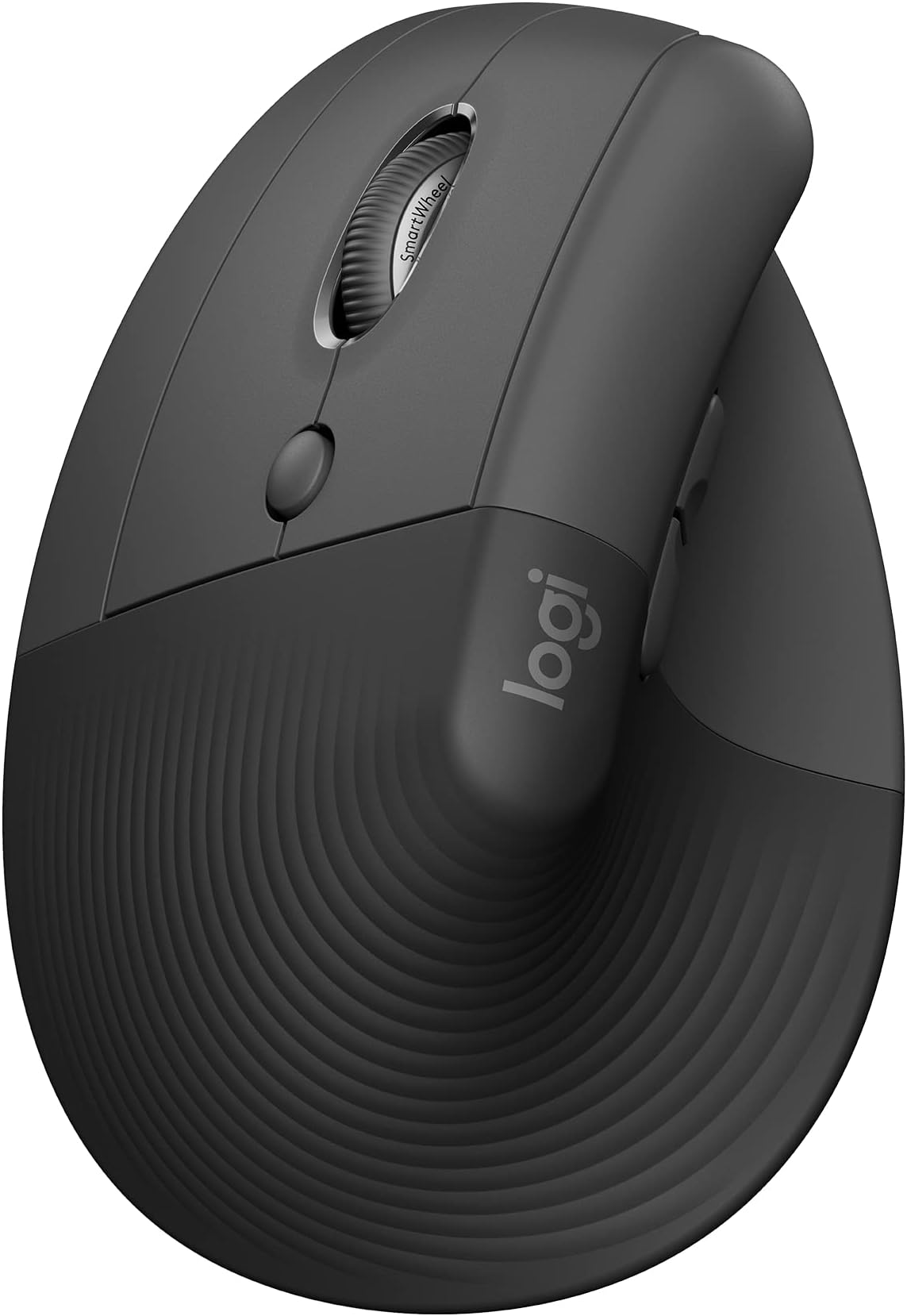
The Logitech Lift Left Vertical Ergonomic Mouse is a wireless, left-handed mouse designed with a 57-degree vertical tilt to promote natural wrist posture and reduce strain. Featuring Bluetooth and Logi Bolt USB connectivity, it supports multi-device switching and offers up to 2 years of battery life on a single AA battery. With 4 customizable buttons, whisper-quiet clicks, and compatibility across Windows, macOS, iPadOS, Chrome OS, and Linux, itโs an ergonomic powerhouse crafted from 70% recycled plastic and certified by leading ergonomists for professional comfort and sustainability.


| ASIN | B09J1SYX5B |
| Additional Features | Bluetooth/Radio Frequency |
| Antenna Location | Mouse |
| Are Batteries Included | Yes |
| Are Batteries Required | Yes |
| Battery Average Life | 24 months |
| Best Sellers Rank | #10 in Computer Mice |
| Brand | Logitech |
| Built-In Media | 1 x AA Battery, Lift Ergo Mouse, Logi Bolt USB Receiver, Quick Start Guide |
| Button Quantity | 6 |
| Color | Graphite |
| Compatible Devices | Personal Computer |
| Connectivity Technology | Bluetooth |
| Customer Reviews | 4.4 out of 5 stars 14,293 Reviews |
| Embellishment Feature | LED |
| Enclosure Material | Graphite,Plastic |
| Global Trade Identification Number | 00097855170897 |
| Hand Orientation | Left |
| Hardware Platform | Mac, PC |
| Item Dimensions L x W | 4.3"L x 2.7"W |
| Item Type Name | Mouse |
| Item Weight | 0.45 Pounds |
| Manufacturer | Logitech |
| Mfr Part Number | 910-006467 |
| Minimum Required Operating System Version | Windows 10 |
| Model Name | Lift Ergo |
| Model Number | 910-006467 |
| Mouse Maximum Sensitivity | 4000 Dots per Inch |
| Movement Detection | Optical |
| Movement Detection Technology | Optical |
| Number of Batteries | 2 Lithium Polymer batteries required. (included) |
| Number of Buttons | 6 |
| Operating System | Chrome OS, Mac OS X 10.15 Catalina, Windows 10, Windows 11, iPadOS 14 |
| Pattern | Mouse |
| Power Source | Battery Powered |
| Range | 30.0 feet |
| Special Feature | Bluetooth/Radio Frequency |
| Style Name | Left-Handed |
| UPC | 097855170897 |
| Unit Count | 1.0 Count |
| Warranty Description | 1 Year Limited Hardware Warranty |
J**J
Good scroll wheel, coming from g305, 18cm hand
For reference my hand 18 cm measured from the first crease after your palm to the end of my middle finger. I flexed my wrist and the first crease I used as my end point for my palm. My arms are at a 90 degree angle, and my wrist is neutral (not flexed up or down) due to my wrist rest keeping my wrist straight. Most of my arm weight is on my memory foam wrist rest. My review is based on my personal hand size 1 month update: I have not noticed any staining on my white lift. But I am also a pretty hygienic person and I never touch my mouse if I touched food. 1 year update: Still have not noticed any staining. I do wipe it with a baby wipe maybe once every 1-2 weeks though. One thing to note is that in order to use shortcuts you need to have the Logitech Options+ software installed. The shortcuts/settings you program to you buttons aren't saved on the mouse. Also annoying since the software takes a substantial amount of CPU usage (why????). Wrist pain: This might be because I don't have arm rests so the weight of my arm is resting on the wrist wrest, but I had some minor wrist pains within an hour or so. It didn't really feel like a muscle or bone kind of pain, but a nerve/soft tissue pain. When I didn't use a wrist rest, the weight was mostly the side of my hand, in particular the bony part near the wrist. That part rubbed when moving the mouse around if you don't lift your arm. Edit: After some adjustment I no longer get any wrist pain, even when gaming. Palm grip: I think palm grip would be unusable for this mouse. My fingers extend 0.5-1 cm after the end of the mouse (where the left and right buttons start curving). When clicking the mouse it almost feels like im clicking with my finger joint instead of my fingertip. With a relaxed thumb (thumb slightly curved and only fingertip touching mouse) it is pretty easy to click the side buttons. Side of thumb can press upper button, thumb joint can press lower button. With the entire thumb fully in contact with the mouse, the upper button is a bit awkward to press but possible, and the lower button is the same as relaxed thumb position. Awkward to use the scroll wheel since you have to curve your fingers quite a bit to get your finger tip on the scroll wheel but still usable. Also because of the hand angle, I found it much more comfortable using my middle finger to use the scroll wheel instead of my pointer finger that I use normally. Fingertip grip: Personally I found it feeling different, but perfect. My finger length is perfect so my fingers land around or slightly below where the left and right mouse button start to curve. When I click, the direction of the force from my finger is more diagonally down and to the left. If my fingers were a bit shorter, it the force would be to the left. I found this diagonally force feels more natural, kind of like squeezing a trigger (kinda) instead of just squeezing a mouse. It is hard to describe. In this grip, the only part of my fingers (including my thumb) that are touching the mouse are my fingertips. My palm is resting on the mouse. Thumb characteristics is same as palm grip. Scroll wheel characteristics same as palm grim. Claw grip: Works fine, only problem is pushing lower thumb button is a bit awkward since you kind have to shift your entire thumb back but it is still possible. Easy to use scroll wheel since your fingertips end right next to it Compared to g305: The Lift is much more comfortable and natural. I got used to the Lift very quickly. In comparison, the g305 felt like a petite mouse. The g305 felt hollow, like there was nothing supporting my palm. I didn't have any issues with the mouse shifting when clicking it on my mouse pad. Even on a smooth surface with no mouse pad it would happen rarely. Scroll wheel: Excellent combination of a normal scroll wheel and a free one. I can scroll down all the way to the end of reddit threads and spotify playlists in one scroll. Going back up takes a few scrolls however since I apply less force. Smooth scroll supplied by Logitech Options+ is also nice. Makes it feel like scrolling has inertia. There a lot of very nice features in Logitech Options+ like Logitech Flow
D**H
Don't Delay - Get One
Make sure you get the right size - I got the Small/Med. Perfect fit. Have had tennis elbow for years and the computer use exacerbated the issue. Very comfortable, great fit. The best position for your hand is in the upright position. Would recommend one for everyone. Good, solid mouse.
A**H
Saved my wrist
My old version of this mouse finally died and I immediately bought another as a replacement. I work a lot on my computer and my wrist was starting to feel it. This mouse has saved my wrist. Battery life is amazing, quality is great, scroll wheel is quiet, and I use it for precision work on a Mac with zero issue. Not a travel mouse, but I have something else for that. Would buy again and again.
A**T
My favorite mouse ever
I'm very particular when it comes to mice. It has to be: - quiet click and scroll - scroll wheel, not track ball - bluetooth - vertical - real battery, NOT rechargeable There are actually several mice that fit all those criteria, and I've tried nearly all. This Logitech is double the price of most of the others, but for me well worth it. Prior to this I used the Mojo which is about half the price, and that mouse is probably my 2nd favorite but it is a distant second. Compared to the Mojo and others, this mouse has more precise movement, smoother scrolling, and more reliable clicks. Because of the vertical orientation, my finger tends to click diagonally downward with gravity instead of fully horizontal in line with the intended click direction. That causes the Mojo to sometimes miss my clicks, forcing me to constrain my finger direction more carefully, often requiring several tries just to click something. But this Logitech has no such issue, it's very responsive every time even with my sloppy clicks. So while I used to think the Mojo was the best I could find given my requirements, this Logitech is clearly better. When I spend all day at the computer, these minor things make a big difference to me, therefore well worth the extra money. Also want to mention I'm 6' 4" tall and the size of this mouse is fine for me. It is a little smaller than some others, but it feels fine in my hand, it's not abnormally tiny or anything. I was concerned because the description says it's intended for smaller hands and suggested I should get their larger MX Vertical model instead. I would have considered it but the MX Vertical has a rechargeable battery which is a deal-breaker for me. What's my beef with rechargeable batteries? Earlier I had the Seenda vertical mouse but its rechargeable battery died after a year, unable to recharge, so I figured it was a fluke and bought another, and same thing happened after a few months. So after that I switched to replaceable batteries and never looked back. Replaceable batteries last forever (well, they only last a year too, but then you just replace the battery!). I've been very happy using replaceable batteries, way more reliable and durable, because all rechargeables die eventually, and it is easier to replace a battery than an entire mouse! So in summary, if you're price sensitive you could get a usable vertical mouse for less. But if you're OK to spend a little more for a tool you might well use all day for years, then this one is totally worth it IMO.
P**O
Handle type mouse.
This may seem a bit too biased since I already like logitech products but there is a bit cool and not so hot on this mice... so build quality as always will be top quality and top of the line.. thats what you get with logitech and the somewhat premium price. scrolls good but gets a bit of getting used to due to the handle type hold for the mouse and what kinda reminds me of the trackball days. this is a bit of that with a regular mouse movement tied in. track is good as long as you set it your speed and resolution matches hand coordination. This is practically compatable with a phone if you ask it to. and is very capable.
T**H
Easy peasy connection
First time using an ergonomic mouse of this kind and it'll take a little bit of getting used to. Color matches the theme of my home office and it has a pleasant feel to it. No lights or RGB on this one. Very easy to move maneuver around with. The mouse is very accurate when you move it around your computer screen. I even connected it to my tablet and the accuracy and speed is great. Fast but not excessively fast. I do feel like that there is less strain on my wrist while using this mouse. It makes resting my hand in the wrist pad easier and more comfortable. The size is okay but I have big hands for a female so there will always be a size factor for me when it comes to various mice. The quality and build of this mouse is very good. I've had quite a few products in the past and now from Logitech so it's a brand that I trust. I'm not even opposed to buying another one of these for the office. Initially I thought I would have a problem adjusting to the scroll wheel and clicker being on the side of the mouse, but it's actually more comfortable and convenient than my current Windows mouse. Scrolling is much easier but still adjusting to clicking on things. I'm sure it'll become second nature soon. Instructions on the cardboard are super easy to follow to set up which devices you want to connect the mouse to. It took less than a minute to connect each of my devices. Being able to scroll back and forth on a website or folder without having to use the browser/folder's back and forth buttons is wonderful. I just have to not hit the left click button when I touch them. I decided to install the Logi Option+ software to see what all I could do with this mouse. I was a bit annoyed the software took longer to install than download. The actual mouse is lightening fast compared to the software. Since I'm just getting the product today and starting to use it today, I'm not able to speak on the battery life just yet. Comes work a typical AA alkaline battery which I'm grateful for, but at some point I'll change it to a lithium battery since those last a bit longer. Yet before I do that I'll check to set if the batteries last at least a year. So back to the software, once it finally installed, it took forever to load so guess that portion will be an update. Any hoo, great mouse with a movie of comfort, convenience, speed, and accuracy. 10/10 recommend!
S**M
All you need to know before buying this mouse.
The Logitech Lift is an excellent vertical mouse that is a great choice for long-term ergonomic comfort. While the build quality and battery life is amazing, the rubberized grip tends to trap heat and cause palms to sweat during longer work periods. The transition to a vertical grip requires brief time to adjust and can initially feel less smooth than a standard mouse. However, the adjustable DPI settings allow you to fine-tune the tracking speed to your exact preferences. Also the scroll wheel is incredibly smooth. With both Bluetooth and Bolt receiver compatibility, it blends in throughout any workspace.
J**B
Relieved my hand fatigue
I work at a computer all day long. I am a drafter and after work I am a gamer. I bought this to help relieve some hand fatigue. Definitely helped. It feels good in my hand and I don't get sore hands anymore. The only downside is that I pick up and move my mouse sometimes to re-center it on my desk. This one is not as easy to pick up, it tries to slip out of my grasp. I have gotten use to that though, and grab it lower when I go to do this. The battery is still the original one I put in it. I do not turn it off when I am not using it. I'm too lazy for that. Months later it is still going strong. I also have dropped it off the desk a time a two, and other that the difficulty of grabbing it to pick it up, it has handled that fine.
G**O
Perfeito! Melhor mouse
Simplesmente perfeito! Nao tem segredo na conexรฃo, รฉ plugar o usb e ele comeรงa a funcionar imediatamente! Leve, macio, silencioso e rapido! Estou usando a 3 meses e estou apaixonada! Sรณ conprem
M**F
TOP
Comfortable mouse, very customizable, I have tested it on different surfaces, and still works very well & smoothly on all surfaces including "plastic & glossy surfaces" :D.
A**R
Comfortable and Efficient
I got one for my partner and myself, and we've been using 'em for about 1-2 (1 month me, 2 her) months and here is our thoughts: Comfort and Feel: The mouse feels really nice in hand. Itโs extremely comfortable to use. Battery Life: The battery lasts a long time, which is great for uninterrupted use. I haven't charged it once in the 1-2 months we've had them Performance: It has good sensitivity and the clicks are really quiet, which I appreciate. Multi-Device Pairing: Being able to pair it to three devices is a fantastic feature. Switching between my laptop, PC, and Steam Deck is seamless. Scroll Wheel: The free-wheel scroll is decent, but not as satisfying as I hoped. Itโs not quite up to the standard of the Razer scroll wheel, but it gets the job done. Gaming: I can play games with it without any issues. It took about a day to adjust, but once I did, there was no loss in click accuracy. Overall, the Logitech Lift Vertical Ergonomic Mouse is a solid choice - though the scroll wheel could be more satisfying.
Y**A
Yes but depends
I really love it! Works great but for me it hurts my hand more than the horizontal one.
S**G
The best left handed mouse ever
The only and best left handed mouse made by logitech. Quality quality quality product. I would buy this again and again forever if I need to. It surely has made my wrist pain disappear.
Trustpilot
1 week ago
1 week ago