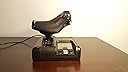
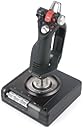
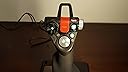
🛩️ Elevate your cockpit game — fly like the pros, feel the difference!
The Saitek X52 Pro Flight System Controller is a professional-grade HOTAS setup featuring dual Multi-Function Displays, precision non-contact joystick technology, and an adjustable throttle with tension settings and detents. Designed for Windows platforms, it offers extensive programmable controls, durable metal and hard plastic construction, and customizable RGB lighting—perfect for immersive flight simulation and serious gamers seeking precision and reliability.


| ASIN | B000LQ4HTS |
| Best Sellers Rank | #109,164 in Video Games ( See Top 100 in Video Games ) #269 in PC Game Flight Controls |
| Brand Name | Saitek |
| Color | Black |
| Compatible Devices | PC, Windows |
| Customer Reviews | 4.0 out of 5 stars 973 Reviews |
| Global Trade Identification Number | 00021165105966, 00885417266146, 05052178369798 |
| Hardware Platform | pc |
| Item Dimensions | 15 x 9 x 10 inches |
| Item Part Number | PS34, ps34 |
| Item Weight | 1.9 Kilograms |
| Manufacturer | Saitek |
| Manufacturer Part Number | PS34 |
| Material | apple |
| Model Number | PS34 |
| UPC | 072090782906 617407351934 021165105966 777786167585 887186161424 045556021963 211651059662 663708404978 001910722358 072080011238 885417266146 999994776841 031112581149 132017581002 001782901585 163120452750 807320210320 962327404544 124223625120 763615957830 211651055398 132017774480 012301018301 731855042760 115971251365 |
| Warranty Description | 1 year warranty |
D**C
The quality of Saitek, continues with the X52 Pro!
I am a long time flight sim enthusiast. I used to be the type who would always look for a better joystick on the market; that is until one day I purchased myself an X52 joystick from Saitek. This joystick was excellent, and it lasted me several great years of flying and fighting in combat sims. Recently however, I started to want an upgrade because my old x52 was beginning to wear after 7 years of use. I finally bit the bullet and purchased the x52 pro. First impressions: My first impression out of the box was that the joystick was exactly the same as the X52... I thought this was strange. I then pulled all the packaging away and realized that this x52 pro was a whole new world compared to the regular x52. Further inspection: Upon further inspection of the joystick I found that the same features that made the x52 great were still there; You had the toggle switches on the joystick along with the famous pinkie button and the protected fire button up top. Along with that you also had the multiple POV hats on the joystick. I really enjoyed the new button texture of the toggle switches, it gave me a better ability to feel the switch as I was attempting to use it. The biggest improvement I noticed among everything else was the increased spring tension of the joystick. No longer would I have to worry about my joystick floating about when I wasn't touching it. The throttle still had its many great features including the thumb stick for the mouse as well as the button that acts as a mouse button. The throttle Quad: Moving onto the throttle quadrant I noticed the same great shape and layout that the old x52 had, however I started to notice several difference. The first difference I noticed is that they removed the three buttons below the mini screen and replaced them with two buttons that are also scroll wheels; this gave the ability to have two extra axi's of control on the throttle quadrant. Moving on I also noticed that they made the slider sensitivity greater, that way you could move the thing with much more precision. As I continued to look at the details I also noticed that the throttle part of it had a much stronger tension to it, which is nice for when you want to find that sweet spot in your fighter; Saitek also kept the tension adjuster on the throttle for those of us who don't like the extra tension. Most of all, I really enjoyed the new texture they have on the potentiometers on the throttle; instead of the normal rubber grips from the old x52 they now have a more easily gripped plastic ridge feel to them. Now if my finger tips get sweaty during combat I can be guaranteed that my fingers will not slip off of my potentiometers. I think the best feature of the throttle is that they have added lights to the part of the throttle that tells you the throttle position. This way you can see the numbers. More of a minor detail of the throttle is that they have added a stopwatch basically into the screen display part. There is a start/stop button along with a reset button. I still do not see a benefit of this feature but it has limited use in my combat sims. I can now time my flights to and from a target for example. The joystick: The joystick held all of its details from the x52. Different textures give the x52 pro a better look than its predecessor. The mode selector wheel still exists in the same great location, although it no longer has the old rubber grips. You can still adjust the lower part of the joystick up and down for your hand size to give you a better grip of the joystick. Overall the most noticeable difference is the spring tension. It is much greater which gives you much better accuracy in your sims. Overall construction: Overall the construction of the joystick has stayed the same with the layout of the buttons and the style of the joystick; however, the joystick has gained many new parts made out of a harder plastic and even some metal parts for better durability. I see no problems with my joystick breaking on me unless I was to throw it against the wall. Minor details: Among the more minor details of the joystick we have the new color of the lights. Honestly I find the green lights to be very attractive to the joystick, however, the sheer brightness of the new lights causes some distraction while I am trying to use the joystick. There is also the addition of the protected button on the joystick having two different light colors for which mode its in. If it is protected it is a green color while if it is unprotected it turns red. That is nice to have, just in case you forget that you have unprotected the button. Overall score: Personally, I enjoy all details of the x52 pro; most of all I enjoy the new spring tension as it gives me greater flying accuracy in my sims. The joystick has a real sturdy feel to it. I would give it a 4.5 out of 5 stars if possible, but since I cant I will give it 5 stars instead.
L**E
Unparalleled level of flight control and accuracy!!!
I bought this for use with Elite Dangerous. In one word INSANITY!. This is the coolest thing I have ever owned!!!!! PROS: 1. Unparalleled level of flight control and accuracy!!! I was using a game pad for Elite Dangerous prior to this and it was barley usable, cumbersome at best. I was always bumping into things. However using the x52 Pro I have more control than I ever felt was possible! It's insane! I really feel like I am piloting something. I can zoom thru the tightest spaces with full confidence, and I own dogfights now. With the x52 I am in full control! 2. Very Sturdy High Quality Construction. This feels like a real piece of equipment and not a toy. I am very impressed with the design and quality of the materials used. 3. Fully Customizable. At first I could not easily press all the buttons on the Flight Stick, a quick twist of the screw adjuster and I was able to adjust the base to fit my hand size. I can now easily reach all the buttons without having to remove my hands. You can also customize the colors of each button from Green, Red and Amber. 4. Tons of VERY WELL PLACED Buttons! It can seem a little overwhelming at first but you will quickly appreciate the intelligent placement and amount of buttons, switches, hats, and sliders this thing has. The throttle has a built in mouse stick. One can use to access all the in-game menus and functions (minus chat) without ever needing to use my mouse of keyboard. The joystick on the throttle is very useful for vertical and horizontal thrusters. CONS: 1. The LCD screen on the throttle is cool, but not very usable. At least I have not found much of a use for it other than to display the time. CONCLUSION: I would recommend this to anyone who is serious about flight simulation. This is literally the coolest part of my gaming rig. I recommend using 3 displays with Nvidia Physx Surround, and a Tracker IR for a fully immersive experience!
C**N
Great Flight System!
Bought this specifically for the PC game Elite: Dangerous and I gotta say it was a great decision this flight system is well worth the price, I've had it for near a month now. It has around 16 programmable buttons including 8 that allow you change the LED color from Green, Red or Amber. It is a very sturdy and well put together piece of equipment and overall a great buy for anyone wanting not just a Joystick but Thrust Control for any flight game. PROS - Very sturdy. - Adjustable joystick for different hand sizes. - Three select modes allowing you to save three different settings for different games. - Button colors can be changed to your liking offering a beautiful look a night or in a dark room. . CONS - The suction cups on the bottom do not tend to stick very well. - The screen color on the thrust controller is green and offers no alternative colors.
M**N
Hardware is great but SST is unusable
The x52 Pro is a nice piece of hardware that feels solid when used. It does have a few things I don't like such as the "afterburner" detents near its 0% and 100% throttle. I would really like a way to disable them without having to open up the throttle housing. On both the throttle and joystick the buttons feel solid and work crisply and the LEDs make it look really aggressive. The MFD on the throttle is pretty useless. It tells you what profile you have loaded, the time and date, and what mode the stick is in. You can program 2 other timezones for kicks and gigs. Overall the hardware is good. Not great, but good. Now comes the sole reason I am giving this a 1 star review, the software. My setup right now is a 2012 Apple MBP that I run Windows 7 64bit on to play various games. I have constantly had issues with Saitek's SST software and drivers since day 1 to the point that each use is a gamble as to whether the joystick is going to work. The one game I bought this setup for is DCS A-10C. If you know what it is, you know that you absolutely NEED a HOTAS setup because of the amount of functions you need to access quickly during the game. In my case, I use a profile to map out my setup but because the SST software is garbage my stick will freeze (all the buttons stop working) and the Profiler software will freeze as well forcing me to restart my computer and trying again. The drivers are also awful, making your PC randomly BSOD (well documented across the web) and the best part is Saitek has done NOTHING to fix this in the last 2 years. Be prepared for generic answers from them that just keep shifting the blame to you instead of being smart and updating their extremely buggy software and drivers. The issues are so bad I can't go 15 minutes ingame without having my stick freeze. I have tried multiple versions of both SST and driver software and have tried multiple profiles, even making my own and its always the same issues over and over. Heck, I have lost a good 6-8 hours of my life trying to fix these issues. Too bad Saitek codes about as well as a 10 year old because this setup could be really nice. If all you need is a joystick and wont install the SST software, the stick is nice. If you want to take full advantage of what the setup SHOULD offer, then look somewhere else. I guess I'll be buying Thrustmaster's Warthog HOTAS setup because I know it works on my pc and everyone else's just like it should with or without the TARGET software.
M**1
Great Controller, but USB 3.0 users beware
I purchased this controller to replace my Cyborg X joystick which had gone bad. The new controller has a TON of features, is well supported in the various flight sims that I've tried it with and is easy to program with the included "Smart" software that allows users to create their own custom configuration files. I have a high end Digital Storm gaming rig with an Asus Z87C motherboard running a 6 core over clocked Intel processor with 64bit Windows 7 and 16gb of memory and 2 x GTX 770 4gb SLIed graphics cards. This motherboard provides 8 USB 2.0, 4 USB 3.0 and 2 SATA ports. This controller will not work with that combination at least not with out making some rather important changes.. The driver actually hangs your entire computer during installation. In my case I was able to work around the issue by disabling the USB 3.0 controller in bios by turning off the xHCI option. I confirmed the issue by testing the installation against my older 64 bit windows 7 system that only has USB 2.0 ports. My internet research into this problem indicates that many others have had similar problems with hangs during installation and have resolved this issue by turning off xHCI in the registry file or by not installing the drivers or using any of the software from Saitek. If you encounter similar problems, one easy test that can help you to confirm if you have a bad controller or system is to boot the system into safe mode + network and then try the installation there. If this works than chances are very good that the controller is ok and that there is some problem with either driver interaction or the USB ports on your system. BTW, after confirming it worked using the same method myself, I tried one installation with all of the USB drivers and devices removed and still had the same hang condition after the driver starts installing. In all cases once the system hung, the only way I found to recover was to power down the box. PS - if you are having this issue, don't try booting with this device connected, it will hang your system after the welcome prompt. I give this controller high marks for the quality of the hardware and all of the options it provides Including being able to set almost all of the critical buttons to one of three different colors and thing the controller is offered at a reasonable price point for what you are getting. This controller offers similar features to controllers 2 and 3 times the price point and is a good first investment for those of you getting into flight sims. That said I do wish Saitek had done a little extra testing against some of the more modern systems that have a mix of 2.0 and 3.0 USB ports and for that reason have taken away one star. One other note, don't bother installing the drivers that come on the enclosed DVD. They are very old and don't allow you to change the colors on the major buttons as noted above. The latest drivers and software are available for download at [...]. Start there instead of using the CD.
V**S
Truly a HOTAS worth investing in...
It has plenty of buttons and the software is NOT necessary for you to use it. The drivers are the only necessity. Downloading from the web site is the best way to go. Install the driver, plug in and you are ready to go. The software is necessary only if you want to have full key map control using the HOTAS. (aka, you can program every keyboard key to a button/slider/axis on the HOTAS) Elite Dangerous button layout was almost perfect, but very easy to adjust in game settings There is a glitch that prevents the throttle from responding from time to time. I don't think it is a driver issue because the joy.cpl shows all button presses and movements, just not recognized by the game. Alt tabbing out, running joy.cpl and re-entering the game fixes the issue. The PS/2 connection between the throttle and stick is secure and will not fall out unless pulled or it gets caught on a corner. Overall, the stick is very responsive and a pleasure to use. At first I was intimidated not needing a keyboard at all after mapping buttons around, but the layout is so ergonomic that I was used to all the control buttons in under 2 hours. As far as all of the issues everyone else had installing and configuring: Install downloaded driver, plug in HOTAS, play in game. If you do that and it does not work, either your USB 2.0 ports do not work (check/test them with a different usb device) and/or you should repackage the HOTAS and return to Amazon. It is either defective or you should not own this item.
R**R
Comparison to Older Saitek Versions
I bought this flight stick along with a Saitek Pro Flight Rudder Pedals , as a replacement to my older Saitek X45. Some misfortunes or bugs with previous versions, the Saitek X45 had a very stiff spring within the joystick causing significant problems. Also, the X45 suffered a loose connection on the throttle controller connector to the joystick, and had to resplice the cable. The Saitek X36 only had 32 bit drivers, but there are open source drivers with the additional bug of not being Signed Drivers, causing boot problems with later versions of MS Windows. These previous controllers had the wonderful embedded rudder within the throttle. So far, I am extremely impressed by the quality of workmanship after just a few hours! Initially, I thought this was going be another plastic toy I was going to live to regret purchasing. # lsusb -v Bus 003 Device 003: ID 06a3:0762 Saitek PLC Saitek X52 Pro Flight Control System idVendor 0x06a3 Saitek PLC idProduct 0x0762 Saitek X52 Pro Flight Control System Linux Driver: joystick Windows Driver: Windows Update and Saitek Website. Both, Windows Update and the Saitek Website drivers are the same. Pros: 1) The colors and lighting are very conservative. As opposed to the color of the X45 looking like a toy from a childs' toy boxes. (NOTE: Many of the photos of this joystick on the Internet, have the LED's at maximum brightness. It is far more likely common to significantly reduce the brightness within the driver settings.) 2) The main joystick spring is much lighter than the X45, fixing the previously mentioned bug. Matter of fact, I just noticed the main joystick rod is made of metal, which effectively allows for a smoother bearing surface compared to using plastic! Any future problems can be easily mitigated by a drop of oil. 3) On MS Windows 8, Saitek drivers installed easily and cleanly, separate of any bloat ware. (ie. Other less useful or possibly buggy software.) 4) There are three colors within each of the LED lights! (ie. Green for Common Buttons, Yellow for Counter Measures, Red for Fire or Braking.) With the numerous buttons, this helps to identify buttons that are not easily labeled! 5) A three toggles at the base of the joystick, providing an additional six switches. (ie. Map one toggle to recenter view.) 6) Mode switch might be more well placed near the joystick top hat axis, with an associated three color blue purple red to each of the three modes, to help identify which mode the joystick is currently in. 7) Throttle display, displays three time zones including GMT. 8) Main triggers have hardware mechanical switching, while other buttons have similar quality switching mechanisms. All of which, seem to be superior to previous models of this joystick! 9) The twist rudder within the joystick, can be disabled by a sliding mechanism within the joystick. (ie. You have rudder pedals or prefer to fly without rudder.) I have noticed, it's best to use the joystick twist rudder when flying helicopters. Using additional rudder pedals might provide additional rudder control, during times the twist rudder is commonly inadequate during stressful flight dynamics. Flying helicopters without the embedded throttle rudder or joystick twist rudder, solely depending on floor rudder pedals, is almost virtually impossible or extremely difficult within the current computer simulations or games. Cons: 1) NO Embedded Rudder Controller within the Throttle Handle! The rudder is now embedded within the main joystick axis as a twist, which is hated by most. However, was likely engineered to free the throttle handle for other features, buttons and axis. Workaround is to buy a set of rudder peddles, and will likely provide a better simulated experience? 2) Not sure if MS Windows 8 provides default drivers for the joystick or rudder pedal for this X52, but if they do, they will likely omit such features as controlling the LED light levels and colors, for which most of us dislike not needed bright lighting. Also, default Windows drivers will likely omit setting the throttle time zones. 3) Stupid safety cover for the fire button. On my X45, I simply taped the thing in the open position. (Who cares if I accidentally use it? It's just a game. ;-) On this X52, the cover does halfway stick open and has a neat effect of turning the LED green when closed. 4) My throttle LED display flickers. All other LED's have a steady consistent glow. No apparent loose connections and have tried multiple powered USB ports. This looks to be due to the dimness of the LED display on the throttle, being lowered further than it's specifications causing a flicker effect. (I'll choose to ignore the flicker, as I prefer the dim display.) 5) I brought the device from outside 30F temperatures and all knobs were very stiff. After warming to ~69F, the knobs moved much more easily. 6) There is a catch at minimum and maximum thrust axis. Likely for locking the thrust and preventing further movement of the thrust axis when on ground, or locking into afterburner or maximum thrust while in flight. But over all, it might be more annoying to some, such as when flying a helicopter. (Shrugs, not really much concern currently.) 7) The style or feeling of gripping the controls at first, seems a little awkward as compared to previous versions; such as the X36 and X45. After a few hours or so, I'm getting much more accustomed. 8) About the only really significant Con so far and I noticed almost immediately, the two dial knobs on the throttle have a difficult to feel center, due to the center notch or dimple on the axis not being significant enough. The bottom knob on the throttle controller is very stiff and difficult to turn, while the top knob is slightly easier to turn. (Past versions had adequate easily turning knobs with a definite feel for the center of axis.) 9) For the past twelve hours, I ran into a bunch of .NET errors with the Saitek Profiling software, resulting in MS Windows 8 crashes. Avoiding it's usage and only depending on Saitek's drivers, seems to preserve stability. 10) I avoid the Saitek Profiling or Programming software and, at most and when needed I only use Saitek's drivers. Saitek's Profiling software, along with it's interface drivers are subject to cause operating system instabilities. More specifically, the Saitek Programming or Profiler Direct Output or Direct Input driver is the cause of problems. Again, especially users of Windows 8, avoid the Saitek Profiler or Programming software and only install the device driver! (I have been getting operating system crashes with something in reference to "IRQ NOT LESS THAN", I simply uninstalled the software after the second kernel level crash.) So far, Con #8 is probably the only significant degrading factor, but even then, I am still thoroughly impressed! If you have one of the older X36 or X45 controllers, probably a good time to upgrade even though you might have to purchase additional rudder pedals. That's it for now. Again, a very nice product. HACKS AND FIXES 1) Plugs keep pulling out. To prevent this, use a hot glue gun to place a ring of hot glue around the plug. This pretty much solves the problem, but isn't pretty. Additionally, use two eight inch wire ties to tie the plugs wire to one of the empty eye wholes within two corners of both the base units. (Both bases of the joystick and throttle controller have two empty eye wholes.) 2) Can't feel the middle axis for X and Y axis. The throttle controller has had some really excessive grease used on some of the axis, such as the X and Y rotation axis. (ie. "E" and "!" button axis.) The excessive grease prevents the indention device from signalling the middle of the axis. This can be solved by removing the throttle controller cover, using a mixture of small philips screwdrivers, averting having to open the base. Once open, the rotation axis plastic gears and plastic bearing surfaces can be cleaned using something like a 50/50 mixture of Ammonia and vinegar to aide in breaking plastic safe grease. The X rotation axis ("!" button) has a spring indention device that may buckle underneath the bearing surface, or at least mine was malfunctioning due to unsecured plastic pins holding this metal spring in place. Use a hot glue gun to place a small dab of glue at the base of the two plastic pins while making sure the metal spring is raised above the middle of the plastic bearing surface. This ensures the spring relaxes to at least the middle of the bearing surface, while also ensure the spring does not slip off the plastic bearing surface. The Y axis (or "E" button axis) can be cleaned of the excess grease, but to remove all the grease, the four or five tiny phillips screws need to be removed from the face of the button, which are underneath the plastic outer snap-in rippled ring. Care needs to be used to prevent stripping the heads of these screws. Removing and clean is then trivial. When replacing the gears, have the Windows Control Panel joystick game controller software open to find the center of the axis, and then insert the gear and place the spring into the dimple on the bearing surface. 3) Excessive force is required when moving the throttle to maximum or minimal axis. Open the bottom base of the throttle controller. On the plastic plate, there is an indenting device placing force on the plastic bearing axis of the throttle. Lift of the plastic or rubber indenter and you'll find two small springs. You can remove one of the springs. You may also desire to remove some of the grease per #2 above, but I haven't bothered as removing one springs seems have solved this issue. 4) Flickering Lights. I tried looking for loose wires and have found none that I can see. From the amount of grease used on the axis, including electronic axis swivels, it is possible this grease maybe shorting the power from the device. However nothing I do seems to reproduce any flicker. I have found mention on the Cypress Semiconductor website concerning something about a firmware bug within their Cypress Semiconductor CY7C64215-56L TXC controller chip causing problems between 3.3v and 5v devices. Cypress has published a fix, but it's kind of unknown whether Saitek has pushed this fix into their devices. I initially contacted Saitek by email about this issue, but they have dropped subsequent follow-ups for return or replacement. So I've taken it upon myself to figure some of the problems and provide possible fixes. If while removing the covers, you find you need to loosen some wires secured by hot glue from the manufacturer, the hardened glue will break it's bond easily with the plastic parts and wires with a little pressure applied with a small screw driver. Hot glue can then be easily reapplied. 2013.10.16 - I have reduced the star rating from five star to three star after noticing excessive grease used within the X and Y rotation axis on the throttle controller. (ie. "E" and "!" button axis) Also, the throttle axis has too much tension on a indenting device, causing using maximum and minimum throttle to require excessive force. The solution for this problem is to remove one of the two springs providing force on the indenting device. Switching the LED display to use the two lowest level causes the throttle lights to flicker. I'm not sure if it's caused by excessive grease applied to the axis control slider, loose connection, or a bug with the firmware embedded within the Cypress Semiconductor CY7C64215-56L TXC controller chip within the throttle controller. (The firmware bug mentions something about a 3.3v and 5v bug.) Added some fixes.
T**M
A good HOTAS value if you are new to the game or are not a rich person
I purchased the X52 Pro at the beginning of my DCS A-10C Warthog obsession (WARNING: AVOID THIS IF YOU WANT TO HAVE ANY SORT OF SOCIAL LIFE) as I needed a decent HOTAS but wasn’t ready to drop $500 on the Thrustmaster (at this point). There are a lot of mixed reviews of the X52 Pro, so I wanted to give my 2 cents. Build Quality: The X52 Pro is overall a well built Hotas. The rubberized finish has a great hand feel and makes me feel like I’m an actual pilot. The switches all work well and give you a nice positive feedback. The action of the stick and throttle is very smooth, and is adjustable on the throttle side. It is a little light, so I recommend using the enclosed suction cups. Buttons: This thing has buttons like whoa. Obviously, when compared to the Thrustmaster it is a little lacking as the Thrustmaster throttle has the actual labeled switches as they appear in the A-10C. This being said, you can map this bad boy however you please. If you are playing DCS A-10C, I recommend looking up a map made by a user named JackBauer, as it is a near perfect mapping Software / Drivers: So, the downloaded driver from Saitek’s website is totally broken (in my experience). With is loaded, the stick WOULD not center, no matter what setting I changed anywhere. What I did was to uninstall that driver, and allow Windows 7 to find a default driver, which worked perfectly. The Madcat profile editing software works fine and is totally necessary. Overall: This stick is a good option if you are getting your feet wet in DCS or FSX or ROF or COD or XPlane, or whatever. The price point is attractive, and you get a product which is totally worth the money. My plan is to spend the entire summer indoors mastering the A-10C, avoiding all social contact, except with my friend who will also be playing DCS with me, and who I will only speak to over Teamspeak. At that point, I might upgrade to the Thrustmaster, but who knows.
G**O
Ottimo HOTAS, vale il suo prezzo
Provengo da un Saitek X55 che mi ha parecchio deluso per la scarsa qualità costruttiva, al contrario di quello devo dire che l'X52 Pro è stata una sorpresa dal primo giorno. Innanzitutto, pur essendo in plastica, la sensazione dell'insieme è di solidità, le plastiche combaciano perfettamente e alcuni particolari in metallo lo rendono più rifinito e piacevole a vedersi. I pulsanti non sono moltissimi ma tutti comodi da raggiungere, in particolare il minijoystick sulla manetta, veramente comodissimo da azionare. Il joystick è perfetto e molto preciso e fluido nell'azionamento, la manetta invece ha due "step" che ad alcuni può dare fastidio, io la trovo una soluzione utile, serve comunque un po' di pratica. Nota stonata, il peso: è troppo leggero, soprattutto il throttle, fortunatamente si può fissare con due viti ad un supporto stabile per risolvere la cosa, oppure affidarsi alle ventose fornite (da me lasciate prontamente nella scatola). Il display digitale è utile solo per controllare l'orario, se come me usate Elite Dangerous... sicuramente con flight simulator ha qualche funzione più utile. L'illuminazione dell'HOTAS è bella da vedersi ma si può regolare o disattivare con il software apposito, che è ben fatto e facile da usare. Ottima la possibilità di regolare il joystick per chi ha mani più piccole, le mie sono un po' grandi e ci vanno larghe; meno utile il blocco meccanico dello yaw, se si usano i pedali meglio disattivare il comando via software. Insomma, un valido acquisto, a quel prezzo attualmente non c'è nulla di meglio.
T**E
You won't be disappointed.
This is a solid flight controller with a ton of features. I've had mine for over a year, and had no problems with it. I paid roughly two hundred plus tax, which might seem like a lot for what is essentially just a video game controller, but flight sims are a pretty small niche in the gaming market, so the controllers tend to be pricey. Plus, there's quite a bit more circuitry and switches in one of these things than your typical game pad. The X52 is actually one of the most economical HOTAS controllers available. Any other controller in this class will cost you nearly twice as much, if not more. Saitek may not be a major name brand like Logitech, but in fact, they've been making pc accessories for years. Their products are not flashy or gimmicky. They're functional, reliable and affordable. The X52 is a prime example.
P**L
tengo la mano pequeña y ancha.. y el ajuste me va ideal
tengo la mano pequeña y ancha, y el poder ajustarlo me va ideal. Los modelos reales tienen en cuenta el guante del piloto y son gigantes. Jugue al Elite Dangerous y la verdad es que el jeugo viene preparado y configurarlo me fue facilisimo... espero que saquen mas juegos en los que pueda aprovecharlo
D**N
La quasi-perfection, la rolls des HOTAS orientés simu spatiale, ça se paie...
Elite : Dangerous m'aura coûté cher. Ce n'est pas grave, le plaisir est au rendez-vous. Commençons par ce qui fait mal : le prix sur Amazon. Vous pouvez trouver ce joystick de luxe à 20-30€ de moins ailleurs mais vous paierez le port. De plus le prix Amazon a un peu baissé, il était proche des 200€ jusque là. Concernant le HOTAS (Hands on Throttle And Stick = tout contrôler sans lâcher les commandes) : - précis, le calibrage n'est pas vraiment nécessaire - course très longue sur le manche, surtout le pitch. Faut s'y habituer mais ce n'est pas un défaut - CD d'installation des pilotes et du logiciel. C'est aimable de nous le fournir mais la version n'est pas à jour. Installez celui du site Saitek (Mad Katz) - Éclairage "arbre de noël" à 3 couleurs, paramétrable en couleurs (sauf le hat de tête et le chapeau chinois sur le joy) et intensité - parfois un peu compliqué, pensez par exemple à désactiver l'embrayage (Clutch) sur la manette des Gaz pour Elite - Durable : ressorts de qualité. Tout revient en place même après un dogfight éprouvant - Programmable à outrance. Bien sûr ça va prendre du temps... - contrôle des propulseurs verticaux et latéraux avec un champignon assez proche des manettes PS/XBox. Un peu rigide peut-être mais précis. Petit reproche : l'écran de la manette des gaz est un peu inutile à mon sens. J'aurais préféré avoir plus de Toggles à cet emplacement, comme sur le Warthog ou le Rhino. Idem pour moi il manque au moins un bouton sur le throttle, juste à côté de la molette sous l'index (d'ailleurs cette molette est bien utile et bien placée). Malgré les deux gâchettes et les boutons de tir (dont un sera a priori mobilisé par le verrouillage/déverrouillage du hat de tête), il manque un bouton de tir au pouce sur le côté gauche du manche. Il me semble que ça aurait été très faisable. Mais ce sont des pinaillages. Entre le design merveilleux et la souplesse et la précision des commandes, ce HOTAS sorti il y a plus de 10 ans reste excellent et vaut même de débourser 200€.
A**I
Mein Griff zu den Sternen
Ok, ich habe mir nun diesen rufgefährdeten HOTAS Saitek X52 Pro zugelegt [folgend X52 genannt]. Dieser ist für mein Budget und meinen Ansprüchen Ideal. Jedoch; nach all den negativen Rezessionen bzgl. der Treiber- und USB3.0-Problemen hatte ich richtige Bedenken und dennoch wollte ich es auf eigener Faust versuchen. Gerade über neuwertige PCs ist hier viel zu viel zu lesen, dass es massive Probleme geben soll! Kann ich nicht bestätigen und werde kurz drauf eingehen wie mein Stand ist und was ich gemacht habe. Mein System hat einen Highend-Stand: - Mainboard: MSI Z97 Gaming 5 - CPU: Intel 4790 - Grafik: nVidia GeForce GTX 780 Ti 3GB - OS: Windows 8.1 64bit >> Windows 10 64bit - Sonstige angeschlossene Peripherie: -- Tastatur: Logitech G19s -- Maus: Logitech G600 Kurzer Verlauf: - Gerät ausgepackt, begutachtet und die Treiber & Software von der Saitek-Seite runter geladen. meine Auswahl: >> Selecting from : Pro Flight range >> Selected product: X52 Pro >> Selected OS: Windows 8.1/8/7 and Vista 64 bit Ich habe NICHT die beiliegende CD verwendet, da ich ohnehin davon ausgehe, dass dort lediglich veraltete Treiber und Software zu finden sind! - Treiber installieren (Als Admin ausführen) - X52 zusammengesteckt und nach Aufforderung in ein USB-2.0 Port des Mainboards gesteckt. Installation wurde fortgesetzt - Der X52 leuchtete auf, wurde sofort erkannt und ich konnte anschließend mit Feedback die Tasten, Regler und die Beleuchtung testen und justieren - PC neu gestartet (X52 steckte drin, keine Probleme) - Software installieren (Als Admin ausführen) - sicherheitshalber habe ich den PC neu gestartet (X52 steckte drin, immer noch keine Probleme) - Software gestartet: der X52 wurde auch hier sofort erkannt Die Software ist von der Funktionsweise in Ordnung, sieht jedoch ein wenig retro aus. Visual kann man die Tasten direkt via MouseHover identifizieren, anklicken und eine Funktion zu zuweisen. Die alternative Grid-Ansicht finde ich noch sehr unübersichtlich. Ein Probeflug habe ich in ED hinter mir (nicht vergessen in der Steuerung den X52 ein zu stellen und zu speichern!) Das Erlebnis ist Atemberauben - gerade dann, wenn man noch nie zuvor einen HOTAS benutzt hat oder jenes gar sehr lange her ist. Die Anschlagpunkte und Reaktionen sind ausgezeichnet und die Tasten sprechen ohne Sorgen an. Ein bisschen rumprobieren bringt die einzelnen Tastenfunktionen ans Tageslicht, die ich jedoch noch umstellen werde. Mein X52 macht keine störenden Geräusche beim Regler und Stick. Mein PC macht lediglich Probleme, wenn ich den X52 während des laufenden Betriebs raus ziehe. (Die Maus setzt aus und lässt sich nicht wiederherstellen) Somit ist man gezwungen den X52 immer drin stecken zu lassen, wenn der einmal angeschlossen ist. An sonsten nur bei Bedarf einstecken und erst im ausgeschalteten Zustand wieder abziehen. USB3 Support / AHCI Modus sind nicht deaktiviert. Warum auch? Schließlich steckt der X52 an einem USB2.0-Anschluss und hat damit dann nichts zu tun. Stick und Regler liegen prima in der Hand (ich habe nicht zu große/kleine Hände). Besonders gefällt mir, dass man am Stick die Ablageplatte höhenverstellen kann. Für die ED Fans unter uns, die ED via Steam bezogen haben, gibt es eine Windows 10 Problemlösung, die bei mir geholfen hat. Problem: Steam-Installation; Missing vcomp110.dll / msvcp110.dll beim Start Lösung: Im Steam-common-Ordner > "steamapps\common\Elite Dangerous\_CommonRedist\vcredist" sind 2 Verzeichnisse zu finden [Setupdateien für die Visual C++ Redistributable for Visual Studio Komponenten] - in den Ordnern 2010 und 2012 sind vcredist_x86 und vcredist_x64 zu finden - jeweils als Admin installieren - kein Neustart nötig, ED sollte nun starten vermutete Ursache: ED scheint Probleme zu haben die Visual C++ dll zu finden. Das Phänomen tritt insbesondere dann auf, wenn ED auf einem anderen Laufwerk oder einer anderen Festplatte installiert wird, als das Betriebssystem liegt. Ob das nun Glück war oder Können - Fakt ist: Der X52 Pro überzeugt und funktioniert! Dann wünsche ich allen Kämpfern, Entdeckern und Abenteurern einen guten Flug <3~
Trustpilot
2 months ago
3 weeks ago