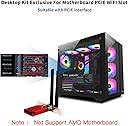
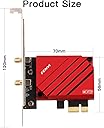
Desertcart purchases this item on your behalf and handles shipping, customs, and support to Mexico.
🚀 Level up your gaming and streaming with WiFi 7 speed that leaves lag in the dust!
The FENVi WiFi 7 Gaming PCIe Adapter BE200 delivers ultra-fast 8774 Mbps tri-band wireless connectivity with 6GHz low latency, powered by the Intel BE200 chip. Designed exclusively for Intel 12th Gen+ desktops, it supports Bluetooth 5.4 for seamless multi-device connections and ensures lag-free gaming, 8K streaming, and VR/AR experiences with easy PCIe installation and robust network performance.


| ASIN | B073GW9SW9 |
| Best Sellers Rank | #360 in Internal Computer Networking Cards |
| Brand | F FENVI |
| Built-In Media | low profile bracket; bluetooth cable |
| Color | Red |
| Compatible Devices | Desktop |
| Compatible Operating System Family | Windows |
| Customer Reviews | 4.3 out of 5 stars 342 Reviews |
| Data Link Protocol | 802.11be, Bluetooth, wifi 7 |
| Data Transfer Rate | 8774 megabits_per_second |
| Hardware Interface | Bluetooth 5, PCIE x 1, PCIE x 16, PCIE x 4, PCIE x 8 |
| Item Highlight | Ultra-Low Latency, 320MHz Smooth Streaming, Bluetooth 5. |
| Item Weight | 0.27 g |
| Manufacturer | FENVi |
| Mfr Part Number | FV-BE8800R |
| Minimum Required Operating System Version | Windows 10 |
| Model Number | FV-BE8800R |
| Number of Items | 1 |
| Number of Packs | 1 |
| UPC | 645195971690 |
| Unit Count | 1 Count |
A**N
Linux: Fenvi FV8802-8265 Review
I was a bit concerned when ordering from an unknown company, Fenvi, that this might be a knockoff and lack performance. However the product was as described and performed well on two Dell servers, both running Arch Linux with kernel 4.9.41-1-lts. Note that this PCIe card with antennae costs only a couple of dollars more than the Intel 8265 card alone. [giuseppe@gverdi ~]$ sudo lspci -v -s 04:00.0 04:00.0 Network controller: Intel Corporation Wireless 8265 / 8275 (rev 50) Subsystem: Intel Corporation Device 0050 Flags: bus master, fast devsel, latency 0, IRQ 32 Memory at 92b00000 (64-bit, non-prefetchable) [size=8K] Capabilities: [c8] Power Management version 3 Capabilities: [d0] MSI: Enable+ Count=1/1 Maskable- 64bit+ Capabilities: [40] Express Endpoint, MSI 00 Capabilities: [100] Advanced Error Reporting Capabilities: [140] Device Serial Number 34-13-e8-ff-ff-5a-01-ef Capabilities: [14c] Latency Tolerance Reporting Capabilities: [154] L1 PM Substates Kernel driver in use: iwlwifi Kernel modules: iwlwifi As you can see it uses the in kernel iwlwifi driver and requires the proper Intel firmware to be available, so install linux-firmware using your distributions package manager. Environment 1 I first tested this card in my own machine in a very challenging setting for the 5g band, one floor above and several walls from a Ubiquity AC Pro wireless access point. At first I was connecting only on wireless N, but at the full 300mbps rating of the 2.4g band. I have another device connecting as AC, but never getting better than N speeds, so I knew that the AC signal was at least available. I was, after a bunch of tweaking, able to connect at AC speeds varying from about 450-700mbps, probably averaging in the 500-550mbps range. In order to achieve this I needed to tweak one setting on the PCIe card and a couple on my access point. 1) On the access point I needed to dial down the power output of the 2.4g band and max out the power level on the 5g band. Those changes allowed the card to lock onto the AC signal instead of just wireless N in the 2.4g band. 2) I set the option "options iwlwifi 11n_disable=8" in "/etc/modprobe.d/iwlwifi.conf" which enable antenna aggregation on the PCIe card. These two tweaks provided very acceptable performance in this environment. Environment 2 After a couple of days burning in the card, I moved the card to a server in a different location with a wall + a partial wall between the server and a Ubiquity AC Pro wireless access point. This time without any tweaks to either device. I immediately was averaging a 600mbps connection. I altered only the 5g radio power on the access point and immediately connecting at 780mbps. The connection speed varied, but was always at or above 650mbps. I then turned on antenna aggregation and, while I never exceeded the 780mbps mark obtained without the tweak, speeds seemed to remain more consistently closer to that high mark. I'm quite happy with the Fenvi card. The Ubiquity AC Pro is a 3x3 11AC MIMO access point and in both environments was serving 8-10 other wireless clients. I did not test the Fenvi in an unobstructed environment, where performance should improve. Also, the nature of the antennae location relative to other possible electromagnetic interference from the server itself may be detrimental. If I had an extension, I'd test with the antenna somewhat further from the server. The Intel drivers make for a simple install on Linux, which is why I gravitated to this card. I would recommend this card for modern Linux kernels. Addendum: My Biggest Headach This card is great, but will drive you bonkers if you install in a Dell T130 server because the fan speed will kick permanently to full speed and none of the firmware settings in the Bios/iDrac gui will allow you to get your fans spinning at normal, quiet, levels. Do not despair. First, it has nothing to do with this specific card. Any third party PCIe card inserted into this server will result in the same issue. To fix this, you need to install the Dell Open Manage tools and run the command: racadm set System.ThermalSettings.ThirdPartyPCIFanResponse 0 I just saved you at least a day and handfuls of hair:)
L**Y
Intel drivers are kept up to date and are solid
You need 802.11AC compatible router to get the most benefit from this card. Get drivers from Intel's website. The FV8802 is an Intel Dual Band Wireless AC 8260 chipset. I copied these to my PC prior to install. Bluetooth requires an open USB pin slot on your motherboard. Make sure it's plugged in firmly. After startup Windows 10 will be able to locate drivers but for optimal performance install Intel's latest Bluetooth first then wifi driver. The windows drivers didn't seem to work with the Bluetooth. The Bluetooth quality is strong and my headphones worked in the other room without any degradation. WIFI is connected at over 500MBPS and maybe higher is possible with a better router. Overall I'm happy and so far is the fastest WIFI connection I've used. 5 stars overall. It took me two tries to optimize performance and get Bluetooth working. Good luck!
J**.
Great WiFi/Bluetooth card, non-existent customer service
tl;dr - 5 stars for the product, minus 1 star for no customer service. Product support is just as important as the how well the product itself functions. Without support, the greatest WiFi card in the world could be useless. My motherboard does not have WiFi or BT built in, so I got the FV-8802 to add these functions. This WiFi card gives me around 65Mbs on a 100Mbs connection with the router 3 rooms away. The BT is fantastic. I previously had a cheap USB BT dongle, and my Bose headphones would cut out if I moved 5 feet from the computer. Now with this card, I can walk about 40 feet away with my headphones on, and the signal stays solid. My only complaint is the customer service. The card installed very easily, and the WiFi picked right up and started working with the Windows 10 drivers that automatically installed. However, I could not get a BT device to connect. I emailed customer service on August 8th and NEVER received a response. Mind you, that is the email address Fenvi provides on their website for Amazon orders. After 2 hours of frustration, reading through reviews to see what other people have done to fix this, reinstalling the drivers (straight from Intel's site, not the Fenvi-provided drivers), unpairing and re-pairing the BT devices did the trick. Something to note is that there are two separate drivers for the WiFi and BT, as other have noted. Get the drivers straight from Intel. You'll notice independent drivers for WiFi and BT. Don't use the ones from Fenvi's website as they are outdated; as of August 8th, 2019, they are a few revisions old. Also, the antenna magnet is very weak, so don't plan on mounting it on a vertical surface. I just put it on the top of my case. When I put it on the side, it slid down the case.
T**C
FV-8802 (8265): Great Installation, Great Performance
Bought 2 of the FV-8802 (8265) version, one for an Intel MB, and one for an AMD MB, both running Win10 x64. Both went into PCIe x4 slots, both were connected to USB headers on the MB for BT capability, and both showed up as devices upon bootup. So far, so good. Connected the extended antennas so they sat on the desktops for much better signal strength, loved that it wasn't just two antenna prongs fixed to the cards at the back and bottom of the machines where reception is not ideal. Did NOT install files from packaged CD, downloaded them directly from Fenvi site, which included latest WiFi and BT drivers for FV-8802. Installed drivers, device manager on both machines recognized the WiFi and BT of the cards. Connected them to my 5G router, was immediately off to the races, tripled my download and upload speeds from my older 2.4G N cards. Fantastic, very happy with this purchase.
H**H
It really is simple to set up best value for the money
I really like the fact that this device serves as a Wi-Fi and Bluetooth combo. Just plug and play very easy to set up. I did not interact with their text Support but I gave it five stars anyway because really the best tech-support is one way you don't have to use them because the dam thing works. Price was great and the range on the Bluetooth is pretty good. I do not do competitive gaming but the performance is great for my kid who uses it just for Minecraft and homework
J**L
Great product and fair price!
Super easy to install. Only problem was the disc with the drivers had a corrupt rar file so I had to download from the site, but it works flawlessly so far. Upgraded from win7 to win10, reason I bought the card in the first place (pc would not upgrade to win 10 with old wireless card), updated automatically with no problem after upgrade. Have it set to use the 5g signal in a room far from router and still get maximum download and upload speeds! I highly recommend this wireless card!
M**F
Just do not buy it.
Seriously bad. Not the electronics or the Wifi chip, its the way it is built (or not built really), very cheap material, no attention to housing, zero care about durability. Got 2, shipping back 2. The antena by the way, just flips down ward, and cannot be installed and positioned properly, does not mater what you do, antena justy falls down ward, as it is very loose. the whole thing really is just garbage with a decent chip in it.
E**N
Wifi works great, bluetooth not so much
I'm a CS guy, have worked in IT for years and built countless computer systems. The bluetooth on here doesn't work but the wifi is fantastic.
P**N
Perfetta scheda WIFI
Ottima scheda. Ha il bluetooth e banda AC . Attenzione: scaricare i driver aggiornati dal sito del produttore. Ottima ricezione.
M**.
写真と違うものが来た
FV9801型を頼んだんですけど、写真とは全く違う物が来てびっくりしました。よくよく見れば、FV9801の写真はFV8802型が写っているようです。BT4.2が欲しくて頼んだのに、来てるのがBT4.0でした。これ、詐欺じゃないですか?
A**W
WiFi is fast and stable
I was previously using one of those USB WiFi dongles which wasn't so stable. The internet connection would drop out for a few seconds every few minutes, so I bought this hoping the WiFI would be more stable by plugging directly into the motherboard. And indeed it is far more stable. I have not had a single issue with my WiFi connection since installing this a year ago. Windows 10 automatically detected and installed the drivers so I didn't have to worry about any software. I can't comment on the bluetooth as I have never used it.
B**T
Marche nickel sous Linux et Windows 10
Marche nickel sous Linux (Kubuntu 20.04) et Windows 10. C'est d’ailleurs pour cette compatibilité que je l'ai choisi. L'antenne déportée est très pratique. Pas de coupure intempestives. Connexion stable et rapide. Donc du tout bon pour moi.
B**P
写真ちがうじゃん……
アンテナ増えてんね。まぁフツーに使えてるから文句はないけど。 Windows10のPCに追加したけど、接続すれば即使えるということはなかった。 ドライバのCDが付属していたけど、念のため公式サイトからダウンロードしてインストールさせた。 1週間ほどつかっているけど、WifiもBluetoothも特に不安定に感じることはない。 ちなみに、Wifiルータに接続したHDDの接続速度を測るとこんな感じ。 規格の上限に比べたらずいぶん遅いってことになるかもしれないけど、Wi-Fiルータは一階上の別の部屋だからこの程度なのかなとも思う。
Trustpilot
2 weeks ago
4 days ago