Buy anything from 5,000+ international stores. One checkout price. No surprise fees. Join 2M+ shoppers on Desertcart.
Desertcart purchases this item on your behalf and handles shipping, customs, and support to Mexico.
🚀 Elevate Your Connectivity Game!
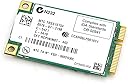
The Nic 4965AGNMM2WBPAK1 is a high-performance wireless networking card that supports the latest 802.11n standard, utilizing MIMO technology for enhanced signal strength and coverage. It is compatible with older wireless standards and features robust security with WPA2 encryption, making it an ideal choice for professionals seeking reliable and secure internet access.
| ASIN | B000RFPBQQ |
| Best Sellers Rank | #214 in Laptop Network Adapters |
| Brand | Intel |
| Color | Assorted |
| Compatible Devices | Desktop, Laptop |
| Customer Reviews | 4.4 out of 5 stars 257 Reviews |
| Data Link Protocol | Ethernet |
| Data Transfer Rate | 300 Megabits Per Second |
| Global Trade Identification Number | 00735858190879 |
| Hardware Interface | PCI , USB 3.0 |
| Item Dimensions L x W x H | 1.18"L x 2"W x 1.18"H |
| Item Part Number | 4965AGNMM2WB |
| Item Weight | 4.54 g |
| Manufacturer | Intel |
| Mfr Part Number | 4965AGNMM2WB |
| Minimum Required Operating System Version | Ubuntu 16.04 Xenial Xerus, Windows 10 |
| Model Number | 4965AGNMM2WB |
| Product Dimensions | 1.18"L x 2"W x 1.18"H |
| UPC | 675900848252 735858190879 |
| Unit Count | 1.0 Count |
2**Y
4 Stars for now, it's only been 24 hours since I put it in my laptop
I have a Dell Latitude D630, which I picked up for a good price from a Microsoft Authorized Refurb place. This laptop is from the 2007/8 era with a core 2 duo processor. It was listed as "A" condition and when I got it, it sure looked new, and came with Windows 7 pro and 4Gb of memory. I wanted a better wi-fi card in it because (while the one it had worked just fine) it only went as far as "G". I wanted one that would not only do "N", but also dual-band (2.4GHz/5GHz), and this card fit those specifications, as listed by Intel: The Intel® Wireless WiFi Link 4965AGN product is an embedded 802.11a/b/g/n¹ PCIe* Mini Card network adapter card that operates in both the 2.4GHz and 5.0GHz spectrum, delivering high throughput and a host of features that enhance today's mobile lifestyle. Deploying WLAN technology in your home and business increases productivity, efficiency and flexibility by enabling faster decision making, reducing down-time, and enhancing employee satisfaction. For more information visit our WLAN ROI and WLAN Deployment web pages. Once installed I Windows 7 immediately identified the card and set it up. I tried my 2.4 "N" side of my dual-band router and it logged in just fine, then tried logging into my 5GHz part of my router and....no problems. Considering that I paid less than $20 for this (card + shipping), I think it made a great update. Should I run into problems in the field, etc. I'll update this review, but as of now, I'm a "Happy Camper". UPDATE: OCTOBER 12,2013 No issues at all since purchasing this card. My hope now is that they will come out with the same card with the addition of 802.11ac
M**R
works with Dell Inspiron 1520
I purchased this item to upgrade the wifi unit from a Dell Inspiron 1520 Laptop. The installation was a breeze: Power down(!) the Laptop. Flip it over, remove two screws and plastic cover to access the wifi card. Unplug the two old antenna cables. Remove the old wifi card (pull back the two metal springs, the wifi card will flip up). Put in the new one (insert in the same angle, then press it down until the metal springs latch). Connect three(!) antenna cables. Explanation: The hardware implementation of N-(draft) class wifi needs three antenna cables for max performance. I found the third antenna cable (grey) in a plastic pouch near the location of the wifi card. Not all Laptops have a third antenna cable. It depends on what display is installed in your device. By the way: It doesn't matter in which order you connect the three antenna cables. At last, use the screws to fix the plastic cap and boot up your Laptop. In my case, Windows 7 found the driver without connecting to the internet, otherwise you might need to connect your Laptop via an ethernet cable to your router/switch to download the wifi driver before you can use your wifi(!) The maximum speed was 54 mbps before. Now, with the new wifi card, I can reach over 130 mbps. Well worth the money!
R**E
WOW!
Installed this card in a 6 year old Dell Inspiron E1505. Rebuilding this laptop, installed 500GB 7,200 rpm hard drive, new memory (2 GB) and of course this wireless card. Expectations were low as the laptop is very old. I recently installed Ubuntu 12.04 onto the laptop (was too dilapidated for Windows 7), the existing wireless card was dropping intermittently and too inconsistent to use. Had to install new card from the keyboard side. Once installed, I booted the machine, and Ubuntu picked up the new device immediately (drivers? Who needs drivers when you have Ubuntu!)! Went to connect to my access point, and also saw 12 different access points (previously only seen mine and the next door neighbor). Connected to access point, and subsequently browsed the Internet at speeds I never thought possible for this machine! Great card! If you are sick and tired of Windows, look into getting Ubuntu, it truly does know how to treat your computer! If this WI-FI card is compatible with your computer - GET IT!
P**R
Cheap and worked for my Dell Vostro 1500
I tried to put 2 different Wireless N USB adapters but they actually slowed down my itnernet speed. I installed this card by watching a video posted titled ' Dell Vostro Wireless N adapter installation". My laptop did not have drivers so i connected to internet with Ethernet cable and windows Vista updated the drivers. The internet wireless speed went from 6 MBPS to about 11.5 MBPS. My internet would disconnect earlier on my Wireless G card. I used my laptop for about 2-3 hours last night and did not get disconnnected. Hopefully this will solve the internet disconnect issue. The product arrived on time. I am happy with the product so far.
G**P
Died after only one month.
It only worked for about a month. I replaced the stock WIFI card that was in my Dell Inspiron 1525 laptop. The Dell card was limited to Wireless a and g. It also had problems with a poor signal even when in the same room with our fairly powerful ASUS router. When this WIFI card was working (for the first month), it worked great. Much improved reception and speed. Assuming that this is just a defective card, I was hoping to get a replacement. Unfortunately, they don't offer replacements, but you can get a refund if you return the card back to Shenzhen Guangdong, China. You pay the shipping. I haven't dropped it off at the post office, yet, but I won't be surprised if the return shipping costs more than buying a new card. Update1: I went to the post office and asked for a price to ship it back to China (using the original packaging) and was told the price was over $13. Considering that the refund is only $3.99 and the cost for a new card is $5.98, it will be cheaper to just buy another WIFI card. Hopefully, the second one will work. Update2: JM Electronics contacted me, I assume after reading this review, and graciously shipped me a replacement without having me ship back the defective WIFI card. The replacement has been working great for the last couple weeks. I'm upgrading my rating to 3 stars and will increase this rating if it continues to work in a few months.
R**U
Not worth buying, but worth the risk since this was just 5$
Hoping that WiFi N would be great upgrade from WiFi G, not happy with this card. Worth the risk since this is just 5$, if this was expensive I would have returned this card. Using this in Dell D630 laptop with Ubuntu & Windows 10. 1) Doesn’t recognize 5 GHz. 2) On Ubuntu it doesn’t connect to WiFi after I start my system (after every start), I have to force it at least 3 to 5 times to connect to WiFi. 3) Some times WiFi connection suddenly drops & have to restart system to reconnect. 4) On windows 10 it does connect after the system starts but same issues as above sometimes the connection just drops & have to restart system to connect to WiFi. Installed old Intel WiFi G card everything is fine now.
T**N
Flaky
The card installation was ok in my Dell D620. However the laptop has only two antenna leads and this card is designed for three leads. Because of this, if I was at the other end of the house the performance was slower that the original 'G' adaptor. I bought an usb instead, and its not worth returning this pos.
K**.
Perfect Wireless Upgrade to Wireless-N for my Gateway M6827
I ordered this to replace an existing Intel PRO/Wireless 3945 (ABG) in my Gateway M-6827 laptop. I had recently upgraded to Verizon FIOS internet service and my existing wireless card did not work well with my FIOS Router (I kept getting only one or two bars strengh only 2 feet from the FIOS router!!). I downloaded the latest drivers and Intel Wireless Application on to my Gateway laptop prior to removing my old card and physically installing the new Intel 4965AGN NextGen Wireless PCIe Mini Card Network Adaptor. The new Intel 4965AGN wireless card went right into the spot from my old wireless card, connected two existing antenna wires to Connection 1 and 2 on the new card, replaced the two small screws to lock the card in place, and then put the cover back on the bottom of the laptop. I then restarted and Windows Vista automatically recognized the new hardware and loaded an older driver. I then went into Device Manager found the Intel 4965AGN Wireless Network Card and disabled card and removed the older driver. Then I ran the Intel Application to install the new Intel 4965AGN Wireless Network Card and the latest drivers. I then restarted my laptop and logged into my FIOS network and router, and reentered the WPA key. Now I have a steady 5 bars of strength (no fluctuations at all!!), and ran the Speedtest for Verizon FIOS -- Amazingly fast 35-42 MBps for both download and upload speeds or nearly 10x faster than my old Intel 3945ABG wireless card!!). I strongly recommend the Intel 4965AGN Next-Gen Wireless-N PCIe Minin Card Network Adaptor, especially with how inexpensive and easily installed upgrade.
P**R
N type Wireless
Hard to rate this as my T60 Lenovo will not recognize it. The Lenovo have the bios locked down so it is hard to get around the issue.
K**T
gute upgrade Möglichkeit für Notebooks
Nach langen Mühen den WiFi Empfang im Haus zu verbessern, wagte ich mich endlich an ein Upgrade der WiFi Karte im Thinkpad R60. Leider gibt sind nur wenige Karten in einer Whitelist im Lenovo Bios zugelassen. Daher muss man ein neues Bios aufspielen. Dazu gibt es in einschlägigen Foren Hinweise und links. Da dies jedoch ein spezifisches Lenovo Problem ist, führt es zu keinem Punktabzug für die Karte. Nach der Aktualisierung des Bios ging alles recht problemlos: Unter Linux (Ubuntu 12.04 LTS) wurde die Karte sofort korrekt erkannt und funktionierte sofort einwandfrei. Die Verbindungen zum wireless Router waren stabil, auf große Entfernung, auch durch Beton-Bodenplatten. unter Windows mussten zunächst die Treiber geladen und installiert werden. Dann jedoch auch hier prima Empfang, schnell und auch auf größere Entfernung zum Router. Bin mit der Karte sehr zufrieden und kann sie uneingeschränkt weiterempfehlen. Vor dem Kauf sollte allerdings geprüft werden, ob das Notebook eventuell wie Lenovo eine "Whitelist" im Bios führt und, falls das der Fall ist, alternative Bios Varianten erhältlich sind.
M**N
Top Quality replacement for stock Wireless card in Dell Studio Hybrid
I was having real issues receiving my wireless signal in my house using the Dell standard N-Draft wireless card. I searched for hours and was having very little luck until I came across this. Don't be put off by the fact that you have to install it yourself, it's the easiest thing to replace in your Dell Studio Hybrid (no prior computer knowledge required). JUst unscrew the case and take the sides off, you should see a large metal box, unscrew that and you will see the wireless card in there, replace that with this product, Done! I'm now getting a strong, 5 bar signal, where i used to get 1 bar at best, and the quality and performance is much higher. If you have a Dell Studio Hybrid and are getting annoyed with the wireless performance, buy this 100%.
Y**7
Fait le job pas trop cher
Acheté en remplacement de la même, tombée en panne et que j'ai identifié comme la responsable des plantage d'un Dell Latitude D530. Effectivement, l'ordi. ne plante plus. Prix raisonnable.
A**E
installed, worked, wonderful
The atheros card on my Acer Aspire One A110-Aw Netbook, Linpus Linux Lite version, 512MB DDR2 RAM, 8GB Flash (Seashell White) died. I decided to risk (after all, the AAO is five years old) replacing it with this (before you start if you've only got 512MB, you might want to upgrade the memory at the same time) It comes with no instructions however you just need to carefully follow the instructions here: "How to upgrade an Acer Aspire One netbook's memory" www dot reghardware dot com slash 2009 slash 02 slash 19 slash aa1_memory_upgrade slash If you are only replacing the wifi card stop once you've got the case apart (20 minutes honestly) note which aerial lead goes where (main, aux) carefully prise them off, unscrew, pop out, replace. main (ath) = 1 (int), aux = 2, reassemble, done, working... You might need new wifi drivers in which case you might need to replace Linpus with one of the mainstream - I'm using openSUSE 12.1 KDE netbook interface. They're all installable via a USB, GIYF If you're sticking with Linpus and you haven't tweaked already, you should consider the article "Ten tweaks for a new Acer Aspire One"
Trustpilot
2 weeks ago
2 months ago