We remain fully operational. Our teams are working around the clock to ensure your deliveries continue safely.

DOWNLOAD THE APP


Customer Services
Copyright © 2025 Desertcart Holdings Limited
DOWNLOAD THE APP
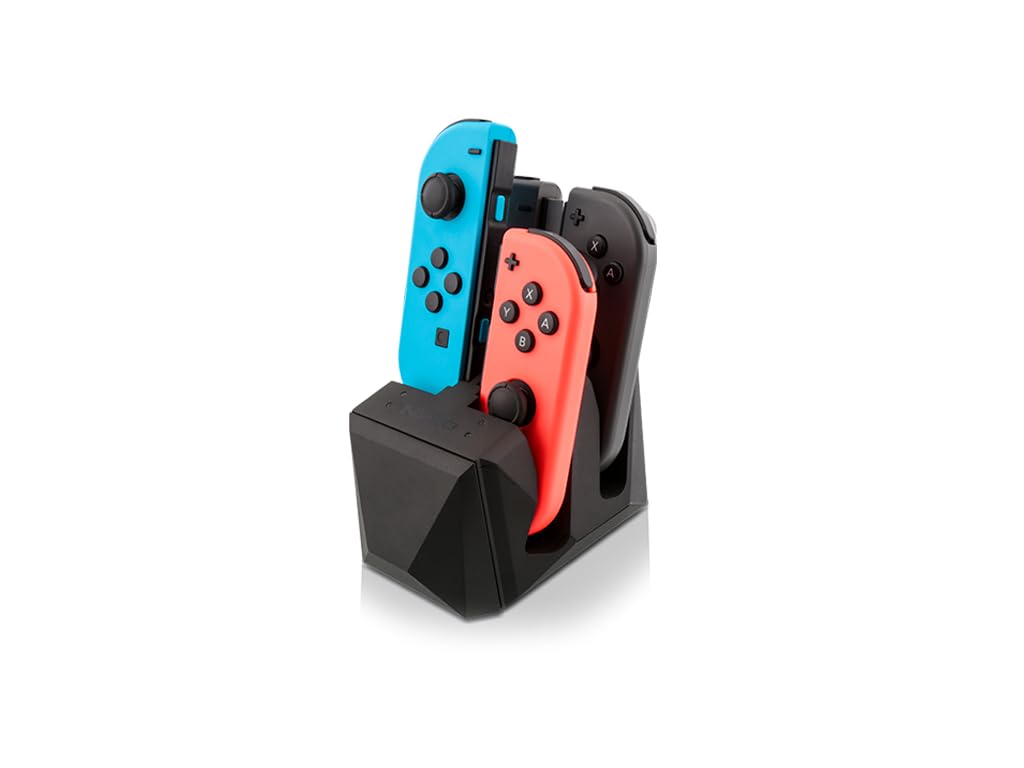
⚡ Power Up Your Playtime!
The Nyko Charge Block for Joy Con is a 4-port charging station designed for Nintendo Switch Joy-Cons, featuring a slide-in design for secure placement, the ability to connect multiple units, and LED indicators to show charging status. It can be powered via USB or wall outlet, making it a versatile addition to any gamer's setup.
G**L
Best charging solution for Switch Pro and Joy-Cons
I tried so many different chargers for my Switch controllers and all were terrible for one reason or another. I was trying to go cheap and learned the hard way that they are cheap for a reason. So I decided to splurge and get a few of these and I’m glad I did. Easily the best feature is the ability to chain up to 4 charging blocks together. You can mix and match Xbox One, PS4, Switch Pro and Joy-Con blocks. The covers are easy to pop off but stay in place when you want them to. The blocks are easy to connect and stay together well. I already had other chargers for my Xbox One and PS4 but I definitely would have picked up blocks for them as well had I needed them. It creates a really nice look to have them all matching despite the different consoles. The charging dongle looks kinda weird at first, but once you start playing you don’t look at it or think about it. I much prefer having the dongle over those other chargers that force you to try to align the charge port which often result in scratches to the controller. Once it’s on, you don’t feel it or notice it at all and the ease of being able to drop the controller on the dock is so worth it. Given how the Pro controllers are made, you have to rely on the charging indicator on the controller itself which isn’t an issue at all. You can’t see the charging status from across the room like with Xbox One or PS4 controllers, but it doesn’t bother me. For Switch controllers, there is simply no better option. I’m pretty sure I’ve tried them all. From the other big brand names shipping chargers that are DOA over and over to the cheap off brand chargers that come with 1’ cables and no charger to charging indicators that never actually indicate a charge.. I’m glad I finally found a charger that works as advertised.
S**I
Just what I needed!
Wonderful charger, just what I needed! After I got my switch pro controller, I immediately started looking for a charging block so I didn’t have to constantly plug it in and wear down the charger port. Most of the charging blocks had the controller upside down, and I wanted to display right side up. The charging block is light, but it has pads on the bottom so it doesn’t slip. The dongle has a firm connection with the controller, and though sometimes it takes a few tries to establish a connection with the charging block due to not being placed right, I have no complaints. My controller is always charged and ready to go, the dongle doesn’t impede controller inputs and I haven’t noticed any weight difference. There is a very faint red light from the top of the dongle when it’s charging, and it’s barely noticeable. It turns off when it’s done charging. Love this charger
J**S
Best controller charging system I have ever owned - and I have owned many
This has worked flawlessly! Love how more than one can be "daisy chained" together with one charge cable going to the wall. The connector is completely out of the way, and doesn't detract from the aesthetics of the device since it fits so well and is made of the same plastic. I wish it contained its own LED to indicate charge state rather than a pass-through plastic light conduit, because it is almost impossible to see unless the room is dark. But its so easy to use, even the kids put the controller away and it's just always charged. So I haven't really needed the LED.
S**Y
... Switch Pro Controller since release and due to it's great battery life
I've owned the Nintendo Switch Pro Controller since release and due to it's great battery life, I've never run out of charge mid gaming session. Mostly because I normally play in handheld mode but also because I rarely played for long periods of time. After getting Splatoon 2, that changed. Since I rarely got around to plugging in my controller, I ended up getting the Low Battery Life notification a few times. After that, I started looking for a charging station. The Nyko Charge Block was the only charging station that I found. At the time, there were no reviews yet so I was a little reluctant to try it out. That and because I thought you had to charge it through the Switch Dock; I didn't know that it came with an AC adapter. While I have several from old cell phones, I was worried about them providing too much power or not enough (I ruined a Dual Shock 4 this way). Anyways I took a chance and was pleasantly surprised that an AC adapter is included. The dock is light but has two rubbery strips underneath it that keep it from moving around too much. The controller is very simple to dock due to lining up easily with the charging pins. The length of the micro USB to USB-A cable is approximately 46 inches (not counting the actual plugs). The USB-C dongle plugs in with just the right amount of force that I don't see it becoming loose any time soon. The dongle does add a bit of weight to the top of the controller but not enough to make it uncomfortable or feel unbalanced. According to the user manual, it takes approximately 6 hours to fully charge the Pro Controller. I'm not sure if that's decent or slow but it doesn't matter much to me since the controller now gets charged whenever I'm not using it. I haven't tried Daisy chaining it since this is the only Nyko Charging station I own. The one for my Dual Shock 4's is a different brand.
S**S
Good enough for the price
I bought both the Nyko Nintendo Switch Pro Controller charger and the PlayStation DualShock 4 charger and combining both products into this one review; they’re the same just with different charging ports for different controllers. If you’re wondering, they’re made of plastic and light feeling (they feel cheap) but also do their job. One thing I was worried about was that these chargers would overcharge my controllers, but they don’t. After your controller is fully charged, the charger will stop feeding power to your controller, so it doesn’t kill the battery over a long time. I don’t know if technology has gotten better but all controller chargers, I’ve bought the past few years, operate this way. Here’s how I know this; when the DualShock 4 charges it gives an orange-yellow hue for its backlit indicator, that hue stopped on the charger but (for the PS4 charge block) the light indicator was still on meaning power was going through the charger but not the DualShock 4 – bravo. The reason this is so important is that you can’t replace the internal batteries in the Nintendo Switch Pro Controller or the DualShock 4; if you kill the charge cycle in these game controllers (aka kill the battery, so it holds little to no charge) then you’re SOL – just buy a whole new controller and charger unless you want to rip open your controllers and buy aftermarket controller batteries. The reason I’m taking off a star is that these are cheap feeling, enormous, clunky pieces of plastic. Plastic doesn’t have to feel cheap; they could have been smaller and sturdier with a more texturized feel. This isn’t a big deal since it’s not like you’ll be picking these up regularly. They look modern and sleek and have large rubber feet on their bottoms so that they won’t slide around everywhere. Overall, these get the job done. Note: The Nintendo Pro Controller charge block has a USB-C charging adapter that attaches to your controller, and it’s HUGE. I don’t personally mind, but I guarantee that those who play with you on your switch will notice. It doesn’t add significant weight or get in the way but something to note.
C**S
Best joycon charger!
I got this charging stand for our joycons because I wanted something that clicked so it would be easy for my kids to use. This works great. It’s easy to use, slides in easily and flashes green when charging and stays solid green when fully charged. The stand is light weight and I plugged it into the USB port of the switch itself and it works great. I would buy this product again.
J**J
Skeptical at first but really like it now!
I have another charging dock for my PS4 by PowerA and I love it. I was really hoping this dock was going to be comparable but, at first impression, I was a little disappointed. The cons: the block is really light. I mean REALLY light! It feels cheap and it moves whenever you set the controller down. I fixed this by removing the foam tape underneath and replacing it with double sided sticky tape. Not a big deal but might be for some. Another issue I ran into was the power cable provided was too short for my needs. I wasn't able to run it down my Av tower to my power strip but luckilee you can just use the Nintendo Switch docks USB port as well. The Pros: After having this dock for some time I actually have come to really like it! I really like the convenience of just dropping the pro controller down and have it start charging when not in use. It also looks pleasing to have your controller mounted on it like if its on display. The piece that plugs into the controller also has a small window for the controllers LED which is nice. I really wish I would have gotten a dock like this for my old Wii U pro controller. I would have liked this more if the quality was like the PowerA PS4 controller dock but it does exactly what it's suppose to without any real hassles.
C**.
Perfect for charging your controllers and getting rid of unsightly cords!
Simple to set up and start charging your wireless controllers. I have the Nyko charge block duo for my PS4 pro connected to the charge block pro for my Nintendo Switch. Keeps controllers nice and neat ( I hate clutter in the entertainment area) Works as advertised. I have a total of 3 controllers connected and charging to one AC adapter. Saves space and outlets. I highly recommend this product.
Trustpilot
1 month ago
2 months ago