Buy anything from 5,000+ international stores. One checkout price. No surprise fees. Join 2M+ shoppers on Desertcart.
Desertcart purchases this item on your behalf and handles shipping, customs, and support to Mexico.
๐ก Light up your life, smartly and effortlessly.
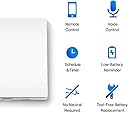
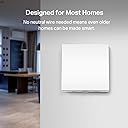
The Tapo S210 Smart Light Switch is a 1-gang, 1-way Wi-Fi enabled switch designed for easy installation without a neutral wire. It includes batteries for immediate use and supports remote and voice control via Alexa and Google Assistant when paired with the Tapo Hub. Features like scheduling, Away Mode, and tool-free battery replacement make it a convenient, secure, and modern upgrade for any smart home.


| ASIN | B0BC23S4SF |
| Actuator Type | Push Button |
| Best Sellers Rank | 3,245 in DIY & Tools ( See Top 100 in DIY & Tools ) 21 in Switches & Dimmers |
| Brand | Tapo |
| Circuit Type | 1-way |
| Colour | white |
| Compatible Devices | Amazon Alexa, Google Assistant |
| Connectivity Protocol | Wi-Fi |
| Connector Type | Screw |
| Connector type | Screw |
| Contact Material | Copper |
| Contact Type | Normally Open |
| Contact type | Normally Open |
| Control Method | Remote, Voice |
| Control Type | Full |
| Controller Type | Amazon Alexa, Google Assistant |
| Country Of Origin | China |
| Current Rating | 15 Amps |
| Current rating | 15 Amps |
| Customer Reviews | 4.4 out of 5 stars 501 Reviews |
| Included Components | Tapo S220,2ร 1.5 V AAA/LR03 Batteries,2ร Mounting Screws |
| International Protection Rating | IP00 |
| Item Dimensions | 8.7 x 8.6 x 4.1 centimetres |
| Item Type Name | Smart switch |
| Manufacturer | Tapo |
| Manufacturer Part Number | Tapo S210 |
| Material | Plastic |
| Model Number | Tapo S210 |
| Mounting Type | Wall Mount |
| Number of Items | 1 |
| Number of Positions | 1 |
| Operating Voltage | 230 Volts |
| Operating voltage | 230 Volts |
| Operation Mode | ON-OFF |
| Operation mode | ON-OFF |
| Product Warranty | 2 year manufacturer |
| Smart Home Compatibility | Smart Home Compatible |
| Specification Met | CE |
| Switch Type | Toggle |
| Terminal | Screw |
| Unit Count | 1.0 count |
| Upper Temperature Rating | 40 Degrees Celsius |
| Wattage | 600 watts |
J**.
Smart, convenient, and makes controlling lights effortless
Iโve tried several smart light switches over the years, and the Tapo S210 Smart Light Switch has quickly become my favourite. Itโs easy to install, simple to control, and genuinely adds convenience to daily life without the usual complications. I first bought this switch to control a single light in a room where running a neutral wire wasnโt possible. Installation was straightforward, and the included battery made setup simple โ no electrician required. Once paired with the Tapo Hub, it connected instantly to the app, and I could start controlling it remotely right away. The remote control and voice functionality are excellent. Using Alexa or Google Assistant, I can turn lights on or off without getting up, which is perfect for bedtime or when Iโm carrying things around the house. The Away Mode is a particularly nice feature โ it simulates someone being home, adding a layer of security when weโre out. The switch itself feels well-made and responsive. It works consistently, and I havenโt experienced any lag or connectivity issues. The design is clean and unobtrusive, fitting in perfectly with existing decor. Overall, the Tapo S210 Smart Light Switch is convenient, reliable, and easy to use. It adds a level of automation and control that really improves everyday life, whether at home or away. Iโd recommend it to anyone looking for a simple, smart, and effective solution for controlling lights.
G**D
Works great, but watch how you name it for Alexa
Very easy to wire in and perfect if you do not have a neutral wire. Batteries were included so that is a bonus. It is quite deep though so may not fit in a shallow socket housing. Have this connected to an LED light and it works fine. No flickering. My setup was a bit of a pain, as although it was working through the Tapo app, it was showing in Alexa but nothing happened when turning it on and off. It turned out to be a combination of having an old Kasa skill linked to Alexa, which I don't use anymore, and this interferring with the device communication (Kasa and Tapo and both part of TP-Link) and also the fact that I have an Amazon Echo called "Bedroom" and I called this new switch "Bedroom Switch". There are documented issues between Tapo and Alexa communications where Alexa can be confused with very similarily named devices and trying to control the wrong device. Even though you specify "Bedroom Switch" in the command, it actually tries to control the Bedroom Echo. Once this was sorted though, it now works fine. Sometimes a slight delay from issuing the command to something happening (like a second or less) but still quicker than getting up to turn the switch off :D
R**I
Very good switch but could be better
I've installed 4 of these so far during our house renovation. I originally wanted to replace the dumb switch with something modern and came across these during Prime day. Packaging is excellent, so were the instructions. It came with a pair of batteries and fixings as well which was VERY handy. It does require a hub to work, unlike some other Tapo products that only rely on wifi. I already had a Tapo H100 hub so didn't need a new one. Quality is generally ok, albeit a bit platicky. One of the switches had a bit more travel than the other, I had to put some foam tape on the button to correct it. Installation is split into two parts: pairing and wiring. I'm a DIY enthusiast, not an electrician so before I got to wiring I did a lot of googling and most importanly, took a few pictures of wiring behing the existing switch. Pairing was a breeze, there is a latch under the switch, once moved to "open" position the front plate comes off revealing the battery slots and the "reset/pair" button. I put the batteries in, opened up the Tapo app, choose the switch I wanted to add and there on the app showed step by step guide to completion. It took no time to connect it to Tapo hub. The wiring part was also much easier than I thought. It doesn't require a neutral, which means it draws power from the included batteries instead. I made sure the main switch was off and used a mains tester to make sure it really was off! I then turned it back on to use the mains tester to confirm the live wire, turned electric back off to take wires out of the old switch and put the Live one in the LIN slot and the load one in the Lout1 slot. I did need go buy some spacers as the backbox turned out to be too shallow. You can see it in the picture. Once all that was done, I turned electric back on, pressed the switch and to my surprise it worked! Compared to other wifi smart devices, these switches seem to work much faster via the app. I suspect it's because the hub is making communication much easier and straight forward. Pressing the switch, the lights come on immediately without delay just like a normal switch. The switch makes an audible click/clunk noise when you turn it on, as if it's physically turning the switch on. Which is a good thing because one of my bug bears with smart bulbs is that they don't work when there's no internet. These switches however work fine without internet, as long as there are batteries, you can physically press the switch to turn lights on. Overall, very happy with the switches. I've mainly used them where there are multiple lights involved, dining lights kitchen lights etc. Much more practical and reliable then using loads of smart bulbs. There are some cons though. 1. No status light, I understand it's not drawing power from mains but in this day and age, they could have used a very faint led as a status light. Would have looked nice, would come in handy in the dark as well. 2. Altough the switch looks like you can click the entire face, only the bottom half is clickable. Very much like my old macbook! 3. There are no 2 way wiring option. For kitchen and dining it was ok but for the hallway 2 way switch was a must for me. The only way I could do it is by grouping two switches and automation in the Tapo app so that one switch turns the other on and vice versa. (see app screenshot and video. Excuse the mess). If you're a competent electric DIYer, I don't you don't need to wire in the second switch at all. Just connect the wires with some wago and the second switch should just work. Although it works, they drawback is that it takes a second for the lights to come on as one switch has to ask the other to turn on as well. Would I buy them again? Not at full price. I'd like a status light and the option to wire in Neutral and get rid of the batteries.
K**T
Good alternative to bulbs to control lights.
Had this fitted at the same time as some other switches and light fittings by an electrician. After reading the reviews I also purchased spacers 10mm and 20mm. The electrician was about to fit it with the 10mm spacer. Apparently easy to fit. The switch allows you to turn it on and off manually too. I have multiple different Tapo products so it was easy to add to the app. I also have Echo Dot/Echo Pop and it works well with Alexa once set up. I have it on the switch for my outdoor pouch lights which will really help during winter months as I can put it on a timer without using Tapo bulbs. I think I got it on a limited deal.
E**N
Works great with the Tapo setup
Used this to convert the garage light so it works with the rest of our Tapo setup and itโs been spot on, easy to set up, works reliably, and has a really satisfying click when you press it.
I**N
Good product
Easy to install and connect work well with the app.
W**E
Easy to install these and the necessary hub!
I'm changing the light switches in our home as arthritis is setting in making normal switches painful at times. These are just the ticket. They respond to Alexa and they are very easy to operate manually. The only fiddly bit was the fact that my switch backboxes were not deep enough which meant I had to buy 10mm. spacers (ASIN: B00H2FGWZI). No problem there, just that I had to wait another WHOLE day for them to be up and working!!! (Prime to the rescue!) Approaching my 70th I find home automation such a bonus. My family has access to my gadgets (NOT my internal CCTV) and they can see, by my electricity usage and Alexa routine activity, that I'm up and about and more importantly, well without ringing me every other day. (My sister complains about big brother, but she watches my progress on Google maps when I go to pick her up. That has stopped the "why are you late question." She can see why) The only negative is that these switches will not work with a light that has two or more switches like in a hallway. Hopefully Tapo will counter this one niggle soon.
N**Y
Read my review before you purchase
I bought three of these switches , two in the last few days. The first one is working fine and no issues setting up. The new ones , the first was a pain to setup as it would not connect to the cloud. After many factory resets it updated the firmware and is working fine The second one , no problems. One has to question if there's issues with quality control with Tapo ? Update 13th Jan. I received a replacement switch today, same problem, no connection to the cloud. After resetting the switch, at the end of the setup there is a firmware check. Showed up to date on the installation first time, on reset it required updating. New firmware, it works fine . Come on tapo GET YOU ACT TOGETHER !!! Update 16.01 If you add a automation, program the sensor first, then the switch. I have 3 switches working now . But , cloud connection is still an issue.
F**N
Inmejorable
Repito, van perfectoz
J**I
Funciona bien
Va muy bien
ๅฑฑ**ๅคช
ใจใฆใไฟก้ ผใงใใ่ฒฉๅฃฒๅบใงใใ
ๅๆไธ่ฏใฎ็ใใใใฃใๅๅใซๅฏพใใฆใใจใฆใ้ ๆ ฎใใๅฏพๅฟใ่ฟ ้ใซใใฆใใใ ใใพใใใๆฌกๅๆฉไผใใใใฐใใฒๅฉ็จใใใฆใใใ ใใพใใ
Trustpilot
5 days ago
1 day ago