We remain fully operational. Our teams are working around the clock to ensure your deliveries continue safely.

DOWNLOAD THE APP


Customer Services
Copyright © 2025 Desertcart Holdings Limited
DOWNLOAD THE APP

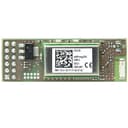
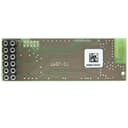
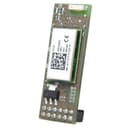
Shop RaspBee premium - ZigBee addon for Raspberry Pi with Firmware. Free delivery and returns on eligible orders. Review: Nice! Expensive but runs well. - Purchased this for use with HassIO Quite fiddly to set up but runs smoothly. Great range, one issue I had was fitting it into my Pi case. Set up instructions - Follow the instructions which come with the module. - install the Deconz plugin for hassio and copy down the “first steps” - take your MicroSD card and use your computer to read the boot partition (doesn’t appear on OS X) - Edit the Config.txt file in notepad++ at the end of the file enter the lines found in the first steps section of the deconz plugin - boot your pi with the new settings and finish the first step instructions - start Deconz If you want Bluetooth and Zigbee2mqtt together, delete the disable Bluetooth line you added to the Config.txt file and change the device location to /dev/ttyS0 I was going to buy another one but they’re unavailable at this time unfortunately. Review: Small, but powerful - Installed easily on my Pi 3 B+ and set up with home assistant and the appropriate add-on. Once configured, it found my first ZigBee device quickly and easy. Updates from the ZigBee device are instant which means automations take place straight away without any lag. I'd recommend this if looking at adding ZigBee devices to a Raspberry Pi, especially if home assistant is being used as it is extremely easy to install, configure and pair to devices.
| ASIN | B00E6300DO |
| Box Contents | ZigBee addon |
| Brand Name | dresden elektronik wireless |
| Customer Reviews | 4.3 4.3 out of 5 stars (222) |
| Manufacturer Part Number | BN-600052 |
| Model Name | RaspBee premium |
| Model Number | BN-600052 |
| Network Connectivity Technology | Ethernet, Wi-Fi |
| Operating System | Linux |
| Processor Brand | Broadcom |
| Processor Count | 1 |
| Total USB Ports | 4 |
| Wireless Compability | Radio Frequency |
A**M
Nice! Expensive but runs well.
Purchased this for use with HassIO Quite fiddly to set up but runs smoothly. Great range, one issue I had was fitting it into my Pi case. Set up instructions - Follow the instructions which come with the module. - install the Deconz plugin for hassio and copy down the “first steps” - take your MicroSD card and use your computer to read the boot partition (doesn’t appear on OS X) - Edit the Config.txt file in notepad++ at the end of the file enter the lines found in the first steps section of the deconz plugin - boot your pi with the new settings and finish the first step instructions - start Deconz If you want Bluetooth and Zigbee2mqtt together, delete the disable Bluetooth line you added to the Config.txt file and change the device location to /dev/ttyS0 I was going to buy another one but they’re unavailable at this time unfortunately.
J**A
Small, but powerful
Installed easily on my Pi 3 B+ and set up with home assistant and the appropriate add-on. Once configured, it found my first ZigBee device quickly and easy. Updates from the ZigBee device are instant which means automations take place straight away without any lag. I'd recommend this if looking at adding ZigBee devices to a Raspberry Pi, especially if home assistant is being used as it is extremely easy to install, configure and pair to devices.
A**.
Superb, works perfectly with Hue light bulbs
I bought this to use with Home Assistant and it works like a dream, just remember to disable the Raspberry Pi's built in Bluetooth first
A**R
Control zigbee devices without hubs!
Wish I had found this a long time ago. Can now control zigbee devices without the need of hubs for each manufacturer. Took a little to set up, however Google is your friend and works well.
A**Y
Simply brilliant
I bought this so that I could more effectively control my Ikea lights from my Home Assistant instance. They have transformed the lights from being unreliable pieces of junk to being so dependable I just don't think about them any more.
A**.
Let down by the software
The hardware seems fine, I get decent enough range . Whilst this is a very niche product, I have to say that I am a bit disappointed. I found the instructions fairly confusing and outdated, not that I was too dependent on them, but I used the deconz raspbian image to get up and running quickly enough. The problem is the software. Architecturally the separate graphical UI backend and API plugin feels clunky and contributes to a lot of the issues "works in deconz but not in the API or phoscon" is a common occurrence. There are a lot more bugs than the dev team is able to deal with, documentation leaves a lot to be desired, and the 'Hue compatible API' doesn't seem to be compatible with anything that works with Hue. I found that every single device I added to the gateway had some sort of issue or major limitation. Maybe I was just unlucky, but this is definitely a 'alpha' tinkerers device, not something I would be happy to have as part of my 'production' HA setup.
F**O
Exactly what I was looking for
A 802.15.4 board that has the Zigbee stack working out of the box together with a software that allows you to pair and interact with smart lighting devices. On top of that there is the possibility to flash your custom firmware to develop your own stack
A**Z
Easy to connect but poor range
It is easy to configure the Deconz gateway with most of the sensors, switches or lights but it does let me down with its range. I have problems where motion sensor would switch lights of after 20 seconds or not switch them at all and it is random behaviour. Sometimes it does not trigger anything at all. Tried with SD image from and with HA. Do not recommend. Would rather use USB version to limit interference with Pi hardware.
E**O
Funciona perfecto. Integrada sin problema en HASSIO. De momento todos los componentes tradfri funcionan sin problema y espero ir añadiendo más dispositivos sin tener que usar un hub para cada marca.
J**4
Nutze das Modul um Hue, Xiaomi und Tradfri Sensoren/Lampen in mein homebridge Setup einzubinden. Damit spare ich mir das Einbinden unzähliger Gateways der genannten Hersteller. Bisher funktioniert alles tadellos. DIe Installation war in meinem Fall eigentlich kinderleicht. Voraussetzung ist natürlich etwas Grundverständnis in Sachen Raspberry nötig (Installation von Paketen, homebridge plugins, etc.). 1. Raspberry Pi (Model 3 in meinem Fall) ausschalten 2. Raspbee Modul aufstecken 3. Raspberry Pi wieder einschalten 4. wget <Hier den Link einfügen - laut Handbuch - siehe unten> 5. sudo dpkg -i deconz-latest.deb 6. sudo apt update 7. sudo apt install -f 8. sudo raspi-config 9. “Interfacing Options” auswählen 10. “Serial” auswählen 11. “Would you like a login shell to be accessible over serial?” → <No> 12. “Would you like the serial port hardware to be enabled?” →<Yes> 13. Config tool verlassen und Raspberry Pi neustarten 14. <ipAdressedesRaspberry>/pwa/login.html im Browser eingeben und dann sollte das Gateway automatisch auftauchen in der Phoscon-Web-App auftauchen 15. Passwort vergeben und dann kann man mit dem hinzufügen der Lampen und Sensoren starten (sollten diese vorab mit einem anderen Gateway eingebunden worden sein, dann diese Verbindung zurücksetzen!) Weiterführende Infos zur Installation und Einrichtung findet man im Handbuch auf der Herstellerseite von dresen-elektronik (unter funktechnik >Wireless Light Control >RaspBee) In meinem Fall (für die Einbindung in die homebridge für Apple HomeKit Kompatibilität) habe ich das homebridge-hue plugin installiert und die config.json entsprechend anpassen. Beispiel config.json - im Bereich platforms folgenden hinzufügen: { "platform": "Hue", "name": "Hue", "users": { "XXXXXXXXXXXX": "YYYYYYYYYYY" } Dann in der Phoscon-Web-App -> Einstellungen -> Gateway -> Erweitert -> App verbinden drücken und im Anschluss (innerhalb der 60 Sekunden) homebridge starten. Dann sollte ein User und Passwort erstellt werden. Diese Daten dann bei "users" in der config.json anstelle von X und Y eintragen und nochmals die homebridge starten. Nun sollten alle verbundenen Lampen sowie Sensoren in HomeKit sichtbar sein.
F**Z
I'm investigating my options in home automation and so far this is the winner for lighting. I got a Pi 2 and the RaspBee to test on Cree Connected ZigBee bulbs. It's only my first couple days fiddling with it but this is what I learned so far: 1. It doesn't seem to work on Pi 3: the device might, but not the software. I just used a spare Pi 2 and it worked fine. 2. Place the device on the very first GPIO pins, 1-11. The picture on the website shows it on 3-13 for some reason. 3. The only software I needed to install was the "deCONZ for Raspbian Linux" 4. deCONZ cannot be started headless. Meaning, there needs to be a desktop installed and either a monitor or VNC connection so you can start the application and it can't be started over SSH. 5. deCONZ starts a web front-end that can be accessed from another computer or phone, anything with a browser, and the default username and password is delight:delight. 6. The aforementioned web service likes to crash and force you to VNC over and use deCONZ to reset it - I'm still trying to figure this one out. After a crash, deCONZ still runs so I imagine the REST commands will still work and the issue is with the web service, not the software itself. I'll update as I play with it. UPDATE 4-21-16 It's been a few weeks, I've had time to get used to the device, and I'm still very happy with it - I changed my rating to 5 stars. The range is fantastic, farther than the Samsung Smart Things hub. Granted, I live in a 900 sqft apartment, but it covers that no problem. It's faster too, the Samsung would sometimes take a second or two to toggle a light, this guy is almost instant - barely noticeable. They updated the picture on the website and it's shown on the correct GPIO pins, and they updated the content to make it a lot clearer how to get started. I still can't figure out why the web service keeps crashing but it's a quick thing to reset and my switches still work fine when it's unavailable. The CPU on the Pi 2 spikes at a whopping 3% with deCONZ and X running - it's very lightweight. The web application has out-of-the-box support for Philips HUE switches but, using the deCONZ "bind dropbox" plugin, I was able to get an OSRAM Lightify switch, Amazon product B0196M620Y, to work perfectly. I landed up buying 8 more, they work great and I imagine any other ZigBee switch or device can be joined using deCONZ. I'll be adding motion sensors and temperature control in the coming weeks so we'll see how that goes. Basically, if you're looking for quick and easy home automation, this might not be the device for you. But if you're a home automation and/or Linux nerd, who likes weekend projects, and fiddling with Pi's, then this is definitely the way to go. I don't understand why so many reviews say it's too complicated; it's an addon board for a Raspberry Pi, what should one expect? I wouldn't suggest this for my parents to use, they're getting my Smart Things hub instead ;)
D**T
Très bon produit. Très bonne alternative à la passerelle de Xiaomistable, et Ikea. Permet de garder les données en local et non pas on sait pas trop où dans le cloud (probablement en Chine). Facile d'installation et de configuration, il marche très bien avec Home Assistant. Surtout il n'est pas capricieux comme la Gateway Xiaomi, la connexion avec Home Assistant est stable.
A**J
Tested on Raspberry Pi 3B and 3B+ with 8 Philips Hue lights. Installation on a custom headless debian 'stretch' can be challenging. Great product
Trustpilot
2 weeks ago
2 weeks ago