Desertcart purchases this item on your behalf and handles shipping, customs, and support to Mexico.
📝 Elevate your note game — where classic meets cutting-edge innovation!
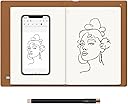
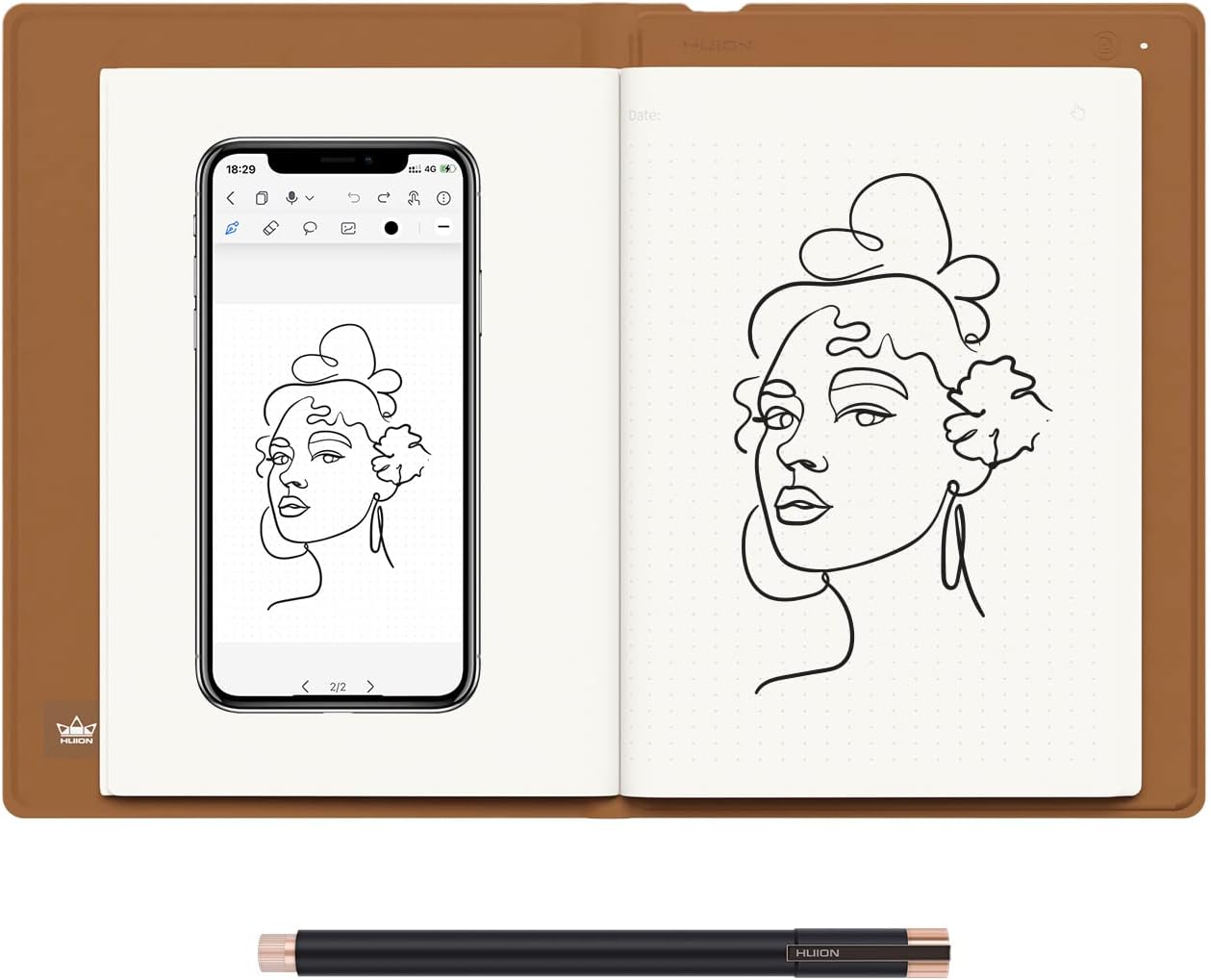
The HUION Note X10 is a sleek 2-in-1 digital notebook and drawing tablet featuring a battery-free EMR pen with 8192 pressure levels and ±60° tilt recognition. It captures your handwritten notes on real A5 paper and instantly transfers them via Bluetooth 5.0 to the Huion Note app for seamless editing, organizing, and sharing. With an 18-hour battery life, USB-C charging, and the ability to switch to a graphics tablet mode, it’s designed for professionals and creatives who demand fluid analog-digital workflows in meetings, classes, and creative sessions.


| ASIN | B0BG2T9SGV |
| Active Surface Area | 7.35×5.5" |
| Additional Features | 18hrs Long-lasting Battery Life, 2-in-1 Multifunctional Notebook, Audio Record & Playback Function, Bluetooth 5.0 Wireless Connection, Offline Storage & Online Editing |
| Best Sellers Rank | #33 in Computer Graphics Tablets |
| Brand | HUION |
| Built-In Media | Digital Pen, Graphics Tablet Cover, Huion Note & A5 Notepad, Magnetic Pen Sleeve & USB-C Cable, Replacement Nibs & Pen Nib Clip |
| Color | Orange |
| Compatible Devices | Desktop, Laptop, Smartphone, Tablet |
| Connectivity Technology | Bluetooth, USB |
| Customer Reviews | 4.3 out of 5 stars 659 Reviews |
| Display Type | No Screen |
| External Testing Certification | Não aplicável |
| Item Dimensions L x W | 9.5"L x 7"W |
| Item Type Name | Digital Notebook |
| Item Weight | 433 Grams |
| Manufacturer | ShenZhen Huion Animation Technology Co., LTD |
| Model Name | Huion Note |
| Model Number | X10 |
| Native Resolution | 1920x1080 |
| Operating System | Android 6.0 or later, Linux, Windows 7 or later, iOS 11 or later, mac OS 10.12 or later |
| Pressure Sensitivity | 8192 Levels |
| Screen Size | 7 Inches |
| Special Feature | 18hrs Long-lasting Battery Life, 2-in-1 Multifunctional Notebook, Audio Record & Playback Function, Bluetooth 5.0 Wireless Connection, Offline Storage & Online Editing Special Feature 18hrs Long-lasting Battery Life, 2-in-1 Multifunctional Notebook, Audio Record & Playback Function, Bluetooth 5.0 Wireless Connection, Offline Storage & Online Editing See more |
| Specific Uses For Product | Designing, Drawing, Painting, Editing, Writting |
| Target Audience | Business Meeting, Note Taking, Professionals, Student, Teacher |
| Unit Count | 1.0 Count |
| Warranty Description | 1 year warranty |
A**.
Limited drawbacks, if any...
The Huion Note x10 is really cool. I first started looking to digitize my notes years ago and went with the Rocketbook brand. It was ok. Being stuck to specific pens that only do decent with left-handed writing, the re-useable notebook was neat but cumbersome to use. The Note x10 is also stuck with a single specific pen, however it seems there are replacements readily available, and the quality of the ink standard/nice enough. The Huion Note x10 does everything that I was looking for. First and foremost, ease of use. It is instantaneous when using it. The longest part of setting up the device was when creating the account I had to wait a couple of minutes for the verification code to come through in an e-mail. I'm not even sure if creating an account is necessary. Once you scan the QR code from the Huion Note App, it's paired and re-pairs itself fairly quickly as you open and close the pad. Similarly for tablet mode, I installed the driver first and then plugged it into the computer. Right away it was connected and usable. It should be noted that I found it most reliable to unplug and replug the device in when you put it into sleep mode. The Huion App is very good, which is great. Often these are the shortcomings for such a device. In this case, the app has a multitude of notebook selections, pen styles, and a few tools for note-taking. Honestly, just in itself it is a very good note app (though not ideal without the Note x10!), and given that it is how you will likely primarily be interfacing with the Note x10, this is a very important aspect and they did a good job. A couple of outstanding points -- you are able to create notebooks in the app, so I create a "Daily Tasks To-Do" list and each page is a separate part of the house. I also created a "Blueprints" and standard "Notes" notebook. This alone sets the app apart from others I've come across. Another nifty trick is to use the pens Tablet Rubber Nib on a blank page. You get the feel of writing, but of course there is no ink. It takes a second to get used to, as you'll be looking at the phone screen for where you've written on the page, but it's nice for when you want to take notes but without using up one of the 50 pages. So far I have used it the most this way, as I wanted to digitize existing notes, but without using up pages. Tablet mode is also very serviceable, while it may not have gestures or buttons like a fully fledged Wacom tablet would, that's not really an issue since that's not it's main purpose. So far I've tried it out with photoshop and with storyboarder and it works exactly as you'd expect. Possible negatives to look out for: First on this short list is the notepad paper itself just happens to be semi-easily affected by humidity. I have found that some papers tend to fold with use and perspiration. The default A5 paper that comes with this notebook seems to have this happen. However, the paper quality itself is very good and feels pleasant to write on. Next is the possible longevity of the pen tips -- each tip is about 1/4th to 1/3rd the length of a normal pen. They advertise 400m, which I'm sure is plenty. I'm more thinking long term, say 8 years from now if everything will still be available. Finally, it sounds like only their brand of pen works -- to be expected. Don't lose it! The pen does come with a leather carrying case that can magnetically attach to a specific spot of the front of the Huion Note x10, however I wouldn't rely on it alone were I to carry mine out and about. That is about it. In terms of positives: The A5 Paper can be any replacement pads. This is really great for longevity. The device itself feels fairly high quality and has few moving parts, nothing that seems like it would break. The app is very, very good for note taking and it looks and feels really cool taking notes with it. And being able to use it in tablet mode means that even at the very end of its life it can still have a purpose. In short: The Huion Note x10 is very well advertised, delivering on everything it promises. Connecting to the App via Bluetooth on your phone is very easy, using it is very fluid, and interfacing between the two of them has next to no downsides that I came across. In addition to all of this, it can very easily connect to the computer to be used as a drawing tablet. The downsides that I tried to list are honestly not even about the device or the app itself, but just possible concerns about long term supply of pen tips and being extremely nitpicky. This is a great device. If you want to digitize your notes, I highly recommend it for that alone and you get the added bonus of having a drawing tablet.
C**S
Very useful device
Excellent device. I use for note taking and e reading. Because it is Android I can run other apps I like (News, You Tube etc...). Battery life is good not great but easily gets you through a day of note taking and reading. The screen is fantastic given it is anti-glare. The pen works very well and does not need charging....very clever! One thing with the note taking is that yes, you can back them up for example to your google drive, but I have struggled to be able to read them on other Android devices even with the Huion Note app loaded. It auto synchs the native Huion format when it saves and this device uses the Huion Note E app and not the Huion app that is in the google store. I have a work around for really important notes to manually share/save in PDF. Overall an excellent device.
J**E
Digital notepad
My daughter art student loves this works as good as much more expensive options. She uses it daily!
J**.
A nice notebook with a few shortcomings.
I'm mostly satisfied with it. The strong points are that most of the Android apps from my phone also work here on the tablet. Some don't, notably ones that require NFC or other special hardware. Things that I don't like about it include: 1. The stylus behavior: If I try to write on the tablet and a letter starts with an upstroke, it sometimes jumps to the top of the page. I often find there is no way to recover from that other than leaving the page and coming back. 2. App compatibility: If you use their writing apps called Notes or Tasks, it generally works okay; however, in Obsidian, this annoying handwriting issue crops up quite often. 3. The stylus seems to get locked in a mode where you're writing. If you try to select another place on the screen or use one of their gestures (perhaps to cross out a word or the like), it still thinks you're trying to write stuff. I'm not quite sure how it's supposed to recognize the difference between writing, positioning, or editing. Maybe I just don't know how to use it yet, but it's pretty annoying when it happens. That is probably my biggest complaint. well, that and its strange behavior when writing in a note on Obsidian. Another shortcoming is their apps. They are pretty limited. Sure, you can take notes in the note-taking app and you can keep a task list, but they are limited only to the app and cannot be shared amongst other devices. You can't even set it to dark mode for the app screen, and the shortcuts to the apps are in some strange order that I haven't quite figured out yet. If I reorder them, it just reorders them the way it wants to. I also can't lock those app-launching icons, which sometimes results in strange behavior. Fortunately, Google Calendar works great, so there is that. I haven't set up Thunderbird for my email yet, but it looks like it's probably going to work okay. Battery endurance seems to be adequate. I go several days between charges and usually notice when it's getting low, but I haven't had to worry about it, at least during those few days. Another good point is the handwriting recognition; I thought it works very well. That definitely is in the plus column. The only issue with the handwriting is that as you write and it recognizes your input, it tosses the words directly into the sentence. Pretty soon, the sentence gets long enough that you're writing over the top of it. It would be great if you could define a specific handwriting zone where you could just continue to write and the recognized words would appear in a different part of the screen. That way, you're not writing over what you've already written, and you always have a blank space to work in. But unfortunately, it doesn't work that way. Unless you're using their app, where it's not recognizing handwriting as you write it, this becomes a limitation.
A**Y
The most curious note book I've seen in a while
This is amazing, never thought I'll find such an interesting note book, works for artists like me that sketch better on paper and want it to be digital as well, also has a pad to do it on pc, definitely worth it
R**S
Love it.. But…
I love the concept more than the product. The pen does not require charging, a huge plus. The Huion app is weak, at best. There is no Face ID integration to make login smoother. The app looks dingy and not as crisp. The cloud framework is not intuitive, so you must set up cloud sync on each device to ensure your work transfers to each one. I would imagine that if it were account-based, it would be easier. The A5 notebook quality is great, but the app cannot capture the entire surface area. The “date” line on the physical notebook page is outside the capture area. The lines are tight, and the app may have issues capturing the input. Another challenge is remembering to press a button to “turn” the page. Since the device has offline capabilities, it is up to the user to remember whether they turned the page. If you forget, your downloaded notes will have a “write-over,” making them illegible. One cool thing is that the pad works as a trackpad. You can control your computer’s cursor. It’s less fun if you are trying to work on the laptop while charging the pad. So, it’s a great concept—just poor execution.
D**E
Awesome cheap digital notebook! LOVE IT!
Ok I was really worried about these reviews but so far I've really been liking it and for 100 bucks I'd say it's pretty great. The pen is very light and comes in a carrying case, and although the case is magnetic and sticks to the front of the device I wouldn't leave it there as I did a shake test and it flew right off. I bought this tablet for it's memory function and wow it works amazing, I put the device in offline mode and it captured everything I wrote as shown in the images. It seems to have a fairly large memory for when you're out and about aswell. I also liked the design and it's a perfect travel size. I am an artist and I have owned huion tablets before and currently using the kamvas slate 10 standalone tablet. And it's safe to say I am impressed with this little digital notebook, I'm not quite sure about it's drawing abilities but it is perfect for writing and little doodles. However if you're using this as a drawing tablet I suggest using a program that is better suited towards drawing and not Huion note.
I**!
READ NOW!!
I have been dying to get this and I finally got i for Christmas!! I had originally saw this on an ad on YouTube, and it finally came back to my mind for Christmas. Reading the Amazon reviews, every bad review was mainly just people not actually understanding how to use it!! For example, the product’s ‘factory smell’ disappeared almost immediately, and just using the app in general was so easy! The ‘loading’ screen isn’t actually a loading screen, it’s just some pages to scroll through but swiping to the left (to scroll right) until you get a start button!! I was a little confused at it at first and I thought it just wasn’t loading like other reviews said, but after tapping/swiping on the screen, I discovered how to use it. It took a few minutes of trial and error, but syncing the tablet was easier than expected. The little pamphlet that comes with the tablet says to ‘change the pen’ out, but you just have to take off the waxy tip, don’t waste the pen!! I personally like the app, and even though this request might be hard to make true, I think if there was a way to tell which page is 1, 2, 3 etc and when you write on the page, it automatically goes to that page if it’s online rather than making a completely separate page for something that is on the same page as what was originally written. Yeah, it’s a bit of a stretch, but it would be nice if it existed. I love the tablet, it’s great, I love the app, it’s great! I would probably add something on the first load screen that says ‘Swipe’ or something with an arrow so customers don’t get confused. Also, maybe add in the instructions *where* to put the stick on drawing pad on the tablet for the drawing bad sheet…? I still haven’t put mine on yet :( also, I would personally point out the drawing pad pen nib to make it easier to define which job is which, because I think I read a review about that, too. Just to make things less confusing!! Another thing I would like to add as recommendations for future designs, maybe have a little attachment or something that can store extra pen-nibs so they don’t get lost or someone can easily use both the drawing pad nib and the regular pen nib? That would be great!! Thanks for reading this!!
A**R
Very happy! I use it daily for research notes...great for people who like paper
I have been very happy with this product. I use it daily for research work and the quality is excellent. I've used the android app for uploads, but I also use the Windows and Linux drivers with OneNote as a sort of "live copy", which I find works best. The android app took a short time to understand but I have not had it crash or lose data. I would suggest you get an elastic band to keep it tightly closed in your backpack, as if you have a thick notebook, the sensor may not indicate closed, and the battery runs down. I keep a cellphone battery bank just in case. Android app has a nifty "playback" feature that re-animates your pen strokes. Great for deriving equations when teaching a class!
M**.
Bon mais pas parfait
La tablette en elle même est de bonne qualité Bon écran, la résolution est suffisante L'etui est correct mais ne sera pas durable. Par contre côté logiciel il y a des progrès a faire. Les traductions sont parfois très approximatives peu d'options pas exemple on peux grouper les notes mais pas faire de dossiers. Plus gênant, des protocoles de sécurité obsolètes avec Google qui empêchent un partage simple Je reste en attente des mises a jour firmware
G**M
What I wanted
A great tablet to focus on reading, writing and annotating pdfs...
T**A
Too good to be true
Now I want to go to China)))))) this one makes me thinking I live in the future! And it has the price like for two people lunch. Quality is outstanding 100%. Will get as gifts also for my best friends.
H**M
Suprisingly great at bridging traditional and digital art
I work as a full time digital artist and draw on a screen tablet everyday. My eyes get fatigued often and I miss drawing on the sketchbook. Of course I could get a sketchbook and scan it in, but that's a long and tedius process. I found that this tablet/sketchbook fulfills my both my needs perfectly. I'm able to carry this tablet anywhere and turn my drawings to digital art on the go. I think something that needs to be emphasized more is pressure sensitivity, I thought that since the ball point pen is pretty uniform in width that it would not register pressure sensitivity, but it does! And I really like that I can lightly draw on the paper and having that reflected on the app. I also like that I can carry around a sketchbook that can also act as a tablet when I need it for making quick sketches or more refined work through the mobile/laptop version of clip studio for example. Everything considered, this is a great tablet/sketchbook and I hope more products like these are made to bridge traditional and digital art.
Trustpilot
1 month ago
1 week ago