We remain fully operational. Our teams are working around the clock to ensure your deliveries continue safely.

DOWNLOAD THE APP


Customer Services
Copyright © 2025 Desertcart Holdings Limited
DOWNLOAD THE APP


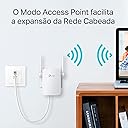
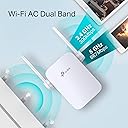
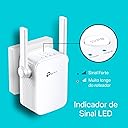




🚀 Amplify your Wi-Fi, amplify your life!
The TP-Link AC1200 RE305 is a sleek, dual-band Wi-Fi range extender delivering up to 1200 Mbps combined speed. Featuring 2 external antennas, a handy Ethernet port, and a smart signal indicator, it ensures optimal wireless coverage. Compatible with all major operating systems and routers, it also offers a built-in access point mode and easy mobile setup via the Tether app, making it the perfect upgrade for seamless, high-speed connectivity in any space.


| ASIN | B01N4I3YOB |
| Best Sellers Rank | 112,892 in Computers & Accessories ( See Top 100 in Computers & Accessories ) 1,195 in Network Repeaters 4,698 in PlayStation Legacy Systems |
| Box Contents | Package Contents AC1200 Wi-Fi Range Extender RE305Quick Installation Guide |
| Brand | TP-Link |
| Brand Name | TP-Link |
| Colour | White |
| Compatible Devices | Laptop, Personal Computer, Smart Television, Tablet |
| Connector Type | RJ45 |
| Customer Reviews | 4.1 out of 5 stars 2,665 Reviews |
| Data Transfer Rate | 1200 Megabits Per Second |
| Data transfer rate | 1200 Megabits Per Second |
| Frequency | 5 GHz |
| Frequency Band Class | Dual-Band |
| Frequency Bands Supported | 2.4 GHz, 5 GHz |
| Frequency band class | Dual-Band |
| Item Weight | 5.64 Ounces |
| Manufacturer | TP Link |
| Product Warranty | Up to 3 years (register to active free 3rd year guarantee) |
| Range | 300-867 mbps |
| Special Features | Dual-band Wi-Fi, Built-in Access Point Mode, Intelligent Signal Indicator |
| Special feature | Dual-band Wi-Fi, Built-in Access Point Mode, Intelligent Signal Indicator |
| Unit Count | 1.0 count |
| Wireless Compability | 802.11b, 802.11g, 802.11n |
| Wireless communication standard | 802.11b, 802.11g, 802.11n |
S**S
Essential for users with terrible WiFi
I am over the frickin moon! I am with Sky and the Sky hub sucks, the WiFi is terrible and even 2.4ghz can barely penetrate the walls in my home. 5ghz was never even an option! All despite my hub being just 2 meters from my devices (behind a wall). This device worked flawlessly, instead of my Hub wifi penetrating the wall, the WiFi in this device did it instead and repeated the signal perfectly with full bars. Setting it up was a breeze, especially if you use WPS but using the app (TP-Link Tether) is just as easy. You can also connect an ethernet cable to the extender to turn a wired connection into a wireless connection but you need to change the mode of the device via the app. Long story short, I've now got perfect WiFi throughout my home which I didn't have before. I highly recommend this item :D
M**Y
Good enough!
Works well. It has extended our Wifi range well -we can now get Wifi all over the house and it's just a quick as connecting directly to the router. We live in a standard four bedroom house and it only just about extends everywhere - there is still a weak signal in one of the bedrooms. I was hoping it would reach the garden as well but doesn't quite make it hence dropping a star - however it can easily be moved to different positions in the house. It's easy to get setup and connect- just takes a few minutes. It looks OK and is small enough to not completely block a double plug socket.
C**J
Good Product
I got this product in exchange for a Netgear version of roughly the same cost and same speed. While the Netgear unit did not function in both of the units I had and dropped connection constantly this TP-link extender has been going solid for 3 days now. No drop outs, excellent signal. Set up was easy, took me about 10 mins maximum out of the box. I'm using a Vodafone Router with split channels for 2.4 GHz and 5GHz and I'm connecting to the extender on the 5GHz band with a TP-Link Dual Band USB Adapter. My house has pretty thick walls and pipes in the floor so I'm putting the extender about 20m away (diagonally) from the router on my landing and signal is perfect. I've also statically assigned the IP address for the extender in the settings and also on my router. Build quality seems sturdy but it warm to the touch though not in a way that's immediately alarming but if it burns my house down I'll be sure to update this review.
S**R
FIRMWARE UPDATE Oct 2018! Great product
Bought the AC1200 extender to go with the TP router we’d previously bought. The routers provided by our broadband suppliers weren’t strong/good enough for all the appliances connected via WiFi ( seems to be a growing list!) Anyway, the one AC1200 extender we bought to give coverage through out our house & separate building ( about 10m away, but again needed an extender to bounce through 4 brick walls) worked perfectly. That is until end of last year, then the extender became a bit intermittent. Couldn’t reach the separate building not reach 3rd floor. Turns out there had been a firmware upgrade in Oct or Nov. After doing all the usual stuff that ‘sometimes’ works - pressing ‘reset’ unplugging, plugging in, resetting router etc, I logged onto the TP UK site yesterday, upgraded to latest firmware & hey presto- all working perfectly again. If you’ve any troubles, before writing this extender off, just check you've the most up to date firmware. I’m a non -techy person ( as you can probably tell!) so, if I can do upgrade - anyone can !!
M**K
Made no difference
I don't think it'e entirely to do with this extender/repeater as our internet connection is famously dog poo even if I sellotape the router to my forehead but I at least expected some difference. We live in a small house so range has not been a huge issue, except maybe in the garden. I thought maybe this would work as a repeater but clearly not. I'll be adding a decent DSL cable to see if that improves things but I will probably send this back at some point as it has made absolutely no difference. The router is a poor one from ISP so that is some of the issue and there is obviously a ceiling on the connection speed. What I am hoping for is that it will stop the signal dropping out all together but I suspect it won't. Haven't used it to stream Netflix/Now TV yet so I can't comment on that. It was pretty easy to set up (and I'd watched a YouTube video beforehand anyway), the WPS didn't work the first time but did at the second attempt so that saved me faffing around doing it online or having to download yet another app. Just pressed WPS on my router and then held the WPS button on the extender for 1 second and it eventually connected up. All in all, I will probably be sending it back. It's a mid-price one but I've essentially paid £30+ for nothing so I see no reason to keep it at this stage. It seems a well made product and obviously works for some people if they have dead spots or a massive house where you can’t get internet in some rooms but didn’t solve my problem so for that reason I can’t sit here and give it top marks, unfortunately.
S**S
Great for what I wanted
Purchased the AC1200. Bit of background to help others first. My aftermarket router (Asus ac66u) is sat behind the TV in the living room, where the master socket is. Fast forward a few years after purchase of said router and there's kids involved, so running cables from the router or socket isn't an option. Oh and the wife likes a more aesthetically pleasing non view of the router ha ha Even though we had coverage all over the house, we were suffering a bit for reliability in the furthest points from the router. Anyway setup was simple using the WPS function. Had to do it twice as I've split the 2.4 & 5 GHz networks on my router (purely so I can I decide what connects to each). The extender basically connects to each band and pushes the signal further. You'll have a led lit on the extender to show which or both is being extended. Once setup I moved the extender to upstairs on the landing and the results are brilliant! No drop in speed after several tests around the house and reliable WiFi. Weak signal is cured and no matter where I go in the house I'm pretty much picking up full signal (5ghz) on my phone. One handy thing about these plugs is they can be placed anywhere with power and an incoming router pickup signal. So I'm planning on using mine outside, on sunny days for extra garden coverage! If you have a dual band router, buy a dual band extender (AC......) and be realistic with what to expect, because at the of the day if it's not receiving a quality signal it won't have much to work with. And every house is different. My only concern, albeit a personal one is it has lights (can turn off) plus aerials, and I have a very inquisitive 2yr old........ Fingers crossed. Used in a 3 bed newish build semi (1100 sq ft ish) with the router in the back corner of the house and the extender on the landing upstairs.
R**W
Works well as an extender but mesh is vendor specific
Perhaps I should have done a little more research but I thought that wifi mesh was vendor-agnostic: turns out if's not. The mesh that this extender supports is specific to TPLink's other wifi and router devices so wouldn't connect to my Fritz!box mesh. As it turned out that wasn't a particular problem for me as this was bought to support a couple of devices in a garden building and they were able to connect to the "...-EXT" SSIDs that the extender created, and happily bridged over to the main wifi network/ The AC1200 chipset seems to be a generic wifi extender (presumably enhanced by TPLink to support their mesh) so I had selected this variant purely on price. It extends both 5Ghz and 2.4Ghz networks, adding a "-EXT" to their SSID so you effectively need to pair your device to that new network/ I found that the 5Ghz extended network was very sporadic, however the 2.4Ghz connection has been rock solid. It would be 5/5 if you just want a wifi range extender (on 2.4Ghz) but 4/5 if you think you're buying a generically compatible mesh device.
A**N
Set-up flawed, throughput extremely limited.
Initial setup, with the device in the same room as my BTHub6, went ok. Testing the speed of the device showed real weakness, however. The router delivers 100-150mbps over wifi in this room, yet the RE305 barely reached 15mbps. Despite this I unplugged the device and moved it to the next room, where I wanted to use it as an Access Point for a CCTV system. That's when I found the device would not reconnect to the router, not even showing the lights indicating it was attempting to connect. Accessing the extender using the TPLink App confirmed I was no longer connected to the router, despite my phone still getting 90mbps from the router in this location. On a hunch I performed a factory reset, at which point it was able to connect from this location, however it promptly lost signal again. Using WiFi analyser shows there is absolutely negligible drop in signal between the room the router was in and the room the range extender was in. Frustrated, I took the range extender back into the same room as the router, factory reset, set it up again then turned it off, left it for 2 minutes, then restarted it. This behaved in the same way as when I moved it to another room; it refused to connect to the rooter again after being switched off and restarted, which is somewhat flawed. It also seems to get very warm, which is slightly worrying. So essentially it will provide you with a much lower speed access point in the same room as your router, or a very small wall heater with a couple of pretty lights and no network access if you actually move it to another room. Have now resigned myself to running some cat5e from my router to the cctv and have sent this device back for a refund. Have added TPLink to the list if domestic networking kit providers that I won't bother with again. Back to Draytek for me. Sure, it costs more, but it works.
Trustpilot
3 weeks ago
2 weeks ago