Desertcart purchases this item on your behalf and handles shipping, customs, and support to Mexico.
🚀 Elevate your multitasking game with the M720 Triathlon—where endurance meets precision.
The Logitech M720 Triathlon is a versatile, ergonomic wireless mouse engineered for professionals who demand seamless multi-device control. Featuring a 24-month battery life, dual Bluetooth and USB Unifying Receiver connectivity, 1000 DPI optical tracking, and 6 customizable buttons, it enables effortless switching between up to three computers. Its hyper-fast scrolling and sculpted rubber grip ensure comfort and efficiency during extended use, making it the ultimate productivity tool for laptop, PC, Mac, and iPadOS users.


| ASIN | B01KZVQB42 |
| Antenna Location | Office |
| Are Batteries Included? | Yes |
| Are Batteries Required | Yes |
| Battery Average Life | 24 months |
| Best Sellers Rank | 1,544 in Computers & Accessories ( See Top 100 in Computers & Accessories ) 67 in Mice |
| Box Contents | Mouse |
| Brand | Logitech |
| Brand Name | Logitech |
| Button Quantity | 8 |
| Colour | Black/White |
| Compatible Devices | Personal Computers, Laptops |
| Connectivity technology | Bluetooth, USB |
| Country of Origin | China |
| Customer Reviews | 4.5 out of 5 stars 5,438 Reviews |
| EU Spare Part Availability Duration | 2 Years |
| Enclosure Material | Plastic |
| Hand Orientation | Right |
| Hardware Platform | Linux, Mac, PC |
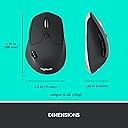
| Item Dimensions L x W | 7L x 11.9W centimetres |
| Item Weight | 4.76 Ounces |
| Manufacturer | Logitech |
| Manufacturer Part Number | 222A425 |
| Minimum Required Operating System Version | Windows 10 |
| Model Name | M720 Triathlon |
| Model Number | 910-004791 |
| Mouse Maximum Sensitivity | 1000 Dots per Inch |
| Movement Detection | Optical |
| Movement detection technology | Optical |
| Network Connectivity Technology | Bluetooth, USB |
| Number of Batteries | 1 AA batteries required. (included) |
| Number of buttons | 8 |
| Operating System | Windows, macOS, Linux, Chrome OS |
| Pattern | Mouse |
| Power Source | Battery Powered |
| Product Features | Wireless |
| Product Finish Type | Smooth or Matte |
| Product Warranty | 2-year Limited hardware warranty |
| Range | 10 meter |
| Special feature | Wireless |
| Style Name | Wireless Mouse Multi-Device - M720 |
| Theme | Computer Accessory |
| Unit Count | 1.0 count |
P**K
Perfect work mouse for multiple devices and easy switching too.
The Logitech M720 Triathlon Multi-Device Wireless Mouse is a game-changer for anyone seeking seamless productivity across multiple devices. From its ergonomic design to its effortless connectivity, this mouse is a true powerhouse that enhances efficiency and comfort during long hours of work or play. One of the standout features of the M720 Triathlon is its versatility. As someone who juggles between multiple devices throughout the day, I greatly appreciate the ability to seamlessly switch between three devices with the touch of a button. Whether I'm working on my laptop, desktop, or tablet, this mouse adapts effortlessly to my needs, streamlining my workflow and minimizing clutter on my desk. The ergonomic design of the M720 Triathlon is another highlight. The mouse fits comfortably in my hand, with contoured curves that provide ample support during extended use. The rubberized grips ensure a secure hold, reducing fatigue and allowing for precise control with minimal effort. Plus, the durable construction means that this mouse can keep up with even the busiest of workdays without missing a beat. Connectivity is where the M720 Triathlon truly shines. With both Bluetooth and 2.4GHz wireless options, this mouse offers unparalleled flexibility in how it connects to your devices. Setup is quick and hassle-free, with no drivers or software required. I've experienced no latency or connectivity issues, even when using multiple devices simultaneously, ensuring a smooth and uninterrupted user experience. In terms of functionality, the M720 Triathlon delivers on all fronts. The hyper-fast scrolling wheel allows for lightning-fast navigation through documents and webpages, while the customizable buttons provide quick access to frequently used commands. Whether you're tackling a demanding work project or engaging in intense gaming sessions, this mouse offers the precision and responsiveness you need to stay ahead of the game. In conclusion, the Logitech M720 Triathlon Multi-Device Wireless Mouse is a must-have for anyone seeking ultimate productivity and versatility in their computing setup. With its ergonomic design, effortless connectivity, and advanced functionality, it's a worthy investment that will enhance your productivity and comfort for years to come. Highly recommended.
M**E
One of the best mice on the market
My favourite mouse, has become the only choice for me and have now had 3 of these. Two are still in rotation, when one gets badly worn out I replace the housing with parts I get from China and its like new all over again. I love this mouse because the device switching button is on the side, near the thumb rather than underneath like the newer models. Battery life is great on this mouse and it takes a single AA battery. Weight is goof and feels great in the hand, moves smoothly on most surfaces. The size is perfect, fits in the palm nicely, not big, not small, just right.
J**9
Excellent bluetooth mouse - with one caveat
The Logitech M720 is an excellent mouse overall and one of Logitech's better efforts. Quality of construction is great and has a nice weight and balance to it. Ergnomics are fabulous for anyone wanting a full sized mouse - these seem to be a rarity these days as manufacturers seem so keen to make mice smaller and smaller for the sake of portability. Buttons have a positive click and the scroll wheel is a dream to use. The mouse can connect either with the USB nano receiver or directly via Bluetooth (the mini receiver has a storage slot next to the battery if not used). The one major caveat is that it does not work well with my Dell XPS 13 9300 (2020) under bluetooth. Essentially, the mouse enters power saving mode when not moved for 10-15secs. It does wake in a split second on movement, but the on screen pointer will skip a full inch or more at the initial movement. This might not bother everyone, but the big jerky jump at initial movment really puts me off. It is especially noticeable when filling in forms where one has to do some typing, then move the mouse to the next data entry box. The unpredictable intial jump as the mouse wakes up makes for an annoying workflow day. I've tried to reduce the overly-agressive power saving feature of the mouse by changing drivers, changing bluetooth settings in Windows 10 (disabling its power management), altering registry settings to change the polling rate etc. No help. Weirdly, this erratic jumpy wake-up does not affect any of the other three laptops in my household (all Dell laptops, too; but larger variants than the XPS13). So it appears to be a problem isolated to my laptop. Shame, because I really like it and if all I was doing was continually moving it browsing web pages, this jerky issue wouldn't be an issue at all. Update 30.07.20 - I've now given the M720 to my son who uses it with his XPS15 (no jerky power managment lag issues) and says it's the finest full sized multi-button & feature mouse he has ever used. I currently use this: https://www.amazon.co.uk/gp/product/B07WJSB6RH It is very similar in shape to the M720 which is my ergonomic preference. It is less than half the price of the M720, and the construction, features, feel and overall quality are also less than half, in keeping with its lower price. However, it does not have the same deal-breaking jerky bluetooth lag, so is a very reasonably priced reasonable alternative with the caveat that it is no where as luxurious as the M720. Such a shame that I couldn't get the M720 to work well with my XPS13. If Logitech could release an updated driver that was less agressive with its power saving (I don't really mind changing my mouse batteries every couple of weeks if it means great useability), I'd never use any other mouse!
A**R
Unbreakable and highly productive
Fantastic and surprised it has not breaked after nearly 4 years of dropping this down. Sturdy you will not regret buying this plus it's 3 in one as you do not need to buy another to connect to another device just click the button and voila. Seriously though it should broken by now but it's not. Great value and quality like battery life can last months and weight is also perfect not too light like other mice. Size too.
A**R
A good purchase
Great value, no hassle, fast scroll, quick, great quality.
Z**H
Quality and comfortable bluetooth mouse
This is a quality and comfortable mouse. The Bluetooth connection is brilliant. Got a lot of function but did not make the product too complex and confuse to use. I was a bit worried about the middle wheel as some of the review mentioned it is too sensitive while using CAD. As an engineer I am using CAD and other design software along with the normal PDF, MS office and internet browsing. So the experience of using it in CAD is a bit of concern. However, I decided to give a try and prepared to send it back if it does not work well with CAD or other design software. It ends up works very well. I figured out that the issue about the middle wheel zooming the CAD window randomly is due to a mis-setting up. The middle wheel has two different setting by simply clicking the little black button behind it. One mode is for fast exploring which will help the internet or long document reviewing as each rolling movement of the wheel will move the document or internet page with a good 'distance'. The other setting is to switch this function to get back to the normal motion which is just like the normal mouse. You can clearly notice the different modes - one is very smooth rolling with very little resistance and the wheel will not stop until you put your figure on it or taking a bit while without touching it. The other mode is with some resistance and you can feel the 'click' when you roll the wheel. When I am using CAD, the 2nd mode works very well. I hope that explains the concern for CAD user and I do recommend to give it a try. I love it for a week of using. Cheers
I**N
Great upgrade from my old wired mouse
This is a perfect mouse for everyday use. It fits really well into the hand and glides really well on my mouse mat (woven material type) The various function buttons are easy to use and well placed. The accompanying software Logitech Options allows for easy configuration of the mouse buttons to your liking. I have two Logitech Unified receivers and separate computers, and the the mouse easily paired with both, and swapping between systems is easy. One thing I did find was the speed of the mouse pointer was too slow. This is not a fault of the mouse, but how the Options software deals with mouse speed. I had it set to max, but it was way too slow. I checked the Windows mouse pointer speed, and found that I was still able to increase it, so I did. Problem solved. It seems the Options software doesn't take over the Windows mouse settings entirely. Just something to be aware of, otherwise I may have decided to return it!
T**D
MX Master 2S Lite
Background: I bought this as a replacement for an MX Master 2S. Why did I not move to a 3S or 4S - two reasons: cost and click experience. I really like the audible and satisfying click that the 2S has and the 3S model switched to a different kind of button which is a lot quieter. I'm not going to compare the actual "mouse" experience as I don't game and really as long as it moves the cursor that is all I care about in terms of performance. What I do care about is the experience, hand feel and ergonomics. Things that are the same as an MX Master 2S: - similar weight, they both feel compact and substantial - not flimsy - though if you want the experience of moving nothing around - this isn't it - support for 3 different devices + the unifying connector - button clickiness both sound and feel - even though not the same exactly the same it is close enough - rubberised top - this is a love it or hate it feature - on my 2S this is showing signs of age and needs constant cleaning to not look grimy, it does feel nicer than bare plastic but keep in mind that it ages - 2 secondary buttons and 1 hidden thumb button Things that are different: - no auto infinite scrolling - if you've never used the scroll on an MX2 you don't know what you're missing, the wheel feel substantial, responsive and each step is crisp (mine is over 6 years old and still going strong), it also does this amazing thing where the wheel can free-spin if you are scrolling very fast - the M720 can do both but cannot auto switch, you have to change this manually. Also its scroll wheel feels a bit more flimsy overall (I believe this is because it allows for side scrolling by tilting the wheel left or right - but it does make it feel less solidly anchored than the 2S (PS: the mode change button feels very cheap on mine with an unsatisfying click) - rechargeable (MX 2S) vs 1 AA battery (M720) - now this is up to you - I much prefer a rechargeable mouse (though the 2S is the last thing I use that uses micro-usb) - size - even thought the M720 is quite big, and I have quite small hands for a bloke it still feels a bit too small, I guess I could get used to it, but coming from something bigger you'll notice there is less arch support - no thumb rest - I did not think I would care about this but the thumb rest on the 2S really improves comfort, the M720 is very ergonomically built but it's not as good as the 2S. - no secondary scroll - the 2S has a thumb wheel, which I have never used as it always felt unnecessary and not very satisfying. The M720 does not have one though the main use case for it - scrolling left-right can be achieved by tilting the scroll wheel on it - though this feature does cause the worse scroll experience overall - this is pedantic - but for some reason the bottom of the M720 is white for some reason - this does not seem like a wise long term decision Conclusion: You can tell that Logitech's market segmentation team is top notch - this mouse has enough features from the MX Master line to make it good but not enough to compete with it. It's not the mouse for me though, it's not enough of an improvement over the 2S to keep. I guess that's the reason why you can still find MX master 2 mice for sale new
A**I
A Step Down from the MX Master, but well worth the money
The mouse works great, a small step down from the Logitech MX Master. However, if you don't want to pay the ridiculous premium for those mice, it's a great addition to your workspace. I sometimes wish the scroll wheel were metal or had magnetic stops, but it's not a deal breaker.
F**I
Qualità Logitech, cambio dispositivo fluido e veloce.
Mouse solido, sensazione premium in mano. La funzione multi-dispositivo è il punto forte: passare da PC a Mac a tablet con un tasto è comodo davvero, non una feature di facciata. Per chi lavora su più schermi o sistemi, difficile trovare di meglio.
A**I
The best
Best mouse especially if you have more than one device
M**N
Datamus
Denna kan jag absolut rekommendera, har en likadan på arbetsplatsen så valet var enkelt då jag behövde en ny datamus hemma.
A**D
منتج أصلي
منتج أصلي والماوس رائع فعلا
Trustpilot
1 month ago
1 month ago