







Xjam
Product ID: 493869177
Details
- BrandESI
- Number of Keys16
- Connectivity TechnologyUSB_C
- Special Feature16 ultra pads
- Model NameXJAM USB
💻Plug & play USB-C, no drivers
🔲16 ultra-responsive backlit pads
🎛️6 assignable 360° knobs
Buy anything from 5,000+ international stores. One checkout price. No surprise fees. Join 2M+ shoppers on Desertcart.
Desertcart purchases this item on your behalf and handles shipping, customs, and support to Mexico.
🎶 Elevate your beats anywhere, anytime — the pro’s choice for unstoppable creativity!
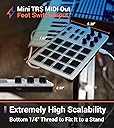
The Xjam Professional MIDI Pad Controller is a compact, ultra-portable music production tool featuring 16 pressure-sensitive, tri-color backlit pads and 6 assignable rotary knobs housed in a durable aluminum frame. It offers seamless plug-and-play USB-C connectivity compatible with iOS, Android, Mac, Windows, and Linux, plus MIDI out and footswitch input for expanded control. Included free software and a 3-year warranty make it a versatile, reliable choice for professional and aspiring beat makers alike.


| ASIN | B0B4K8FVBN |
| Additional Features | 16 ultra sensitive pads with polyphonic aftertouch, 48 user-programmable scene presets, which can be recalled instantly, Includes Bitwig Studio 8-Track, Cubasis LE, Wavelab LE |
| Best Sellers Rank | #13,049 in Musical Instruments ( See Top 100 in Musical Instruments ) #55 in Computer Recording MIDI Controllers |
| Brand | ESI |
| Brand Name | ESI |
| Color | Silver |
| Compatible Devices | Laptop, PC, Smartphone, Tablet |
| Connectivity Technology | USB_C |
| Connector Type | TRS 3.5mm MIDI Out, TRS 3.5mm for footswitch, sustain pedal, USB-C |
| Customer Reviews | 4.3 out of 5 stars 119 Reviews |
| Hardware Interface | USB Type C |
| Human Interface Input | Touch Pad |
| Instrument | Drum |
| Item Type Name | XJAM USB |
| Item Weight | 14.4 ounces |
| Manufacturer | Artesia |
| Manufacturer Part Number | 40014 |
| Material Type | Aluminum |
| Model Name | XJAM USB |
| Model Number | Xjam |
| Model Year | 2022 |
| Number of Keys | 16 |
| Outer Material | Aluminium |
| Platform | Android, Linux, Mac OS X, Windows, iOS |
| Product Style | Xjam |
| Size | Ultra-thin, Mobile friendly |
| Special Feature | 16 ultra sensitive pads with polyphonic aftertouch, 48 user-programmable scene presets, which can be recalled instantly, Includes Bitwig Studio 8-Track, Cubasis LE, Wavelab LE Special Feature 16 ultra sensitive pads with polyphonic aftertouch, 48 user-programmable scene presets, which can be recalled instantly, Includes Bitwig Studio 8-Track, Cubasis LE, Wavelab LE See more |
| Total USB 2.0 Ports | 1 |
| Total USB Ports | 1 |
| Unit Count | 1.0 Count |
| Warranty Description | 1 year limited warranty. |
B**T
Excellent drumpad without the nonsense
So after some installation problems, which seem to have been specific to my computer and not the fault of the Xjam itself or the editor software, I’ve had a few days to practice with it. Coming from the padKontrol, it’s quite small which took a bit to get used to. But it saves on desk space so overall it’s a plus. The pad sensitivity is remarkable. I can get audible sounds at inputs of 1 or 2. I had to dial back the headroom 2 or 3 notches on a few of the pads because I was maxxing out too easily. Once that was done, the unit has a smooth response through the velocities. I haven’t had to adjust the sensitivity at all. Being able to adjust these levels on a per pad basis is great. I just use the straight linear velocity curve so far (number 4). It is a universal, not per pad, curve. As to the rotary encoders. As others have mentioned, mine were jerky and sluggish as well. I contacted support about the initial problems I was having and asked about the encoders. Here is the reponse: "Regarding the encoders: Xjam uses the encoder as midi controller. It covers 20 signal steps within one cycle. If you turn the knob faster, it still sends out 20 midi messages also, but the step between two message is greater than 1. You might find maybe steps 0,6,12,18,…127. I admit, that relative values for Xjam’s controllers is a compromise. We are considering adding relative CC messages for the encoders, but I cannot tell yet, when this feature will be implemented. I have to discuss with the developers if this could be implemented via firmware or if this is rather a feature for a future hardware update." Support from Mike from ESI was prompt and helpful. The issues I was having worked themselves out (computer gremlins I guess). The build quality is excellent. It’s nice to have a no-nonsense controller where you aren’t paying for redundant features or libraries you’ll never use (Maschine and Aura) or redundant DAW integration with so-so pads (Atom).
W**R
Great hardware, setup sucked.
All I'm looking for is a reasonably responsive set of drum pads. That's all. I'm a professional pianist for many decades, so I have some sense of how striking keys/pads should elicit a reasonably consistent response. I tried AKAI LDP8 and LDP218, and the basic responsiveness of the pads was terrible -- fortissimo (really smack it) to get any response at all. Same with the Korg NanoPad2. The XJam, however, works fine. I'm not looking for perfection here -- especially at this price point. Just reasonable, and the XJAM does the job well. My only complaint is that I found the software/driver side to be fussy. Unlike other drumpads (like the AKAI and KORG), you MUST install their MIDI driver for the unit to work at all. OK, I can live with that. Meanwhile, on first install, their driver crippled my Cubase (wouldn't load at all), but when I uninstalled and reinstalled, Cubase worked again. (Cue Twilight Zone music). While I'm at it, the necessity of installing their proprietary driver was not mentioned at all in their setup instructions. Wait, they don't have setup instructions -- just "plug it in" with their implication is that it will work. Not so. Their printed documentation goes from "just plug it in" straight into minutia about the various knobs and features -- nothing about the steps an actual user would need to do to get it working. (Like "install our proprietary drivers.) I also searched online and found no videos (by the manufacturer or anyone else) on how to get my initial setup working. Maybe I'm too dense to just get it. Wouldn't be the first time! Meanwhile, at the end of the day, it IS a reasonably sensitive and very usable unit (now that I'm past the setup 'fun'). It certainly beats everything else I tried at this price point by a country mile.
A**R
Awesome product. Very well built and works right out of the box without any drivers.
I was going to get the Maschine Mikro, but thought I would give the Xjam a try as it is much more compact and would fit in my gig bag. I was blown away by the quality of the item. The pads are great and very responsive. The product is solidly bulit and is of the highest quality. The top is aluminum and the rest is plastic. I am a pianist and wanted this item to serve as a means to record drum tracks. It has a MIDI out as well which I could use to connect to other equipment. I use a Macbook Pro and was able to easily use it with Logic pro without any issues.
L**O
Pads are a joy to play
I am learning finger drumming, which is so fun, by the way. I initially ordered a Maschine Mikro, which is widely viewed as being the least expensive device with the absolutely best pads money can buy. I have to say I was underwhelmed by the Maschine. The pads didn't feel that responsive, and one pad was notably less sensitive than the others. So I returned it, and then heard about the Artesia Xjam, which is half the price of the Maschine Mikro. I fell in love with this thing as soon as I started playing it. For me (running Logic on a Mac Studio) it was truly plug and play. And the pads are so good! They are certainly more sensitive than the Maschine I returned (maybe I got a dud?) And it just feels good to make a loud drum sound with them -- almost like you are actually hitting a drum skin. Also the software (downloadable on Artesia's website) makes the Xjam extremely tweakable and customizable. Some people complain that the pads are too small. They are indeed quite small, but they are larger than the pads on something like a Launchpad. The size does not bother me at all, perhaps because I play guitar and piano. The width of the pads looks to be about the width of a standard white piano key, and there is more space between the pads than there is between the keys of the piano, so I am failing to see the problem. It is a perfectly playable control surface, and in fact it is a ton of fun to play!
P**S
Best value controller you can get.
I bought this after watching some YouTube videos including T.J. Guardino (great channel). I'm not planning to be an expert finger drummer but I really wanted a small expressive controller to go along with my live setup. This controller has so much going for it -- way more than I expected even. With the controls for 3 banks, there are actually a total of 18 encoders and 48 pad triggers available. Each control can be configured separately by channel, type, etc. and then you can save everything into a quickly recallable scene... and store up to 48 scenes! The pads are not just useful for drumming because they have more than velocity. You can use polyphonic aftertouch (set up by default!) -- or just normal channel aftertouch/pressure, if you set the unit that way. Or fixed velocity of course. And it has some preset velocity curves too. The pads are very sensitive, in a good way. If you're into finger drumming, you'll be able to really do some dynamics. If you're planning to use this for triggering clips or changes, you won't need to worry about the unit missing your taps. The encoders are not flimsy, they feel pretty tight and smooth when rotated, seems like they have the potential to be quite reliable. The app works great on my Mac, although it's a little ugly to look at. But the controller itself is so nice looking and functional, who cares? Very happy with this purchase.
D**V
Great product. Setup kinda stinks
Very well-built product. Size is compact and seems to be good. Don't know how to use it too well but can't wait to learn. Keys seem to be soft to touch. 4 stars
A**.
Shotty QA
Wanted a compact drum pad controller. Got the xjam based off review by the Quest for Groove guy. The first one I got didn’t have the greatest sensitivity so I ordered a second one to compare. Second one had better sensitivity / responsiveness that I would have been happy with but one of the pads would trigger without being pressed. Probably a worthwhile pad controller if you get a good one. Returned both and got a maschine mikro instead.
E**K
Great feeling pads for finger drumming!
I've been finger drumming on various drum machines and midi pad controllers since the late 90s and I've tried many, many devices of this nature. For me, the single most important factor in how good these units are is the sensitivity of the pads. The pinnacle of pad playability was the Korg PadKontrol which is sadly no longer in production. It's important that you get the full range of velocity from the lightest touch to the hardest tap without putting strain on your fingers or having to deal with triggering issues. This little xjam is nearly perfect in this regard. It needed little to no tweaking for my playing style but the software editor seems to offer a pretty comprehensive set of parameters for fine tuning the pad performance. Editor was easy and intuitive - no need to dive into the manual. I appreciate the portability of the unit as this is definitely on the small side for pad controllers. I wouldn't mind if the pads were maybe 25% bigger, but they are not uncomfortable to play. I'm really enjoying the trs midi out, connecting to some older drum machines that I've neglected due to their crappy pads. Overall, I'm very happy with the xjam.
C**N
Pad poco sensibili
Il controller è leggero e comodo ma la sensibilità dei pads lascia un po' a desiderare. Sopratutto appena uscita dalla scatola i pad erano davvero poco sensibili, poi sono migliorati dopo diverse ore di finger drumming. Al momento la sensibilità è discreta ma non uniforme sui pad. L'impressione è che i pad meno utilizzati siano meno sensibili. Andrebbe bene per un prodotto di fascia bassa ma a questo prezzo è inaccettabile. Inoltre le manopole non sono fluide nell'invio dei segnali midi rendendole quasi inutilizzabili.
C**N
genial
Va muy bien! tiene un tacto muy pro, lastima solo tiene 3 bancos.
B**I
Solid drum pad for finger drumming, very ajustable
Very good quality, the sensitivity is good if you set it in the app how you would like it, the pressure curve is very useful. Sometimes there is Choke group, but I hope it is just the program I am using and I can fix it, it's not very common, but is annoying when it happens.
A**R
Pads have excellent senitivity
From a light touch to heavy , the responce of these pads are one of the best I've tried and for this price easily the best in class. all pads and rotary knobs and foot switch can have the notes/ cc/ pc etc changed to whatever you like and their veocity curves and feel tweaked to youre hearts delight . eg. notes/ cc/ pc to play synth , vsts , drums (addictive , mdrummer etc ) also I have certain midi channel set to reaper shortcuts , xjam can be set to do almost anything in reaper ,eg record ,play , loop , save/ delete, undo redo ,macro actions ,render ,next marker ,insert fx, you can set the pads to do almost anything. the sofware is very good and easy to use . you can program it using the pads which is alittle more difficult but not too bad with a little familiarity. seems to be well made as well . cons : wish it had 32 pads it would be perfect then. my yamaha dtx multi 12 (ancient 2011 and still selling) has 3 layers on each pad which would be great on this . ie different midi signal acording to how hard you hit it . maybe the xl version will have it , would sell like hot cakes and easily be the best out there buy you won't regret it , simple to use,one of the best for finger drummers.
S**S
Monster...Budget friendly Pad controller
Best finger drumming MIDI controller, started loving...ultra velocity sensitive...with polyphonic after touch... looking for their XKeys...37.... Bit complicated... no mention of downloading the midi driver/ editor from Manufacturer Artesia website, once done this, its mapping to all Daw without flaw...Bit Wig is the right daw for this device....once installing its syncs with all DAWs
Trustpilot
1 month ago
3 weeks ago