Desertcart purchases this item on your behalf and handles shipping, customs, and support to Mexico.
๐๏ธ Elevate your note-taking game โ donโt just write, create with precision!
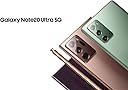
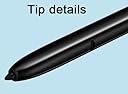
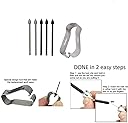
The Note 20 Ultra S Pen replacement offers 4096 levels of pressure sensitivity and Bluetooth connectivity, designed specifically for Samsung Galaxy Note 20 and Note 20 Ultra 5G. It comes with 5 replacement nibs and a tweezer for maintenance, is rigorously tested for quality, and backed by a 180-day warranty, making it the perfect tool for professionals seeking precision and reliability.
| ASIN | B0BKZXRMY1 |
| Best Sellers Rank | #23,660 in Cell Phones & Accessories ( See Top 100 in Cell Phones & Accessories ) #536 in Styluses |
| Brand | Generic |
| Built-In Media | s pen |
| Color | Black |
| Compatible Devices | Galaxy Note 20, Galaxy Note 20 Ultra 5G |
| Customer Reviews | 4.6 out of 5 stars 746 Reviews |
| Enclosure Material | Plastic |
| Item Type Name | Galaxy Note 20 Ultra |
| Item Weight | 5 g |
| Manufacturer | jiujiajiu |
| Material | Plastic |
| Mfr Part Number | FBA-002 |
| Minimum Required Operating System Version | Android 10.0 |
| Model Number | Galaxy Note 20 Ultra |
| Number of Packs | 1 |
| UPC | 717378992515 |
| Unit Count | 7 Count |
| Warranty Description | 180 days |
C**A
Works well
This stylist is the next great thing to the original stylist that comes with the phone. It does work great on the phone screen, and so far the quality has been great. It 100 percent works as expected, and I don't have any dead spots on the screen at all. I would definitely would refer this product to a friend or family member!
T**A
Works great and connects to phone easily
Got it to match my rose gold phone. Looks great and works great despite being second hand. It connects to my phone just fine. I think its a good value.
K**S
Blev Pen
Works like original pen
S**8
The real deal. Will address some comments with those having problems.
This S-Pen is 100% the real deal. Not a fake S-Pen and does everything the Note 20 Ultra original S-Pen is supposed to do. I will use this review to address some of the problems others seem to be having. S-Pen didn't fit the slot. - Mine didn't either, but before I lost my last S-Pen it began getting tight going in and taking out of the slot. The fix was simple based on a video I watched. I took a Q-Tip and coated one end with spray hand sanitizer and cleaned out the slot then used the other end to run it through and dry. It took six Q-Tips before I finally stopped getting dirt out of the sides of the slot. Afterward the S-Pen slid in and out like a new phone. It was filthy inside of that slot. S-Pen is not Bluetooth. - This S-Pen is Bluetooth and comes 20% charged. You will likely have to reconnect the S-Pen even if you tapped on "Got it" when asked if you had your S-Pen. The phone charges the S-Pen to 100% as it reconnects all functions to Bluetooth. From 20% to 100% and reconnecting took less than five minutes. Which leads to the third complaint. No instructions. Here is how to do it. 1. Turn off your phone. 2. Insert new S-Pen 3. Reboot phone Note: At this point the S-Pen will work as a basic S-Pen but Bluetooth is not connected because is a different S-Pen. Continue for connecting Bluetooth. 4. Remove S-Pen and tap the "Settings" Icon. 5. Go to S-Pen settings or tap the small search Icon up top and type in S-Pen then click on S-Pen "Advanced Settings". 6. Tap "S-Pen" 7. Turn on "Air Actions", "Air Command:, and click on "When S Pen is Removed" under the "When S -Pen is removed" click on "Open Air Command". These are Bluetooth required settings. A box will pop up stating the Bluetooth is disconnected and click to reconnect. 8. Once you click to reconnect the box instructs you to insert the S-Pen. 9. Box pops up gains "Reconnecting-This could take a while". "A while" is under five minutes. 10. Now you can just watch the S-Pen screen as it reconnects and shows the S-Pen charging level. 11. Box pops up saying "Done". Click on that and now you can use your S-Pen as normal for photo's, audio or whatever you use it for. Summarizing This is a real S-Pen with Bluetooth. If it sticks clean out the S-Pen slot. Well worth the money. Hard to see but this S-Pen, like all original S-Pens does have a serial number on the side up by the button. To reconnect Bluetooth follow above instructions. Definite buy if looking for a Bluetooth S-Pen Quick update. I set my S-Pen down on the army of the recliner and walked away to grab something. Came back, no S-Pen. Found it by the back door, one of my three dogs decided to use it for chew toy. Ordered another, it came and works just as well as the first one I ordered. If you need an S-Pen replacement, go with this one.
M**W
Give it a try for the price.
Good Samsung replacement S pen. It was advertised as a s pen & 5 nubs. Just chose this because of the price & advertised extras. Can't say anything regarding durability as I've just received it today. It works well thus far.
D**I
Close but not exact
Did the unthinkable and lost my pen as it fell out from a fall at work one day. Got this one from reviews and that one that had the instructions detailing how to pair. Can confirm pairs and syncs properly with the phone and allows all the same old air actions. It doesn't feel as though it fits as snug as my original pen but it does still lock in and stay in while shaking the device. Reason for the knocked off star is from after a week of use the clicky part you use to remove the pen from the phone came out but not the rest of the pen. I put it back in and applied a lil torsion to increase friction to remove lower 80% of the pen. Solution was easy, introduced a dab of superglue to lock the two pieces back together and now it's back to new. Interesting note, the pen has a serial number number mimicking OEM Samsung for whatever reason despite being clearly off brand.
R**Y
Works well with my phone
Amazing little s pen works great so easy to use, just simply put it in the phone and it does the rest on its own. No need to worry about connecting it. Just make sure you get one that says Bluetooth
C**A
Worked perfectly
Very easy to set up. My daughter lost the pen to my galaxy note 20 ordered this replacement it worked perfectly. And of course found the pen a week after I purchased this one. Same color as described. It also works on my galaxy s24 ultra without being set up to it.
Trustpilot
1 day ago
3 weeks ago