Buy anything from 5,000+ international stores. One checkout price. No surprise fees. Join 2M+ shoppers on Desertcart.
Desertcart purchases this item on your behalf and handles shipping, customs, and support to Mexico.
⚡ Power Your Workspace, Own Your Day!
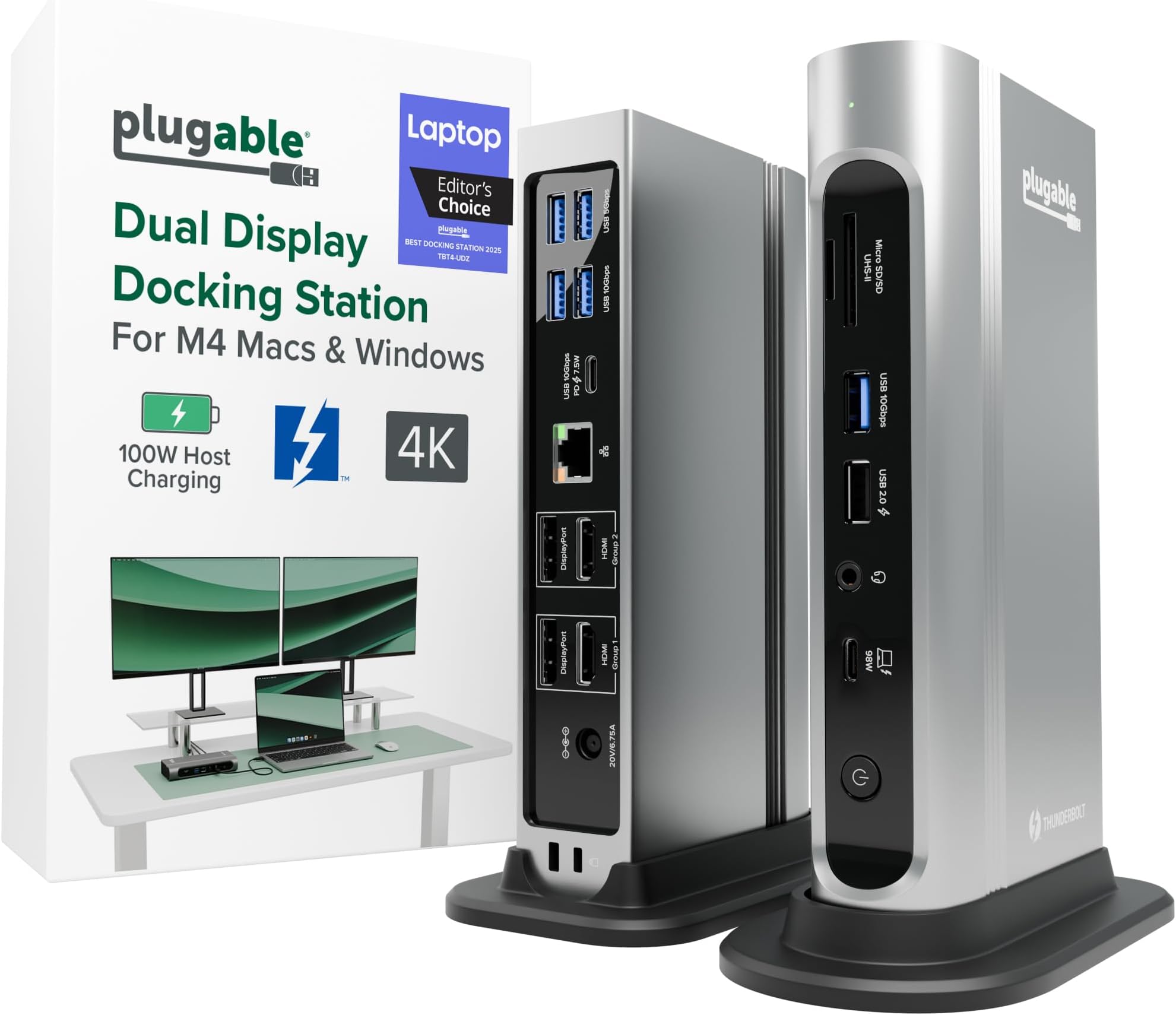
The Plugable 16-in-1 Thunderbolt 4 Dock transforms your laptop into a powerhouse workstation with dual 4K 60Hz displays, 100W charging, 2.5Gbps Ethernet, and 16 versatile ports. Designed for M4/M5 MacBook Air/Pro and Windows Thunderbolt 4/USB4 laptops, it delivers seamless plug-and-play connectivity, boosting productivity and streamlining your professional setup with award-winning reliability.


| ASIN | B0BQJWKBMF |
| Best Sellers Rank | #605 in Computers & Accessories ( See Top 100 in Computers & Accessories ) #64 in Laptop Docking Stations |
| Brand | Plugable |
| Built-In Media | PLUGABLE TBT4 QUAD DOCK 100W THUNDERBOLT 4 QUAD DOCKING STATION |
| Color | Silver |
| Compatible Devices | Windows 11 Thunderbolt 4 hosts and Thunderbolt 4 Macs with macOS 11+ including, M5 / M4 MacBook Pro and MacBook Air, M1 Pro/Max, M2 Pro/Max, M3 Pro/Max, or base M3 (with clamshell mode required for dual displays), HP Omnibook / EliteBook / DragonFly / ProBook / Spectre x360 series, Dell Pro Max / Plus / XPS / Latitude / Inspiron, Lenovo ThinkPad / IdeaPad / Yoga , Framework (Intel Processors), Microsoft Surface Pro 11 & 10 for Business, Surface Pro 9,8 / Surface Laptop Studio / Surface Laptop 6 / 5, Acer Swift, Predator, Aspire Vero, ASUS ZenBook, ExpertBook, ROG Zephyrus, ProArt Compatible Devices Windows 11 Thunderbolt 4 hosts and Thunderbolt 4 Macs with macOS 11+ including, M5 / M4 MacBook Pro and MacBook Air, M1 Pro/Max, M2 Pro/Max, M3 Pro/Max, or base M3 (with clamshell mode required for dual displays), HP Omnibook / EliteBook / DragonFly / ProBook / Spectre x360 series, Dell Pro Max / Plus / XPS / Latitude / Inspiron, Lenovo ThinkPad / IdeaPad / Yoga , Framework (Intel Processors), Microsoft Surface Pro 11 & 10 for Business, Surface Pro 9,8 / Surface Laptop Studio / Surface Laptop 6 / 5, Acer Swift, Predator, Aspire Vero, ASUS ZenBook, ExpertBook, ROG Zephyrus, ProArt See more |
| Customer Reviews | 4.0 out of 5 stars 496 Reviews |
| Hardware Interface | Thunderbolt |
| Item Dimensions L x W x H | 4.1"L x 1.4"W x 7.7"H |
| Item Type Name | laptop docking station |
| Item Weight | 646 Grams |
| Manufacturer | Plugable |
| Mfr Part Number | TBT4-UDZ |
| Minimum Required Operating System Version | Mac OS 11 Big Sur, Windows 11 |
| Model Number | TBT4-UDZ |
| Number of Ports | 16 |
| Product Dimensions | 4.1"L x 1.4"W x 7.7"H |
| Smart Home Compatibility | Not Smart Home Compatible |
| Total Number of HDMI Ports | 2 |
| Total USB Ports | 7 |
| Total Usb Ports | 7 |
| UPC | 819927012733 |
| Unit Count | 1.0 Count |
| Warranty Description | 2 Year Limited Parts and Labor |
| Wattage | 100 |
C**S
Very solid construction, top notch support
I bought this to dock a new gaming notebook to the two monitors, keyboard, mouse, speakers, mic, webcam, and other assorted odds and ends at my working desk. All of that is shared with a work notebook which has its own company-supplied "meh" quality off-brand Thunderbolt 3 dock, with both docks switching through a modern KVM so that I can jump back and forth as desired. As the new computer has a Thunderbolt 4 port, I wanted to go with a TB4 dock to allow for the possibility of higher resolution & higher refresh monitors and maybe even more of them at some point. This Plugable dock looked to be the best balance between price and features -- for the features, there just aren't that many docks at this price. A lot of the docks around this range don't even have DisplayPort, just capability for USB monitors. A lot of the ones at this price also tend to supply less power, which aren't enough for this computer. This one also seemed to make the top X on quite a few of the "best Thunderbolt 4 docks" lists. So nothing much to report in the functionality -- plug stuff in, stuff works. I had no issue with the computer locking onto the dock or the dock addressing any of the peripherals. Everything happens pretty much instantaneously. You get a nice green solid light to show successful TB connection with the computer, or white if no connection. The dock supplies 98W of power, which is enough to actively charge my power-hungry Lenovo Legion 5 Pro notebook which needs something close to that to charge while using. It's almost the 100W max for this computer for USB charging. Anyway, that certainly works. I had one hiccup -- toward the end of the first full day of use, it just stopped working at all, unable to ever establish a connection to any computer plugged into it. Swapped cable, same deal. I contacted tech support (after hours) via email and immediately got a human response acknowledging the problem, letting me know the real techs were going to be back in office first thing in the morning and would get with me, and as promised, they did, the very next day. Josh from Plugable, probably one of the most polite and pleasant people I've ever dealt with from a tech support team, was quick to ask for a bit more info, followed by acknowledgement that it appears that the dock is bad, and an offer to send out another immediately in exchange for promise of return from me using the shipping label that was to be included. Each interaction was very quick -- no long waits between emails. The package did arrive in just a couple of days and the replacement so far is working great. He mentioned really being eager to get that other one back with all of the original stuff (i.e., "please use only the new stuff [power supply, cable, etc] because we don't know which part of the old unit is the point of failure") so that they can diagnose the cause of the problem, presumably to know whether there are manufacturing or design issues to address. It's what I like to hear. Anyway, highly recommend this product. If you need it, the tech support is unbeatable. Hopefully you won't need it, and you'll have a really solid and frankly very attractive dock that looks good sitting on my desktop where my old mid-tower system used to be, along with easy access to USB ports and SD-card slots and a headphone jack.
M**N
Solved My Video Conferencing Problems and Provides Reliable Connections to Multiple Devices
Semi-retired and now working part-time from home, I've been relying on my home office far more than I ever anticipated — virtual meetings, external monitors, multiple peripherals, the works. The problem: my video kept freezing, sometimes locking up the entire session and forcing everyone to turn off their cameras. My first instinct was to blame my internet connection. I had the cable company run a full check — turns out our speeds are well above what video conferencing requires. After more research, I landed on the real culprit: my old hub. It was a basic, inexpensive unit I'd bought just to connect a few peripherals, and I'd never considered its limitations until they became impossible to ignore. Swapping in this hub fixed the freezing immediately. Beyond solving that core problem, it's transformed how my workspace functions. I now have my external monitor, scanner, external drives, ethernet adapter, cooling mat, and mouse all plugged in — cords neatly routed through separate cable management — with a single cable connecting everything to my laptop. It has its own power supply with pass-through charging, front and rear-facing ports, and I still have open USB and HDMI ports to spare. If you're running a serious home office setup and still using a basic hub, this is a meaningful upgrade worth the price. I wish I hadn't waited so long.
R**S
Nothing but problems, didn't work!
We purchased two of these units for our business as a test. Our test environment was two new Dell XPS 15 laptops with TB4 running Windows 11 Pro, and 4 (quad) new HP non-4K monitors running at 1920x1080 resolution. All tests were performed in our company IT department with IT staff as the primary users. We've previously had the above hardware setup working with the Dell WD22TB4 dock, but that dock is unstable and we've lost trust in the hardware (works great for a week, then suddenly doesn't work anymore and you spend hours trying to get it back). After reading a lot of reviews we were hopeful that the Plugable TBT4-UDZ dock would work well for us. Spoiler warning: it didn't. We've had nothing but problems. On both units we could only get two monitors working via HDMI. The DP ports would not drive any monitor (we tried several monitors), even if the HDMI ports were disconnected. We contacted technical support, and after spending a lot of time working through various troubleshooting steps and cable changes, we were told that we need to buy additional DP-to-HDMI "Active" adapters. We actually had those adapters in-house, but using the adapters didn't solve any problems. We never got all four monitors running, ever. The marketing information above clearly states "With this Thunderbolt 4 docking station Windows computers can use the 2x HDMI ports, and 2x DisplayPort ports to connect as many as 4x screens at up to 4k 60Hz.". In our experience that statement is not accurate or truthful. We've wasted two days in troubleshooting - on our own and with tech support - and can't get this device to work as advertised. We are returning both units. (Note: the XPS 15 laptops pull more power than the dock can support, so we supplemented with dedicated laptop power supplies. Didn't make any difference.)
S**Y
Best Thunderbolt 4 Docking Station for MacBook Air/Windows
Best Thunderbolt 4 Docking Station for MacBook Air After trying multiple Thunderbolt 4 docking stations including the Anker D7400 and Dell pro smart TB4, I finally found the one that truly delivers the Plugable TB4-UDZ. The other docks failed to meet my needs, but the Plugable TB4UDZ checks every box. It offers a true single-cable solution using a USB-C Thunderbolt cable, keeping my desk clean and clutter-free. What really sets it apart is its support for both dual and quad monitor setups something that’s notoriously difficult to achieve with a MacBook Air due to its native display output limitations. If you’re a MacBook Air user searching for a reliable, no-compromise docking station that handles multiple external displays without the headache, look no further. The Plugable TB4UDZ is hands down the best investment I’ve made for my workstation setup. Highly recommended! 🙌
J**N
Great product, doesn't like HDMI and DisplayPort on different groups
Got this as a replacement for an HP thunderbolt 3 dock. It works wonderfully and is pretty sturdy with the included vertical base. It has two groups for displays, each with a DisplayPort and an HDMI connection. I ran into issues with running two monitors. My main monitor was using DisplayPort and was very stable, but my secondary monitor was running on HDMI and had loads of issues. Every time I would open a site like Crunchyroll or Spotify, the second monitor would go black and I'd have to reset my display settings in Windows to get it to work again. Also, running two monitors on Linux has been a tough time, but that might not be a dock issue. I've recently swapped to using a DisplayPort cable for my second monitor. Haven't tested with Linux, but on Windows all of my issues are fixed. TLDR: Excellent little dock with lots of features. Works great when using multiple monitors with the same type of connection, not so great with different connections. Great with Windows, YMMV when using Linux.
M**E
Perfect Dual-Monitor Dock for Mac Mini M4 -- Use the Included USBC Cable!
I’m using this Plugable TBT4-UDZ with a Mac Mini M4 (2025 base model), and it works perfectly for dual extended monitors, no drivers needed. My main display is a 34” HP ultrawide connected through DisplayPort, and the secondary 19” Samsung runs over HDMI. Both show up as separate displays, full resolution, super stable. One important tip: ➡️ Use the USB-C cable that comes in the box to connect the dock to your Mac! I originally tried a different cable I had on hand, and the monitors would not work correctly. Once I switched to the included Thunderbolt/USBC cable, everything lit up instantly. The dock gives me plenty of USB-A ports for my keyboard, mouse, webcam, and mic, plus fast Ethernet. Love the flexibility: I can disconnect one USB-C cable from my Mac Mini and plug it into my laptop (or a Windows PC) and immediately have both displays and peripherals ready to go. Exactly what I needed; plug-and-play dual monitors on modern Macs without messy adapters or driver installs. Worth the price. Highly recommended!
D**N
Quality, High End Dock
Before I begin, this in an honest review, and I am receiving no compensation for it. So I found myself in need of a work-from-home setup. My employer issues laptops as a way to work remote using a VPN, but a laptop is not an ideal solution for someone that works with large spreadsheets, and I do. I wanted a dock that offers several display connections, ethernet, and USB. This dock also happens to have a card reader, but it's 2024 and the cloud is a thing. This dock delivers on all those things. If you don't have Thunderbolt 4 on your laptop, this dock probably isn't worth it. I would buy something that uses DisplayLink (Plugable makes every kind of dock, and they have a tool on their website that helps you decide which model to buy). Thunderbolt 3 doesn't support as many displays as T4, and I don't see any reason to spend $300 on a dock unless you need the displays to connect directly to the internal graphics card. I already had a gaming computer at home, so I needed this plus a KVM to be able to use the same desk space and peripherals. I connected a Lenovo ThinkPad T16 Gen 2 to this thing. The product specs says it supports four displays, three external and the native laptop screen. I was able to close the lid and use four external. This computer doesn't belong to me and I don't have administrative privileges. This usually doesn't matter because Plugable offers drivers through windows update (no admin rights required). In my situation, our IT department uses WSUS / SCCM windows update. This kept the laptop from installing the Thunderbolt - Ethernet driver, so I had to get IT to install it while the computer was connected to the dock. Plugable doesn’t have the Ethernet driver easily accessible from their website. I get it…..almost nobody needs it there. Easiest way to find it online is to search the hardware id from device manager. I didn’t see anyone else with this issue in the Amazon reviews or any reviews from external sources. Let me address some of the issues I read in other Amazon reviews. Yes....this thing is expensive. I managed to pick it up at a discount during the Amazon spring sale. It is definitely on the pricier side of Thunderbolt / USB C docks, but I would argue that it is better quality for your money compared to the docks offered by the big computer retailers (Lenovo, Dell, HP). More connectivity and better reviews, for around the same price. Two reviewers complained this dock would not support four displays. One of them was more specific and said that the DisplayPort connections was the issue. I plugged in my VGA to DP adapter, and it worked. I then plugged in an HDMI to DP adapter (StarTech brand, I think). It did not work. After further research, I discovered that I needed an active adapter to go to HDMI. Plugable makes one. If you intend on using the DisplayPorts and your monitor only has HDMI……go to the Plugable website and find the DP to HDMI active adapter. There is a link there to buy on Amazon (15ish dollars, and worth every penny). I am now running four displays (with the laptop lid closed). In conclusion, this is a high end dock that does exactly what the product description says. I highly recommend it for those looking for a work-from-home solution. I currently have four displays, mouse, keyboard, Ethernet, printer, and the Thunderbolt 4 cable connected without issue. I can’t speak for those who do high end video stuff, but it’s a gem for any accountant in the market for a laptop dock.
N**C
Worked great until it died
I got this one to replace an OWC 11 Port Thunderbolt 4 Dock because I had multiple burn out on me. They got REALLY hot. I love this dock, especially because it can stand vertically and feels pretty cool to the touch even after staying docked all day with dual monitors and almost every other port used. I eventually bought 4 more for other computers in the office. Unfortunately, I had one die on me a couple days ago. My monitors started disconnecting. After checking to see if it was my computer or the included thunderbolt 4 cable, I was pretty sure the dock just died on me. I let it sit for a while unplugged, but no dice. I think I had this one since May of 2023, so almost 2 years strong. Wish it would have lasted longer and I'm hoping the others don't die on me anytime soon!
T**I
4.5 stars for the hardware, 5 stars for the humans behind it!
The Plugable TBT4-UDZ has done what it promises in over a year of my usage. However, recently I ran into some frustrating display glitches, the kind that made me worried about the money I had spent on it for my home workstation. After purchasing the product in January 2025, the issues kept coming and going now and then. Finally, last month, the Ethernet port stopped detecting my internet connection. Obviously, since the return window had closed on Amazon, I reached out through their product page for help. And this is where I was genuinely surprised and relieved to own this product. Josh at Plugable reached out (after I ignored their AI chatbot and thought this was done!) and asked me to send a device report using their debugging software. I wasn’t still sure how this was going to pan out, but I did it. Once he had the report, he assured me that the stated problem was present and that he was going to send me a pre-tested and firmware-updated dock for free, according to their 2-year warranty! Moreover, he stayed engaged across multiple exchanges (read probable dumb doubts and queries I had) and followed up proactively. That level of support is increasingly rare, and it deserves to be called out. The product itself gets 4.5 stars. There are still some minor issues, like one monitor not coming active on a screen wakeup, but nothing that an on/off from the dock power button can’t resolve. And it currently supports my 2-monitor + 1-laptop setup, all with 2560 x 1440 resolutions and refresh rates of 120Hz on the monitors and 240Hz on the laptop. With 16 ports suitable for most kinds of setups involving display, audio, internet, and accessories, this dock is definitely solid, barring the few unavoidable glitches that might pop up. So, would I buy Plugable again? Without hesitation — not just for the hardware, but because I know if something goes sideways, there's a real person on the other end who gives a damn. And that is something, IMO, we need to support in an increasingly AI-baked techscape in the name of efficiency.
A**R
Funciona impecable con Linux
Pese a que las especificaciones mencionan que no es compatible con Linux (me di cuenta después de hacer la compra...), me funcionó perfecto sin tener que instalar o configurar absolutamente nada (en Ubuntu 24.04). Lo uso con 3 pantallas FHD externas más la pantalla FHD interna de mi notebook, las 4 pantallas mostrando contenido distinto. No he probado el puerto de red, pero el sistema sí detecta la interfaz, así que debería funcionar sin problema también.
N**L
Great functionality.
Great item with a good number of functional ports. All appears to work well and powers my Dell with 2 monitors.
T**A
Very durable and Easy to setup
I ordered this for my husband. I am not a fan of gadgets, but he loved this dock once he opened it. The quality was extremely durable, and the setup was easy. He simply plugged his 2 screens and laptop. The dock has many options for connecting devices, which ultimately saves you from having to use different devices to connect to the system, like a Bluetooth adapter for a keyboard and mouse, your 2 HDMI ports, a webcam, and more. What else does a person need? Extremely helpful and problem-solving device. My husband highly recommends this.
C**R
Very good product, even better Support
Very good product! Well worth the price tag. Features as advertised are all there. And most of all: VERY GOOD PRODUCT SUPPORT team! Very responsive, very helpful. No frills, no fuss, just a really professional approach. More than makes up for any perceived shortcomings.
Trustpilot
3 days ago
2 months ago