Desertcart purchases this item on your behalf and handles shipping, customs, and support to Mexico.
๐จ๏ธ Print Smart, Print Anywhere โ Your Portable Powerhouse
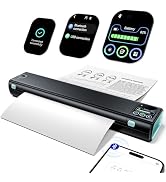
The Phomemo M08F is a compact, lightweight Bluetooth and USB thermal printer designed for professionals on the move. It delivers high-quality 300 dpi black-and-white prints without ink, using thermal technology for mess-free, economical printing. Compatible with iOS, Android, and PC, it supports multiple file formats including PDF, Word, and images, making it ideal for business, travel, and creative uses like tattoo stencil transfers.


| ASIN | B0BW89G2BG |
| Additional Printer Functions | Print Only |
| B&W Pages per Minute | 15 ppm |
| Best Sellers Rank | 14,651 in Computers & Accessories ( See Top 100 in Computers & Accessories ) 26 in Portable Thermal Printers |
| Box Contents | Paper |
| Brand | Phomemo |
| Brand Name | Phomemo |
| Color Depth | 1 bpp |
| Colour | Grey |
| Compatible Devices | Laptops, PC, Smartphones, Tablets |
| Connectivity technology | Bluetooth, USB |
| Control Method | App |
| Controller Type | Android, iOS |
| Country of Origin | China |
| Customer Reviews | 4.0 out of 5 stars 718 Reviews |
| Display Type | LCD or LED |
| Dual-sided printing | Yes |
| Duplex | Automatic |
| Global Trade Identification Number | 06976367632274 |
| Hardware Interface | USB |
| Initial Page Print Time | 14.7 Seconds |
| Ink Colour | Grey |
| Is Electric | Yes |
| Item Dimensions D x W x H | 33.8D x 8.8W x 10.6H centimetres |
| Item Type Name | Multifunction Printer |
| Item Weight | 964 Grams |
| Manufacturer | Phomemo |
| Maximum Copies Per Run | 140 |
| Maximum Copy Resolution Black and White | 300 dpi |
| Maximum Copy Resolution Color | 300 dpi |
| Maximum Copy Speed Black and White | 4.2 ppm |
| Maximum Print Resolution Black and White | 300 dpi |
| Maximum Sheet Capacity | 5 |
| Maximum Supported Paper Size | A4 |
| Maximum print Resolution Color | 300 dpi |
| Model Name | M08F-GY |
| Model Number | M08F-GY |
| Model Series | M08F |
| Model name | M08F-GY |
| Network Connectivity Technology | Bluetooth, USB |
| Number of Trays | 1 |
| Other Special Features of the Product | Portable |
| Output sheet capacity | 5 |
| Paper Size | 210x297 Millimetres |
| Print media | Thermal Paper |
| Printer Output Type | Monochrome |
| Printer Resolution Horizontal in Black and White | 80 Centimeters |
| Printer Resolution Vertical in Black and White | 80 Centimeters |
| Printer Type | Thermal |
| Printing technology | Thermal |
| Processor Count | 1 |
| Product Warranty | 1 year manufacturer |
| Resolution | 300 x 300 |
| Scanner Type | Portable |
| Series Number | 5 |
| Special feature | Portable |
| Specific Uses For Product | business, travel, car, office, school, mobile office, phone, tablet, computer |
| Total USB 2.0 Ports | 1 |
| Total USB Ports | 1 |
| Warranty Type | Limited Warranty |
| Wattage | 13.2 Watt-hours |
C**.
Mini Thermal Printer.
Delivered quick seems a good little thermal printer and good price for the printer and case and easy to use many thanks.
M**O
Great portable printer!
Handy printer for when I'm out and about. Not the easiest interface with the app - you have to save files and then open them in the app. I do like the idea of thermal paper though - no need to buy cartridges. Small enough to carry in my rucksack and with a handy protective cloth sleeve. I've used it on several weekends work without any problems. Only looses one star because you can't print straight from a PDF
A**Y
Absolutely Fantastic
I recently purchased this thermal printer, and I couldnโt be happier! The print quality is crisp and clear, and it works flawlessly with my phone, computer, and POS system. Setup was a breezeโno messy ink or toner, just plug-and-play simplicity. The speed is impressiveโreceipts and labels print almost instantly, saving me so much time. Plus, itโs compact, durable, and looks sleek on my counter. The low maintenance (no ink costs!) makes it a cost-effective choice. Whether you run a small business, sell online, or just need a reliable printer for shipping labels and receipts, this thermal printer is a must-have. Highly recommend!
J**L
Did not work at all
Bought it as desperately wanted to print something and wanted something compact too, so thought this would be ideal. When I got it, I tried to set it up following instructions but it did not work at all. There was suppose to be some lights but it didnโt even materialise. It was very disappointing as this has great reviews - I even search for it on YouTube as sometimes they have better instructions or someone made a clip to help others but to no avail. Itโs supposed to be very simple set up and I am savvy enough to do so. I had to return it and will never consider this brand ever again as it was waste of my time/effort. I even bought thermal paper to use with it and had to return that unopened
K**N
Superb compact printer
The first printer did not work properly so I returned it and got another which works perfectly. So easy to use and connect via the app. The print quality is great and in my opinion it is good value. Customer service is first class, great communication and support.
C**.
Trouble connecting everytime.
Not as good as it says.
R**I
Great little printer
This printer is great itโs small enough to store away and when I need it I can easily and quickly print postage labels onto a4 paper
M**.
Reliable (albeit toxic)
Bought this for my mother who prints her accounts every month. Really handy in that the โinkโ doesnโt run out which saves money and means itโs always ready to go. Downside is the chemicals it transfers to skin when touched and when printing. I wouldnโt use around young children
A**N
It does not print
Printer does not print. at all I connect ed to laptop and used printing paper comes wiz printer and installed it's program it's site and it takes paper but no print blank paper
D**R
Definitely recommend
Been using this consistently for over a year and not a problem with it, the battery life is great and all the lines come out perfectly
๏ฟฝ**๏ฟฝ
Compatible with Linux but I had to download the driver on the manufacturer's website
The thermal printer doesn't have an internal paper roll holder nor does it have a cutter. Yet I can still use a thermal paper roll. I feed the paper on one side and it comes out the other and I use a mail opener to get a clean cut. The main reason I chose this printer is its compatibility with any Linux distro as long as the OS uses CUPS for printing. The manual doesn't mention that this model is Linux compatible but I researched online and found the Linux drivers on the manufacturer's website. I downloaded the driver and installed it and it works. To install the driver, I extracted the downloaded zip file and then the tar.gz archive. I used the file manager to navigate to the driver folder /Downloads/QY_Printer_Driver_Linux/QY_Printer-1.5.0.002/QY_Printer-1.5.0.002 or similar. Inside that folder is a file named install. In the file manager, I right-clicked and selected open in the terminal here, then entered this command: sudo ./install. After that, I connected the printer with the USB cable and I could print whatever, from PDFs, Word documents, images and simple text. The print manager calls the printer M08F and it chose the location root but I can change that. The print manager also chose the correct paper size, A4. And I don't have to disconnect the printer from my PC to use it with my Android phone, too. But I have to check that it's idle on the PC side. The Phomemo app has a lot of functions. It includes a graphic section and an AI image generator. And it lets me choose more paper sizes and I can select between roll or single sheet paper. Printing a single image takes me about 40 seconds and a document page between 5 to 25 seconds. It's a printer I can use with many devices and for many purposes.
D**N
Tattoo printer review 5/5 star
Would highly recommend
J**N
works!
works great
Trustpilot
3 days ago
1 month ago