Buy anything from 5,000+ international stores. One checkout price. No surprise fees. Join 2M+ shoppers on Desertcart.
Desertcart purchases this item on your behalf and handles shipping, customs, and support to Mexico.
🚀 Elevate your workspace—connect, extend, and conquer with StarTech USB 3.0 to HDMI Adapter!
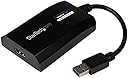
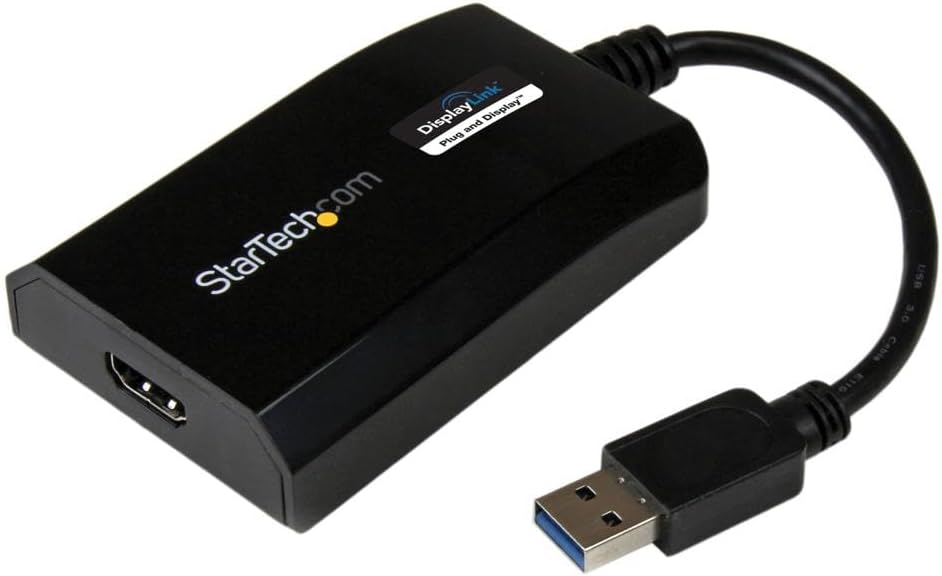
The StarTech.com USB 3.0 to HDMI Adapter (USB32HDPRO) is a compact, bus-powered converter that enables professionals to connect any USB-A laptop or desktop to an HDMI monitor or projector at crisp 1080p resolution with 5.1 channel audio. DisplayLink certified for broad OS compatibility, it supports extended multi-display setups to boost productivity without extra power supplies. Trusted by IT pros for over 30 years, it comes with a 2-year warranty and expert support, making it the go-to solution for seamless external display connectivity.


| ASIN | B00O6G5ZGI |
| Best Sellers Rank | 19,608 in Computers & Accessories ( See Top 100 in Computers & Accessories ) 91 in DisplayPort to HDMI Adapters |
| Box Contents | User manual, cable or connector. |
| Brand Name | StarTech |
| Colour | Black |
| Compatible Devices | Audio/Video Device, Computer, Laptop, Monitor, Projector, Ultrabook, Workstation |
| Connector Type | HDMI/USB |
| Current Rating | 1 Amps |
| Customer Reviews | 4.4 4.4 out of 5 stars (581) |
| EU Spare Part Availability Duration | 2 Years |
| External Testing Certification | CE, FCC, DisplayLink |
| Global Trade Identification Number | 00065030857505 |
| Input Voltage | 5 Volts (DC) |
| Item Dimensions | 8.9 x 5.6 x 2 centimetres |
| Item Type Name | Graphic Adapter |
| Item Weight | 64 g |
| Manufacturer | StarTech.com |
| Manufacturer Part Number | USB32HDPRO |
| Model Number | USB32HDPRO |
| Nominal Power | 5 Watts |
| Number of Items | 1 |
| Number of Ports | 1 |
| Package Quantity | 1 |
| Power Plug Type | No Plug |
| Product Finish Type | Matte |
| Product Warranty | 2 Years |
| Smart Home Compatibility | Not Smart Home Compatible |
| Specific Uses For Product | Monitor,Projector |
| UPC | 065030857505 |
| Unit Count | 1.0 count |
| Warranty Type | Limited |
J**H
Works with macOS Ventura on Macbook Pro M1
Bought this to add an old 23" 1920x1200px Cinema HD display as an extra screen for my 13" Macbook Pro M1. I already have an external monitor attached via USB-C, so this was the only way to add an additional monitor. I had to download the drivers from the StarTech website. Install was simple, you then have to allow it access to Screen Recording. Reboot the computer. Connect the adaptor (I had it connected to a USB dongle). At this stage I thought it may not be working, as the help manual doesn't state anything other than going in to the Display settings. I had read other reviews that you would need to start the DisplayLink software, so I did that, which opened in the menu bar, and the extra screen started working. There are limited options in this, but I ticked "start on login" to save having to manually do this each time. I also tested it in Windows 10, in Windows it just recognises it automatically and you don't need to install or configure anything (I assume you will need an administrator account though). In use I have found it to work as expected. I can play YouTube videos on it without any issue, not sure on any protected content as I don't have Netflix etc. I don't expect these will work on this. Latency seems fine for day to day office work, I can drag items across screens as normal. One thing I have found, you can't calibrate the display as you normally would, both in Windows and macOS, any changes you make don't make a difference on the screen, so you will need to calibrate using the display itself.
D**N
To say I’m impressed is an understatement!
We’ll I am a very happy chappy with this. Couldn’t recommend more!!! Best usb graphics card out there ! I use a Mac mini but require a 3 display , as Mac mini’s only only have a hdmi port and thunderbolt 2, I couldn’t connect my third display with out a usb graphics card. I have tryed cheaper alternatives and have suffered terrible lag even just when using my mouse. So being honest I didn’t have high hopes for this product be a USB adapter . But I am absolutely amazing, there is absolutely no lag, handles videos and films perfectly, which is great for me as I use this display to ethier run my CCTV app or OBS Studio. I can’t say for Window’s , but on Mac, you need to to make sure that the display link driver you “keep in dock” , and set to “open at login” . Otherwise every time you log in you have to open the driver . - but I’m sure I this is something startech could easily rectify with a software update perhaps.
J**E
Didn't expect it to work quite so well...
Well, I didn't honestly think this would work. I'm running and Earning 2015 13" MacBook Air which comes with one Thunderbolt port and two USB 3.0 ports. I already have one monitor hooked up to my laptop via the Thunderbolt port, and had been struggling to find any way of connecting a second external monitor. I tried using a USB 3.0 to USB-C converter, and then connecting that to an HDMI adaptor, but this did absolutely nothing. Pretty much nowhere sells HDMI to USB 3.0 or USB 3.0 docking stations. At over £80 when you add in shipping, I almost baulked at the price. But I was desperate for a two screen configuration as working from my laptop was giving me terrible neck pain and which a laptop screen and a monitor was an improvement, they were both at different heights and really not what I wanted. I paid extra for two day shipping but the delivery ended up taking 6 days; turns out the seller had to change couriers due to Coronavirus and unfortunately chose ParcelForce, the worst company in the business. But Nicola was very quick to respond to the emails I sent chasing up the package and shipping info so kudos there. Had an initial panic when I found out the drivers that needed to be installed were on a CD (my laptop does not have a CD-Rom), but was eventually able to find the download I needed on the StarTech website. After this it was plain sailing. Once my laptop restarted, I connected all the wires and adaptors and, hey presto, not only did both my external monitors instantly start working, but neither were mirroring my laptop screen! So I now have a nice three monitor set-up to work from. Nothing has broken yet, if it starts playing up down the line I will update this, but as it stand I'm very happy with my (albeit expensive) purchase.
J**C
Works with Mac and USB3- such a relief to get this
Works for Mac and not much choice in market if don’t have usb c so very happy I got this to run a third screen. Sometimes need to plug in and out as doesn’t work 100% of the time from boot up. It is expensive but as I already said this works and not much competition
R**R
Fantastic - Adds a second external Monitor to my 2015 MacBook
I was trying to find a way to add a second external monitor to my 2015 MacBook Air. I have a thunderbolt dock, but that will only support a second display if one of them is a thunderbolt display. I found this and checked with the manufacturer that it supports Big Sur the latest Mac Operating System launched this month. They confirmed that it does. Installation is so simple, download the latest version of the software from display link, install, plug the device in, enable security permissions, check for start up on logon, and hey presto it works. I could write an awful lot more about this, but its like that well known wood treatment, "it does what it says on the tin!" The product, does what its needs to, is reasonably priced as the cheaper ones are not Mac Compatible, and it adds an additional external monitor to my older macbook, saving me much more expensive monitor.
I**K
Not bad. Not great either.
Not bad. Didn't output the right format to my TV correctly so using with an external monitor instead. Still a bit laggy - not as smooth as my laptops display or my TV via the star tech thunderbolt dock.
G**E
Excellent!
This adapter doesn’t the job, but what amazes me is the impeccably after care! I have a mac and with every update the driver doesn’t connect. But with one phone call the team gets me connected everytime. Years later and I’m happy
S**R
Working fine. If you connect it on USB 3 device it will work on Windows, Linux, Ubuntu 17.10 (Download latest driver from displaylink website). USB 2, currently it working only on Windows. Very good device. I have 3 monitor and my NUC has only 2 video outputs, this will help me to connect 3rd monitor.
D**S
I was having a challenge getting three screens in expand mode with my lap top as the main source. This was plug and play! Amazing.
P**K
Werkt perfect met samsung tablet samen met progamma DisplayLink app Om via hdmi naar monitor aansluiten
M**L
je m'en sers pour ajouter un 2nd ecran externe à mon pc lenovo. celui ci n'a qu'un port hdmi et son ports usb c ne gère que le transfert de données. j'étais un peu coincée et pour travailler il me fallait augmenter la surface de mon écran donc soit acheter un écran nettement plus grand et mon écran est déjà grand soit ajouter un second écran (que j'avais). le moins couteux était donc cette solution. Après avoir cherché longtemps la solution ce petit élément est fantastique. je regrette juste de ne pouvoir étendre sur les 3 écrans, je suis obligée de dupliquer l'écran de mon pc sur un écran externe et d'étendre ensuite sur les deux écrans mais cela ne me gêne pas plus que cela puisque dans la configuration poste de travail je ne travaille que sur les deux écrans externes.(mais ceci dit je vais creuser quand même cette option, j'ai peut être mal cherché). en tout cas ce produit me sauve la vue à moindre coût.
C**N
Consegna rapidissima e regolare, prodotto confezionato perfettamente. Prodotto eccellente che mi permette di utilizzare piattaforme di lavoro multi monitor senza dover acquistare un pc nuovo. Dispongo di un portatile con 1 sola uscita video (Hdmi) ed ora posso avere il desktop esteso al totale di 3 schermi: quello del portatile, quello in uscita Hdmi principale, e quello collegato all'adattatore USB di Startech. Installazione ad occhi chiusi in 3 passi (tempo richiesto: pochi secondi): inserito in usb, controllato che update di windows (win) caricasse i driver, collegato il monitor all'uscita hdmi. Consigliatissimo a chi come me ha l'esigenza di più spazio desktop senza per questo dover cambiare scheda video o pc completo. Grazie Amazon e grazie Startech.
Trustpilot
4 days ago
2 weeks ago