


🖤 Print smart, label fast, and never miss a beat with MARKLIFE P50!
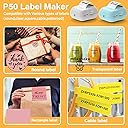
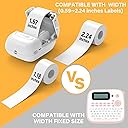
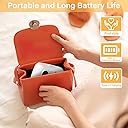
The MARKLIFE P50 is a sleek, portable Bluetooth thermal label printer designed for professionals and small businesses. It supports up to 2-inch wide black-and-white labels, connects effortlessly to smartphones via Bluetooth 4.0, and offers advanced app features including barcode, QR code, photo printing, and voice control. With a rechargeable battery and compact size, it empowers efficient, on-the-go labeling for retail, office, and creative uses.






| ASIN | B0BMFNXFND |
| Additional Printer functions | Print Only |
| Best Sellers Rank | #248,138 in Office Products ( See Top 100 in Office Products ) #592 in Desktop Label Printers |
| Compatible Devices | PC, Smartphones |
| Control Method | Voice |
| Customer Reviews | 4.1 4.1 out of 5 stars (736) |
| Date First Available | November 15, 2022 |
| Dual-sided printing | No |
| Duplex | simplex |
| Hardware Interface | Bluetooth |
| Included Components | Labels |
| Ink Color | black |
| Item Weight | 13.7 ounces |
| Item model number | P50 |
| Manufacturer | MARKLIFE |
| Max Copy Speed (Black & White) | 60 ppm |
| Max Input Sheet Capacity | 1 |
| Max copy resolution black-white | 300 dpi |
| Maximum Black and White Print Resolution | 300 dpi |
| Maximum Media Size | 2 inches |
| Memory Storage Capacity | 8 MB |
| Model Series | P50 |
| Number of Trays | 1 |
| Output sheet capacity | 100 |
| Print media | Labels |
| Printer Ink Type | Thermal |
| Product Dimensions | 4 x 3 x 2 inches |
| Scanner Type | Portable |
| Series Number | 50 |
| Sheet Size | 2 inches |
| Supported Media Sizes | 1.75 x 2.5 inches |
D**R
I’m delighted!
This MarkLife P50 printer is a great custom thermal label printer that can handle multiple different sizes and shapes of thermal sticker label stock. Download the MarkLife app and it works with you mobile device, connecting to the printer via Bluetooth, no Wi-Fi connection needed, which makes it perfect for on the go. It automatically detects the printer and sets it to the default stock size to 40mm x 30mm. There is a roll preloaded 40mm x 30mm in the machine. I purchased additional labels for the P50 printer in 50mm x 30mm which also work well. The labels can be cut to the size you need after your print is done if you want to make 2 smaller labels from one larger one. Print multiple copies of the same label and save your designs to the cloud with ease. The machine will print pictures, logos, pdfs, barcodes, QR codes and other media and has print density and photo quality settings to enhance the print job. The machine prints fast. It can be used with or without being plugged in because it has a rechargeable battery built in. It has a usb c connector to charge with and comes with a wire for that. I would highly recommend this device if you are looking to pick up a fully customizable label machine.
D**I
Very easy to use
I bought this for my homemade toiletries and herbs from my garden. I needed a way to label them before gifting them to my friends. I have a rare genetic disorder that causes severe joint damage. My handwriting isn't really legible anymore so I can no longer simply write on my labels. I'm not very tech savvy so I was a little scared that it would be too complicated for me. Thankfully the app is very user friendly. There's a lot of versatility in the fonts, sizing, label types, etc. It sounds complicated, but the app walks you through it. I really appreciate that you can sign in as a guest instead of setting up an account. I wasn't sure if I would be able to use it at first so it was nice to try it out a couple of times first. Once I did set up an account the process was very quick and easy. Another thing that I was concerned about was loading the labels into it since I have so much trouble with my hands. It was very easy to do and only took a few seconds to complete. The best part is how compact the printer is. It doesn't take up much room and I ended up just tossing it in my craft drawer.
T**S
Easy to use
Why did you pick this product vs others?: Great price! Actually very simple to use. App is fairly easy to use also. Connects good to phone which is awesome. I want to get more style rolls to use in it. Great gadget to have on hand.
J**A
Serves its purpose
It’s really a great way to make bar codes, labels, and would be perfect for a small business. It prints out little stickers and pictures.. however, it does not come with instructions. So, if I can save someone time, download the MARKLIFE app before attempting anything. You want to turn your Bluetooth on your phone, however disconnect it on the app. (Kind of confusing) but the light on the side of your device will turn blue and then you can print.. also the black screen doesn’t do anything. Took me a while to figure that one out 🤦♀️ Good luck
K**D
Great for 1 label at a time
I got this because it was the only one that would allow you to use your PC as well as your phone. My phone doesn't have much room on it for more apps so I was really hoping to use my laptop. The instructions do not come with how do use on a laptop. Sent a message today to seller for instructions and still waiting (it's a holiday weekend, so hoping to hear back Tuesday). With that said; I did load it on my phone, make sure you turn on your bluetooth, downloaded the app and played around with it. Here's the problem. The labels that come with it (40mmx30mm) and yes, you NEED to know the size in mm; keeps moving when printing. What I mean by that is; there is nothing under the hood to keep the roll of labels to the right. If you print more than 2 or 3 labels, the roll starts sliding to the left and you get a partial label. You have to re-calibrate and print again after opening the lid and pushing the roll to the right MANUALLY. What this printer needs is a little spring arm or something to keep it pushed to the right. They should you give 2 rolls of labels for the price of one, because you'll constantly have to re-adjust. My solution: Print one label at a time, open lid, move roll to right, close, and print another one, if it "jumps", re-calibrate and repeat. It's a much slower process, but not recommended for A LOT of labels at a time.
J**C
Affordable Temporary Option
I’m grateful to have a label printer for my new business however this printer doesn’t print well when it comes to pictures. The template options have grammatical errors. Comes with a roll of gap tape . I recommend ordering a continuous roll of tape as well. Affordable start for a new business will have to be replaced for the next level. Update it is now March 2024 I purchased this in August. I’ve had two big order sessions with this printer the reviews are less than stellar from me. The amount of tape wasted because the machine kicks out of alignment for no reason. The template and the labels are not matched well. If you in a crunch this is a very temporary fix.
T**N
Good label maker
If you are looking for a high quality label maker with lots of options this one is not for you. It does print at a good pace, it has pretty good options for font. The images are pretty generic. It is hard to sort of go back to edit or move letters or images at times. The option to take pictures and print is kinda cool except you have to edit the pictures before the download because you cannot adjust the size on the label maker app. Overall I'm pretty happy with it for what it does. Also got the product in a timely manner and in perfect condition.
A**S
product doesnt work as advertised
Trustpilot
3 weeks ago
1 month ago