Desertcart purchases this item on your behalf and handles shipping, customs, and support to Mexico.
⚡ Power up your game with effortless wireless charging!
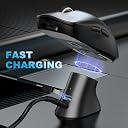
The Soarking Charging Dock is a compact, magnetic wireless charging station designed exclusively for Logitech's premium gaming mice lineup. Featuring USB-C connectivity and smart charging technology, it delivers steady 0.1A power to keep your mouse ready without overcharging. Its non-slip base and lightweight design make it ideal for both home and travel, ensuring your gear is always charged and adventure-ready.


| ASIN | B08JFXFSJ2 |
| Amperage | 0.1 Amps |
| Best Sellers Rank | #107,138 in Computers & Accessories ( See Top 100 in Computers & Accessories ) #1,146 in Mice |
| Box Contents | Charging dock,Cable |
| Brand | Soarking |
| Brand Name | Soarking |
| Colour | black |
| Compatible Devices | Laptops |
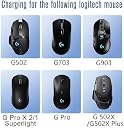
| Compatible Phone Models | G502, G903 |
| Connectivity Technology | USB |
| Connector Type | USB |
| Customer Package Type | FFP |
| Customer Reviews | 4.2 out of 5 stars 2,120 Reviews |
| Enclosure Material | Plastic |
| Included Components | Charging dock,Cable |
| Input Voltage | 5 Volts |
| Item Weight Unit of Measure | 0.02 Pounds |
| Main Power Connector Type | USB Type C |
| Manufacturer | Soarking |
| Manufacturer Part Number | USSKLGTMSSB |
| Model Name | USSKLGTMSSB |
| Model Number | USSKLGTMSSB |
| Mounting Type | Tabletop Mount |
| Number of Items | 1 |
| Output Current | 0.1 Amps |
| Output Voltage | 5 Volts |
| Portable | Yes |
| Power Plug Type | No Plug |
| Power Source | Corded Electric |
| Special Feature | Charging Indicator |
| Special Features | Charging Indicator |
| Specification Met | oem |
| Total USB Ports | 1 |
| UPC | 616859794061 |
| Unit Count | 1 Count |
| Wattage | 1.00 |
J**.
Overpriced dock
Overpriced for Indian consumers. The 502x costs 12k and 5k for charging dock ? Why is it too expensive??? Whats with minimum words. ?
B**L
Worth the money
I tried another, cheaper, alternative recently and was disappointed at how the charging insert did not sit flush with the mouse and would drag while in use. I finally bit the bullet and purchased this one and I absolutely do not regret it. The puck that goes on the mouse feels almost like the original. It also comes with an included weight, which I removed, leaving it as light as I originally had my G502. No drag, no issues. It snaps on with magnets that feel like the original. Setup is super easy. You stick the charging base wherever you want it, connect the USB C to the back and then the USB A to a power source. The bottom of the charger has a reusable sticky pad so you don't need to worry about repositioning or leaving residue on your desk. The battery charging, from what I understand, is normal to only charge to 80%. If you're charging this every time that you stop using it, then this won't be a problem. The only thing to note is that the base magnet is pretty strong so you'll have to kind of rotate the mouse off of the base rather than lifting it straight off. That being said, since it's so strong, it holds the mouse just fine when docked. I only tried one other one so I can't speak for the rest of the wireless chargers for the G502, but you won't regret buying this one.
M**O
Dejo de funcionar
Ya no carga… funcionó por varios meses y ya no funciona
R**7
Does the job well [2 year update] + [4 year update] Edited June 2026
June 2026 Update: I started working 2 weeks after Logitech firmware updated my mouse. My G502 lightspeed is about to get replaced by G502X, will update after using it then. November 2025 Update: its the end of the road guys, the dock no longer charges my G502 Lightspeed. HOWEVER, I will investigate whether this is an issue with the Soarking dock, or my mouse itself, as my mouse is getting quite old now. I still feel this product is 5 star-worthy because of its performance record. [June '26 update, it started working again, I think LG updated mouse firmware and fixed it.] [Update after 4 years: yes, it's still working great, no issues!] [Update after 2 years: still going strong, no issues at all.] Had this for over 8 months now, has faithfully charged my G502 lightspeed mouse. The included charge puck (necessary for charging the mouse) fits exact and is well made, doesn't snag on my mousepad. The dock has some decent weight to it, but the magnets are quite strong, and usually requires 2 hands to remove the mouse from it. [If you pull the mouse down and off, you can take it off with 1 hand and the puck will stay in the mouse.] Many people miss this detail: the dock charges the mouse to 80% only!!! This is a battery protection feature from Logitech. The charging pins on the bottom of the mouse were designed for their expensive Powerplay mat, so it will never charge the mouse to 100%, because keeping the mouse at 100% always would harm the battery eventually. If you want to charge to 100%, you'll have to plug in the mouse directly to charge. [Update: I've let my mouse hit 0% multiple times now, and 30 seconds on the charger dock nets about 5-7 minutes of use, and 2 minutes of charging gets me well over 15 minutes! Using a G502 Lightspeed. The Soarking dock is plugged into a POWERED USB hub, so mine charges fast, yours may charge slower if connected directly to motherboard USB.] Overall, 80/80
H**I
هزاع
مونتج جميل وفادني بشكل خورافي انصحكم به 👌
G**R
Questionable dongle orientation, but works like a charm (Updated)
Bought this for mouse battery longevity. It charges the device only to 80% or 90% which is ideal for longevity. A questionable design choice to have the USB port for the dongle be on the backside, but it doesn't hinder performance at all (and I should know, I'm extremely nit-picky about these things). The lid and weight are of good quality, just make sure you tilt the mouse up from the back when taking it off, if not the lid will stay attached because of the way it's designed to be removed from the mouse. I'm not using the adhesive yet but it seems very strong. I think you can get one with the current orientation from a Chinese retailer on another website. If you are unsure about buying this, just consider that these Logitech mice have very long battery life. I've been playing for four days non-stop since 90%, I'm now at 77% and these mice go to sleep when idle, saving battery even more. I haven't manually turned the mouse off since day one. So you'll find yourself charging your mice once every two weeks at most with heavy usage. Also, this product is overpriced in my opinion. A fair price would be $20 at most, $15 would be ideal. EDIT: After some months with the mouse and this charger, I have some things worth mentioning: #1 Make sure the contacts on the mouse lid are clean. Rub them with your fingers before charging. Two nights in a row I tried to place the mouse on the dock to charge, and it did not charge at all. Turns out the contacts were dirty despite looking clean. They caught a thin layer of sweat from the mouse pad. #2 The Logitech G Hub does not accurately display the charge of the mouse. For example, I typically charge my mouse on this dock overnight and G Hub will say that the mouse is at 50 or 60 percent. That's not true, and after the mouse went to sleep and waking up the mouse, G Hub now showed correctly 89%. I use in-memory profiles in my mouse, So I don't rely on G hub for charge levels. Upon wakeup, the mouse itself shows the battery level using the 3 leds (I have a G903 Lightspeed wireless). 3 green leds means fully charged, two means halfway, a blinking red means charge around 20% and so on.
Trustpilot
1 month ago
2 weeks ago