Buy anything from 5,000+ international stores. One checkout price. No surprise fees. Join 2M+ shoppers on Desertcart.
Desertcart purchases this item on your behalf and handles shipping, customs, and support to Mexico.
🎯 Elevate your workflow with precision and comfort — the ultimate trackball for pros who demand more.
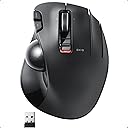
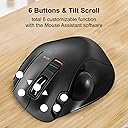
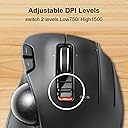
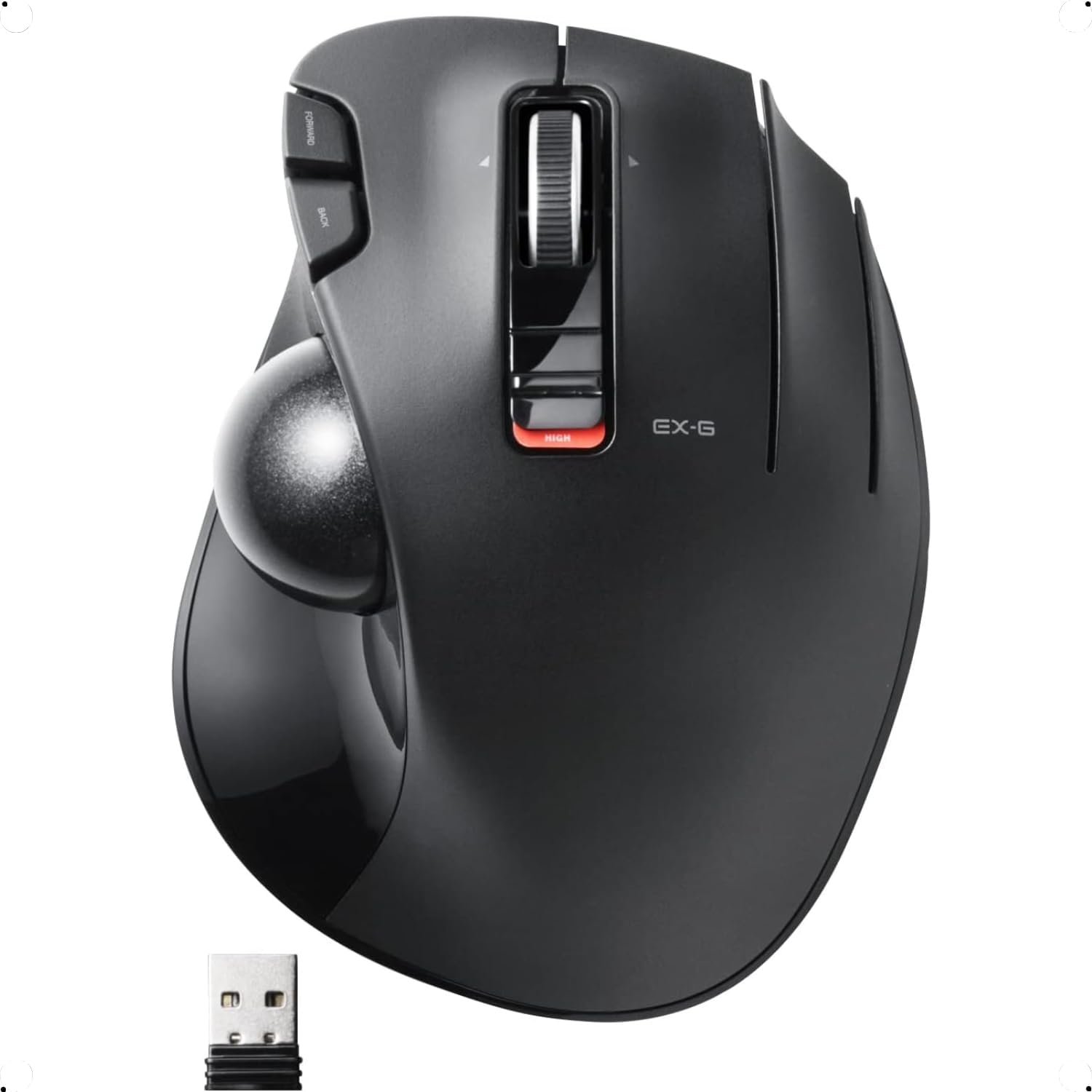
The ELECOM M-XT3DRBK is a wireless thumb-operated trackball mouse featuring a high-performance optical sensor with adjustable DPI up to 1500, six programmable buttons including scrollwheel tilt for horizontal scrolling, and an ergonomic sculpted design optimized for right-handed users. Its durable ruby ball bearings minimize maintenance while delivering smooth, precise cursor control. Compatible with Windows 8 and later, and macOS 10.10+, it offers reliable wireless connectivity and a battery life of up to one month on a single AA battery, making it a superior alternative to legacy trackballs like the Logitech M570.


| ASIN | B016QCPNUW |
| Antenna Location | Creative Software, Home, Office, School, Video/Photo Editing, Work |
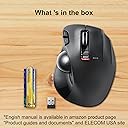
| Are Batteries Included? | No |
| Are Batteries Required | Yes |
| Best Sellers Rank | 29,629 in Computers & Accessories ( See Top 100 in Computers & Accessories ) 17 in Trackballs |
| Box Contents | English manual, Japanese manual, Receiver, Trackball mouse |
| Brand | ELECOM |
| Brand Name | ELECOM |
| Button Quantity | 6 |
| Colour | Right Handed |
| Compatible Devices | Laptop, Personal Computer |
| Connectivity technology | USB |
| Country of Origin | China |
| Customer Reviews | 4.0 out of 5 stars 9,327 Reviews |
| Enclosure Material | Plastic |
| Global Trade Identification Number | 04953103473683 |
| Hand Orientation | Right |
| Hardware Platform | Laptop, PC |
| Item Dimensions L x W | 12.5L x 9.5W centimetres |
| Item Type Name | ELECOM 2.4GHz Wireless Thumb-operated Trackball Mouse, 6-Button Function with Smooth Tracking, Precision Optical Gaming Sensor (M-XT3DRBK) |
| Item Weight | 0.44 Pounds |
| Manufacturer | ELECOM |
| Manufacturer Part Number | M-XT3DRBK |
| Minimum Required Operating System Version | Windows 10 |
| Model Name | M-XT3DRBK |
| Model Number | M-XT3DRBK |
| Mouse Maximum Sensitivity | 1500 Dots per Inch |
| Movement Detection | Optical |
| Movement detection technology | Optical |
| Network Connectivity Technology | USB |
| Number of Batteries | 1 AAA batteries required. |
| Number of buttons | 6 |
| Operating System | Windows 10, Windows 7, Windows 8.1, Windows Vista |
| Power Source | Battery Powered |
| Product Features | 4 Way Scrolling, Ergonomic Design, Programmable Buttons, Wireless |
| Product Finish Type | Matte |
| Range | 10.0 meters |
| Special feature | 4 Way Scrolling , Ergonomic Design, Programmable Buttons, Wireless |
| Style Name | Wireless_BlackBall |
| Theme | Versatile |
| Unit Count | 1.0 count |
S**R
For too long the only real option for a good thumb track ball mouse has been available from logitech ...
For too long the only real option for a good thumb track ball mouse has been available from logitech and even they reduced their range over time, leaving just the wireless m570 as the only one. What is unfortunate is they also cheaped out on some of the components used too (probably due to lack of competition) which often causes them to develop a fault with the buttons/switches (often registering double clicks or not at all). It seems like a very common problem and more than just annoying! It makes them unusable! This is what happened to mine of course and repairing/fixing the issue meant having to replace the switches (too much hassle) or purchasing another, which again was likely to get the same fault after an unacceptable amount of time considering the price. For a long time I searched for alternatives but many seemed to suffer from poor design and other annoyances/lack of features. Finally I stumbled across this Elecom EX-G M-XT3DRBK (Careful of the stupid naming scheme, there are a few variants!) so order it, but thinking again, its likely it would not be what I had hoped. Thankfully I was totally wrong, its been excellent so far. Not only is it a good replacement from the m570, its better in just about every way. It has more buttons and functions and has not developed any fault even after continuous abuse. It also has a nicer feel than the m570, especially the finish quality and shape as well as the button clicks (specifically the back/forward). It makes the m570 feel cheap in comparison IMO. It has 3 buttons + scroller + scroller tilt clicks left/right/center as well as the normally back forward buttons, it also has a high and low speed switch (I use mostly high). All the functions work using the default plug and play drivers, except for 1 of the 3 main buttons, but using Elecoms own driver/software can over come this and also has the added benefit of assigning anything to any of the above functions, including gesture options! The only thing is misses is the precision option, but that can be selected in windows mouse option and you are good to go. Just search for ELECOM Mouse Assistant (global) to find the download. The only slight annoyance (cant call it a fault) I could find was the smoothness when new, but this seems to have improved with use and now feels much smoother than the m570 ever did. The name of the product is also a bit stupid, Elecom really need to sort out their naming scheme as its just confusing, still it does not take much away from the product itself, which I would not hesitate to highly recommend to any looking for good thumb tracker ball. I believe this to be the best thumb tracker ball currently available on the market.
M**S
Excellent Mouse with only Minor Issues
I love thumb controlled trackballs, but there just aren't many options available these days except for the Logitech M570, which has all the usual build-quality issues I've come to expect from Logitech's increasingly shoddy devices, namely mouse buttons that become increasingly unreliable after only a few months of use. After chancing upon a recommendation to try Elecom I did so, and I haven't looked back; it's an excellent thumb-trackball with only a few minor niggles, which I'll try to summarise: Pros: 1. Excellent design in terms of comfort, especially for someone with larger hands (but it should be comfortable for all). 2. Flywheel scrolling with tilt for limited horizontal scrolling. 3. Very good build quality with excellent mouse button switches. 4. Solid battery life, with options to adjust wireless signal strength and tracking sensitivity for either faster speed or longer battery life. 5. High DPI setting has very high precision with a bit of a practice; not sure if I'd use it for gaming, but any work requiring precision will benefit. Cons: 1. Takes a little getting used-to; you might find yourself accidentally right-click a lot until you get used to it. 2. Stock ball requires a lot of wear-in before it feels smooth, this may cause it to feel a grind-y for the first week or two of use. If you have a spare Logitech M570 ball not only does it fit, it feels a lot smoother straight away. 3. Elecom software is incompatible with newer versions of macOS, meaning limited control of some functions, notably the extra buttons and the horizontal scrolling speed (though Mac users may find that holding Shift while scrolling is easier anyway). Specifically comparing to the Logitech M570: 1. Far superior build quality, more comfortable fit. 2. Battery life is shorter, though you should still get at least a month on low wireless signal and low DPI for a single AA battery. 3. Requires more frequent cleaning of the ball area (every 1-2 days compared to every 3-4 days, both with heavy use), but cleaning is very easy. So to conclude, the main things that really let this mouse down are the stock ball, and the broken macOS software; if these were addressed this mouse would easily be a 5 star product, and regardless of these minor issues it's vastly superior to the Logitech offerings (including their new £90 rip-off). If I could I'd have rated this a 4.5, but I can't justify rounding up when there is room to improve.
T**H
Wrist Saver and Smooth Scrolling!
This trackball mouse has been a lifesaver for my wrist pain! Switching to this design has drastically reduced the strain I used to feel after long hours of work. The thumb-operated ball makes scrolling and navigating so easy and precise—it’s incredibly intuitive once you get used to it. The ergonomic design is comfortable to hold, and the customizable buttons are a nice bonus for streamlining tasks. It’s also great for limited desk space since you don’t need to move the mouse around. If you’re dealing with wrist discomfort or just want a more efficient way to navigate, this trackball mouse is a game-changer. Highly recommend it for anyone looking for comfort and functionality in their setup!
C**M
Amazing value.
OK my mouse broke after 3years ish a jelly trackball. So I saw this on black friday deal. I've had logi also. This mouse is hands down way better. The software works well. The 3rd click on the mouse is just brilliant for fast opening of certain things my computer etc. If you like trackball mice this is a great deal right now. Speed is nippy with on the fly high or low. Then in software you can change cursor speed etc. Ohhh and it's super comfy. Even if you have larger hands I think this would still be awesome. I don't do many reviews unless it's something really worth talking about. So yea if you want a trackball you've found it..
D**Z
It has similar problems to the Logitech trackballs.
I used to have a couple of Logitech MX trackballs, but after a year or two of heavy use they started having double-click problems. So I bought an Elecom trackball. In terms of shape and ergonomics, I preferred the Logitech trackball, but there is no big difference and you can easily adapt to the Elecom. Unfortunately, the Elecom has similar problems. After 11 months of use, I have problems holding down the left button, selecting text, etc. All in all, I'm disappointed because it hasn't even lasted a year and I'm going back to the MX series.
E**G
Useless!
The Left, Right and second Right buttons are extremely weak. So one have to keep their fingers up in the air to avoid incidental clicks. If the buttons were stronger, I'd have given 5 stars all the way. I'll keep the device as it is otherwise very good, but I will replace the buttons. Edit. Using the device 2 days already. My first impression is correct. The device is OK, but I will be changing the 3 buttons for the reasons explained earlier. I learned to keep my fingers up in the air, and accidental clicks happen less than in the beginning, but that is not a solution. Edit. After returning to my old mouse for a while and getting back to this mouse. This mouse is an absolute USELESS TRASH. I regret for not sending it back to amazon.
S**3
First trackball better than a mouse even for gaming/editing
Product Review: It didn't arrive in retail packaging;just a plane brown box,which made me suspicious but the build quality and performance is above expectations iv even stopped switching to a mouse for fps games. The main feature of this mouse over many other with programmable extra buttons is the button on the ring finger placement can as always be set to any keystroke but can also be easily set to recognise gestures just hold it down and draw a shape eg; clockwise and counter clockwise circles to adjust pointer speed or maybe zoom functions,hold and draw a quick cross for your quicksave,triangle for home key,swipe motions...ect literally no limit to the amount of functions on a single key all without using macros that can effect computer security or get you band from online games. Highly recommended,well built,comfortable to use,fast and accurate control with less wrist/hand strain than a mouse that only has correct position until you move it. if you've never tried editing or gaming with a trackball then this is definitely the one that's worth the time it takes to adapt from a mouse,and free from the need of a mouse mat you can binge watch amazonprime or social media from your sofa/bed with its just resting on your leg or anything next to you.
L**E
1 year on... beats my old M570 with ease.
I've been using Trackball Mice since the 90's. Starting with the Microsoft Explorer trackball and like most users upgrading to the Logitech M-570. However the latest Logitech version seems 'somewhat' overpriced. There are finally a few other options on the market and having done some research I decided upon the ELECOM 2.4GHz Wireless Thumb-operated Trackball. I haven't been disappointed so far. It's been 1 year and I'm very happy using this trackball mouse for design artwork, video editing and general web browsing as well. The programmable features are great using the downloadable software - well designed and lots of options. I have large hands and the ELECOM mouse is big enough to use unlike some of the other brand options. Very comfortable for hours at a time, day after day. The 3D scroll-wheel has been very handy for web browsing as well as video editing. It took me a while to get used to something other than a usual scroll-wheel but going back to the traditional variant will be hard after this. Value for money; I'm really impressed with this mouse. They don't seem to have cut corners anywhere. I guess ELECOM could of added some rubber support padding but it doesn't really need it and that type of padding generally wears down over time. It's been 1 year now and this mouse still looks and works great. I found that the ball is even interchangeable with my old Logitech so it means I have a spare just in case. I thought that was interesting too. Hope that helps. L.
A**B
منتج جيد جدا وسعر ممتاز ومناسب استخدامه 90٪ رائع حتى الان
كل شي جميل وبتصميم انيق واستخدمه سلس ، حيث استخدمت جميع اجهاز لوجتك M النوعين وهم ممتازين جدا
P**N
Muy parecido al Logitech M570, con mas botones, pero con algo menos de precision
Viniendo de dos Logitech M570 seguidos, con sus habituales fallos en los botones, el cambio ha sido muy facil, Es ligerisimamente mas corto que el M570 pero muy comodo y manejable. Practicamente no hay diferencia en la postura de la mano respecto al Logitech. Muy utiles los botones adicionales. La precision es mejorable. En ese sentido daria un 10 al M570 y un 8 al Elecom P.d.: añado que le he puesto la bola del Logitech y la precision es ahora absoluta. Parece que el dibujo de la trama de la bola Logitech funciona mejor
S**O
Super Responsive
After 25 years using the Logitech m570 , I will never look back. Go Japan all the way. It's half the price , has almost twice the buttons , and its smooth scrolling and feels natural in the hand. I love it !!!
K**H
Product failed within 6 months of purchase
Hi giving this a one as this is the second Elecom trackball I purchased that has failed inside of 6 months. Thought to save some money but with two units going down, I should spent the cash upfront for the Logitech instead
P**S
Love it!
I've been using this trackball for a while now. I absolutely love it. It's nice: heavy and sturdy. Beautiful really! Just what I expected from Japanese technology.
Trustpilot
1 month ago
3 days ago