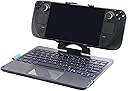


🎮 Elevate your Steam Deck game with DeckTop — where style meets precision!
The DeckTop is a Bluetooth keyboard and trackpad accessory designed specifically for Steam Deck and similar handheld gaming PCs. Featuring tactile responsive keys, customizable RGB lighting, and a unique 360° swivel stand, it enhances mobile gaming with improved control and ergonomic flexibility. Lightweight and durable, it fits snugly on your device for seamless integration, making it an essential upgrade for gamers seeking both style and functionality on the go.
| ASIN | B0CBL27QKC |
| Best Sellers Rank | #6,527 in Video Games ( See Top 100 in Video Games ) #465 in Computer Keyboard & Mouse Combos #531 in PC Gaming Keyboards |
| Customer Reviews | 4.1 4.1 out of 5 stars (132) |
| Date First Available | July 10, 2023 |
| Item Weight | 1.7 pounds |
| Manufacturer | Invensic |
| Package Dimensions | 11.18 x 8.03 x 2.24 inches |
W**M
Great product, but poor quality materials.
Works as intended and lasts quite a while. The only negative things I have to say, is 1 the rgb times out quickly so useing it to see what your typing in the dark when playing a game and not typing regularly. 2 to get it to reconnect when its gone to sleep you have to press a key on the keyboard and wait a few seconds (mouse pad isn't effective for this) or turn it off and on again. 3 the grip pads are stick on and will peel off with extended use. The biggest problem in my opinion is the fact the keyboard has a 360° swivel so when not useing it for a keyboard it also functions as a stand.
S**5
Tight fit, decent enough keyboard quality, but why?
This is a pretty innovatively designed keyboard accessory for your Steam Deck. It can be a good option for a keyboard and trackpad when using your Deck in desktop mode. The key travel and tactility is decent enough for quick sessions but keyboard snobs won't like typing on this for too long. The trackpad is kinda mid - it does the job but gestures aren't very fluid and tracking is just okay. That being said, keep a few things in mind: (1) If you plan to use this for long work sessions with your Deck in desktop mode, be aware that this keyboard connects to your Deck via bluetooth. While there's an input delay, it is no longer than any other bluetooth keyboard (so you're not going to be playing FPS games on your Deck with the same responsiveness of a wired keyboard). Also, every so often, the keyboard's bluetooth connectivity can disconnect randomly. (2) Before spending the money on this, ask yourself if you couldn't spend the money on a Steam Deck dock and a portable bluetooth keyboard. That would bring you more flexibility, more ports, and you'd possibly avoid the BT disconnection issues of this keyboard. (3) Travelability. With this keyboard attached to your Deck, you're not slipping both into a backpack. The mounting clamp can fold down but that leaves your Deck's joycons pushing against the keyboard and little protection for either your Deck or the keyboard. Sure, you can remove your Deck from the clamp before packing things away, but see #4 below about that clamp. (4) Fitment: Getting this keyboard to attach to your deck is a bit more difficult than it should be. The fit is tight and if your deck is in a case, it won't fit. A naked Deck, or a Deck with a vinyl skin (including that thicker-than-normal "dead cow" skin from a certain Canadian tech skins company that advertises a lot on popular online tech reviewer videos) can fit -- but attaching and detaching the keyboard is, as I said, a bit more difficult than it should be. Anything thicker protecting your Deck will have to be removed for this keyboard's clamp to fit.
P**T
Like the other half of a laptop when combined with the steam deck.
Pricey but works great. Very clickly, large keys, weighted and stable, works with your phone and any bluetooth device. Feels nice and sturdy and has a good battery life from what I can tell. I just wish this device could've been a dock and keyboard combo for the price but it is what it is.
A**R
So far, so good!
I got the Steam Deck for me, but my son took it away and now believes it's his. It's fine... I have a nice desktop setup with a 42" 4K tv... I'll live. But he likes some weird games that aren't necessarily Steam Deck compliant. Garten of Banban and Poppy Playtime being the worst offenders. He'll routinely come to me asking for help getting to a spot that requires him to run and jump. But there's no run button on Steam Deck. I'm too lazy to figure out game-specific custom bindings. I found this KB as a solution (well... I also needed a mouse... got a wired one that connects to the splitter cable, which allows for power to be hooked up to the Steam Deck simultaneously). Running is the Shift key, as God intended. After charging, I turned it on, put it in pairing mode, then opened the Steam Deck settings for blue tooth and it found it immediately. My son, who knows nothing of connecting to blue tooth, evidently played his game this morning without having to connect it again, so that's good news. The Deck is held securely by the clamp. This is a pretty good setup. I'm relieved that the workaround wasn't "Buy a ten year old a gaming laptop for Christmas". We were pretty close to that point. We've already spent too much on Christmas Lego sets as it is, so this is an excellent compromise.
I**E
Inconsistent Product Advertisement
I like the idea of this product. I've ordered 2 of these keyboards. The first one was great. I received it timely and it was fairly simple with the setup. With the first one I had a fitting break, so I re-ordered - I couldn't locate replacement parts. Since getting the new one, not only have had issues with it being discoverable via Bluetooth, but the attachment that holds the intended tech (e.g. Steam Deck) was different and definitely inferior to the original clamp. In reviewing the photos posted by the seller, you can see at least 3 different types of clamps that you could end up with (the keyboard appears to be the same). The first one is a 3 prong holder, which stretches from the bottom (towards the keybaord - pretty great). The second one I received is a 2 prong holder, both prongs are located at the top and you have to push upward (away from keyboard - which seems counterintuitive & isn't pictured in the photos advertised) and slips the device into the groove that sits on top of the keyboard. It's harder to get your device in and out of the holder safely. It also looks like there's a 4 prong holder, which I haven't experienced. Ultimately, there is no option to select which one you want, so it appears to be a lottery. If I could confirm getting the one I originally received (3 prong - 2 on top and 1 on bottom), I'd purchase this product again, otherwise I don't plan to. If the seller wishes to respond and assist in fixing this issue, it would certainly increase my customer satisfaction.
N**N
Bought as a present for grandson who absolutely loved it.
M**.
Amazing, helpful and good quality My only problem was fn and control keys should be switched, really takes a lot of times to get used to it
J**N
Very nice Product, works as Intended. While I don't use my Deck in Desktop mode all that much. Having this at the ready when I do want to turn my Deck Into a semi-laptop is amazing!
Trustpilot
4 days ago
2 days ago