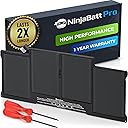
![NinjaBatt Battery A1466 for Apple MacBook Air 13 Inch [2010 2011 2012 2013 2014 2015 2017 Years] A1369 A1405 A1377 | 661-7474 661-4570- High Performance [7160mAh/54.4Wh/7.6V]](https://m.media-amazon.com/images/I/71Te9IRDF8L._AC_SL3840_.jpg)



Buy anything from 5,000+ international stores. One checkout price. No surprise fees. Join 2M+ shoppers on Desertcart.
Desertcart purchases this item on your behalf and handles shipping, customs, and support to Mexico.
🔋 Power your MacBook Air like a pro—stay charged, stay ahead!
NinjaBatt A1466 is a high-performance replacement battery designed specifically for Apple MacBook Air 13" models (2010-2017). Featuring a robust 7160mAh capacity and stable 7.6V output, it delivers reliable power with premium lithium polymer cells and advanced safety protections. Compatible with multiple MacBook Air model numbers, it supports up to 1000 charge cycles and comes with a 12-month warranty, ensuring long-lasting performance and peace of mind for professionals on the go.


| ASIN | B09HSGB6TB |
| Amperage | 7 Amps |
| Antenna Location | Laptop |
| Battery Capacity | 7160 Milliamp Hours |
| Battery Cell Composition | Lithium Polymer |
| Battery Cell Type | Lithium Polymer |
| Battery Weight | 10 Ounces |
| Best Sellers Rank | #9,659 in Electronics ( See Top 100 in Electronics ) #44 in Laptop Batteries |
| Brand | NinjaBatt |
| Compatible Phone Models | A1466 for Apple MacBook Air 13 Inch [2010 2011 2012 2013 2014 2015 2017 Years] A1369 A1405 A1377 | 661-7474 661-4570 661-04570 |
| Customer Reviews | 4.2 out of 5 stars 3,811 Reviews |
| Item Dimensions | 12.95 x 6.81 x 1.26 inches |
| Item Weight | 10 Ounces |
| Manufacturer | NinjaBatt |
| Model Name | A1466 |
| Model Number | A1466 |
| Number of Batteries | 1 Product Specific batteries required. (included) |
| Recommended Uses For Product | Laptop |
| Reusability | Rechargeable |
| UPC | 842167113854 |
| Unit Count | 1.0 Count |
| Voltage | 7.6 Volts |
A**.
Great performance for it's created year, 1 year warranty offers peace of mind!
Perfect replacement for my 2015 13" MacBook pro. These batteries don't last all day in the older Mac laptops because Intel CPU's are not as efficient, but this one will last about 6 hours of random surfing, typing, or other non intensive tasks, but if you are streaming on YouTube, Netflix, Paramount+, etc. the battery only lasts about 4 hours. For these machines, that was pretty good back in the day. Functions perfectly, and was easy to install once the old battery was removed. Instruction manual could be a little more detailed, it looks like it was translated from another language (possibly Mandarin Chinese or Japanese) but you likely won't need it if you are skilled enough to take out a MacBook battery and replace it. A huge factor for me to buy this one over the others is that there is a 1 year warranty on this battery whereas other batteries on Amazon do not have a warranty.
L**N
It works!!
Update: I purchased May 2025. It is now March 2026. The battery life is still intact. Best DIY ever!! It works!! The installation went smoothly. I followed a video I found on YouTube and found it pretty easy to replace. My OG battery wasn’t charging and I couldn’t even use my laptop while plugged in or it would die on me. Apple wanted to charge me $300 for the battery replacement. I decided to purchase this battery due to the mostly good reviews I read. This was my first time changing a battery on a device. When I was done, the laptop wasn’t turning on and I thought it wasn’t going to work (disappointing!). However, I left it to charge for a little bit and within 20min or so the laptop turned on and battery was on 50%. It has been three days since I replaced it and I have not experienced any issues so far.
E**Y
Great ! ⭐️⭐️⭐️⭐️⭐️
After looking at some YouTube videos I got this one. So happy that it worked and is holding a charge..
M**N
Terrible Replacement Battery - A Total Ripoff
I recently purchased the NinjaBatt replacement battery for my Macbook Pro, and the entire experience has been nothing short of a nightmare. I ordered this battery as a replacement for my swollen Macbook Pro battery, hoping for a seamless upgrade. However, the NinjaBatt has turned out to be a complete disappointment. Firstly, the installation process was the only positive aspect, as the battery shape exactly matched the original OEM battery, fitting well into place. Unfortunately, any glimmer of hope was swiftly crushed when I realized the battery was completely discharged upon arrival. Despite a seemingly straightforward charging process, my Macbook could only charge this battery to a mere 39% after a staggering 5 hours of charging. Even more concerning, the battery's charge dissipated at an alarming rate after unplugging the power source, far quicker than my original 9-year-old OEM battery. On the second charging cycle, the battery's performance further deteriorated, and I could only achieve a laughable 27% charge. It's abundantly clear that this battery is not only defective but also boasts a significantly smaller capacity than the original OEM battery. This experience has left me questioning the legitimacy of NinjaBatt's products. Whether it's a blatant scam or a result of abysmal quality control, I am utterly disappointed and frustrated. I strongly advise against wasting your money on this product. Save yourself the trouble and opt for a more reliable battery from a reputable source. I am beyond frustrated with this purchase, and to add insult to injury, attempting to return this defective battery is an absolute nightmare. The battery is glued to the case, making the return process an arduous and messy ordeal. Save yourself the headache and steer clear of this subpar product and its infuriating return process.
S**.
UPDATE: NinjaBatt sent new battery -- Battery failed in 7 months after 23 cycles
Updated review: NinjaBatt sent me a new battery after searching and finally being able to contact them. They were nice about it and just sent a new one out. It arrived actually really fast, only a couple days I think. New battery is installed and working good. It arrived with 40% charge. I'll follow the included instruction to run it down to 10% then charge to 100% and repeat this process five times to make sure it has full capacity. This is on my wife's laptop, so I'll also move all the files and folders she has on the desktop to the documents folder to save resources from the computer. Thanks NinjaBatt for standing behind your warranty and making the process easier. I moved the 1-star review to 4-star because of this, but I can't go to 5-star because the first battery did fail, and my expectations are lower now. Old review: I bought this with high expectations for an aftermarket battery. Installation went easy and battery held a charge right away. It didn't seem to be a high quality battery as the total charge held was similar to the old original Apple battery that I was replacing. Well, after 7 months, the battery now won't even take a charge. It won't charge past 1% and it says it has 23 cycles under it and needs replacement. What do you expect with a Chinese product. Trash.
J**K
Worked great.
I noticed that my 2013 Macbook Pro was starting to rock some when sitting on a flat, hard surface, seemed weird so after a little internet searching, I realized the batteries were starting to swell and distort the casing. My track pad, at least the ability to click it with my thumb, was also not working well. I ordered this replacement battery and received it quickly. There are other similar options out there, but they had additional added things, at additional cost, that I didn't feel I needed. I didn't install it right away, I waited another week or so, but I noticed that my cooling fan seemed to run more often than not, and the case was getting a little more deformed. I made sure I had a current backup performed, then shut all apps down, unplugged, and let the laptop since with the screen active until the batteries completely ran down and it shut itself off. The NijaBatt came with two small torx screwdrivers that matched the 10 case screws on the bottom cover of the laptop, and the two internal screws that hold down the battery connector. These screwdrivers worked fine, BUT they are not very good quality. Make sure you use the right one for each size screw; the case ones used the smaller size, the connector screws used the larger. That said, they look pretty similar in size to the naked eye, so test that they fit right carefully before attempting to remove the screws. You DO NOT want to strip out a screw head. The screws were not in that tight, but make certain you press the screwdriver in firmly as you gently twist them out. There's numerous Youtube videos showing others going through this process. Once the back cover is off, if your laptop is as old as mine, it's probably kinda dusty and gross inside. I used our house vacuum cleaner's hose with a small soft brush attachment to gently move over the internal components and remove most of the dust. NOTE: I DON'T KNOW IF THIS COULD CAUSE A STATIC SPARK, MAYBE, but it did not do so in my case, so no harm done. Perhaps using canned air is a better option...? Anyway, the next step is to unclip the multi pin connector that hooks the battery to the computer board. Only the top flat portion of this connector comes loose, not the entire thing hooked to the board. Mine was pretty tight and took some gentle prying with a non-metallic thingy. Don't try to pry up the whole little rectangular connector box because the bottom 2/3 is soldered in. SO far pretty easy. The hard part comes now. The battery is made of 6 linked sections. They are adhered on the underside to the aluminum case with some very strong sticky tape strips. WHY they need to be SO hard to remove is a mystery; there's not really anywhere for them to slide away into. I suspect it's just another Mac thing they do to discourage user interaction under the hood. According to my Youtube reference, isopropyl alcohol, applied around and between the battery sections will soften the adhesive. Well it did, but not quickly and you still need to pry up on the edges with a stick plastic thingy (some kits come with those) or old credit card, small plastic kitchen utensil. You do this prying slowly, letting the alcohol work in. I cut the outer battery sections loose (wire snips) after I got them up first BUT again, maybe not a great reco since the snips are metal and if your batteries still have some charge, you might make a nasty spark here. Be forewarned. AFter the batteries were finally out, I then use more alcohol to get rid of the left over tape strip residue; using a flat razor to lift the edges a bit then just pulling slowly with fingernails. OK, hardest part done. Try to soak up as much leftover alcohol as you can with little paper towel bits or Qtips. The rest will evaporate soon enough. With you new battery, set it in place WITHOUT removing the plastic adhesive covers. Don't fasten the screws yet, just check for a proper fir and make sure the two screw holes will line up nicely. The take it back out, remove the clear adhesive cover on the bottom and gently put it back in place, trying not to push down on it (and engage the adhesive) until you know the screw holes line up. Press the multi connector back in place, and install the 2 screws. press down on batteries gently to make sure they stick. NOTE the wires going from the battery to the connector have a little U-shaped curve to them. You may need to flex these a bit to make them sit as the old ones did. On my new battery, these wires, seen in the photo underneath the serial number sticker, stuck up a little higher than the originals, but I didn't want to force them down too much and risk damaging them, it did not affect closure of the case. Then remove the top side plastic cover on the batteries; I think this just is used to hold them steady together until installed. I checked that the laptop would them boot up OK, which it did, before shutting down again and closing it all up. The new battery charged up great and has been working flawlessly for about a week now. I do not use it on just battery power that often, so I cannot say just what kind of battery life it provides. The problem of a constant fan running has completely disappeared though and the case is no longer distorted. Dispose of the old batteries in accordance with local regs (public service announcement). As you can see, my old ones were bloated and in eminent danger of doing some serious damage to the laptop and surroundings, I should have done this repair even sooner.
R**H
Fits, works, but.....
Good quality battery which should last the lifetime of my 7 year old Mac, now that I have been educated on proper battery care. Down to 10%, plug in charger, and REMOVE the charger when 100% is reached. Two niggles: other kits advertised on Amazon clearly showed that a set of replacement case screws were included. This one did not. THESE SUCKERS ARE TINY!! I lost two in the process to wherever tiny screws (and 10mm sockets) go. Recommend ordering a set with replacement screws, or, order a set of screws (about $8.00). Gripe two is the instructions do NOT include installation instructions. Only care and maintenance. No prob, as YouTube has many informative videos on how to do it.
A**R
Perfect fitment in Retina MBP mid 2014 "MacbookPro11,2"
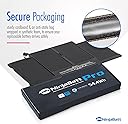
I selected this battery as what I deemed to be the least sketchy aftermarket I could find, that also could be shipped in two days or less. I didn't have to have it fast, but I don't ever like buying direct from other countries and waiting weeks for a shipment to arrive. Price wasn't important to me, but NinjaBatt's price is excellent. Also, there's a nice touch I think is not included with similar products from other manufacturers: There's a sheet of heavy gauge clear PVC on the top and bottom of the battery. One covers the adhesive, the other acts as a spine to keep the battery segments together while sliding the battery into place during the most critical step of the install process. Once you're sure the battery is located perfectly, you can peel off this spine - the second piece of plastic on the top. I had to reposition the battery a bit, and this support piece made that much easier. The adhesive doesn't fully adhere until pressure is applied, so that helps as well. I followed the ifixit guide, which can be found by searching google "battery replacement macbook pro mid 2014 A1494", and it worked fine. I added an extra step because it made sense to me: After going through the install process, I turned on the laptop, connected the charger and made sure the battery had reached 100% capacity. No, I don't mean checking for "100%" next to the battery icon at the top of the screen. I went to about this mac > system report > hardware > power. Then I compared "Charge Remaining (mAh)" to "Full Charge Capacity (mAh)". The first time I checked, these numbers were not equal, even though the percentage at the top of the screen read "100%". About 10 minutes later, I reopened the system report and the latest snapshot showed them to be equal. (truly full charge) With battery capacity at true 100% full charge, I immediately closed all apps and shut down the Macbook. Then I disconnected the charging cable. About a minute later, when I was sure it was completely shut down, I reset the SMC: first hold down shift-control-option keys on the left side of the keyboard, all at the same time. Continue holding those keys and add the power key. Now hold all four of those keys down for 10-12 seconds. (Run a stopwatch on your phone or keep an eye on a clock with a second hand to be sure.) After that, I booted up the Macbook, and left it unconnected. Use the laptop until battery is around 5% before charging again. Then charge until full. Repeat this 2-3x and by then the system should be calibrated to the battery and fully utilizing available charge. In some cases, this means the battery will seem to discharge more rapidly than expected until the third or fourth cycle. Then it should last about as long as a new stock battery. From then on, charge and discharge in the 30-90% range when not leaving the laptop connected to power. If you typically leave your MBP connected all the time, set a reminder to do a monthly discharge down to around 30% before reconnecting. In short, this battery works, but I never paid attention to the discharge rate of this laptop. If it gets me through an hour of work before I board a flight, I'm fine. I'll be charging again before I'm in the air, and everywhere else I go there's always AC receptacles.
E**T
Funktioniert und ist leichter einzubauen als befürchtet.
Der Akku tat, was er soll, er ersetzte den in meinem alten MacBook Pro Late 2013. Der Einbau war wesentlich einfacher als befürchtet oder bei den Nachfolgemodellen (dort würde ich es nicht mehr selber machen). Wichtiger Tipp beim Einbau: Erdungs-Armband (Draht zur Heizung o.ä. zur Erdung) verwenden.
A**3
La duración y fácil instalación
Excelente batería. Mi Macbook Air del 2017 que iba fatal y ya lo iba a tirar y a comprar uno nuevo volvió a la vida. Va tan rápido como el primer día. Esta batería aparte de devolverle toda su funcionalidad al ordenador, dura muchísimo. Cuesta un poco más que otras pero no me arrepiento de la compra. Llevo un mes usándola y estoy muy satisfecho. Luego la instalación ha sido muy fácil.
L**S
Cumple lo prometido
De momento funciona bien. El Mac la detecta como batería original. El sensor de temperatura funciona correctamente. No viene tan equipada, no trae cintas doble cara para pegar la faja del trackpad ni el regulador de carga pero si trae las herramientas necesarias y guantes.
F**O
Por ahora todo muy bien ,la entrega y su estado de funcionamiento
La rapidez de su entrega de lo demas Todavía no puedo decir sólo que hasta ahora muy bien
A**R
Pretty easy to replace. Seems good - time will tell.
It's too soon to tell, but it seems to be working well thus far. Battery arrived at 42% charged, discharged to 20% slowly, then dropped fast. Am charging it for the first time now. The first shipment was horrible, incorrect box, wrong literature, no screw drivers - an absolute disaster. But they were quick to ask I return it for full refund. So I took a chance and re-ordered another one. Arrived the next day, all as described and properly boxed. I am in the process of returning the first one now. While I can't explain why the first shipment was so bad, they have fixed the issue quickly. Time will tell how good the battery is, as I can't tell the date of manufacture, but it seems ok for now. If I do not do an update then all is well.
Trustpilot
5 days ago
1 month ago