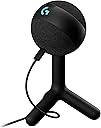
🎧 Elevate your stream with sound and style that commands attention
The Logitech G Yeti Orb is a premium USB condenser microphone designed for gamers and streamers seeking crystal-clear cardioid audio capture, customizable LIGHTSYNC RGB lighting, and effortless plug-and-play setup. Its compact metal design and full software control via Logitech G Hub make it the ultimate desktop mic for professional-grade streaming and content creation.


| ASIN | B07W6JBTXW |
| Best Sellers Rank | 1,793 in PC & Video Games ( See Top 100 in PC & Video Games ) 5 in PC Microphones 18 in Computer Microphones |
| Frequency response | 18 KHz |
| Guaranteed software updates until | unknown |
| Hardware platform | PC |
| Impedance | 16 Ohms |
| Item dimensions L x W x H | 19.6 x 11.5 x 11.5 centimetres |
| Item model number | 988-000551 |
| Item weight | 230 Grams |
| Manufacturer | Logitech G |
| Material | Metal |
| Microphone form factor | Desktop Microphone |
| Number of channels | 1 |
| Power source | USB |
| Product Dimensions | 19.6 x 11.5 x 11.5 cm; 230 g |
| Signal-to-noise ratio | 72 dB |
N**D
Good Microphone
Cracking small microphone for gaming, it is small and doesn't get in the way. You have access the to Blue yeti software from the Logitech Hub which gives a decent sound quality. Overall would recommend.
M**N
Amazing USB gaming mic — clear sound and super easy to use
I’m really impressed with the Logitech G Yeti Orb microphone. Setup couldn’t be easier — it’s true plug and play. I just connected it via USB and it was ready to use straight away with no issues on my PC. The sound quality is excellent for gaming, streaming and voice chats. My voice comes through clear and crisp, and the cardioid pickup does a good job of reducing background noise. It’s a big step up from a standard headset mic. I also love the RGB LIGHTSYNC lighting. It looks great on my desk and adds a nice touch to my setup, especially if you already use Logitech G gear. The microphone feels well built, and the stand is sturdy and stable without taking up too much space. Overall, I’m very happy with this microphone. It’s easy to use, sounds great, and looks good too. Highly recommended for anyone wanting a reliable USB mic for gaming or streaming.
J**E
Solid Mic for the Price – Compact, Stylish, and Easy to Use
I really like the Logitech G Yeti Orb. It's small, compact, and fits nicely into my setup without taking up much space. The RGB lighting is a nice touch, and the software (G HUB) is super easy to use. It makes adjusting settings simple, even if you’re not super techy. Sound quality is pretty decent—definitely good enough for gaming, general streaming, or voice chats. It’s not quite on the level of the full-sized Blue Yeti mics, but for what it is and the price, it does the job well. The only things I wish it had are a physical mute button and volume control directly on the mic. Those would’ve made it even better for quick adjustments. But overall, it’s a solid little mic that looks good and performs well for everyday use.
A**B
Great Plug-and-Play Gaming Mic with Custom RGB and Clear Voice Capture
This USB condenser mic is easy to set up — just plug it in and you’re ready to go — and delivers clear, crisp voice quality ideal for gaming, streaming, and online calls. The customizable LIGHTSYNC RGB lighting adds a fun visual touch to your desk setup, and the cardioid pickup pattern helps focus on your voice while reducing background noise. For most gamers and content creators it’s a solid budget-friendly choice, though the lack of physical controls and lightweight stand may be minor downsides.
D**S
Excellent sound quality, easy setup and great design
I’m very happy with this microphone. The sound quality is clear and natural, perfect for gaming, voice chat, online meetings and casual streaming. My voice sounds much better compared to a headset mic, and there’s no distortion. Setup is extremely easy – just plug it in via USB and it works straight away. The Logitech G Hub software gives good control over sound and RGB lighting, which looks great on the desk without being distracting. The build quality feels solid, the size is compact, and it doesn’t take up much space. It does pick up background noise if your room is very echoey, but that’s normal for a condenser mic and can be adjusted in software. Overall, great value for the price and a big upgrade for anyone who wants clean, professional-sounding audio without complicated equipment. Highly recommended.
P**R
Decent Product!
Overall decent microphone! But a hassle to setup using the Logitech desktop application for someone that doesn’t know anything about audio and how to make certain things sound a certain way but found that YouTube has a few useful videos that help you set it up no issues. The overall build of the product is okay and the stand that comes with it is stable can’t fault a cheap microphone like this.
E**E
Good quality
Good quality, works very good
G**R
WORTH THE MONEY!
This mic is exactly what you’d expect from the Yeti line. The companion app on PC offers fun voice-changing features, which are great for having a laugh with friends. While the plastic build might feel a bit flimsy, it’s not designed to take a beating — it’s just supposed to sit on your desk and do its job. For the price, the sound quality is excellent: crisp and clear, with no issues on Discord or other voice apps. Overall, it’s an outstanding value for the money and truly goated for what you get!
A**T
It's okay
J**N
Äntligen tycker de jag spelar med att jag har en bra mic. Går bara att muta i g hub men många applikationer har inbyggd mute
E**J
Bin total zufrieden mit dem Mikro. Der Ton ist klar und man wird gut verstanden. Man braucht nichteinmal zwingend einen Arm für das Mikro, da dieses durch seine Form Geräusche nicht nur aus einer Richtung aufnimmt. Darüber sollte man sich beim Kauf im Klaren sein. Die Software Funktion auch ganz gut, wobei es mehr Spielereien gibt als ich wirklich bräuchte.
T**�
Ciao ragazzi, ecco la mia Esperienza con lo Yeti Orb di Logitech, davvero un Microfono FANTASTICO! Ho sempre utilizzato i Microfonini USB che si attaccano alla maglietta “quelli piccolini per intenderci” che nonostante la loro Amplificazione, catturano di tutto e moltissimi Rumori Ambientali “tipo le macchine sulla strada” e spesso mi era Complicato Registrare la mia Voce per i Video, o Semplicemente per parlare online durante le mie Sessioni Multiplayer o anche durante le Chiamate su Discord e Teams… Così mi sono deciso di fare un passo avanti e cambiare Microfono, sì ho voluto puntare ancora una volta su Logitech, dato che sono Possessore di Mouse e Tastiera, perché non Completare il Setup anche aggiungendo il Microfono? Così, ho preso lo Yeti Orb per “Migliorare” la Qualità Audio catturata dal mio Computer, beh sono comunque Soddisfatto del Risultato che sto ottenendo ragazzi! 👌 Nella Confezione del Prodotto, troviamo: Il Microfono Logitech Yeti Orb (già montato sul suo Supporto a 3 Piedi) Il Cavo USB-C – USB-A da 2 Metri Il Manuale di Istruzioni (davvero Enorme ahah) Devo dire che consultando il Manuale di Istruzioni “che contiene TUTTE le Lingue del Mondo” dove spiega che bisogna fare questo: Collegare il cavo al Microfono, poi al PC, iniziare a parlare 🤣 FANTASTICO! COME SI SENTE QUESTO MICROFONO? 🎙️ Beh ragazzi, BENISSIMO. La qualità catturata da questo Microfono è secondo me, almeno 5 volte migliore del mio Microfonino piccolo, anche dalle Lunghe Distanze Aumentando ovviamente l’amplificazione si sente abbastanza bene. L’audio catturato è Ricco di Dettagli, non distorce mai neanche aumentando al massimo l’amplificazione da Windows, e parlando molto vicini al Microfono, questo non succedeva con il mio Microfonino, che Distorceva un sacco se impostato ad un’Amplificazione superiore all’80%. Su Discord, mi dicono che mi sentono benissimo ed il tono della mia voce si sente anche in qualità superiore rispetto a prima. La riduzione del Rumore di Discord si sente bene e riesce comunque a migliorare ancora di più la sua qualità, eliminando il rumore della mia Tastiera Meccanica durante la chiamata. COME SI PUÒ POSIZIONARE? Si può collocare sia sulla Scrivania “come nel mio caso” vicino al Monitor e Puntato verso di me, oppure può essere montato direttamente sul Supporto da Studio “Braccio da Scrivania”. Ovviamente utilizzando il Supporto da Studio, potete collocarlo molto vicino alla Bocca, e senza avere l’Amplificazione della voce aumentata, in questo caso la voce è più ottimizzata e profonda. Un tono maschile si sente decisamente meglio con il Microfono molto vicino quando si parla di Microfoni a Condensatore. SICURAMENTE! INSTALLARE LOGITECH G-HUB È OBBLIGATORIO? No, non è obbligatorio, ma facendolo si sfrutta al Massimo ogni Dettaglio del Prodotto, come la Tecnologia “BLUE VOICE” che si è rilevata davvero UNA FIGATA! Infatti con questa chicca presente nel Software, si vanno a sfruttare molte funzioni Divertenti e Simpatiche “tipo Effetti sulla Voce”, oltre alle opzioni di Configurazioni Avanzate che migliorano l’audio “Regolando ed Attivando funzioni di Equalizzatori”. Quindi in questo caso, installare il Software porta NETTAMENTE degli ottimi vantaggi più! 👌 Che dire più, sono davvero molto soddisfatto del Prodotto! Lo consiglio? Certamente! 😍
F**)
Très bon micro pour le prix. Fonctionne très bien et pas besoin d'avoir la bouche collé au micro comme beaucoup d'autres sur le marché. Si il avait eu un bouton on/off il aurait été parfait
Trustpilot
3 weeks ago
1 month ago