We remain fully operational. Our teams are working around the clock to ensure your deliveries continue safely.

DOWNLOAD THE APP


Copyright © 2025 Desertcart Holdings Limited
DOWNLOAD THE APP


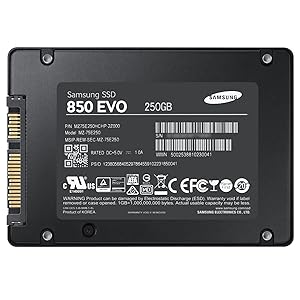
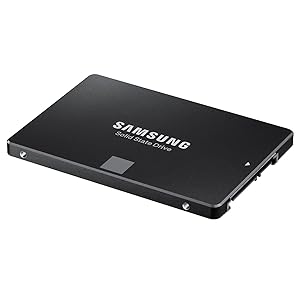
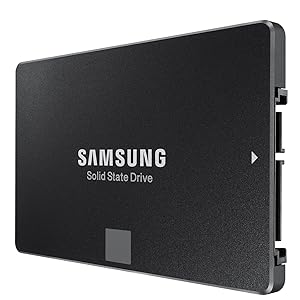
🚀 Transform your PC into a speed machine with Samsung 850 EVO SSD!
The Samsung 850 EVO 250GB SSD leverages advanced 32-layer 3D V-NAND technology to deliver blazing fast sequential read/write speeds up to 540/520MB/s and random IOPS up to 97K/88K. Its 2.5-inch SATA III form factor ensures broad compatibility, making it the perfect upgrade for professionals seeking reliable, high-performance storage that breathes new life into aging PCs.


| ASIN | B00OAJ412U |
| Best Sellers Rank | 95,245 in Computers & Accessories ( See Top 100 in Computers & Accessories ) 513 in Internal Solid State Drives 9,593 in Components & Replacement Parts |
| Box Contents | User manual |
| Brand Name | Samsung |
| Cache Memory Installed Size | 512 |
| Color | Black |
| Compatible Devices | Desktop |
| Customer Reviews | 4.8 4.8 out of 5 stars (10,320) |
| Digital Storage Capacity | 250 GB |
| Form Factor | 2.5-inch |
| Global Trade Identification Number | 00887276086071 |
| Hard Disk Description | Solid State Drive |
| Hard Disk Form Factor | 2.5 Inches |
| Hard Disk Interface | SATA 6 GB/s |
| Hard-Drive Size | 250 GB |
| Hardware Connectivity | SATA 6.0 Gb/s |
| Installation Type | Internal Hard Drive |
| Item Weight | 66 Grams |
| Manufacturer | Samsung Electronics |
| Media Speed | 520 megabajtów_na_sekundę |
| Model Name | 850 EVO |
| Model Number | MZ-75E250B/AM |
| Network Connectivity Technology | SATA |
| Number of Items | 1 |
| Product Features | Shock Resistant |
| Read Speed | 540 Megabytes Per Second |
| Specific Uses For Product | Personal |
| UPC | 724627169819 804904115248 714547219947 808112996101 714547269447 714547252050 724627169604 780746158547 702874766432 782941515040 804067311860 669393978992 887276163925 887276086033 012305136063 801947294329 724627213079 887276086071 809394596614 734911141131 714547199478 |
| Unit Count | 1.0 Count |
S**S
One of the main challenges in choosing SSDs is the immense diversity in brands and the components which they choose in the design of the SSDs. Its no longer just about Seagate and WD as in HDDs. SSDs are very fast, yes- but their performance and reliability is dependent on the controllers and the memory they use. There are just too many reviews of how SSD performances are inconsistent in the real world vis-a-vis the bench tests; and of performance degradation over time. The 850 EVO series has very good reviews, and has now aged gracefully, unlike the 840 series which had speed issues. The package has the SSD, a pictorial installation guide; a warranty statement booklet; CD with Samsung's Magician and Data Migration software. No USB connectors though. PROs- 1. High quality and reliability of Samsung (has its own controller and memory, which are more reliable and faster than the Sandforce/JMicron controllers). 2. Very very fast- your system becomes like a rocket (see, however cons below)- in cases where you are not connected to any slower peripherals (like USB HDD, Pen Drive, etc). 3. While test copy speeds are between 3-5 times as fast as HDDs (300-500 MBps for SSD vs 60-100 MBps for HDD), the SSD can move data within itself at astronomical speeds compared to an HDD. An HDD can move data within itself only around 20-30MBps, while the SSD can move it at 500 MBps. This is where you will really feel the difference. 4. Sufficient space- has around 230GB, of which around 10% will be set aside as an unallocated buffer (if you choose), by Samsung's magician software. This leaves 217GB which is more than enough if you are not loading on multimedia content. 5. Higher tolerances- operating temperature limits are 70 deg C, as compared to 60 deg C for HDDs. No moving parts. 6. Actual temperatures are lower than HDDs. My Seagate thin (7mm thickness) would routinely strike 50 deg C when moving data. The 850 EVO touched 48 deg C under load. 7. Much lower copy speeds when copying into the SSD- as it can easily write at 100 MBps, which is the limit for USB3 HDDs (from which you would be copying the data). See cons however. 8. 5 Year warranty. CONs- 1. Full speed cannot always be achieved due to CPU bottlenecks. It's not always about speeds when copying data; in 90% cases, your CPU also processes the program/ data. Laptop CPUs, which are around 1.9-2.7GHz top out much below the SSD capacities. 2. When moving data between an SSD and other media, the speed is limited by the slower components, which are invariably the pen drives, other HDDs and the USB HDDs. Here, you would get speeds of anywhere between 30-100 MBps. 3. Data migration software can be used only if you have a USB casing free for your laptop. In a desktop, this is not an issue. 4. More expensive than other SSDs. But prices are much lower than they were for the 840 series.
M**N
There are many people out there that can go extremely in-depth with this SSD but I'm planning on just skimming the surface for those who don't know what this product is. SSD? Whats that? An SSD (Solid State Drive) is a storage device for a PC. Its just like a normal Hard Drive but different. A HDD (Hard Disk Drive) works by having a piece of metal spin in circles and there is a small reader and writer arm like that of a record player. As you could imagine that would degrade and parts would break, and that's what happens. A SSD aims to get rid of those problems by storing data digitally rather than mechanically. If you have ever seen what RAM looks like, it uses the same technology for storage. This means that the SSD will not slow down over time, has a longer life-span, and also is faster. This leads to a higher cost of course but over the past three years prices have dropped massively to the point that buying one is no big deal. Should this replace my existing HDD? No, definitely not. While it is faster and better it still cannot hold the same storage capacity as a normal HDD. Unless everything your doing the cloud-based and you have next to no programs or files on your PC, keep your HDD. What SSD's are currently intended to be used for is a boot drive or for video editing. A normal HDD would take 1-2 minutes or more to boot your PC up, however with my PC with this SSD it takes 15 seconds max to boot, log in, and open chrome. Also if you do video editing it makes your loading and exporting times much shorter and time is money. What a HDD would be used for is storing your games, most programs, and any documents / pictures. It will take a while to get used to storing stuff on a different hard drive and not spamming the next button on all installers, but its worth it. Whats all this 3D V-Nand stuff that they are advertising? Words. That's all it is. You don't need to do any research about their technologies or software. All it means is that its an SSD and its trying to look fancy. I'm a gamer. What does this mean for me? Good. I'm a gamer too. This means nothing for you, it does not equate to more FPS or shorter loading times. I found that when upgrading my CPU I saw a lot more performance. Focus mainly on a CPU or GPU if you want better performance. Does that mean that you should not buy it? Of course not! This can make loading programs such as Chrome and your OS boots faster. AKA you can get to gaming sooner. So, Should I buy this? Yes, its one of the cheapest and easiest ways to get more performance and lifetime out of a PC. If you need help installing it feel free to ask me a question or watch one of the many tutorials out there online.
R**O
Sem problemas.
A**R
本体に異常な凹みがあり、四隅の一角が反るような曲がりもある酷い品質のものが送られて来ました。
L**S
Produit conforme
Trustpilot
1 month ago
2 weeks ago