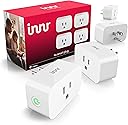


Innr Zigbee Smart Plug, Works with Philips Hue*, Energy Monitor, 4-Pack
Product ID: 591710302
Details
- Brandinnr
- ColorWhite
- Connector TypePlug in
- MaterialPlastic
- No. of wires2
⚡15A max load
📊Real-time energy tracking
📶Zigbee repeater range extender
Desertcart purchases this item on your behalf and handles shipping, customs, and support to Mexico.
🔌 Power up your smart home game with Innr’s all-in-one smart plug!
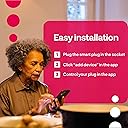
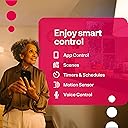
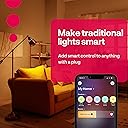
The Innr Zigbee Smart Plug 4-pack offers 15A load capacity plugs that connect directly to popular Zigbee hubs like Philips Hue and SmartThings. It features real-time energy monitoring, voice control via Alexa and Google Home, smart overload protection, and acts as a Zigbee repeater to extend your network range. Certified ETL, RoHS, and UL compliant, these plugs transform conventional appliances into smart devices with ease.
| ASIN | B0CFVNL1P6 |
| Amperage | 15 A |
| Best Sellers Rank | #43,118 in Tools & Home Improvement ( See Top 100 in Tools & Home Improvement ) #124 in Electrical Outlet Switches |
| Brand | innr |
| Brand Name | innr |
| Color | White |
| Connector Type | Plug in |
| Customer Reviews | 4.2 out of 5 stars 82 Reviews |
| Included Components | 4x Smart Plugs |
| Item Highlight | Zigbee Repeater | Home Assistant, Homey & SmartThings | Resettable Overload Protection | Calibrated Power Monitoring |
| Manufacturer | innr |
| Material | Plastic |
| Material Type | Plastic |
| Model | SP 244-4 |
| No. of wires | 2 |
| Number Of Wires | 2 |
| Number of Items | 4 |
| Number of Packs | 1 |
| Part Number | SP 244-4 |
| Plug Format | Type A |
| Plug Type | Type A |
| Specification Met | ETL, RoHS, UL |
| Unit Count | 4 Count |
J**N
Affordable and Reliable
Very easy to set up with a Hue Bridge. Be sure to either create a new zone or exclude this from a zone where you want to keep the outlets separate from lights. In the app you'll have an option to show it as a smart plug instead of a lamp, but you add it as if you're adding a lamp. Very much more affordable than an actual Hue smart plug. It will NOT do power detection, however, if used with a Hue bridge.
A**H
INNR Smart Outlets Work Great with Hue!
INNR Smart Outlets work great with Hue! They add to the app easily as normal. I was even able to get them to work with both hue app and an Ikea Tradfri zigbee on/off remote, but it requires some extra effort and a different process to add them to the app. Instructions to add to Hue and use Remote Notes: -Must have Hue Essentials App with Premium for Touchlink Function. -To set up multiple, unplug all outlets except the one you are currently working on. -The outlet must be touching the hue hub during part of the setup, so an extension cord may be necessary. -The remote/switch will not show up in the Hue App and is not configurable. -The Hue App won't immediately update the status of the outlet (on/off) when the remote is used. Steps: 1. Have the outlet plugged in and touching the Hue Hub. The power button on the side should be flashing a constant rate. If not, hold the power button down for 5 seconds for it to reset. 2. In the Hue Essentials App, press Devices at the bottom 3. Press the + to add a device. Select Light (not plug). Select Hue Hub device (should have IP address next to it) 4. Scroll to the bottom, and press TouchLink. You may need to do this a couple of times. The light on the side of the outlet will blink a different pattern and then should turn solid on or off. 5. Unplug the outlet. 6. Hold the Ikea remote touching the Hue Hub 7. Hold pairing button on the Ikea remote while pressing Touchlink in the App. The red light in the remote should pulse and then go out. Let go of the pairing button when it does. 8. Plug the outlet back in, moving it away from the Hue hub. 9. Place the remote touching the outlet. Press the pairing button on the remote until the light on the outlet blinks and stops, and the indicator light in the remote turns off, then let go. 10. Test the outlet in the app and from the remote. They should both work!
R**D
100% compatible with Philip HUE bridge.
Connected the 4 switches to a HUE bridge and they are completely working fine. When I turn on a ‘room’ or ‘zone’ the switches in this place turn on as well.
T**A
A good product
These smart plugs are handy and versatile. We use them with Home Assistant. They work well for the most part, with a couple of minor issues: - they sometimes *won't* switch on or off using the manual button on the side of the plug. When this happens, they can still be switched using the app. - they sometimes switch off and back on for no reason. It doesn't happen a lot and I'm not sure what triggers it. Overall, they are super-easy to set up and use. We're really happy with them.
W**G
Not as reliable as I hoped it would be.
Needed to get some Zigbee plugs with power monitoring and, according to the description, these would fit the bill. And, in principle, they do. But then there is an issue now and then when the usage is not updated any more - even if the plug is switched off, it happens now and then that it still reports 100W+. A quick refresh in the Zigbee gateway fixes it, but that shouldn't be necessary in the first place. I also was surprised to find out that the plug 'only' reports every 10 seconds, not every 5 as the WiFi one that I used in its place before.
J**Y
Hue has borked these
These worked great for about a month, then about 80% of the time, they just don't turn on. To make them work again, you have to delete them from Hue, and re-add them (press and hold button until it blinks) this is extremely difficult if you have them installed somewhere hard to get to. Once re-paired with the Hue bridge, they'll work again, intermittently about 9/10 times you try them for a few weeks, then suddenly they'll stop working at all AGAIN. Wash rinse repeat, over and over again. I've changed the Hue zigbee channel, I've replaced the hub, I've bought an additional hub to spread the devices evenly in case I had too many, keeps happening, with all of the plugs in this set. I have 8 total of them, and they are so unreliable, I'm considering throwing them away and buying the HUE brand ones now. It's so heartbreaking because hue stuff is so expensive and these seem like a great deal but the consistent NOT WORKING is both EMBARASSING and frustrating. So wonderful having family stay over and the lights don't turn on half the time. meanwhile my hue brand ones all work 100% of the time every time.
B**A
Bit expensive 🫰yet fully worthy
I used buy only Kasa Smart plugs since my first Kasa plug their app was a necessity. There onwards I kept buying like Forty odd 🔌 smart plugs. I was never happy with it due to their limitations in Third Party application support. Finally even it is a bit expensive side I bought the first Four Innr Smart plugs. The quality of the Innr plugs are lovely. And the built quality of the plugs are great , doesn't feel cheap and low quality. And they work like a charmer. My issue with Kasa Third-party applications now has been solved. I connected Innr plugs into Philips Hue Hub - thereafter through Harmony Elite Hub got the Innr plugs show up via Philips Hue. Amazing product as extremely easy to set them up and most of all it supports many Thirds Party applications. I love these Innr Smart Plugs. I don't think I will have to look into another name brand for Smart-plugs. Bit expensive, but boy you get your money's worth. I am very pleased with the Innr Smart Plugs and very highly recommend Innr Smart Plugs. Cheers.
C**U
Easy to use with Hue, and somewhat nicer that the Hue brand
Pairing these in the Hue app was trivially easy. And they work perfectly with the lamps I have plugged into them. They are just a tab bit too large to use side-by-side, although I am unsure why you would do that. More importantly, unlike my Hue smart plug, they leave plenty of room to still use the outlet next to it with a standard plug. There is a green light on the side then they are on, but mercifully it shuts off when in "off" mode, so it won't bother you at night.
Trustpilot
2 weeks ago
1 month ago