Buy anything from 5,000+ international stores. One checkout price. No surprise fees. Join 2M+ shoppers on Desertcart.
Desertcart purchases this item on your behalf and handles shipping, customs, and support to Mexico.
๐ถ Command your soundscape with precision and freedom!
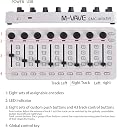
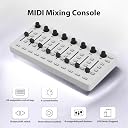
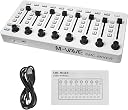
The M-VAVE MIDI Controller Mixer is a compact, versatile MIDI device featuring 43 assignable buttons, 8 endless knobs, and 8 push buttons. It offers dual connectivity via Bluetooth and USB-C, powered by a rechargeable 780mAh battery or Type-C supply. Compatible with major DAWs like Ableton Live and Cubasis, it delivers professional-grade control in a portable, durable design tailored for modern music producers seeking flexible, on-the-go MIDI solutions.


| Best Sellers Rank | #71,150 in Musical Instruments ( See Top 100 in Musical Instruments ) #254 in Computer Recording MIDI Controllers |
| Customer Reviews | 3.9 out of 5 stars 32 Reviews |
G**N
Excellent Device. And it is M-VAVE.
I do not know why the correct brand name of this device does not show up anywhere in the title or description, but it is M-VAVE; the โProduct Videoโ is the only thing that shows the correct brand name. Iโve bought several Bluetooth/MIDI gadgets made by this company, and they all work great. If there is a shortcoming to this company, it is in the area of documentation. 1) Pairing: It seems to be very hard to get my iPad to recognize these devices when trying to pair with Bluetooth. The secret seems to be to use the Cube Suite app. Be sure the device is powered up, run the app, and tap the SCAN NEARBY DEVICES button. This finds the device and gives you the option to pair it. Once thatโs done, the device is recognized immediately when powered on. I donโt know if there is a corresponding app for Mac or Windows. 2) Customization: All of the M-VAVE gadgets have lots of flexibility built in; you can configure them to do almost anything. All the knobs & sliders on the M-VAVE MIDI Mixer are set to default MIDI CC numbers, and can be changed using the CubeSuite app. All the buttons can be configured as 3 kinds of MIDI CC codes, MIDI Program Change, or MIDI Notes. Now, to this device: I donโt know what the title means by โFoot Controllerโ; there is NO Foot Controller, and there is no โkeyboardโ. There ARE 43 buttons, 8 sliders, and 8 โendlessโ knobs. One other reviewer didnโt like these, but to each his own; I assigned them to L-R Pan controls, and I thought they worked very well. Using MIDI Learn, I have started to set the MIDI Mixer to control my iPad DAW app, Cubasis 3, and so far itโs working great. The sliders are level controls for up to 8 channels, the knobs are L-R pan controls, and each channel has buttons for MUTE, SOLO, RECORD ARMING, and one more for something else. Across the bottom of the panel are 11 more buttons which are marked with transport functions (Play, Pause, Record) and Left/Right/Up/Down cursor controls. The M-VAVE MIDI Mixer has a power switch, and a USB-C port for charging the internal battery. So far, everything works as expected, the price was extremely reasonable, and Iโm very happy with this unit. As mentioned above, my only gripes are in the area of documentation; everything Iโve discovered about the various M-VAVE gadgets has been by trial and error, but once you start using the CubeSuite app and get the hang of it, it makes sense. This seller should also improve the quality of the product description.
B**K
Just turn it on and you are ready to go! Battery and Bluetooth!! Easy to map!!
I was running out of midi commands on my keyboard, and I didnโt have or want to make room for another USB connection. Mvave midi mixer was the answer!! This thing is great!! CONSโฆ.. ENCODERS! (Forever spin knobs) Personally I think encoders are the dumbest thing to ever come out.. WHO would not want to โseeโ where they are at?? (I really hate encoders)โฆ also LED feedback would be cool PROSโฆ battery power (6-8 hours!!) Bluetooth! (Wire free!! Yes it has โsomeโ latency but itโs not bad when using only for mixing/ commands).. faders work great! The LEDs are SUPER BRIGHT! Definitely worth the price!! Almost 50 extra commands!! I used some 3m dual lock to mount to my keyboard๐ค๐ค๐ค
D**.
didn't work on my windows 11 machine
well made but could not get this to work on a windows 11 machine after installing all of the necessary plugins and drivers
E**I
Select what you prefer
The device works perfectly โค๏ธ
W**N
Hidden Spyware in software downloads..
Terrible, spyware and malicious tracking elements in the downloads from the companies website. Avoid this item!
S**S
M-Vave is not M-Wave and this has no foot pedal
I bought this under a different product name, but as you can see from the image, it is the same product. The software is malware. You can use the device without it as long as you are prepared to reset any custom settings every time it connects. There is no foot pedal. M-Wave, the trusted brand, does not make this.
C**A
Muy bueno
Excelente producto, todo funcionรณ muy bien y para todo lo que querรญa usarlo
K**R
Fantastic unit - great value
I record on a Mac system using Digital Performer 11 - not the most common DAW in the UK. This little mixer saves a great deal of time with the mouse - it also means it's possible to alter more than one thing at a time. The transport controls work perfectly - I'm a very happy camper!
A**W
Works perfectly with LOGIC PRO 2026 (Instructions included)
Works perfectly with LOGIC PRO 2026 It took me several tries to figure out how to connect to logic pro and i almost started to get frustrated and return the product because i couldnt find help anywhere online. - Connect with the cable to your mac (bluetooth doesnt work for me on mac but it works on ios and ipad) - Open logic - in the logic pro menubar go to; Settings > Midi - in the midi settings go to inputs to make sure that Logic recognises the device which shows up as SIMCO SMC MIXER MASTER/PRIVATE. - Then back in the Menu bar (under Settings) go to; Control Surfaces > Setup - A new window will open. Click on NEW > INSTALL at the top right corner. - Search for MACKIE CONTROL - it will take you back to the Control surface setup window where you will see a drop down settings menu (under Quick help) - set the Output port and Input Port to SINCO SMC MIXER MASTER. The device should automatically align with all your tracks without having to manually program each knob and fader. NOTE: you may need to align the physical fader from the device to match what it looks like on logic before it starts working. Hope this helps.
T**7
Affordable alternative to the Korg nanoKONTROL2 with bluetooth and straightforward control layout.
I am a Logic Pro user and this controller has all the basic functions I was looking for: faders, record/solo/mute, transport controls and arrow keys. All the keys are laid-out intuitively alongside each of the faders. The unit is made of hard plastic and feels solid. It connects either via Bluetooth or USB. The internal battery seems to last a long time. My only wish is that it had motorized faders, but the fact it doesn't is to be expected in this price range. Perhaps M-Vave will offer an enhanced model in the near future.
A**N
Works great except the Bluetooth feature on it, is not good at all
Works great with abletonlive. Generally works as long as you use a cable. The Bluetooth function you have to download a software from a sketchy website as per its own instructions but even with that the Bluetooth connection cuts off every a few minutes. But cable. connection is reliable and works well. Also battery dies quick but with cable you won't need battery so you won't worry about it turning off ever. So overall it's a decent and practical tool in your studio as long as you use a cable for it!
Trustpilot
2 months ago
2 weeks ago