
DOWNLOAD THE APP


Customer Services
Copyright © 2025 Desertcart Holdings Limited
DOWNLOAD THE APP
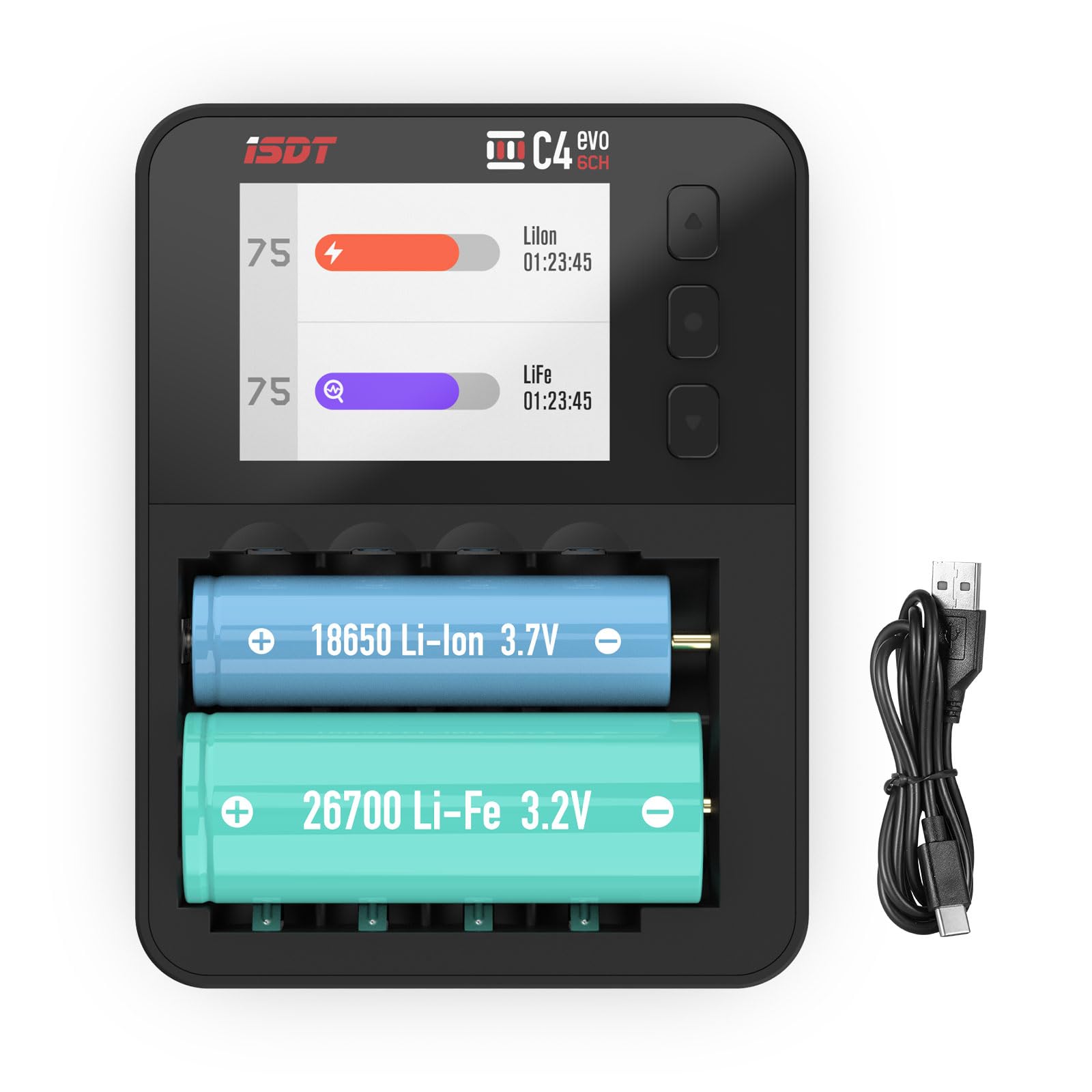
🔌 Power your essentials with precision and style — never settle for less!
The ISDT C4 EVO is a professional-grade smart battery charger supporting 19 rechargeable battery types including AA, AAA, and Li-ion cells up to 26700 size. Featuring six independent charging slots, adjustable current up to 3A per slot, and a vibrant 320×240 IPS display, it offers advanced modes like discharge, analyze, and storage to maximize battery lifespan. Equipped with USB-C QC3.0 input and a quiet cooling fan, it ensures fast, safe, and efficient charging tailored for the modern tech-savvy professional. Firmware updates via the ISD GO app keep it compatible with the latest battery brands, backed by a 1-year warranty and responsive customer support.
| ASIN | B0799JFWM3 |
| Amperage | 3 Amps |
| Brand | ISDT |
| Current Rating | 3 Amps |
| Customer Reviews | 3.8 out of 5 stars 108 Reviews |
| Input Voltage | 5 Volts |
| Item Weight | 195 Grams |
| Manufacturer | Shenzhen ISD Technology Co., Ltd |
| Mfr Part Number | ISDT |
| Output Voltage | 5 Volts |
| UPC | 843359100270 709046963392 768684806010 |
| Warranty Description | 1 Year |
H**S
Wow - Best charger I have ever owned, and I've had many!
IMPORTANT: Please be aware that this review is for the newer C4 EVO model. Most of the reviews found here on Amazon are for the original C4 charger and even some of the reviews for the new C4 EVO have flat out erroneous information. Please read this review in it's entirety as it may clear up some errors I have seen reported by others in reviews here. Let's start with a description of the unique physical layout of the charger. The charger includes 4 vertically arranged bays and 2 horizontally arranged bays. The vertical bays are for use with AA and AAA batteries only. The horizonal bays are for use with Li-Ion and similar chemistries. I won't rehash all the sizes supported, these are clearly listed in the Amazon listing. A couple of notes related to this: Only the vertical or horizontal bays can be used at any given time, they cannot be used simultaneously. So this means that you can service only AA / AAA batteries OR Li-Ion cells, not both at the same time. A maximum of 4 AA batteries or 4 AAA batteries or any combination of up to 4 AA / AAA batteries can be charged at once. Note that this is different from the original C4 could only accommodate a maximum of 2 AAA batteries. The contacts for the AAA batteries in the original C4 were horrible (in my opinion). The C4 EVO has solid fixed point contacts, seperate contacts for the the AA and AAA batteries. Since there are no moving sliders as in many chargers, this should prove to be highly durable. The horizontal bays can accommodate up to 2 Li-Ion cells. There is one review that states that these can accommodate only unprotected 18650 cells. This is flat out wrong for the C4 EVO. It easily accommodates the 18650 protected cells as well as unprotected cells. The same review also incorrectly asserts that there is no analyze or cycle option available. This wrong but I think that there is a very good reason that the reviewer missed this. I admit that it took me a long time to stumble on this because it was not very intuitive. In the menus, you will see an option called "chemistry". By default this is set to "Auto" meaning that the charger will determine by itself if the battery in any given slot is Li-Ion, NiMH, etc. When set to Auto, the only options that you will see are "Charge" and "Destroy". To see the other options (discharge, storage, analyse, cycle, and activate) you need to manually select the chemistry. Once you have done this, all options will be available under "Task" in the menu. Versatile power options: The power input on the C4 EVO is a USB-C connection. Note that no charger is included with the unit - you will need to supply your own. The adapter that you supply will need to support either QuickCharge (QC) 2 or 3 protocols or the Power Delivery (PD) protocol. You can also use the USB port on a computer as a power source. A few important notes regarding this: This charger can charge batteries at a high charge rate (up to 3 amps per cell) / 36 watts maximum for all batteries. If your power adapter is not capable of delivering at least 36 watts at 5V or 9V then the maximum charge rate may be limited to a slower charge rate. If you use a USB port on a computer, make sure that you use a USB 3 port and NOT a USB 2 port. A USB 2 port can only deliver 500mA of current which is only half the 1A minimum needed by the charger. However, the fact that you can even use the USB port on a PC is a really handy feature when on the road with a laptop. Fan: The charger has a cooling fan so be aware that the charger will not run completely silently under all conditions however, I have found the fan to be FAR quieter than the original C4 and it has not bothered me in the least. Hard buttons: The original C4 had a touch sensitive area where there are now physical buttons. Personally, I find the new buttons to be a big improvement as the touch sensitive buttons were more prone to erroneous input. Options galore: Wow - there are a lot of options. You can charge, discharge, analyse, cycle, activate, and place your batteries in storage mode. I'm particularly in love with the storage option. If you are not familiar with this, let me explain: LiIon (and similar) chemistry batteries don't really tolerate long term storage fully charged. As a result, it is best to store these batteries at a lower voltage. As an example, I have a lot of LiIon batteries that I keep only for emergencies to power radios, flashlights, etc. If there are reports of storms or potential emergencies in the next few days I will charge the batteries fully so I'm fully prepared. Otherwise, I will discharge them to a voltage that is healthier for long term storage. This charger can automatically charge or discharge batteries to a level that is best suited for long term storage. Nice feature! Advanced options: For advanced users there are some very advanced options. For example, for LiIon batteries you can set the precise voltage at which charging should be terminated. For NiMH batteries, you can specify the delta V used to determine charge termination. I would strongly suggest not altering these unless you really know what you are doing and have good reason to do so, but the fact that these options are even available are pretty fantastic. USB-C: Just about all my portable electronics use USB-C these days. Having to keep other adapters and cables to support a charger using Micro USB was really annoying. With this charger I am finally free of that and now only need USB-C. This to me is just the icing on the cake of an exceptionally well executed product. Technical Support: I had one or two questions for Technical Support so I set an e-mail to them. I was surprised to get a friendly, through explanation to my query within less than one hour. Very impressive!
M**H
Great Little Charger for Peaking AAA R/C Car Batteries
Small size and light weight make it very good for packing and transporting to the track and it is very easy to use. The AAAs I use to race Mini-Z cars with are charged at home the day before or day of at 0.5A on a bank of LaCrosse BC-9009 chargers. I use this ISDT C4 EVO to peak my cells at the track just before each race. IF you set it to Auto, it gets the cells really hot which gives me that extra punch for the first minute of the race. When I’ve selected the max 1.5A charge rate instead of Auto, the batteries don’t get nearly as hot, so I’m not sure why they do on Auto as it shows them being charged at 1.5A (Auto might have a more aggressive charging algorithm?). Display is easy to see and read. The only negative is if you leave the screen saver mode on, the display goes dark 3 minutes after charging ends and you can’t get it to come back on by pressing any of the buttons, so if you don’t happen to be looking at the charger after the cells are full and before it goes dark, you won’t be able to see the data like voltage, capacity, IR, etc. I think ISDT should fix this with a firmware update so you can turn the screen back on after it goes dark by pressing a button. Otherwise great for my needs.
F**N
Flash in the Pan
Not long ago I purchased the EBL Universal Battery Charger with LCD Touching Screen (https://www.amazon.com/dp/B09B9HFXJ7). I am happy with this charger but I find the slots are not properly configured for the AAA batteries. They just do not seem to sit snug in the slots and I noticed that as I reseat the batteries the internal resistance varies pretty much. Not long after purchasing the EBL charger I noticed the ISDT C4-evo charger. Being the tech junkie that I am I had to get one of these. It took a few months but it finally happened. SIZE After unpacking it I put it next to the EBL charger. Holly cow, that is a small charger. See the picture below. The picture doesn't show that the thickness of the C4-evo charger is about half the thickness of the EBL charger. Of course that comes with some limitations to the number of batteries and sizes that the charger handles: the vertical slots can handle up to 4 AA or 4 AAA (or a combination of these) while the biggest battery that can be charged in the horizontal slots is the 18650 (only 2 of them). Also the battery cooling suffers since they are packed closer together. In my opinion the small fan only helps cooling the internal components and has no effect on cooling the batteries. NEW ISDT C4-EVO The ISDT C4-evo charger is an update from the ISDT C4 charger (which I never used) and it uses physical buttons instead of the touchscreen buttons, has improved battery contacts and it can handle 4 AAA instead of only 2 at a time. FIRMWARE Before starting any test I updated the firmware to v1.0.0.34. The charger came with v1.0.0.31. Updating the firmware is not mentioned anywhere in the manual. You have to go to the ISDT website (https://www.isdt.co/), change to English language if needed then click on the Support link. There you have to download the ISDT Go software for updating the firmware. You have a choice for MacOS and for Windows. They also show the ISDT App for iOS and for Android but that would not work with the C4-evo charger since the charger does not support a Bluetooth connect. Note that the versions shown for MacOS and for Windows are NOT the firmware versions. You have to install the software, connect the C4-evo charger with a USB cable and then run the software. The software will determine which charger is connected, show the current firmware and then tell you if an updated firmware is available. Installing the firmware takes about a minute. What I would like to see at the website is firmware update notices showing the date they were released and changes introduced with each version. CHARGER OPTIONS The charger has plenty of configurable options. After powering up the charger, without any batteries inserted, if you long press the center button you get the charger settings. The settings shown with the firmware updated to v1.0.0.34 are different than what is shown in the manual. Some of these settings are straight forward others are obscure (at least to me). The manual describes "Activate Charging" as "If this option is turned on when the user selects the task type as Charging, the charger will automatically discharge the battery before charging. This is to eliminate the memory effect of the battery and restore the storage capacity of the battery.". Don't know about others but this makes me scratch my head. To make things even more confusing firmware v1.0.0.34 has a setting named "Activation Charge". To me that has more to do with the battery activation, but Battery Activation is an operating mode selectable per battery once inserted. As I said... Confusing! The included simplistic manual does not help at all. For example what is the "Destroy" mode of operation? I can't really help it but chuckle when I associate this mode with the charger model C4. Or What is "Capacity limit"? The manual says: "Set the maximum battery capacity". OPERATION MODES The operations you can perform on batteries are Charge, Discharge, Storage, Destroy, Cycle, Activate, Analyze. The Charge and Discharge modes are straight forward. Storage will discharge a battery to a certain level for long term storage. This applies to Lithium type batteries which do not quite like being stored with a full charge. Destroy... hmmmmm... well... OK... Cycle will let you repeat Charge or Discharge a number of times. Activate will attempt to revive a battery that was discharged so deep that it can no longer be charged normally. Analyze will perform a Charge followed by a Discharge followed by a Charge. This is supposed to give you the state of health of a battery, showing its capacity recorded during the Discharge step. The Charge/Discharge current is shown for example as 0/-0.5. This means that the battery is discharging at a rate or 0.5A. On the same hand the Capacity is shown for example as 231/-2345 mAh. This means that at that particular moment in time the battery received a charge of 231 mAh and put out 2345 mAh. At the end of the Analyze operation the number on the right would indicate the real battery capacity. In Analyze mode the charging and discharging current is set to 1A. Cannot be adjusted. If I adjust in Charge and Discharge to 0.5A then I go back to Analyze it will be 1A. That is WAY too high for AAA batteries. They will get VERY hot. For AAA batteries instead of Analyze I would have to do separate Charge and Discharge operations so I can set the current. This is not very convenient because you have to be there at the end of the Charge and Discharge modes to start the next step. When an option is set to AUTO other related options are not available. This may lead people to believe that those options are not supported. I recommend to change the options set to AUTO to some other setting and then explore the other related options. However, when changing options make sure you understand what those options do. While running my first test in Analyze mode with AAA batteries, 3 batteries just finished the analyze operation and one was still charging. Their temperatures were between 40 and 43°C. The 3 that just finished charging felt lukewarm to the back of my fingers. The 4th battery that was still charging (showing 40°C) I felt a little burning sensation. Its temperature had to be much higher. I do not consider the temperature readings accurate. ISDT SUPPORT Unfortunately this is one area that brings down my rating the most. So far I have attempted to contact ISDT 4 times: twice thru Amazon messaging and twice thru direct email to [email protected]. So far I received no response. I call their support abysmal and I cannot count on it in the future. FINAL REMARKS Yes... the charger works, at least for now. However it can easily damage AAA batteries. It has obscure and/or confusing options and settings which due to lack of response to my attempts to contact ISDT I cannot clear out. I asked in Q&A about charging the newer AA Lithium 1.5 Volt Rechargeable Batteries with the hope that I will receive an answer. Instead what I got was: - Yes two ways turtle or rabbit. - Yes, you can. The holder is flexible. Apparently ISDT used the listing for the older C4 charger when they introduced the new C4-evo charger. As a result Q&A and reviews can and will refer to both models making things even more confusing. So the question I have to answer myself is: Do I need this headache? I know that the C4-evo charger looks nice, is small, feels good in hand but is that worth it? Couple that with the complete lack of support from ISDT. I think the answer to that question is a resounding NO!
J**D
Not sure this charger is worth the price
I was looking for a charger for AA lithium batteries. When I got this unit and put in an AA cell, the unit went crazy. I emailed MFG to get a URL for firmware updates. Once I installed this update, the unit seemed to work fine with my lithium AA batteries. I set the charging current to 500mA, and the charger seems to be heating up the batteries while charging. I was looking for a charger to provide me with detailed info on the health of my AA batteries. This is a nice charger with a nice color screen, but I am not sure it is worth $50. I decided to return my unit.
V**.
Good charger, needs some software improvement
Bought this charger to supplement my c9000, BC1000, and Opus BT-C3100. Pro: -Form factor is nice and portable. -Bright and clear, colored screen -AC adapter was included with my purchase, which was a relief as some Youtube reviewers claimed it didn't include an adapter. -Another bonus is the screen protector. -Despite being an advanced charger, the programming is easy to figure out. The manual included is not that helpful due to some language issues during the translation, but so far it was easy to figure out. -Out of the box, I went ahead and updated to the V1.0.0.15 firmware. Upgrading was simple as well due to the file having the necessary software to upgrade the firmware of the charger. -The fan keeps the cells cool (but this is also a con in the next section) Cons (there are a few cons after 2 days of playing with the charger): -Using the analyze feature for NiMH, I noticed that the final capacity reported was the charge capacity, not the discharge capacity as the other chargers I own will report. I thought it was unusual that after the analyze function completed, the numbers seemed too high. I did find a workaround to this and used the Cycle feature with 1 cycle programmed. This will actually report the discharge capacity. Hopefully this will be addressed in future firmware updates. -Another con is the fan noise. It is loud...Really loud. It's to the point where I placed the charger in another room since it is loud enough to keep me awake. Different fan speeds would have been nice in the firmware, but one can wish. Overall it's a nice charger. I just hope they fix the issues I presented in the cons list. I do recommend this charger at this price point. I intend on use this predominantly for NiMH/NiCD cells, but do like how it chargers Li-Ion and NIZN to name a few. If they fix the analyze issue regarding the capacity readout, I'll update this review. Quick Update 4/7/18: -My recommendation to use Cycle instead of Analyze for the battery capacity is incorrect. I have noticed it also displays the charge capacity, rather than the discharge capacity. Will lower this review to 3 stars for now until they can fix it, as the analyze function is one of the main reasons people may want to buy this charger for. Without accurately displaying the discharge capacity, you won't be able to get the actual capacity of the cell. Update 6/14/18: I updated the OS to v.1.1.0.6 and they have fixed the issue I had regarding being able to see the discharge capacity of the cells. By selecting the slot you want and pressing the O key, it'll open up additional information, including the discharge capacity. I would like to thank the company for continuously updating. I will update the star to 4/5 (fan noise is still an issue).
L**D
Great charger, it could be better.
After looking around at many different chargers which included the BT-C3100 (3400), Litokala Lii-500S, and many others, I decided on this one because of the very controllable user interface, up to 3 Amp charging current, wide battery chemistry coverage, very adjustable charge and discharge currents in 0.1 Amp increments, excellent display, with plenty of information, plus the upgradeable firmware (software that makes it work). In choosing this charger, I was aware that I sacrificed the convenience of battery size and number of batteries that can be charged at one time, given the limitations of the charging bay. It allows for up to (4) AA, or (2) AAA, or (2) 18650 batteries and similar batteries to be charged simultaneously. You cannot, for example, charge a AA or AAA battery if you are charging a 18650 cell. This limitation can be overcome with adapters that use the 4 AA charging locations, wired to external battery holders. Some 3D printable designs for these adapters are available for free on line, and some of them are available for purchase; I have seen adapters for (4) 18650 or (4) AAA cells. I chose to design my own adapter, which allows me to use from 1 to 4 adapters individually, and use the remaining AA charge locations in the charger itself. Once you connect the power, the display will show the voltage of the power supply. You can adjust the charger settings from this screen. These include language, buzzer volume, display intensity, the use or not of charge interruption by cell capacity, time after battery insertion for auto charge to start, battery information display scroll time. I chose manual charge start, because it allows for the relaxed adjustment of the parameters under which the battery just inserted will be charged; this is very important if you are charging different chemistry or capacity cells, or if you want to perform different operations for each cell. When you insert a battery, the screen will show the voltage of the battery before it starts charging. It will also show the battery charge parameters for you to choose. The charger will then time to auto charge or wait for a manual start. The charger can automatically guess the chemistry and charge/discharge parameters, and operation to be performed. I recommend using manual selections. Once you select these parameters and the operation to be performed, you will be offered the same options for every cell you place in the charger. Once the operation starts, the display will show all relevant parameters and values for each cell, for the amount of time you chose on the charger setup screen, and then scroll to the next battery. You can manually switch the screen to show some of the parameters and a voltage vs time graph. I am very pleased with the charger, but: - It would be better if it had the conventional spring loaded charging bay contacts that allow to charge from AAA to 26700 cells. - It would be even better if you could charge 9 Volt batteries. - The use of stronger charge contacts would also be a welcome improvement. - Some have complained about the internal fan noise level
R**�
Good replacement for a BC9009
Good charger - good replacement for my Lacrosse BC9009. Why? I've been trying to find a compact, 4 position charger, that has flexible current (amps) adjustments, multi-chemistry support, has a easy to read display, and is powered by USB-C. This one checks all the boxes. Interesting bonus - it seems to be able to charge NiZn batteries and alkalines! Should you charge alkalines? No, unless you really know what you're doing. This charger can't manually set the current down to correct levels for alkaline charging. Notice the 0.09A in the picture? Still too much. This Duracell will end up leaking. But, if you have tolerant dry cells, or wet alkalines that you know are safe to charge at this rate, then go for it!
M**V
Great device. Saved me money on 21700 batteries.
I used this device to test several brands and suppliers of 21700 Li-Ion batteries before choosing ones for my needs. They are expensive, and the quality and capacity vary a lot. I ended up returning all batteries but one. This device already saved me more than it costs.
Trustpilot
3 days ago
2 days ago