We remain fully operational. Our teams are working around the clock to ensure your deliveries continue safely.

DOWNLOAD THE APP


Customer Services
Copyright © 2025 Desertcart Holdings Limited
DOWNLOAD THE APP
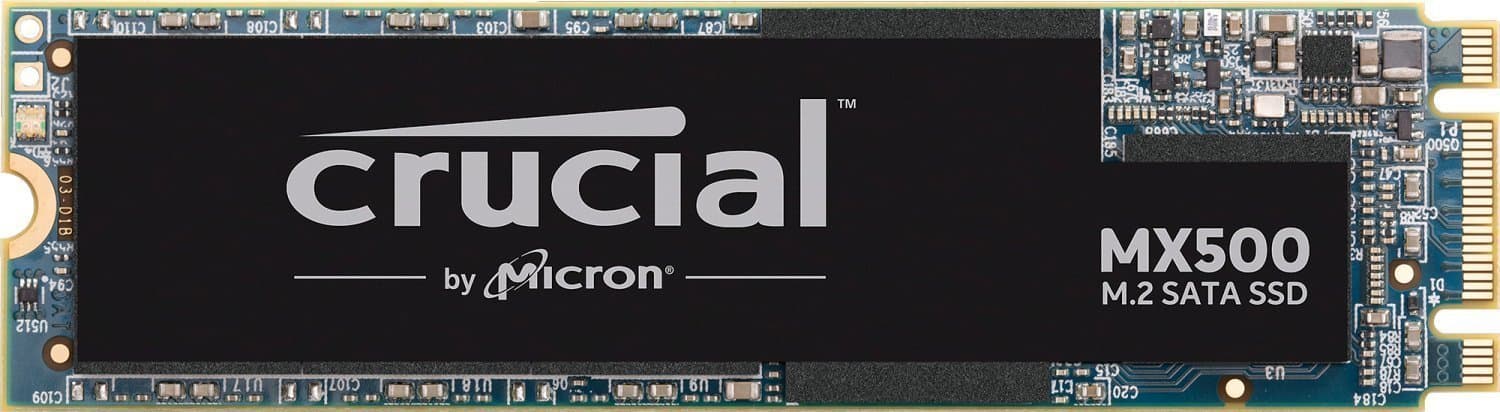


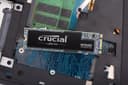
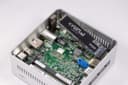
🚀 Upgrade to speed, security, and reliability — because your data deserves the best!
The Crucial MX500 500GB SSD combines Micron’s advanced 3D NAND technology with SATA 6Gb/s interface to deliver blazing fast read/write speeds up to 560/510 MB/s. Featuring AES 256-bit hardware encryption and integrated power loss immunity, it safeguards your data while boosting system responsiveness. Its compact M.2 2280 form factor fits seamlessly into laptops and desktops, supported by a 5-year limited warranty for lasting confidence.
| ASIN | B077SQ8J1V |
| Best Sellers Rank | 277,990 in Computers & Accessories ( See Top 100 in Computers & Accessories ) 1,584 in Internal Solid State Drives |
| Box Contents | 3 |
| Brand Name | Crucial |
| Cache Memory Installed Size | 1 |
| Color | Multicolored |
| Compatible Devices | Desktop, Laptop |
| Customer Package Type | Standard Packaging |
| Customer Reviews | 4.5 4.5 out of 5 stars (10,737) |
| Data Transfer Rate | 6 Gigabits Per Second |
| Digital Storage Capacity | 500 GB |
| Form Factor | M.2 2280 |
| Global Trade Identification Number | 00649528785091 |
| Hard Disk Description | Solid State Drive with 3D NAND technology |
| Hard Disk Form Factor | 3 Inches |
| Hard Disk Interface | Serial ATA |
| Hard Disk Rotational Speed | 560 |
| Hard-Drive Size | 500 GB |
| Hardware Connectivity | SATA 6.0 Gb/s |
| Installation Type | Internal Hard Drive |
| Item Type Name | Crucial 500GB M.2 2280 Solid State Drive MX500 (SATA/600) |
| Item Weight | 0.02 Pounds |
| Manufacturer | Micron |
| Media Speed | 510 MB |
| Model Name | CT500MX500SSD4 |
| Model Number | CT500MX500SSD4 |
| Network Connectivity Technology | SATA |
| Number of Items | 1 |
| Product Features | Compact |
| Product Warranty | Limited 5-year warranty |
| Read Speed | 560 Megabytes Per Second |
| Specific Uses For Product | power loss |
| UPC | 649528785091 |
S**Y
It's a must have for any PC
A really great price point for a 500GB m.2 SSD. It has exceptionally fast load up speeds, my PC starts up before I can even sit down after pressing the on button. Very easy to install, a youtube video does the trick. 500GB is enough for installing windows, office and a few games and I have a second hard drive for more games/apps/files. The SSD has a flashing red light so you know if it's working or not.
A**S
The best solution for your laptop
I bought this SSD to upgrade my Alienware laptop and oh boy... it is not a laptop now, it is a rocket... I could easily put numbers forward like how quick it is but this is not very important for every day user, the important is that it does not get hot to slow down and works flawlessly no matter how long computer is on and how hard it works. After over 6 month since I installed it and 6 month of everyday work with 4K multimedia using this SSD I can strongly recommend it without hesitation to everyone who need reliable and fast solution. Perfect. Thanks Crucial :)
M**C
Very fast
So I bought this drive as it was recomended to me by a friend. It was my first PC build in way over 20 years and understandibly I was a little rusty and disconnected with todays technology. After plenty of reading and research i bought the drive and didn't look back since, loading times are lightning fast, games respond better and downloads have definitely sped up. So if you're looking for a great value SSD look no further, this one will keep youy happy. I should also point out that updating the F/W was super simple and intuitive. One last thing before I finish, this is SATA M.2 connector so make sure this is the type of connection for your MOBO. I happen to have purchased PCIe before and struggled with drive detection under BIOS and was sure that it was my MoBo that was faulty and after a tonne of troubleshooting turned out i was a burke and bought the wrong thing.
J**M
Must have for boot drive or gaming
This M.2 SSD is quite good for the price. I use this for my games and loading times is not an issue. If you plane to use this for a boot drive, you will be pleased that your overall PC experience will be relatively fast. My only change would be to get the 1TB version since games nowadays are pushing past 100GB, but I installed a bunch of smaller games which is perfect for my needs.
A**R
very good product, but they don't provide compatible screws
its a good product after tedting it for some months , he opers perfectly i already used a samsung evo 840 and they oppers same on my laptop, i notice somewhat that my battery last a bit longer, guess its overall consumption isn't the same the samsung have good software in relation to crucial, but as far as i m concerned for sata 3 needs on m2 its a good product and good quality price althought the benchmark aren't the same i get some +20% perf on samsung on heavy wight 4k files but no noticeable difference on my daily uses
D**V
Very fast, reliable and easy to install
Very easy to install. This is a m.2 ssd which should be noted as before I bought this I thought all m.2 storage items were super fast but a m.2 ssd is as fast as a ssd, only wayy easier to install and with a smaller form factor,to note a m. 2 nvme is the fastest in the m. 2 drive however a m. 2 ssd such as this will work amazingly and is probably even overkill for most builds. On my build it is holding windows and many of my games making loading times close to none and my boot up time under 6 seconds! I bought a 500gb which is more than enough for any operating system with many applications and games but I would recommend also buying a HDD to store applications that are used not so often and other files. BTW I have been using it for a few months now and it hasn't let me down!
N**R
Flying SSD is a real Terra
This is the second SSD I've bought, but much better value than the first. 1/2 a Terra of brow dabbing speed for white knuckle gaming. One thing that was different to my first SSD is that this one is completely inert when installed. It is not activated, formatted or in any other way 'awake'. It's Crucial You download Crucial's version of Acronis cloning software. Note: You do not need to clone anything but Acronis will find and fire this puppy up for you. Another thing, if this is to be your Windoze install disk, switch virtual memory to a standard hard disk to prevent Win wearing out your precious SSD with endless read writes, as these disks have a finite read write life . Delivery was next day.
U**.
Great as an upgrade from HDD
I recommend upgrading to an SSD as soon as possible if you are still using a hard drive. Some basic research may be in order if you are not familiar with the various form factors and such. All can be found online or be asked about on Reddit. This M.2 drive specifically has been working as expected so far, I can’t speak to longevity as I have been using it for under a month but I have been using it under fairly heavy load which includes gaming and large file transfers. You shouldn’t buy this as an upgrade if you already use a SSD unless its just for additional storage because this is essentially the same thing just different form factor. So far a great product.
M**2
I have bought it almost a month ago, and it is working great. While browsing or watching a movie, the temp is between 40-50, and if I try to push the SSD a lot, the temp is around 60-65 Celsius. It is very fast, Windows boot process is done in a matter of few seconds, transfer speed are as advertised, and it doesn't heat like some people said since the heating problem could also be due to the laptop design and how did the vendor dealt with the airflow, etc. The only thing I don't like is the lower TBW than with some other 500GB M.2 SSDs. However, having 180 TBW is around 96GB daily in a course of 5 years, and for this price, it is a great deal. 90ish GB daily should be plenty enough, unless you plan to reinstall Windows every week for several times.
L**B
There are a lot of good reviews on the performance of this drive, and I think that's great. So I'm not going to go in detail about the performance numbers. My System: Dell XPS 9343 Intel i5 8GB RAM OS -> Ubuntu Mate 19.04 ----INSTALLATION---- Installation was very easy. I popped off the back of my laptop, unscrew a screw, took out the old ssd, put this ssd in, screw back on, pop on the back. Simple as that. The MATE installation was very smooth. USB booted up right away, installed MATE, and that's it. All in all it took maybe a hour from installing the SSD to installing Mint. Obviously getting packages, customizing the settings, etc... all took much more of my time, but that's not the part of this review. ----PERFORMANCE (SATA only, no NVMe slot)---- Original SSD: Samsung SSD PM871 256GB M.2. - Didn't really have a problem with this driver. It was the OEM (came with laptop purchase). I used to have dual boot Windows 10/Ubuntu 18.04 and did a SSD performance test on it (from Windows) a while back. I don't remember the result, but it was really not "THAT" bad compared to Samsung 860 EVO. I originally had 860 EVO in mind before MX500. MX500 at the time of purchase was over $20 cheaper with only a tad less in performance overall compared to the 860 EVO. I decided not to dual boot this time because Windows 10 just took up too much resources that this machine does not have (at least for what i do). I also decided to install MINT instead of Ubuntu because it's just far more light weight. SO basically, I don't think this is a fair comparison since the drivers were used in different circumstances, but here it goes: - Boot up time a several seconds faster on MX500. And that's it. I use Dropbox to store my codes and I rarely do large disk write/read. I really can't tell you any real life performance difference between the MX500 and OEM Samsung PM871. There were performance boost overall in daily usage, but that's most likely from using a lighter weight distro than the driver itself. My reason for buying new SSD was purely for reliability (PM871 was several years old). My reason for buying MX500 over 860 EVO (or other brands) was the price per performance. This is an older laptop that I use primarily for linux environment because I rather not use VM's if I don't have to. I didn't need super fast SSD (which is an oxymoron since NVMe's exist, so there's no such thing as a "fast" SATA m.2. SSD) for that reason. For actual daily driver (for other coding and personal use) I have my macbook pro. Reviews throw a lot of numbers at you and crap, but hardly go over real life performance or even real life scenarios. Real life performance can be subjective because it's based on perception when it's not an obvious difference. The numbers, of course, validate that. I did not see a drastic performance boost in real life performance. As for real life scenarios, how many of you normal users are actually moving around 100's of GB's of data every day/week???? These numbers really only matter for daily users if you do content creation (i.e. Youtuber), data analysis, and the likes. I guess to sum this part up... Don't bother going for the more expensive and faster SATA m.2. SSD's unless you are one of those people. AND EVEN THEN, FOR YOUR SANITY... If you are still on a SATA m.2 ONLY system, please upgrade your system. The worse NVMe drivers are significantly better than the fastest SATA m.2 driver. Speed Test samples ********************************************************** *****WRITE SPEED: ...-9343:~$ sync; dd if=/dev/zero of=tempfile bs=1M count=1024; sync 1024+0 records in 1024+0 records out 1073741824 bytes (1.1 GB, 1.0 GiB) copied, 2.50705 s, 428 MB/s *****READ SPEED (from buffer): ...-9343:~$ dd if=tempfile of=/dev/null bs=1M count=1024 1024+0 records in 1024+0 records out 1073741824 bytes (1.1 GB, 1.0 GiB) copied, 0.251535 s, 4.3 GB/s *****REAL READ SPEED (cache cleared): ...-9343:~$ sudo /sbin/sysctl -w vm.drop_caches=3 vm.drop_caches = 3 ...-9343:~$ dd if=tempfile of=/dev/null bs=1M count=1024 1024+0 records in 1024+0 records out 1073741824 bytes (1.1 GB, 1.0 GiB) copied, 1.95643 s, 549 MB/s The write speed was bouncing around in the low to mid 400 MB/s. So not the 510 MB/s as advertised. The read speed after clearing the cache was right about the same as advertised. Nice :). *****MORE READ SPEED ...-9343:~$ sudo hdparm -Tt /dev/sda /dev/sda: Timing cached reads: 8994 MB in 1.99 seconds = 4508.58 MB/sec Timing buffered disk reads: 1564 MB in 3.00 seconds = 520.80 MB/sec ...-9343:~$ sudo hdparm -Tt /dev/sda /dev/sda: Timing cached reads: 8432 MB in 1.99 seconds = 4229.38 MB/sec Timing buffered disk reads: 1564 MB in 3.00 seconds = 521.33 MB/sec Also ran hdparm read speed test a couple of times for extra measures. Don't mind the Timing cached reads for obvious reasons, but if it's not obvious then just know that it's not actually reading from disk and that's why it's so high. The more accesses the kernel has to go through, the slower the read/write. (CPU cache -> RAM -> SSD/HDD) this is a very simplistic and "inaccurate" depiction. ********************************************************** ---FIRMWARE UPDATE---- This is really for my linux users. For windows users, Crucial has a software you can install that will do the firmware update for you. I don't know about Mac users. So I fully expected to update the firmware on this driver when I purchased it. When I got the boot ISO ready to go, I figured let's just check what the current version is. ********************************************************** ...-9343:~$ sudo fdisk -; // this gives you a list of all your disk with the directory name. You'll need to find it for the next part ...-9343:~$ sudo hdparm -i [THE DIRECTORY NAME] // for example: ...-9343:~$ sudo hdparm -i /dev/sda <--- i think /dev/sda is going to be the same for most. Also it's a lower case I and not L for " - i ". this prints on terminal something like: /dev/sda: Model=CT250MX500SSD4, FwRev=M3CR023, SerialNo=... ... ... and so on... ********************************************************** The current firmware on Crucial's website is M3CR023. Basically... I didn't even need to create a boot drive for the firmware update. The driver came already updated to its latest firmware. Moral of the story, check before you do it. ---IN CONCLUSION--- That's about it folks. Some final summary bullet points: - Boot up is faster (if you're coming from something that's actually slower. I doubt you'd see a noticeable boot speed increase if you were to upgrade from this to a Samsung 860 EVO) - $40 for 250GB (which is more than I need for linux) is just so cheap for the performance - Performance is as advertised (meaning it goes UP TO advertised, and while I never peaked to the advertised speed, it was consistently up there) - Recognized immediately by Linux - Already up to date firmware - 5 year warranty - No real life performance boost for my uses - Quite simply, It works :). Can't say the same for defective units. If you get a working one, it shouldn't give you must, if any, issues - If your system supports m.2 NVMe, DO NOT GET m.2 SATA (including this) - This should not be any different if you're installing this on a Windows laptop or (older and still upgrade-able) macbooks. Well as far as process. Performance will vary for all OS and Distros.
G**E
Of course you must ONLY buy this is you need a SATA m.2 which is the same performance as a SATA SSD. Otherwise if you have an m.2 nVME/PCIe capable controller/slot, you should look at a m.2 nVME drive which perform 10x faster. We needed an m.2 SATA drive for space/slot saving reasons. This is perfect, great reviews online for this model vs Samsung Evo 860 competitors, AT 1TB the Warranty Total Bytes Writted is 380TB, which is really good. But if you go down to 500GB watch out for the TBW. For TBW you can check Crucial's Specification Sheets (PDF's on their website from the Product pages) and search (ctrl+f in chrome for example) for TBW, or Warranty, and read it Per exact model and capacity. Compare that with your other options, higher TBW means longer endurance. Then just read reviews if you're more interested in actual speed and performance. Good luck! Thanks to the seller for making this available on Amazon AE Prime, really helped my friend.
D**N
Received the 1TB M.2 SSD today and plugged it in my desktop. It recognized it right away and so I used Easus to clone my primary platter drive that had my operating system on it in about an hour. Then I restarted the computer and pressed F12 to select which drive to boot from and selected the crucial drive. Then I pressed windows button + R to gain access to HD manager and proceeded to format my old drive designating it to a data drive for photo's etc. The whole operation was quite painless. It started right up and no problems. Ran a speed test with performance mark and it reads at 561 mb/s and writes at 520 mb/s so it's operating at optimal specifications. Not a single problem installing and getting it set up. I like that they included the tie down screw as most SSD's do not. My mother board didn't come with one so this was nice. Everything runs butter smooth now which is a huge difference from having a platter HD that ran at 7200 rpms. It's night and day. Thank you crucial for a fair priced SSD. The drive temp never climbs over 55 degrees celsius.
L**L
Estupenda compra. Instalación sin complicaciones en una Acer Nitro 5. Software incluido para clonar tu HDD, funciona sin problema en Windows 10 - con la última actualización disponible del sistema -. El cambio en la rapidez del equipo se nota desde el encendido y al abrir aplicaciones. Me dedico a la edición de video, tengo en el SSD el sistema operativo, la suite de Adobe y Software de composición musical como Reaper, Kontakt y Spitfire Audio. Todo funciona de maravilla.
Trustpilot
2 weeks ago
2 days ago