Desertcart purchases this item on your behalf and handles shipping, customs, and support to Mexico.
🚀 Power your workstation like a pro — don’t get left behind!
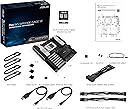
The ASUS Pro WS WRX90E-SAGE SE is a high-end workstation motherboard designed for professional-grade computing. Featuring support for AMD Ryzen Threadripper PRO 7000 WX-Series processors, 8 DDR5 memory slots, 7 PCIe 5.0 x16 slots, and dual 10Gb LAN ports, it delivers exceptional performance, expandability, and networking speed for demanding desktop, server, and personal computer applications.
| ASIN | B0CSG9JGYH |
| Available Memory Slots | 8 |
| Best Sellers Rank | 58,669 in Computers & Accessories ( See Top 100 in Computers & Accessories ) 491 in Motherboards |
| Box Contents | Keyboard |
| Brand Name | ASUS |
| CPU Model | 5X86 |
| Chipset Family | AMD Ryzen |
| Chipset Type | AMD WRX90 |
| Compatible Devices | Personal Computer, Desktop, Server |
| Compatible Processors | AMD Ryzen Threadripper PRO 7000 WX-Series |
| Customer Reviews | 3.1 3.1 out of 5 stars (10) |
| EU Spare Part Availability Duration | 1 Years |
| Global Trade Identification Number | 04711387441145 |
| Graphics Card Interface | PCI Express |
| Item Dimensions L x W x H | 30.5L x 33W x 1H centimetres |
| Item Highlight | 7 PCIe 5.0 x16 Slots, Multi GPU Support, 4 PCIe 5.0 M.2 Slots, Dual 10Gb LAN, PCIe Q-Release Slim |
| Item Weight | 2.5 Kilograms |
| Main Power Connector Type | 8-pin |
| Manufacturer | ASUS |
| Manufacturer Contact Information | ASUS Computer GmbH, [email protected], https://www.asus.com/de/ , Harkortstraße 21-23 City: Ratingen Postcode: 40880 Country: Germany |
| Manufacturer Part Number | ASUS Pro WS WRX90E-SAGE SE |
| Memory Clock Speed | 2400 MHz |
| Memory Storage Capacity | 10 GB |
| Model Name | ASUS Pro WS WRX90E-SAGE SE |
| Model Number | 90MB1FW0-M0EAY0 |
| Number of Ethernet Ports | 2 |
| Number of Items | 1 |
| Number of Ports | 4 |
| Platform | Windows 10 |
| Processor Socket | Socket sTR5 |
| Product Warranty | 2 year manufacturer |
| RAM Memory Technology | DDR5 |
| Ram Memory Maximum Size | 8 GB |
| System Bus Standard Supported | PCIe 5.0 |
| Total PCIe Ports | 7 |
| Total SATA Ports | 8 |
| Total USB Ports | 7 |
| USB 2.0 | 1 |
| Unit Count | 1.0 count |
M**R
Does not turn on and BIOS flashback doesn't work
I've had a horrible experience with this motherboard, bought from two different sellers. I was trying to use the motherboard with and AMD Threadripper Pro 9985WX which requires an updated BIOS, and there were all problems started to appear. To update the BIOS of this motherboard, you have two methods (both require the CPU not to be installed and do not require turning the PC on, they just need the PSU's switch to be switched on): First method: Use the BIOS flashback USB function, which requires downloading the BIOS from the ASUS official website and having it renamed then copied to a FAT32-formatted memory stick then have the stick plugged into the didicated BIOS Flashback USB port of the motherboard and then pressing and holding the BIOS Flashback button for 3 seconds, then finally wait for the flashing to stop, which indicates the success of the BIOS update. That method does not work unfortunately, you do everything right, but the BIOS Flashback LED never stops blinking, no matter how long you wait. Second method: This requires pressing the BIOS flashback button on the motherboard and holding it for 3 seconds until the BIOS flashback LED starts blinking and then waiting for 2 minutes for the BMC LED to also start blinking in the motherboard (can be found on the left of the second PCIE slot from the top), then plugging a network cable into the dedicated management LAN port and accessing the motherboard's BMC using another machine. The BMC is a separate chip on the motherboard that has its own OS, and does not require a CPU, RAM, or even a GPU to work. Once you find the IP address of the machine in your router, you open a new web browser on the controlling machine then type "https://MOTHERBOARD_IP_ADDRESS" and the BMC page will load (you will need to accept the self-signed certificate first). From the BMC page, under "Maintenance", there is an option to force update the BIOS, which will allow you to pick and upload a BIOS file and update the BIOS on the motherboard. The second method always completes successfully, but after the reset (switching the PSU's switch to off then back to on), the BMC still doesn't recognize the BIOS version and it just shows "Sync after reboot" message, which requires turning the PC on. Problem is, the motherboard never turns on, no matter what I tried! I've tested three power supplies with it and they were all new, but it never turned on (all Asus, 1200W, 1600W and 3000W PSUs). Pressing the power button on the motherboard does nothing. Pressing the power button on the chassis also does nothing! I tried both the single and dual PSU setup according to the manual, nothing managed to turn the motherboard on. I've made sure that all the PSUs I've tried were single rail as stated by the manual, still no luck getting either of the motherboards to turn on. I've bought one from a seller in USA and another from Scan.co.uk, both had the same problem, both returned.
B**E
Turn off bmc and vga switches on board for smooth windows experience.
There is some issues with these boards that is causing failed boot loops for windows if onboard vga physical switch is turned on while there is no monitor connected to motherboard vga port. Some esoteric issue with this, also usb flashback doesnt work, there is not even a single google result for an issue like this, where green led keeps blinking eternally (like 12h most i tried, actually have 2 of these boards, the reseller for other tried to update bios, run in same issue, formats and usb are all oke, issue here is with board), only way to update bios for new board is by having older gen threadripper that board supports. Asides esoteric eternal boot loops, and the bios flashback (alongside bios itself being legacy for no reason but to annoy) the board is great, (stop enumerating last slot as 0 tho, wtf) by size alone u can tell its serious piece, backplate is nice, everything feels like quality, no issues running it with 9995wx and blackwell 6000rtx'es. As far as quality and features goes its miles ahead of assrock, yet assrock have less esoteric unexplained issues that u might run into while trying to build with this board.
A**O
Conformité
Super produit !
A**V
Bad seller.
For such an expensive motherboard, the package was very pure The seller just stuck the sticker on the box; the box was unsealed and missing parts inside... Avoid this seller.
N**N
Produit reçu en état non neuf malgré une commande neuve
Produit commandé neuf, payé 1200 €, mais reçu dans un état qui ne correspond absolument pas à cette description. L’emballage était déformé, et la carte mère présentait des traces évidentes de manipulation (empreintes, salissures). Tout indique qu’il s’agit d’un produit déjà utilisé ou reconditionné, et non d’un article neuf. C’est d’autant plus décevant qu’il s’agit de mon second achat du même modèle, le premier ayant déjà dû être retourné pour non-fonctionnement. À ce niveau de prix, ce type de situation est inacceptable. Je ne recommande pas.
G**4
Produit déjà utilisé
Emballage, probablement déjà ouvert car aucun scotch ni sur le carton, ni sur le cellophane entourant la carte mère
Trustpilot
2 weeks ago
5 days ago