We remain fully operational. Our teams are working around the clock to ensure your deliveries continue safely.

DOWNLOAD THE APP


Customer Services
Copyright © 2025 Desertcart Holdings Limited
DOWNLOAD THE APP

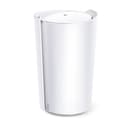





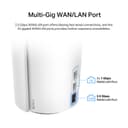



🚀 Elevate your home network to warp speed and total coverage!
The TP-Link Deco AX7800 Tri-Band Mesh WiFi 6 System (Deco X95) delivers ultra-fast AX7800 speeds with tri-band technology, covering up to 3,100 Sq.Ft. of seamless WiFi. Equipped with AI-driven smart antennas and a 2.5G multi-gigabit Ethernet port, it supports over 200 devices simultaneously, making it ideal for busy smart homes and home offices. Enhanced by TP-Link HomeShield security and easy app management, it replaces traditional routers and extenders for a future-ready, reliable network.


| ASIN | B0C3G2GK4Y |
| Antenna Location | Home |
| Antenna Type | Internal |
| Best Sellers Rank | #158,974 in Computers ( See Top 100 in Computers ) #376 in Whole Home & Mesh Wi-Fi Systems |
| Brand | TP-Link |
| Built-In Media | 1 Deco X95 unit, 1 Power adapter, 1 RJ45 Ethernet cable, Quick Installation Guide |
| Color | White |
| Compatible Devices | Gaming Console, Personal Computer, Security Camera, Smartphone, Tablet |
| Connectivity Protocol | WiFi |
| Connectivity Technology | Ethernet, Wi-Fi |
| Control Method | App |
| Controller Type | App Control |
| Coverage | 3100 square feet |
| Customer Reviews | 4.2 4.2 out of 5 stars (22) |
| Data Transfer Rate | 2.5 Gigabits Per Second |
| Frequency | 5 |
| Frequency Band Class | Tri-Band |
| Global Trade Identification Number | 00840030705038 |
| Is Modem Compatible | Yes |
| Item Dimensions L x W x H | 13W x 21.1H centimeters |
| Item Type Name | Mesh WiFi |
| LAN Port Bandwidth | 2500 Mbps |
| Manufacturer | TP-Link |
| Maximum Upstream Data Transfer Rate | 2500 Megabits Per Second |
| Mfr Part Number | Deco X95(1-pack) |
| Model Name | Deco X95(1-pack) |
| Model Number | Deco X95(1-pack) |
| Number of Antennas | 6 |
| Number of Ports | 3 |
| Operating System | Proprietary Networking Operating System (not meant for end-user interaction) |
| Other Special Features of the Product | Access Point Mode, Guest Mode, QoS |
| Router Network Type | Tri-Band |
| Security Protocol | WPA3 |
| UPC | 840030705038 |
| Wi-Fi Generation | Wi-Fi 6 |
| Wireless Compability | 802.11ac, 802.11ax, 802.11b, 802.11g, 802.11n |
J**Z
I needed a Deco as a router in the basement with more power and stronger antennas to reach three X55 access points on the 2nd and 3rd floors via wireless backhaul. The X55s are WiFi 6, so I don’t need WiFi 6e or WiFi 7. This Deco X95 does the job perfectly, and at a good price point. It is oddly shaped and quite tall compared to my Deco X55s and previous Google WiFi and Nest units, but that’s not a problem now that I have very strong and consistent connections and over 400 up and 100 down at the most remote location in my house from 500/100 internet service. I connected the 2.5 Gbps port to the same on my Arris S34 cable modem and everything is working as well or better than expected.
A**O
La verdad es que en cuestión de alcance no hay diferencia con un deco E4 que es el que tenía inicialmente, pero la velocidad si mejoró considerablemente, extraño pero así fue!!!
F**R
We have the TPX 90 Deco system for our home internet. Beyond the reliable connection and great app features, I have to emphasize how outstanding the customer service is. This isn't the first time I've needed their help—initially for setting up the system—and both their chat and phone support have been excellent. Today, I spent about 40 minutes troubleshooting an overnight glitch with Blair. She provided clear and effective instructions to reset the system, which is now working perfectly. I’m very thankful to Blair and the support team for all their help.
T**I
Overall, router is okay. It has an issue and I am having difficulty with the warranty. The Deco app is okay. It is limiting in features and options. It won't tell me if something is connected to one of the ethernet ports or if it is correctly setting it to a WAN vs LAN. Limited is the one word that sums up the Deco experience. It also does not have an option for Wireguard VPN. I have a cable modem plugged into the 2.5Mbs port. I am currently running a pair of NAS's via a TP Link switch to one router ethernet port. The other router port is for the rest of the network, printer, etc. is connected using a TP Link switch. I was troubleshooting network issues for months. I bought this router thinking it would be great. It turns out 1 of the 2 available ethernet ports open to use for my network was bad. It would transmit smaller data packets, and then as soon as the data amount goes up, like a small video, it would stop transmitting. No access using that port. Since it took time to figure out, I was outside the Amazon the window and had to deal directly with TP Link. They want to charge for the shipping AND the full retail amount (+ tax) to replace my router, first. Today, that retail amount is $130 more than what the price is on Amazon, nearly double. It's not a good experience dealing with their warranty claims and it's not the experience you would get from Amazon. They have an option if I send my router in first, but I need to use the internet wifi for my home office and with shipping to/from plus their processing time, it could take two weeks.
A**X
Bought this AP to replace my main deco because I figured the extra radios would help improve bandwidth to the other two APs. All my wireless devices started lagging, dropping wifi, and reconnecting. Found out my TV's remote stops responding when the Wi-Fi on it drops frequently. LOL TP-Link says all deco products will mesh together, but that is an obvious lie. When I contacted tp-link support they told me to turn off fast roaming and beam forming. Both are newer technologies that help with wireless quality. Disabling those feature did not help. I assume a mesh of only x95s might work just fine or if you just one, but you cannot mix models. I'm returning this and won't be recommending the deco line again. Only buy APs that support the open wifi mesh standard, EasyMesh.
Trustpilot
5 days ago
1 month ago