


phone dpte - e nd eeive ell on You lndne Fee
Product ID: 658842108
Details
- Colourwhite
- Compatible devicesSupport all No
- Connector typeRJ11
- Item dimensions L x W x H22.9 x 15.2 x
- Specific uses for productHome
Buy anything from 5,000+ international stores. One checkout price. No surprise fees. Join 2M+ shoppers on Desertcart.
Desertcart purchases this item on your behalf and handles shipping, customs, and support to Mexico.
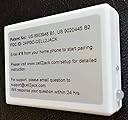
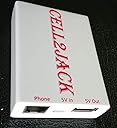
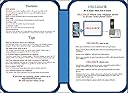
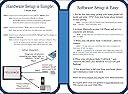
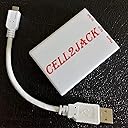
A common complaint among cell phone users is missing calls while at home, even with the ring volume on high. Well, never miss a cell phone call again! Cell2Jack connects your cell phone to your existing landline phone. You can now make and receive calls on any home landline phone extension while still using your cell phone calling plan. For more information, visit www.cell2jack.comThe Advantages Of Using Cell2JackConnecting your cellphone to your home telephone using Cell2Jack's cellphone to home phone Bluetooth adapter offers you a lot of convenience.First, you can make and receive cellphone calls in anywhere in your home where a home phone is available, and even in areas where cellphone reception is not that good. Second, Extend your cellphone voice assistant function (SIRI or Google assistant) to your home telephone.Third, no more irritating dead spots! Simply place your cell phone in a location where reception is good, and then use your landline to make and receive calls.Make and Receive Mobile Call from your Landline PhoneUse Cell2Jack's cellphone to home phone Bluetooth adapter and make mobile calls with all the comforts of a home phone system.Great Signal AnywherePlace Cell2Jack where your mobile signal is best, and enjoy clear mobile calls anywhere in your home.Save MoneyCell2Jack can work without a subscription to your local telephone company, saving you money in the long run. Take a look www.desertcart.com/cell2jack for more informationNote: Since mobile voice network has higher data error rate, modem/alarm/fax may not work with cell2jack. Also the audio quality may be interfered by other electronic such as microwave oven.. Note: Cell2Jack DOES NOT provide you landline service. Note: No Flip phone support. Tips How to setup Software: Step 1: For the first time setup, pickup your home phone (off hook) and you should hear "..warning phone is not connected..". Step 2: Press "#*#" (or 0000) from your home phone keypad to start pairing to your cell phone Note 1 : Cell2Jack's RED LED should start flashing and you should hear "..pairing..". If RED LED does not turn on. Repeat step 2. Note 2 : For Version 4 or higher, it will automatic start pairing after power up. Step 3: Activate Bluetooth on your cell phone and set it to search for new devices. Note: It may take your cell phone few minutes to find Cell2Jack. If fail to do so, repeat step 2 again. Step 4: When your cell phone finds "Cell2Jack,.." ,select to connect. Note 1: It may take your cell phone few tries to connect Cell2Jack. If fail, try again. Note 2: If prompted for a passkey, enter 0000 (fours zeros). Do not be alarmed if your phone does not prompt you for a passkey, because many phones do not. Step 5: When your cell Phone finds "Cell2Jack.." and connects, the RED LED should be SOLID ON (stop flashing). Step 6: You should hear a dial tone from your home phone and Cell2Jack is ready to be used. For more detail instruction, please visit . www.cell2jack.com/setup.html Note: Some old landline phone has an option to select dialing mode (pulse or tone dialing). Please select tone dialing. If you have a rotary phone, please click here for setup procedure. It works Yesterday but not now: 1) Check whether BLUE LED is on. If off, check the power. 2) When pickup your home phone, does BLUE LED change color from light blue to dark blue? If not, check the phone cable between Cell2Jack and your home phone. Make sure plug in 100% 3) Check whether the RED led is on. If RED is off, means your cellphone is NOT Bluetooth to Cell2Jack. It will take few min to reconnect Bluetooth (if your cellphone was away from Cell2Jack or Cell2Jack power down/up) 4) Default setting of IPhone and Android will have Bluetooth always on. Make sure your cellphone's Bluetooth is not in sleep. 5) For security reason, Cell2Jack will not auto-repair to other cellphone after it paired to your cell2Jack. To pair to another cellphone, press #*# from your home phone. The RED LED should start flashing after couple minutes. In your cellphone's Bluetooth setting, click search find Cell2Jack then click connect. To make a call: Dial the number on your home phone To answer a call: Pickup and answer when your home phone ring. Call by name: Press your home phone’s start (*) key, wait for the ready tone, and say “Call John”, “Call pizza hut” ,…. Voice Assistance: Google Now and Siri are fully supported. Press your home phone’s star (*) key, wait for a ready tone and say a command. Try: “What’s the weather”, “my appointment”, "set alarm", “read my text message”, “remind me to buy banana”… Review: Does its job - It’s ok. Does what it’s supposed to do Review: Great product - Great product easy to set up


| ASIN | B089984QRT |
| Best Sellers Rank | 24,402 in Electronics & Photo ( See Top 100 in Electronics & Photo ) 1 in Telephone Wireless Jack Systems |
| Brand | CELL2JACK |
| Brand Name | CELL2JACK |
| Colour | white |
| Compatible Devices | Support all iPhone and Andriod. No Flip phone or fax support |
| Compatible devices | Support all iPhone and Andriod. No Flip phone or fax support |
| Connector Type | RJ11 |
| Connector type | RJ11 |
| Customer Reviews | 4.3 out of 5 stars 3,358 Reviews |
| Global Trade Identification Number | 00869067000404 |
| Input Voltage | 5 Volts (DC) |
| Item Dimensions | 22.9 x 15.2 x 1.3 centimetres |
| Item Weight | 1 Ounces |
| Item dimensions L x W x H | 22.9 x 15.2 x 1.3 centimetres |
| Manufacturer | cell2jack |
| Manufacturer Part Number | cell2jack_v5 |
| Model Number | Cell2jack_v4 |
| Number of Items | 1 |
| Number of Ports | 1 |
| Package Quantity | 1 |
| Power Plug Type | No Plug |
| Product Finish Type | Matte |
| Smart Home Compatibility | Smart Home Compatible |
| Specific Uses For Product | Home |
| Specific uses for product | Home |
| Unit Count | 1.0 count |
A**R
Does its job
It’s ok. Does what it’s supposed to do
K**R
Great product
Great product easy to set up
H**S
Perfect!
Absolutely brilliant, love it! So easy to set up, and good sound quality (
S**U
Check compatibility of the adapter with your mobile phone and you regular telephone handset.
Works with iPhone 6plus but didn't work with my Sony Android 12. In addition my phone handset wouldn't ring out even though I could hear the nearby Apple Iphone ring when receiving a call. Apart from the wired phone ringer issue, calls could be conducted normally and the regular phone dialler keyboard dialed out successfully. I will try to obtain some other phone handsets in case my handset needs more line power than the adapter can provide. My handset is of the answer machine type which optionally requires ac/dc adapter for extra functions to work. It is expected to work as a regular line powered phone otherwise. Please check for compatibility before you buy. You may need to try a combination of different mobile phones and wired telephone line powered handset to achieve 100% functionality. I've achieved about 70% and it's not worthwhile my bother sending it back to the USA . Life's too short.
M**K
It gives what promised
It works as expected. Calls can be received from the desk phone, and the installation/setup process is very straightforward. However, the internet calls like WhatsApp should be answered from the cell phone, but you can still talk from the desk phone.
J**Y
Wouldn’t recommend
Just about works, terrible phone quality. Poor audio and horrible customer service
J**E
Ell2
Works great ,does restrict use on mobile can get over it but you have to press phone to use
P**K
Cell2Jack Adapter
Worth buying, relatively easy to set up.Only one thing is it seems take longer to connect call call than usual not a big problem
V**D
Great Little Device!
I will start out this review by saying I do still have landline telephone service at my house. But recently I took possession of an old landline telephone that belonged to a family member, and wanted a way to use it via Bluetooth with my smartphone. The cell2jack does exactly what I need it to do. The phone I tested this with was a 1970s touch tone desk phone (I do NOT currently own any rotary dial phones with modular (RJ11) jacks, so while cell2jack says that this WILL work with those phones, I don't have a way to test that (yet)). Pairing is simple: just plug the USB cable (which is admitting short) into a wall adapter like the one you use with your smartphone (they do NOT include one in the box... you have to supply your own, which isn't a big deal, and while the included USB cable is short, you can swap it out for ANY USB cable if you need a longer one), plug your RJ11 cord into both your phone and the cell2jack (also not included, but that's expected), and then take your landline phone off-gook, and dial #*# (a voice prompt will tell you to pair it to use it). Then just select it within your smartphone's Bluetooth devices, and connect to it. The cell2jack essentially turns your landline phone into a Bluetooth headset for your smartphone. One thing I will say about the cell2jack is that I believe there is supposed to be a dial tone emitted from the landline phone connected to it (just as if you were using a regular landline), but I got no dial tone when I picked up the receiver. However, the touch tones still worked, and the calls were patched through to my smartphone immediately. This may cause confusion for some. Receiving calls works well, and the mechanical bell ringer on my vintage landline phone started ringing at the same time my smartphone did. In both cases (making and receiving calls), when I hung up the handset of my vintage landline phone, the cell2jack disconnected and ended the call on my smartphone almost immediately, which is great. I haven't yet connected the cell2jack to a landline phone with built-in Caller ID, so I'm not sure if the CID information from my smartphone would pass through to a connected landline (I will be trying this in the near future). You can apparently also hook the cell2jack directly to an RJ11 telephone jack in your house, and ALL landline phones in your house connected to other RJ11 jacks will work together as if you had landline service. This is also something I have not yet tried, and don't have any intention to, as I have landline service as well. Another feature I haven't tried yet and would like to try is the built in pass-thru for a smartphone's voice assistant (i.e. Siri or Google Gemini). I will have to try that soon as well. Finally, I love how small the device is. I'd assume that, if you had enough space inside the casing of your landline phone, you could put the cell2jack right inside of it and hide it, although sitting behind or right next to your landline, it still looks good. Whether you're a vintage telephone collector, or just want to keep your landline phones hooked up after you disconnect your landline service, the cell2jack delivers. Sure there are more expensive devices like this out there, but the cell2jack delivers on what you'd expect one to do for a great price. Highly recommended!
S**H
Works well, simple setup
Wow works so well, I love it. I love being able to use old school phones and just have it connected to my mobile. When I’m at home I can leave my mobile on silent in another room and know my rotary phone will ring if someone calls. Great idea
F**O
Funciona
El único problema que he detectado es que no permite cortar la llamada entrante no iniciada desde el teléfono no celular. Es un problema menor. Respecto al alcance del Bluetooth para que el celular se conecte al dispositivo indican que debe estar al lado uno del otro pero en mi caso he probado a más de 10 metros en habitaciones diferentes y seguía funcionando. Por lo demás funciona según lo que prometen.
V**V
Sehr gut
Sehr gut
A**I
very good but dialing function does not work in my country
the device provide an amazing and swift integration between mobile phone and old rotary phones (or any other dial phones). no programing is required and ringing quality is good, I used it with socotel 63, worked like a charm. however I cannot use it for dialing. after referring back the problem to Cell2jack support team, they confirmed that in this stage their support and focus is on US market and they are adopting their dialing conventions. currently I am not using it awaiting any further updates to add a leading zero dialing function.
Trustpilot
2 weeks ago
1 week ago