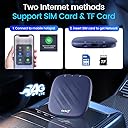
🚗✨ Drive smarter, stream faster, live wireless.
The Tbox Plus Android 13.0 CarPlay Box by Carlinkit transforms your wired CarPlay system into a wireless powerhouse with an 8-core processor, 8GB RAM, and 128GB storage. Enjoy seamless wireless CarPlay and Android Auto connectivity, plus access to streaming apps like Netflix, YouTube, and Hulu. Designed for effortless plug & play installation, it supports online upgrades and offers dedicated customer support to keep your in-car entertainment cutting-edge.

| ASIN | B0DCG5JPJC |
| Audio Output Type | Bluetooth, Internal |
| Audio output mode | Stereo, Surround |
| Batteries Included | No |
| Batteries Required | No |
| Best Sellers Rank | #108,922 in Electronics ( See Top 100 in Electronics ) #112 in Car Stereos |
| Brand | Carlinkit |
| Compatible Devices | Android, IOS |
| Connector Type | Bluetooth, USB, Wi-Fi |
| Customer Reviews | 3.6 3.6 out of 5 stars (51) |
| Date First Available | 14 September 2024 |
| Does it contain liquid? | No |
| Item Dimensions LxWxH | 8 x 1.5 x 8 Centimeters |
| Item Weight | 170 g |
| Item model number | CPC200 Tbox Plus |
| Manufacturer | Carlinkit |
| Model | CPC200 Tbox Plus |
| Model Name | SP-TBOX-6225NA-OVA-BL |
| Mounting Hardware | Box *1, Cable *2, Manual *1, Product *1 |
| Net Quantity | 1.0 Count |
| Number of Ports | 1 |
| Product Dimensions | 7.98 x 1.47 x 7.98 cm; 170 g |
| Speaker Surround Sound Channel Configuration | 5.1 |
| Special Features | Android Auto, Apple CarPlay, Built-In Wi-Fi, Voice Control, WAZE |
| Total USB ports | 1 |
M**H
Purchased this for use in my 2023 Bolt EUV, which will be used when I'm stuck at a DCFC, so I can watch YouTube videos, or content from my Plex server. Seems to work perfectly, so far. I did have issues initially getting it connected to a WiFi network -- After a power cycle, that issue went away, and everything started working as expected. It shows up as a Car Play device, and is completely controlled via the vehicle's touch screen. It seems to support both GLONASS and GPS, and Google Maps had no issues locking onto my location. I also had no issues adding my Google account to the device, and had no issues using Google's Play Store to download apps. Video playback from both YouTube and my Plex server had no issues -- sound appeared to be in sync with the video, and seemed to be nice and crisp/clear. The UI and app load times are reasonably speedy, too. The device is very pricy, but it is what's needed in order to get functionality Google should have been allowing via Android Auto all along -- there's NO reason to block me from watching videos while I'm stuck in park at a DCFC, especially when my car tops out at 54kW, and so this is a price I'm reluctantly willing to pay. :)
D**E
This adapter is slim and looks like any Carplay adapter. However it got a stand-alone Android system and inside the system it can connect to my android phone while it's connected to an carplay system. This mean for cars with Carplay compatibility Android phones can take advantage of the display as well. It is a full fledged Android system that you can connect to WiFi, Bluetooth and use app store to download apps. Nice there is a 4g card slot for internet if you need internet on the go. The con is that there is a lack of physical button to switch phones, especially you got two person both with phones in the car. There is a pin hole to switch Carplay and Android auto system but who carries a pin? And no pin was provided in the box. It only connects to car displays. I tried to connect to a computer but that does not work. Really there is missed potential here that this cannot be used on other kinds of displays.
N**K
Update: After installing a recommended OTA firmware update the device now only recognizes my ATT 4G SIM card about 20% of the time. I have to unplug and reboot the device 5-6 times every time I get in the car until finally the cellular modem is recognized and the SIM card works. Some reading online suggests that this may be a race condition on startup causing Android to boot up before the modem has time to initialize. Toggling airplane mode does not help. Down to 1 star since this is much less useful without an internet connection. The product images suggest that you can download apps from the Google play store and the device does come with a version of the Google play store installed. However you can’t download anything from the Google play store without signing into your Google ID which this device cannot do. Tapping sign in with an Internet connection immediately shows servers cannot be reached error messages. After doing some digging it turns out this device does not have a Google Services framework ID and is not officially recognized by Google so you can’t actually download anything from Google play store. Yes, you can side load certain APK files however not every app is available in that format. furthermore, APK Pure - the unofficial App Store also preinstalled on this device - hosts app images that are not verified as being secure. So while in theory you could download other apps, like Apple Music for example, putting your username and password into an unverified app is really asking for trouble.
C**S
I got this for a family member and they are very happy with it. It connects to a carplay compatible system (but nothing else) and connects to an android phone. The buffering is good on the videos, I'm told, and overall it's quite easy to use for those with a mind for such things (some, like me and my wife, might be a bit baffled by it). For that huge price, though, I do wonder at how pigeon-holed the manufacturer has made this item, when additional software might have made it usable in a variety of other environments, like with a laptop, perhaps.
C**C
I haven’t explored everything this device can do, having just received it today, but I can report that it definitely delivers on its marquee claim: Netflix in the car. I have a 2025 Hyundai Palisade Calligraphy, which is still using wired Apple CarPlay. As it turns out, in this case, that’s an advantage. I plugged this in using the same coiled USB-C->A cable I use for my iPhone 16 Pro. It started right up. Screen dimension adjustment required a reboot, and that took all of 20 seconds. After a few minutes inputting credentials for my car WiFi, and Netflix, I was watching movies. Audio was good and appeared synced. I also set some of my Google credentials and accessed other apps, including YouTube, which worked great. Everything worked as advertised. All this was done sitting in my garage. I have not tried interacting with the system while driving. The downside, of course, is bye-bye CarPlay. I like CarPlay, especially for its navigation sync between my Apple Watch and the car. And of course, there’s Messages and the integration of calendars, navigation, reminders, etc. So, it may be that this is a limited use item when we’re stationary or otherwise don’t need to worry about navigation. We’ll see. But, it delivers. 5 stars.
Trustpilot
1 day ago
3 weeks ago