🚀 Tiny Frame, Titan Performance — The Mac mini that means business
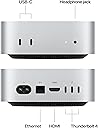
The 2024 Apple Mac mini with the M4 chip redefines desktop computing by delivering a 10-core CPU and GPU powerhouse in a sleek 5x5 inch chassis. Equipped with 16GB unified memory and versatile front and rear ports, it offers seamless integration with the Apple ecosystem and industry-leading performance for professionals and creatives alike—all while maintaining a carbon-neutral footprint.


| Brand | Apple |
| CPU Model | Apple M4 |
| CPU Speed | 1 |
| Graphics Card Description | Integrated |
| Graphics Coprocessor | Apple Integrated Graphics |
| Memory Storage Capacity | 16 GB |
| Operating System | Mac OS |
| Personal computer design type | Mini PC |
| Ram Memory Installed Size | 16 GB |
| Specific Uses For Product | Business, Education, Everyday Use |
R**Y
I Cant think of anything negative. I love it.
The 2024 Mac mini with the M4 chip is an absolute powerhouse in a tiny package. The performance of the 10-core CPU and GPU is immediately noticeable; everything from daily multitasking to more intensive creative projects runs incredibly smooth. Having 16GB of unified memory as the base model makes a huge difference, ensuring that it handles modern applications and Apple Intelligence features without slowing down. I also love how seamlessly it works within the Apple ecosystem. The integration with iPhone and iPad is flawless, making it easy to share files and extend my workflow across devices. Despite its small footprint, it feels like a professional-grade machine that stays cool and quiet even under a heavy load. It’s easily the best value in the Mac lineup right now for anyone needing a fast, reliable desktop.
S**J
A small but mighty powerhouse
I’ve been a Mac user for about forty years now. I used to be in the computer documentation business, and while we wrote about PCs, I have always used a Mac. My desktop and laptop have reached their lifespans—the old versions of Safari didn’t work with bill pay sites, and my life has been ruled by a spinning, thinking cursor. I had been considering getting an M4 MacBook Air, but I missed the best prices on those and then held off. Some had advised me that the M4 Mini would be better for my needs. When Amazon had it on sale at $100 off, I jumped. I could go on forever, but I’ll just say this is a great little computer. I was able to migrate my data over from my older Macs (Migration Assistant), and the jump in speed and responsiveness is awesome. I have decades of archived email on my Mac, and everything was brought over well (though my data folders wound up buried deep in a Volumes directory) to the M4. This came configured with Sequoia, though I can upgrade to Tahoe, which I have not done yet. I did get the base model, which has a 256 GB SSD drive, and honestly, that’s not enough. My old iMac had half a terabyte, so when I migrated the data, I had to be very selective, and I put my huge photo and music libraries on an external—both Photos and Music do run from external data. If you have the budget, I’d advise getting a larger internal SSD. Of course, the nature of the Mac Mini is that it includes no peripherals. I did have an external keyboard, trackball, but I had to purchase a monitor. Here at Amazon the Samsung 27” ViewFinity S8 was also on a very big sale, and I ordered that and it works very well with this M4. It connects to the Mini via HDMI. I also immediately ordered a backup disk for Time Machine. The Mini has three Thunderbolt ports in the back and two USB C ports in the front. It, honestly, could use a few more ports, so I guess I’ll get a hub because I will want more external drives. Because of its size, as you can imagine, the internal speakers are not fabulous. It does offer a 1/8” headphone jack in the front, but I was disappointed because my older Macs use optical. This is just old, standard analog out. Note this comes with the usual Apple applications and utilities. If you want the free productivity suite, Pages, Numbers, and KeyNote, you need to download them from the App Store. I’m somewhat technical but I don’t do speed tests or anything like that. And I am used to the tortoise crawl of decade-old Macs, so this seems instantaneous to me. Overall, Macintoshes are, in my opinion, very expensive but very smooth to use, especially if you create music or art. So even though costs add up, with the screen and the peripherals and an external drive, this is still quite a deal and a real nice computer.
A**R
Even The Low Spec M4 is Still a Real Powerhouse
Speed demon supreme, even in the low-spec model. 27" iMac if connected with Thunderbolt and if using an 8K dummy monitor plug works wonderfully well as a monitor for a headless M4 mini -- using screen sharing. The ride for setup is a bit bumpy to get that all working, but the results are great -- not for gaming or full screen 5k+ video, but otherwise, terrific. An astonishing difference rendering a Rhino 8 drawing on the M4 compared to an i7 iMac (not really practical on the i7 at all). Data transfer speed is wonderful, as expected. This is a really good headless way to get some M4 goodness while keeping the familiar old Intel apps alive until they are fully exterminated by the poison apple policy. Be sure to get the top-flight best USB-C cables you can buy, as the cheaper ones don't work. I was very skeptical, and also reluctant. And these days, a five star is not easily given. But, I have to admit, this is a lot of computer for the money. I bought this machine to be a little automation hub, tucked away in obsurity for meanial tasks. After setting it up and kicking the tires, it's now a programming ambassador to the M4 world, and the door to the next world of Apple. A worthwhile purchase as Apple things go. Buying the monitor and more storage, etc. will be painful but worthwhile. I'm already thinking about whether I should wait longer for the 30" iMac M4/M5/M? - and leaning that way, but the prospect of another Mini with the separate monitor is nice. In principle, I should knock one or two stars for the non-upgradable RAM and non-upgradable storage, and maybe another star for privacy and obsolesence issues, but I'm keeping the 5 star rating for value and the path forward for those of us who are in the Apple camp for until something better comes along. I spent years deep in the driver and update hell of Windows before switching to the smoother Apple world. Apple is now so mature that it takes a good day to fully grind through cleansing and setting up the mini for legitimate use... tools, firewalling, filtering, and more -- but once there, it's impressive. Don't get me wrong, most people will be happy in minutes.
M**I
The M4 Mac Mini is an Incredible Daily Driver
I upgraded a family members computer the 2024 Apple Mac mini with the M4 chip (10-core CPU/GPU, 16GB unified memory, 256GB SSD) after using an older Intel-based PC, and it's been a game-changer. The thing is ridiculously small—literally 5x5 inches—and fits perfectly under my monitor or tucked away on my desk without taking up space. The aluminum build feels premium and solid, and the redesigned ports (front USB-C for quick access, plenty of Thunderbolt on the back, HDMI for easy multi-monitor) make it super convenient for a desktop setup. Performance is where it shines: everything feels snappy and fluid, from everyday browsing, email, and multitasking with dozens of tabs/apps to more demanding stuff like photo editing in Lightroom or light 4K video work in Final Cut. The M4 chip handles it all without breaking a sweat, stays whisper-quiet (fan rarely spins up noticeably), and runs cool even during longer sessions. Apple Intelligence features are starting to roll out and integrate nicely, making things like writing tools and image generation feel seamless in macOS. Battery? Wait, no—it's desktop, but power draw is impressively low, and it wakes instantly from sleep. Setup was straightforward, pairs perfectly with my iPhone/iPad for Continuity, and the ecosystem perks (AirDrop, Universal Clipboard) are as reliable as ever. For the price, especially with 16GB base RAM now standard, it's unbeatable value—way more capable than most budget PCs in this form factor. The only minor nitpick is the base storage fills up quick if you're not careful, but external drives or cloud handle that easily. If you're in the Apple ecosystem or looking for a compact, powerful desktop that punches way above its weight, this is it. Easily one of the best purchases I've made. 5 stars.
B**A
One Year Later — Still Fast, Clean, and 100% Reliable
I’ve owned the Mac mini (2024) for a little over a year now, and I can confidently say it has been one of the best tech purchases I’ve made. Performance & Reliability The Mac mini is incredibly fast, smooth, and stable. It boots quickly, runs multiple applications without slowdown, and has been extremely reliable. I use it daily, and it performs just as well as it did on day one. It’s also been perfect for my kids’ online classes — no lag, no freezing, no random issues. That peace of mind alone makes it worth it. My Setup (Highly Recommend This Combo) I paired it with: • Dell P2723QE (4K USB-C Hub Monitor) • A high-end 4K Logitech webcam (the premium model — crystal-clear quality) Everything works seamlessly together. The display is sharp and vibrant, and the single USB-C connection keeps the setup clean and minimal. It’s honestly one of the nicest and cleanest desk setups I’ve ever owned. Why I Chose Mac Mini Over iMac I’ve owned iMacs before, and while the all-in-one design is convenient, I personally prefer this modular setup. With the Mac mini: • You can upgrade your monitor anytime. • You can replace accessories independently. • You’re not locked into one screen. • It’s often significantly cheaper — especially if you catch a sale (which I did). This route gives you much more flexibility for a fraction of the cost in many cases. Longevity Based on performance so far, I genuinely believe this machine is future-proof for many years — easily 8–9 years depending on usage. Apple silicon machines are built to last, and this one feels no different. Final Thoughts Clean. Fast. Reliable. Flexible. If you’re debating between an iMac and a Mac mini, don’t overlook how powerful and customizable this setup can be — especially if you find a good deal. Very happy with this purchase and would absolutely recommend it.
E**.
Best Budget Mac - Powerful and Perfect for Creative Work
I absolutely love my new Apple Mac Mini. It’s surprisingly affordable - actually cheaper than an Apple Watch Ultra - yet it packs an impressive amount of power for such a compact computer. I mainly use it for music software, and it runs everything smoothly without any issues. I purchased the base model, and the storage capacity has been more than enough for my needs. Another thing I really like is the number of USB-C / Thunderbolt ports, which makes it easy to connect my audio gear and other devices. I’ve always been a big fan of Mac computers because of how simple and intuitive they are to use, and this one continues that tradition. One of the most impressive things is the startup speed - it boots up in about 45 seconds. Overall, it’s a powerful, compact computer that offers excellent value for the price.
K**N
Great first Mac.
I've been a Windows gamer for decades. I can't believe how powerful, silent, and power-efficient this thing is. Granted, nothing that I like to play actually runs well on MacOS. But this is the far superior platform for non-gaming for me. It even encouraged me to try streaming my games. But I ditched that approach due to idle disconnects and not being able to tolerate the long-ish session launch times compared to a truly native experience. If you're a long-time Windows user, now's a great time to try a new OS. AI can really smooth the transition. And if you're already an iPhone / iPad user, the magic integrations are really nice. To this day, it still tickles me that I can paste in a 6 digit code texted to my phone, directly on my Mac without jumpint through any hoops. All said, I still recommend buying a dock for storage expansion and ports. I use usb c monitor, keyboard, mouse, security key, and two separate DACs for audio so I definitely needed more ports than the mini came with.
G**N
Excellent Value and Excellent Service. {With 2nd Edit}
I'm leaving Windows for Mac, so this computer is completely new to me. Setup was both easy and difficult for me. The setup process utility worked quite well, but each step had a "save for later" option, so I assumed, based on my Windows experience that certain set up steps could left for later when I understood the Mac eco-system better. But some things really needed to be done as soon as possible. I advise that new users NOT skip any setup steps at setup time and then reverse the steps you don't think you need later when you have a better understanding of how things integrate. 16 GB of ram is plenty for serious and advanced digital photography, simple video editing, and creative writing. However, the 256 GB of SSD is a little small for a home directory and the business of running the PC itself. If this computer works out for me, I will give this one to my wife whose usage is far more modest than mine, and I will buy one with a 512GB SSD. It's fast and responsive and very quiet. If you have any Linux experience, you will see a strong similarity in the base OS. It's the first Mac... anything that I can say is a good value for the money. I suspect I will be buying another one very soon. EDIT: My wife and I have decided to go ahead with a second Mac mini 4 purchase for her. We feel that this would be better for her than a move to Linux due to the level of commercial acceptance of Macintosh OS. The level of hand holding for the level of user that she is, will be far superior to that which is available with Linux. The internal SSD will be more than adequate in size for the few 3rd party apps she will use. As for me, I don't think I do need a larger SSD for my usage. It is possible with the Thunderbird 4 grade connection ports (they are compatible with USB C ports, but much faster), it is possible to move the home directory to a a Thunderbolt capable external SSD; leaving the internal SSD available for the business of running the computer. I will install my NUMEROUS number of apps to the External drive where I have placed my home directory. We're going full Mac, even considering an iPhone move as well. (2nd Edit} It has been over a year, and I am still pleased with the Mac Mini m4. NO regrets at all.. My wife, who is somewhat intimidated by technology, has settled in with her Mac as well. She is even getting comfortable with the built in and surprisingly complete word processor and spreadsheet programs (Pages, and Numbers). For myself, the Email client and calendar integrates VERY well with my Google accounts, and I have no problems running Scrivener (writing software), ACDSee for Mac 11, and On Photo Raw 2026 (both advanced Photo editors) Still highly recommended by me.
Trustpilot
1 month ago
3 weeks ago