We remain fully operational. Our teams are working around the clock to ensure your deliveries continue safely.

DOWNLOAD THE APP


Customer Services
Copyright © 2025 Desertcart Holdings Limited
DOWNLOAD THE APP

🚀 Elevate your craft with the smartest, fastest, and safest CO2 laser cutter on the desktop!
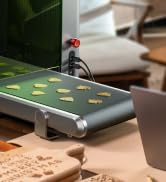
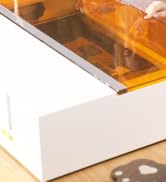
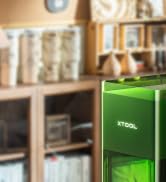
The xTool P2S is a premium 55W CO2 laser cutter and engraver featuring dual 16MP cameras, a large 26"x14" working area with passthrough, and advanced 3D curved cylinder engraving. It delivers ultra-fast 600mm/s speeds, precise 0.001" autofocus via LiDAR, and supports diverse materials including wood, metal, acrylic, glass, fabric, and leather. Designed for professionals seeking effortless setup, superior build quality, and enhanced safety with AI fire detection and powerful exhaust, the P2S is a versatile powerhouse for creative and production workflows.
































| ASIN | B0DDXQYH36 |
| Batteries Included? | No |
| Batteries Required? | No |
| Best Sellers Rank | #57,086 in Arts, Crafts & Sewing ( See Top 100 in Arts, Crafts & Sewing ) #139 in Jewelry Making Engraving Machines & Tools #1,335 in Craft Cutting Tools |
| Color | Gray |
| Customer Reviews | 4.2 4.2 out of 5 stars (110) |
| Date First Available | October 29, 2024 |
| Item Package Quantity | 1 |
| Item Weight | 130.7 pounds |
| Item model number | MXP-K011-004 |
| Manufacturer | xTool |
| Material | aluminum alloy |
| Part Number | P1030630 |
| Product Dimensions | 44.09 x 29.13 x 13.78 inches |
| Size | xTool P2S |
| Warranty Description | 1 Year |
M**M
Fantastic laser, easy to set up and use with minimal experience
Prior to purchasing this laser cutter, i had used both a Diode laser, as well as a Xtool F1 galvo laser, and this has to be far and above the easiest, most reliable laser i've experienced to date. Setup: The setup was extremely simple with very clear instructions, i was up and using it within 30 minutes. Software: I've used both Lightburn as well as Xtool Creative Suite, and while Lightburn has more flexibility typically, XCS is extremely easy to use and beginner-friendly. I believe the P2S loses some functionality if you use lightburn, notably the use of a rotary, but i rarely need to start up lightburn, except for the occasion where i need to vector trace a bitmap (come on Xtool! Get this added to your software!). One thing i appreciate is the built in ability to do a laser test grid similar to Lightburn for your material, you can even do it for a custom shape which is a nice touch. Functionality: The speed of this laser is probably one of the better you're going to get in this price range. I believe the OneLaser is the new sexy up and comer, which i would probably say is the android of the laser world, whereas xtool is the iPhone. The OneLaser is likely a bit better value for the money if you are a heavy user, but if you just want to set it and forget it, the P2S can't be beat, especially with the addon of the SafetyPro AP2 smoke purifier, which also just works out of the box with the laser. I was able to load up files and start cutting right away. And have been doing so for a few months almost daily. One thing i appreciate a lot about this laser is the working area, which is 12 inches by 24 inches roughly, which is on the larger size of the other devices in this class. Maintenance: This is where i'm quite impressed with the hardware, all the mirrors are magnetically attached and easy to clean. Although the first mirror does require the back panel removed to access which is like 11 screws. This is the same area you fill the water reservoir for the cooling system. The lens is very easy to access and clean, with 2 screws, and one retaining gasket to access, although i kinked the air assist hose the first time i cleaned it, and triggered an error. After unkinking the air hose it worked normally again. Accessing the rear fan for cleaning is extremely easy, and i appreciate that you can remove the fan from it's housing to clean further. Calibrating the laser dot is simple as well, and the software walks you through it. Final Impressions: I love this laser. The price you pay is a bit of a premium for the brand and Xtool ecosystem, but for someone just looking to unbox and start using, i find it worth the cost. If you're an experienced user, you might want to look into OneLaser, or if you have a bit more to spend, a Thunder Bolt laser. For me, i have no doubt this will be a great workhorse for years to come.
J**D
Simply The Best
First I have to praise the Amazon room of choice delivery service. They put the machine exactly where I wanted it in a second floor room, on a table. This service is the main reason I ordered the machine through Amazon and not directly from xTool. Having the box on its table made one man unpacking possible for me. So it was well worth the added cost. If you follow the unpacking and initial setup instructions, it’s a breeze to do. Once out of the box, it took much less than an hour to have it powered up and ready to run. The first thing I did after unpacking and setting up the machine is I placed a 24x12 sheet of black acrylic in the upper left corner of the machine. In the software I placed a box that was the size of the working area in the 0,0 position and cut it out on the laser. I left the resulting right angle piece in the upper left corner, this gives a stop for a repeatable 0,0 position of material every time. Next was the test of what I wanted this machine for, cutting and engraving clear/transparent acrylic. I loaded one of the many user submitted projects from xTool, an LED illuminated Christmas item. Once loaded I ran the project. The included photo is the end result. It’s almost needless to say that the machine performed this task perfectly. Note that the clear acrylic blocks in the photo were not done with the P2S, they were a totally different experiment a few days ago. Now it was time to do material cutting test arrays which the xTool Studio software makes easy to set up. I ran the test cuts on several colors of acrylic, including white, several different blues, clear, black and more. Doing this allows me to know common speed and power settings for any acrylic I choose. One thing I would suggest is if you don’t already have one, get an air purifier, or a vent to the outside for the laser. If you don’t you’ll quickly find you need one. And finally there’s the build quality of the machine. In my opinion xTool has some of the best built machines available. I was first impressed with the D1 Pro, then the F1 and F1 Ultra. Now the build quality of the P2S is far beyond anything I expected. Would I buy the P2S again? Absolutely! Would I recommend the P2S? Most definitely.
Trustpilot
2 weeks ago
1 week ago